
1. د خوندیتوب مهمې لارښوونې
Please read and follow these instructions carefully for safe assembly and operation of your FLEXISPOT E5W-UK electric standing desk frame. Adhere to all weight restrictions and consider using additional anchors for enhanced stability, especially if the desk is frequently moved or heavily loaded.
- د راټولولو دمخه ډاډ ترلاسه کړئ چې ټولې برخې شتون لري او زیانمن شوي ندي.
- د 125 kg (275 lbs) د اعظمي بار ظرفیت څخه ډیر مه کوئ.
- د کار پرمهال ماشومان او څاروي له میز څخه لرې وساتئ.
- Avoid placing objects under the desk that could obstruct its movement.
- د پاکولو یا ساتنې څخه دمخه بریښنا قطع کړئ.
- یوازې چمتو شوي بریښنا اډاپټر وکاروئ.
2. محصول ختم شوview
The FLEXISPOT E5W-UK is a robust electric standing desk frame designed for height adjustability and stability. It features a dual-motor lifting system and a memory control panel.

انځور: اوورview of the FLEXISPOT EC5 height-adjustable desk frame, showcasing its robust and stable design in various color options (black, grey, white).
کلیدي ځانګړتیاوې:
- د بریښنا د پورته کولو سیسټم: Powerful dual motors with a three-stage linear motion system ensure smooth and rapid height adjustment at 38 mm/second with low noise (under 50 dB).
- Solid and Robust Construction: The heavy-duty coated steel frame provides stability and supports a load capacity of up to 125 kg (275 lbs). Telescopic crossbars extend from 110 cm to 190 cm to accommodate tabletops from 120 cm to 200 cm in width.
- Humanized Lifting Function: Height adjustment range from 62 cm to 125 cm to suit various user heights and office needs.
- د ټکر ضد فعالیت: Protects the desk from collisions with obstacles during height adjustment, enhancing safety.
- د کیفیت تضمین: Each Flexispot desk frame undergoes 10,000 fatigue tests, meeting international standards with CE/BIFMA/RoHS certification.

Image: Illustrates the dual motor system, highlighting specifications such as max load capacity (160kg), low energy consumption (<0.5W), speed (35mm/s), and noise level (under 50dB).

Image: Details the stability and durability features, including 3 lifting columns, height adjustment from 62-127cm, 20,000+ fatigue test validation, and removable foot caps for casters.
3. تنظیم او مجلس
The FLEXISPOT E5W-UK desk frame requires assembly. All necessary tools are included in the package. Assembly typically takes 20-25 minutes with clear, top-notch instructions.
د مجلس پړاوونه:
- ټولې برخې خلاصې کړئ او په شامل شوي لارښود کې د برخو لیست سره سم تایید کړئ.
- د پورته کولو ستنې د پښو ملاتړ سره وصل کړئ.
- Connect the crossbars between the lifting columns.
- Install the control box and motor cables.
- Mount the control panel to the desired location on the desk frame.
- خپل غوره شوی میز ټاپ د مناسبو پیچونو په کارولو سره راټول شوي چوکاټ ته خوندي کړئ (د میز ټاپ پکې شامل نه دی).
- Connect the power cable and ensure all connections are secure.

Image: Displays all components of the FLEXISPOT EC5 desk frame laid out for assembly, including legs, crossbars, control box, and tools, indicating an easy assembly process.
Adjusting Frame Width:
The frame's width is adjustable from 110 cm to 190 cm to accommodate various tabletop sizes (120-200 cm width x 60-80 cm depth). Adjust the telescopic crossbars to match your tabletop before securing it.
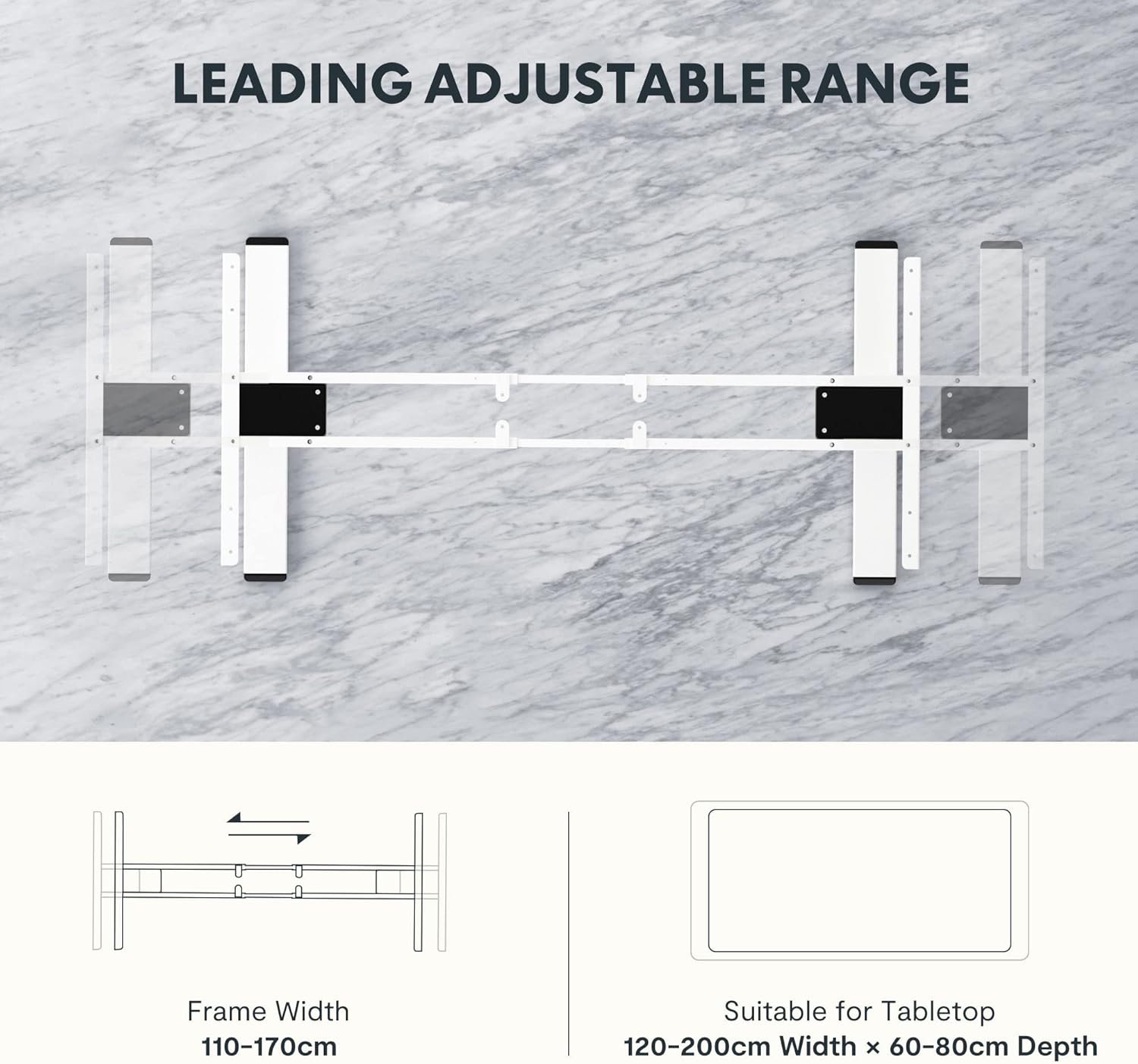
Image: Diagram illustrating the adjustable frame width from 110-170cm and suitable tabletop dimensions (120-200cm width x 60-80cm depth).
4. عملیاتي لارښوونې
The FLEXISPOT E5W-UK desk frame is operated via an intuitive control panel with memory presets.
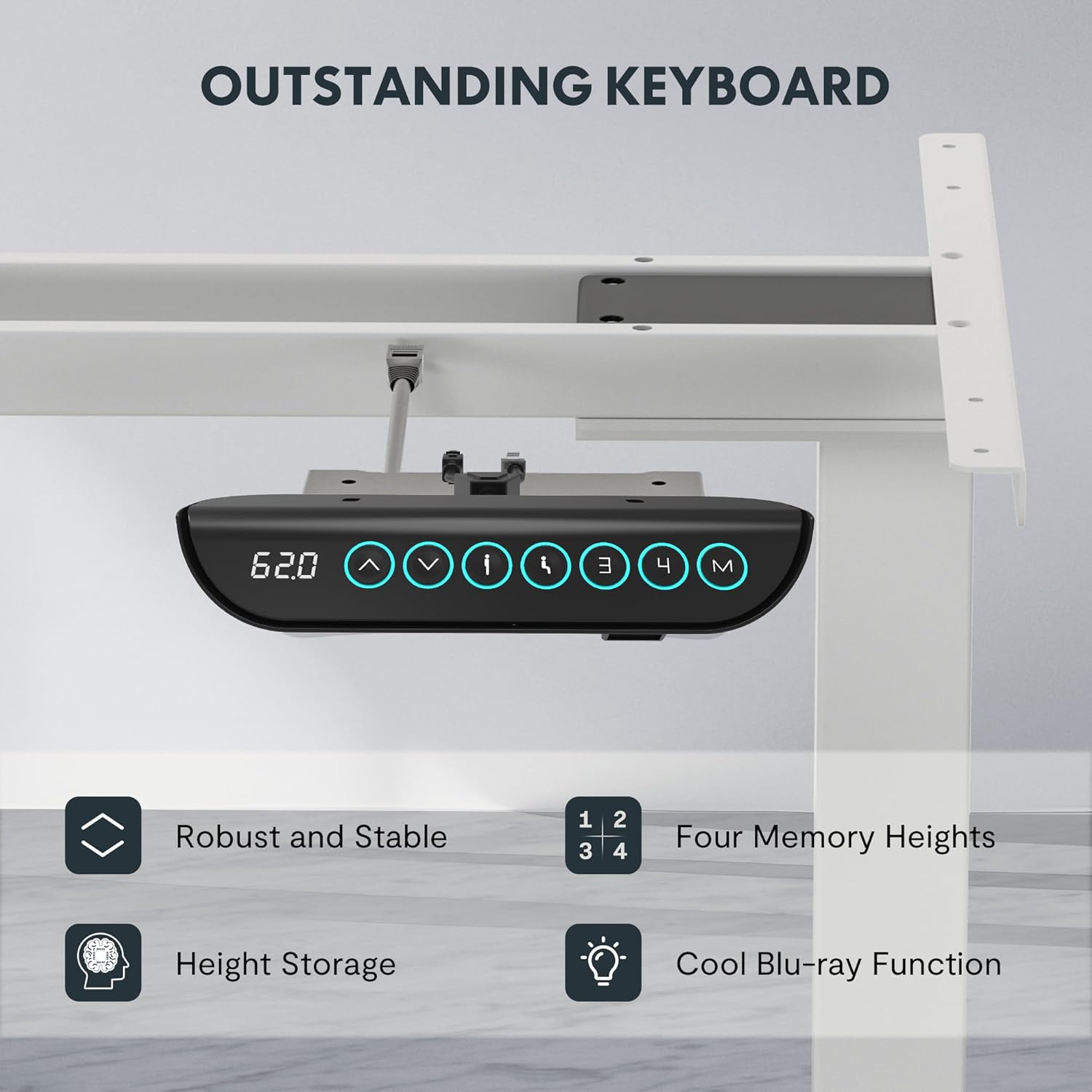
Image: Close-up of the FLEXISPOT EC5 control panel, featuring a digital height display, up/down buttons, and four memory preset buttons (1, 2, 3, 4), along with a memory set button (M).
د کنټرول پینل دندې:
- پورته/ښکته تڼۍ (▲ / ▼): د میز لوړوالی په لاسي ډول تنظیمولو لپاره فشار ورکړئ او ونیسئ. د مطلوب لوړوالي ته د ودرولو لپاره خوشې کړئ.
- ډیجیټل ډیزاین: Shows the current height of the desk in centimeters.
- د حافظې پریزیسټونه (۱، ۲، ۳، ۴):
- میز د خپلې خوښې لوړوالي سره سم تنظیم کړئ.
- Press the "M" button. The display will show "S-".
- Press one of the number buttons (1, 2, 3, or 4) within 3 seconds to save the current height to that preset.
- د خوندي شوي لوړوالي د یادولو لپاره، په ساده ډول د اړونده شمېرې تڼۍ فشار ورکړئ. میز به په اتوماتيک ډول ذخیره شوي موقعیت ته لاړ شي.
- د ټکر ضد سیستم: The desk is equipped with an anti-collision feature. If the desk encounters an obstacle during movement, it will automatically stop and reverse slightly to prevent damage.
5. ساتنه
Regular maintenance ensures the longevity and optimal performance of your FLEXISPOT E5W-UK desk frame.
- پاکول: د میز چوکاټ د نرم، ډ سره پاک کړئamp cloth. Avoid abrasive cleaners or solvents. Ensure the power is disconnected before cleaning.
- د کیبل مدیریت: په دوره یي ډول ټول کیبلونه د خرابیدو یا خرابیدو لپاره وګورئ. ډاډ ترلاسه کړئ چې دوی په ښه توګه مسیر شوي او نه تړل شوي.
- بندونکي: کله ناکله ټول پیچونه او بولټونه وګورئ ترڅو ډاډ ترلاسه کړئ چې دوی کلک دي. که اړتیا وي نو بیا یې ټینګ کړئ.
- د حرکت معاینه: Operate the desk through its full height range periodically to ensure smooth movement.
6. ستونزه حل کول
If you encounter issues with your FLEXISPOT E5W-UK desk frame, refer to the common solutions below.
| ستونزه | احتمالي لامل | د حل لاره |
|---|---|---|
| مېز نه حرکت کوي. | Power cable disconnected, control box loose, overload. | Check power connection. Ensure all cables are securely plugged in. Reduce weight on the desk. |
| Uneven movement or strange noises. | Loose fasteners, obstruction, uneven weight distribution. | Check and tighten all screws. Remove any obstructions. Redistribute weight evenly on the tabletop. |
| د ټکر ضد سیسټم ډیری وختونه پیل کیږي. | Obstacles under or above the desk, sensitivity setting. | Clear the area around the desk. Consult the full manual for adjusting anti-collision sensitivity if available. |
| د حافظې مخکینۍ سیټونه کار نه کوي. | Not saved correctly. | Re-save the memory presets following the operating instructions. |
که چیرې د دې حلونو له هڅه کولو وروسته هم ستونزه دوام ومومي، مهرباني وکړئ د FLEXISPOT پیرودونکو ملاتړ سره اړیکه ونیسئ.
7. مشخصات
- د ماډل شمیره: E5W-UK
- نښه: FLEXISPOT
- رنګ: White (Frame 3 Levels - White)
- مواد: Alloy Steel (Frame), Metal (Raw Material)
- ابعاد (L x W x H): 45.87 x 110 x 7.87 cm (packaged); Product dimensions: 116.5P x 32l x 20H cm (assembled, without tabletop)
- وزن: 29.72 کیلو ګرامه (پکی شوی)
- د بارولو ظرفیت: تر 125 کیلو پورې (275 پونډ)
- د لوړوالی د سمون حد: له 62 سانتي مترو څخه تر 125 سانتي مترو پورې
- سرعت: 38 mm/ ثانیه
- د شور کچه: له 50 dB څخه کم
- د چوکاټ د پلنوالي تنظیم: له 110 سانتي مترو څخه تر 190 سانتي مترو پورې
- Suitable Tabletop Dimensions: 120-200 cm (width) x 60-80 cm (depth)
- مجلس ته اړتیا ده: هو
- ځانګړي ځانګړتیاوې: Sit-stand desk, Height-adjustable desk, Electric standing desk, Anti-collision function, Memory presets.
- تصدیقونه: CE/BIFMA/RoHS (as per product features)

Image: Displays certifications for the FLEXISPOT EC5, including an IGR Institute certificate for ergonomic product and a German Health Award for ergonomic brands.
8. تضمین او ملاتړ
FLEXISPOT stands by the quality of its products.
- د چوکاټ تضمین: ۵ کاله
- د موټرو تضمین: ۵ کاله
- تخنیکي ملاتړ: وړیا د ژوند تخنیکي ملاتړ
For warranty claims, technical assistance, or any questions regarding your FLEXISPOT E5W-UK desk frame, please contact FLEXISPOT customer service through their official website or the retailer where the product was purchased. Please have your model number (E5W-UK) and proof of purchase ready when contacting support.