
1. پیژندنه
This manual provides instructions for the proper setup, operation, and maintenance of your Acer B247Y 23.8-inch LED LCD Monitor. Please read this manual thoroughly before using your monitor to ensure optimal performance and to prevent damage.
The Acer B247Y is a 23.8-inch Full HD (1920 x 1080) monitor featuring an IPS panel for wide viewing angles, an anti-glare display, and a frameless design on three sides. It includes multiple connectivity options and an ergonomic stand for comfortable viewing.
2. د بسته محتويات
ډاډ ترلاسه کړئ چې ټول توکي ستاسو په کڅوړه کې شتون لري. که کوم توکي ورک یا زیانمن شوي وي، نو خپل پرچون پلورونکي سره اړیکه ونیسئ.
- Acer B247Y 23.8-inch LED LCD Monitor
- د څارنې موقف (بنسټ او غاړه)
- Power Adapter (Internal) and Power Cable
- د VGA کیبل
- دسپټ پورټ 1.2 کیبل
- HDMI کیبل
- Audio-in Cable (if included)
- Audio-out Cable (if included)
- د کارونکي لارښود (دا لاسوند)
3. ترتیب کول
۳.۱ د مانیټر سټینډ راټولول
The monitor comes with a detachable foot stand. Follow these steps to assemble:
- د مانیټر او سټینډ اجزا په احتیاط سره له بسته بندۍ څخه لرې کړئ.
- د سټینډ غاړه د مانیټر پینل سره وصل کړئ. ډاډ ترلاسه کړئ چې دا په خوندي ډول په خپل ځای کې کلیک کوي.
- Attach the stand base to the stand neck. Tighten any screws if provided, usually located on the underside of the base.
- راټول شوی مانیټر په یوه مستحکم او فلیټ سطحه کېږدئ.
یادونه: The monitor also supports VESA mount (100 x 100 mm) for wall or arm mounting. Refer to your VESA mount kit instructions for installation.
3.2 د مانیټور سره نښلول
مانیټر د مناسب کیبلونو په کارولو سره خپل کمپیوټر یا نورو وسیلو سره وصل کړئ.
- د ویډیو اړیکه:
- Connect one end of the DisplayPort cable to the DisplayPort output on your computer and the other end to the DisplayPort input on the monitor.
- Alternatively, connect an HDMI cable from your computer's HDMI output to the monitor's HDMI input.
- For older systems, connect a VGA cable from your computer's VGA output to the monitor's VGA input.
- د آډیو اتصال:
- If using VGA or DisplayPort without audio, connect an audio cable from your computer's audio output to the monitor's audio-in port for integrated speakers.
- To connect external speakers or headphones, use the monitor's audio-out port.
- د بریښنا پیوستون:
- د بریښنا کیبل د مانیټر د بریښنا ان پټ سره وصل کړئ، بیا یې بل پای په ځمکه شوي بریښنایی آوټ لیټ کې ولګوئ.

Figure 3.2.1: Acer B247Y Monitor with Stand. This image illustrates the overall appearance of the monitor when fully assembled on its stand.
4. عملیاتي لارښوونې
4.1 بریښنا کول / بندول
Press the power button, usually located on the bottom right or rear of the monitor, to turn the monitor on or off. The power indicator light will illuminate when the monitor is on.
4.2 Adjusting Monitor Settings (OSD)
The monitor features an On-Screen Display (OSD) menu for adjusting various settings. Use the control buttons (typically located near the power button) to navigate and select options within the OSD menu.
د OSD عام ترتیبات پدې کې شامل دي:
- انځور: Brightness, Contrast, Color Temperature, Gamma, Acer eColor Management modes (e.g., Dark Room, Eco).
- آډیو: Volume control for integrated speakers or audio-out.
- داخلول: Select the active video input source (VGA, DisplayPort, HDMI).
- OSD: د OSD وخت پای، ژبه.
- مدیریت: د فابریکې ډیفالټ ته تنظیم کړئ.
۳.۳ ارګونومیک سمونونه
The Acer B247Y monitor stand offers several ergonomic adjustments to optimize your viewتجربه:
- ټیلټ: Adjust the screen angle from -5 degrees to 25 degrees (forward/backward).
- تیر: Rotate the monitor horizontally up to +/- 45 degrees.
- د لوړوالی سمون: د سکرین لوړوالی تر ۱۱۰ ملي میتره پورې تنظیم کړئ.
- محور: د پورټریټ لپاره سکرین ۹۰ درجې وګرځوئ viewing.
5. ساتنه
مناسب ساتنه ستاسو د مانیټر اوږد عمر او غوره فعالیت تضمینوي.
- د سکرین پاکول: په نرمۍ سره سکرین د نرم، لینټ نه پاک ټوکر سره پاک کړئ. د سختو نښو لپاره، dampen the cloth with a small amount of water or a non-abrasive screen cleaner. Do not spray liquid directly onto the screen.
- د سي پاکولasing: د مانیټر پاکولو لپاره نرم، وچ ټوکر وکاروئ casinج. د قوي صابونونو یا د کثافاتو پاکوونکو کارولو څخه ډډه وکړئ.
- وینټیلیشن: ډاډ ترلاسه کړئ چې په مانیټر کې د هوا د تودوخی دروازې بندې نه دي ترڅو د ډیر تودوخې مخه ونیول شي.
- بندول: تل مانیټر بند کړئ او د پاکولو دمخه یا کله چې د اوږدې مودې لپاره نه کارول کیږي د بریښنا له سایټ څخه یې خلاص کړئ.
6. ستونزه حل کول
که تاسو د خپل مانیټر سره ستونزې سره مخ شئ، نو لاندې عام د ستونزو حل کولو مرحلو ته مراجعه وکړئ:
- No Power / Monitor Does Not Turn On:
- ډاډ ترلاسه کړئ چې د بریښنا کیبل په خوندي ډول د مانیټر او کار کونکي بریښنایی سایټ دواړو سره وصل دی.
- د بل وسیلې په لګولو سره د بریښنا آوټ لیټ فعال دی تصدیق کړئ.
- د بریښنا تڼۍ په کلکه فشار ورکړئ.
- No Image / "No Signal" Message:
- Check that the video cable (DisplayPort, HDMI, or VGA) is securely connected to both the monitor and your computer.
- ډاډ ترلاسه کړئ چې ستاسو کمپیوټر چالان دی او د خوب حالت کې نه دی.
- د OSD مینو څخه کار واخلئ ترڅو په لاسي ډول د سمې ان پټ سرچینې غوره کړئ.
- که شتون ولري، یو بل ویډیو کیبل یا پورټ هڅه وکړئ.
- Image is Distorted or Unclear:
- ډاډ ترلاسه کړئ چې ستاسو په کمپیوټر کې د ښودنې ریزولوشن د مانیټر اصلي ریزولوشن (۱۹۲۰ x ۱۰۸۰) ته تنظیم شوی دی.
- Adjust brightness, contrast, and other picture settings via the OSD menu.
- Check for any physical damage to the screen or cables.
- له سپیکرونو څخه غږ نشته:
- Increase the volume using the OSD menu or your computer's sound settings.
- ډاډ ترلاسه کړئ چې آډیو کیبل (که کارول کیږي) په سمه توګه وصل دی.
- ډاډ ترلاسه کړئ چې ستاسو د کمپیوټر د غږ ترتیباتو کې سم آډیو آوټ پټ وسیله غوره شوې ده.
7. مشخصات
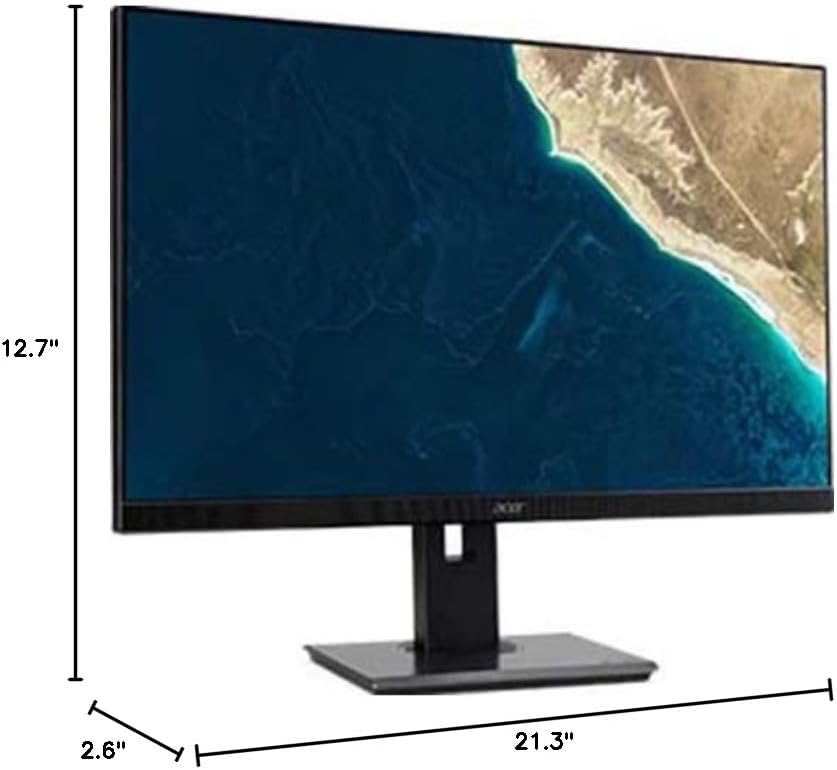
Figure 7.1.1: Acer B247Y Monitor Dimensions. This image shows the approximate height (12.7"), width (21.3"), and depth (2.6") of the monitor without the stand.
| فیچر | مشخصات |
|---|---|
| د ماډل شمیره | B247Y |
| د سکرین اندازه | 23.8 انچه (60.5 سانتي متره) |
| د ښودلو ډول | LED LCD, IPS Panel, Anti-glare (AG) |
| اعظمي حل | 1920 x 1080 (بشپړ HD) |
| د اړخ نسبت | 16:9 |
| د تازه کولو نرخ | 75 Hz |
| د غبرګون وخت | 4ms (gray-to-gray) |
| روښانتیا (عمومي) | 250 cd/m² |
| اصلي برعکس تناسب | 1,000:1 |
| متحرک تناسب نسبت | 100,000,000:1 |
| Viewزاویې (H/V) | 178° / 178° |
| ارتباط | VGA, DisplayPort 1.2, HDMI, Audio-in, Audio-out |
| مربوط سپیکران | 2 x 2.0W |
| ارګونومیک سمونونه | Tilt (-5° to 25°), Swivel (+/- 45°), Height Adjustment (120mm), Pivot (90°) |
| VESA Mount Support | 100 x 100 mm |
| د موقف سره ابعاد (W x H x D) | 21.3" x 14.9"~19.6" x 7.6" (54.0cm x 37.9cm~49.9cm x 19.3cm) |
| د سټینډ سره وزن | 12.3 پونډه (5.6 کیلو ګرامه) |
| د بریښنا اډاپټر | داخلي |
| رنګ | تور |
8. تضمین او ملاتړ
Your Acer B247Y monitor comes with a Limited Three-Year Warranty. Please retain your proof of purchase for warranty claims.
For technical support, service, or warranty inquiries, please refer to the official Acer support website or contact their customer service department. Contact information can typically be found on the Acer webسایټ یا ستاسو د محصول سره شامل شوي تضمین کارت کې.
کینسینګټن لاک: The monitor supports a Kensington lock for security. Attach a compatible Kensington lock (sold separately) to the security slot on the monitor to deter theft.