
1. پیژندنه
This manual provides essential information for the safe and efficient operation of your lightmaXX Nano Beam FX show effect light. Please read it thoroughly before use and retain it for future reference.
2. د خوندیتوب لارښوونې
- ټول لارښوونې په دقت سره ولولئ.
- دا لارښود د راتلونکي حوالې لپاره وساتئ.
- وسیله باران یا رطوبت ته مه ښکاره کوئ.
- د مناسب هوا ورکول ډاډمن کړئ.
- د پاکولو یا خدمت کولو دمخه د بریښنا څخه جلا کړئ.
- Use only specified power supply.
- د رڼا سرچینې ته د سترګو مستقیم تماس څخه مخنیوی وکړئ.
- دا وسیله یوازې د داخلي کارونې لپاره ده.
- Ensure the mounting bracket is securely fastened.
3. د بسته محتويات
ډاډ ترلاسه کړئ چې ټول توکي شتون لري او په ښه حالت کې دي.
- lightmaXX Nano Beam FX Unit
- د بریښنا کیبل
- ریموټ کنټرول
- د لارښود لارښود (دا سند)

Image 1: lightmaXX Nano Beam FX unit, power cable, and remote control.
4. محصول ختم شوview
4.1 مخکښ پینل
The front panel features multiple lenses for projecting various light effects.
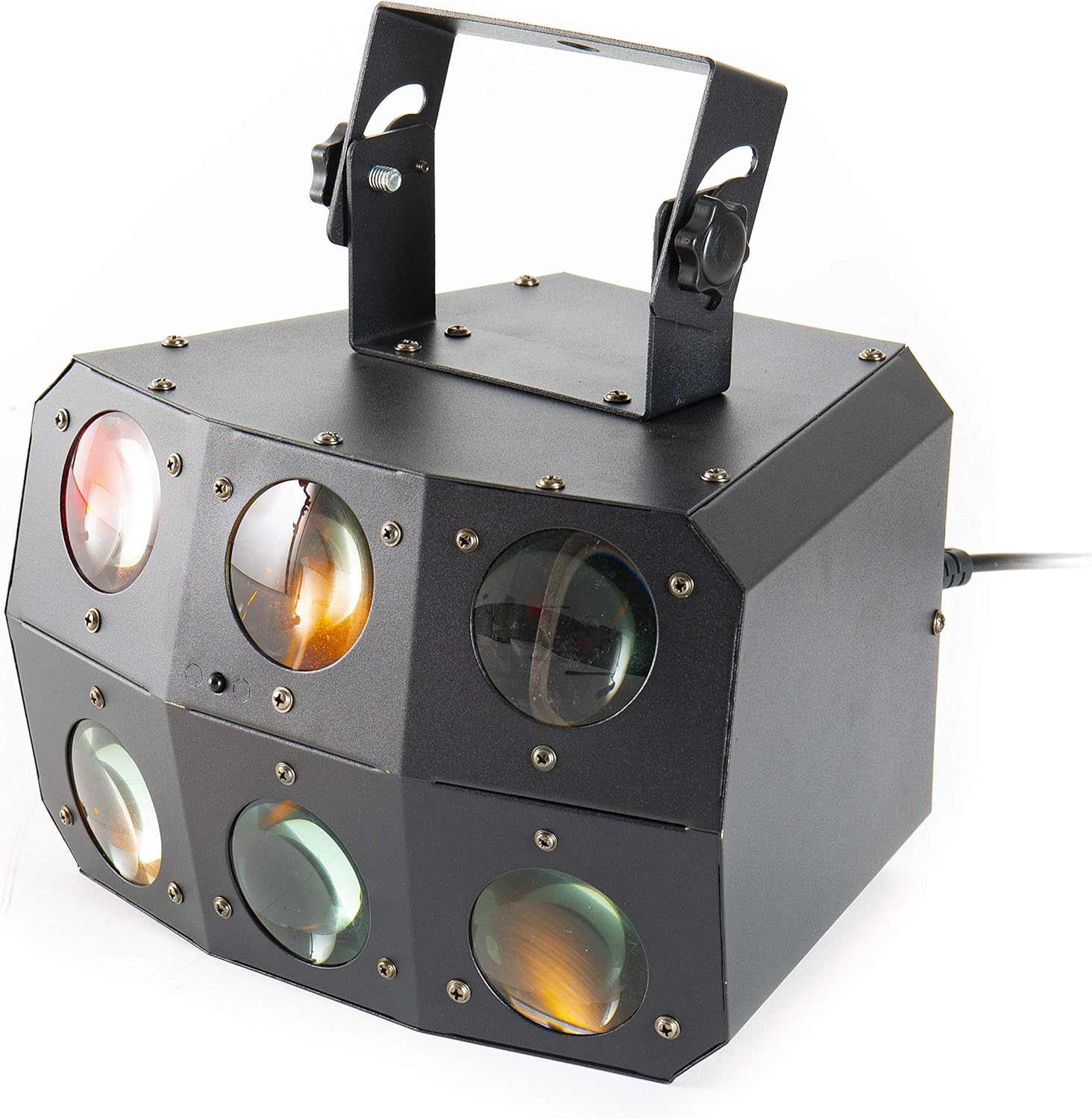
انځور ۳.۱: نږدې انځور view of the front lenses.
۳.۲ شاته پینل او اړیکې
The rear panel provides power input/output, DMX connections, and control interface.

Image 3: Rear panel with connections and control interface.
- په واک کې: چمتو شوی بریښنا کیبل دلته وصل کړئ.
- د بریښنا وتل: For daisy-chaining power to other units.
- په DMX کې: Connect DMX controller or previous DMX device.
- DMX وت: Connect to the next DMX device in the chain.
- MIC: Built-in microphone for sound-activated modes.
- ښودنه او تڼۍ: For menu navigation and settings (MENU, UP, DOWN, ENTER).
- SAFETY ROPE: Attachment point for a safety cable.
4.3 ریموٹ کنټرول
The included remote control allows for convenient operation of the unit's functions.
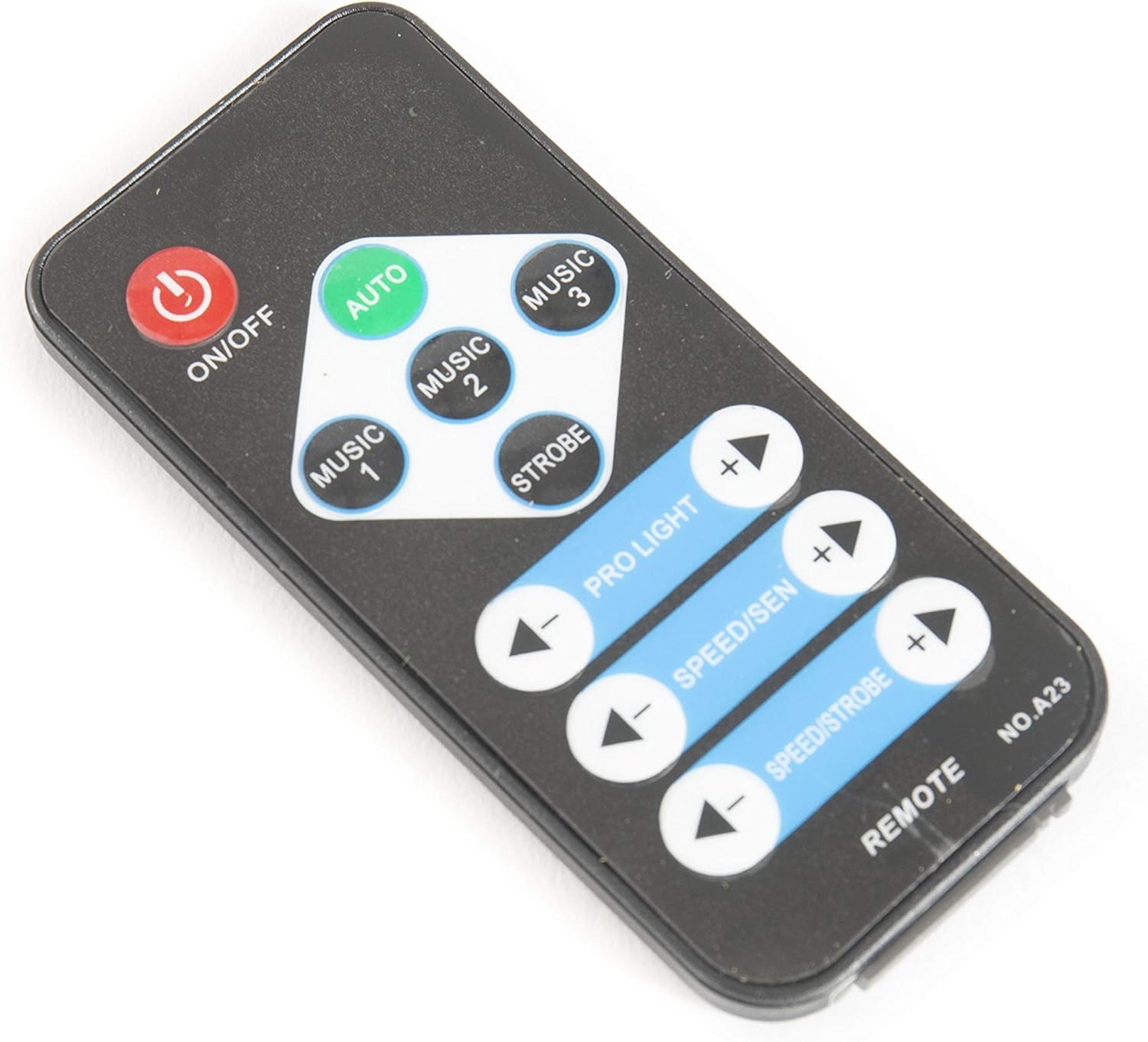
Image 4: Remote control for the Nano Beam FX.
- آن/بند: Power on or off the unit.
- اتو: د اتوماتیک پروګرام حالت فعالوي.
- MUSIC 1/2/3: Activates sound-activated modes with different sensitivities or patterns.
- سټور: Activates strobe effect.
- PRO LIGHT: Adjusts light intensity or program selection.
- SPEED/SEN: Adjusts program speed or sound sensitivity.
5. ترتیب کول
5.1 پیک کول
Carefully remove the unit from its packaging. Inspect for any damage during transit. Retain packaging for future transport or storage.
5.2 پورته کول
The Nano Beam FX unit is equipped with a mounting bracket for secure installation.

Image 5: Adjustable mounting bracket.
- Attach the unit securely to a truss, ceiling, or wall using appropriate clamps and hardware (not included).
- Always use a safety cable (not included) attached to the SAFETY ROPE point on the rear panel, ensuring it can hold the weight of the unit.
- Adjust the angle of the unit using the knobs on the mounting bracket.
5.3 د بریښنا نښلول
Connect the supplied power cable to the POWER IN socket on the rear panel and then to a suitable power outlet.
۵.۳ د DMX اتصال (اختیاري)
For advanced control, connect the unit to a DMX controller.
- Connect a DMX cable from your DMX controller's output to the DMX IN socket of the Nano Beam FX.
- If connecting multiple DMX devices, connect from the DMX OUT of the first unit to the DMX IN of the next.
- Refer to the DMX channel chart (not provided in product data) for specific DMX control parameters.
6. چلول
۸ پاور آن/بند
فشار ورکړئ آن/بند button on the remote control or ensure the unit is connected to power. The unit will power on automatically when connected to power.
6.2 عملیاتي طریقې
The Nano Beam FX offers several operating modes, selectable via the remote control or the rear panel display.
- د موټرو حالت: فشار ورکړئ آټو button on the remote. The unit will cycle through its pre-programmed light shows automatically.
- د موسیقۍ حالت: مطبوعاتي میوزیک 1, میوزیک 2، یا میوزیک 3 on the remote. The unit will react to sound picked up by its internal microphone. Different music modes may offer varying sensitivities or patterns.
- د سټروب حالت: فشار ورکړئ سټوب button on the remote to activate a flashing light effect.
- د DMX حالت: If connected to a DMX controller, the unit will respond to DMX signals. Use the rear panel display to set the DMX address.

انځور ۶: پخوانیample of light effects (blue and red).

انځور ۶: پخوانیample of light effects (green and yellow).

انځور ۶: پخوانیample of light effects (orange and red).
6.3 Adjustments via Remote Control
- PRO LIGHT: د کارولو + او - buttons to cycle through different light programs or adjust intensity in certain modes.
- SPEED/SEN: د کارولو + او - buttons to adjust the speed of automatic programs or the sensitivity of sound-activated modes.
7. ساتنه
7.1 پاکول
Disconnect the unit from power before cleaning. Use a soft, lint-free cloth to wipe the exterior. For lenses, use a specialized lens cleaner and cloth to avoid scratches. Do not use abrasive cleaners.
7.2 ذخیره کول
When not in use, store the unit in its original packaging or a suitable case in a dry, dust-free environment.
8. ستونزه حل کول
| ستونزه | احتمالي لامل | د حل لاره |
|---|---|---|
| واحد فعال نه دی. | برېښنا نشته؛ کېبل خراب دی. | د بریښنا کیبل اتصال وګورئ؛ یو بل سوري هڅه وکړئ. |
| ریموټ کنټرول کار نه کوي. | Dead battery; obstruction; out of range. | Replace remote battery; ensure clear line of sight; move closer to unit. |
| No light effects. | Unit in DMX mode without DMX signal; program not selected. | Select AUTO or MUSIC mode; check DMX connection and settings. |
| Sound-activated mode not responding. | Microphone sensitivity too low; no sound input. | Increase sensitivity using remote; ensure sound source is close to the unit. |
9. مشخصات
| فیچر | تفصیل |
|---|---|
| ماډل | Nano Beam FX |
| برانډ | lightmaXX |
| د محصول ابعاد | 32 x 30 x 29 سانتي متره |
| د توکي وزن | 3.5 کیلو ګرامه |
| د بریښنا سرچینه | د بریښنا تار شوی |
| د رڼا سرچینه واټtage | 3 Watts (per light source) |
| د رڼا سرچینو شمیر | 24 |
| د تولید کونکي حواله | LIG0015648-000 |
| ASIN | B07JM9XVT4 |
10. تضمین او ملاتړ
د تضمین معلوماتو او تخنیکي ملاتړ لپاره، مهرباني وکړئ د تولید کونکي چارواکي ته مراجعه وکړئ webسایټ یا خپل پرچون پلورونکي سره اړیکه ونیسئ. د هر ډول تضمین ادعا لپاره د پیرود ثبوت وساتئ.


