
پیژندنه
Thank you for choosing the MIFA A3 Soundbox Bluetooth Portable Speaker. This manual provides essential information for the safe and efficient use of your device. Please read it thoroughly before operating the speaker and retain it for future reference.
د خوندیتوب معلومات
- سپیکر د سختې تودوخې، مستقیم لمر وړانګو، یا لوړ رطوبت سره مه مخ کوئ.
- د سپیکر قوي تاثیراتو ته د غورځولو یا تابع کولو څخه ډډه وکړئ.
- Do not disassemble or attempt to repair the speaker yourself. Contact qualified service personnel.
- Keep the speaker away from water and liquids, despite its waterproof rating, to prevent damage to charging ports or internal components.
- یوازې ټاکل شوی چارجینګ کیبل او اډاپټر وکاروئ.
د بسته محتويات
مهرباني وکړئ د لاندې توکو لپاره په بسته کې وګورئ:
- MIFA A3 Bluetooth Portable Speaker
- د USB چارج کیبل
- د AUX آډیو کیبل
- د کارونکي لارښود (دا لاسوند)
محصول پای ته ورسیدview
The MIFA A3 speaker features intuitive touch controls and multiple connectivity options. Familiarize yourself with the speaker's layout:
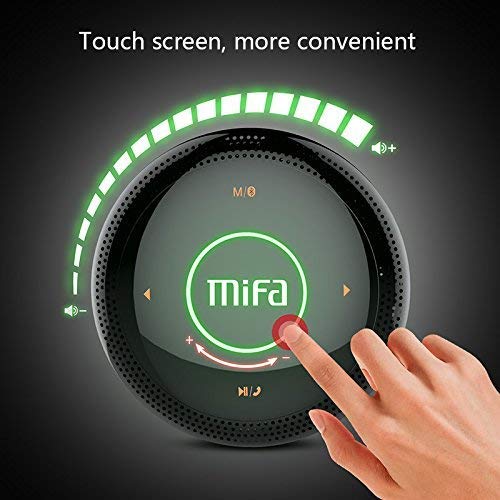
شکل 1: پورته view of the MIFA A3 speaker, highlighting the touch-sensitive control panel. The panel displays volume indicators, play/pause, and track navigation buttons. A central 'Mifa' logo is also visible.
- د ټچ کنټرول پینل: Located on the top surface for volume adjustment, playback control, and mode selection.
- مایکروفون: د لاسونو پرته زنګ وهلو لپاره.
- د چارج کولو بندر: د چارج کولو لپاره مایکرو USB پورټ.
- AUX داخلول: د تار لرونکي اتصال لپاره ۳.۵ ملي میتر آډیو جیک.
- د مایکرو SD کارت سلاټ: د میموري کارت څخه مستقیم موسیقي غږولو لپاره.
چمتو کول
1. د سپیکر چارج کول
Before first use, fully charge the speaker. Connect the provided USB charging cable to the speaker's charging port and the other end to a USB power adapter (not included) or a computer's USB port.
- د چارج کولو شاخص څراغ به د چارج کولو پرمهال روښانه شي.
- The indicator will turn off or change color once fully charged.
- A full charge provides approximately 8 hours of continuous playtime.
2. بریښنا فعال/بند
- د فعالولو لپاره: Press and hold the Power button (usually integrated into the touch panel or a dedicated button) for 2-3 seconds until you hear an audible prompt or see an indicator light.
- د بریښنا بندولو لپاره: Press and hold the Power button again for 2-3 seconds.
عملیاتي لارښوونې
1. د بلوتوث جوړه کول
- ډاډ ترلاسه کړئ چې سپیکر فعال دی او د بلوتوث جوړه کولو حالت کې دی (د چمکۍ نیلي رڼا یا د اوریدلو وړ پرامپټ لخوا ښودل شوی).
- په خپل وسیله (سمارټ فون، ټابلیټ، کمپیوټر) کې، بلوتوټ فعال کړئ او د شته وسایلو لټون وکړئ.
- د وسیلو له لیست څخه "MIFA A3" غوره کړئ.
- Once paired, the speaker will provide an audible confirmation, and the indicator light will become solid blue.
- The speaker will automatically connect to the last-paired device when powered on, if that device's Bluetooth is active and within range.
2. د AUX پیوستون
For devices without Bluetooth, use the provided 3.5mm AUX audio cable:
- د AUX کیبل یوه پای د سپیکر د AUX ان پټ پورټ سره وصل کړئ.
- بل پای د خپل آډیو آلې هیډفون جیک سره وصل کړئ.
- سپیکر به په اتوماتيک ډول AUX حالت ته لاړ شي.
۴. د مایکرو ایس ډی کارت پلے بیک
Insert a Micro SD card (up to 32GB, FAT32 format) with music files into the designated slot. The speaker will automatically detect the card and begin playback.
4. Touch Control Operations
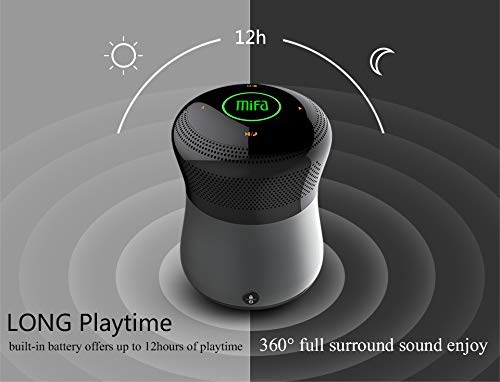
شکل 2: The MIFA A3 speaker shown with an overlay indicating "LONG Playtime" (up to 12 hours) and "360° full surround sound enjoy." This image emphasizes the speaker's battery life and audio dispersion.
- د حجم کنټرول: Slide your finger clockwise on the touch panel to increase volume, counter-clockwise to decrease.
- پلی کول / ودرول: Tap the central Play/Pause icon.
- بله لار: Tap the "Next" arrow icon.
- مخکینی لار Tap the "Previous" arrow icon.
- د حالت بدلول: Tap the "M/O" icon to cycle between Bluetooth, AUX, and Micro SD card modes.
- د بندولو تڼۍ: Press the lock icon to prevent accidental touch inputs.
5. Call Handling (Bluetooth Mode)
- زنګ ووهئ: Tap the Play/Pause icon when a call comes in.
- ټلیفون پای: Tap the Play/Pause icon again.
- زنګ رد کړئ: Press and hold the Play/Pause icon for 2 seconds.
ساتنه
- سپیکر په نرم او وچ ټوکر پاک کړئ. د کثافاتو پاکوونکي یا محلول مه کاروئ.
- سپیکر په یخ او وچ ځای کې وساتئ کله چې د اوږدې مودې لپاره نه کارول کیږي.
- Charge the battery at least once every three months to maintain battery health.
د ستونزو حل کول
| ستونزه | احتمالي حل |
|---|---|
| سپیکر نه چالانېږي. | ډاډ ترلاسه کړئ چې بیټرۍ چارج شوې ده. د بریښنا سرچینې سره وصل شئ او بیا هڅه وکړئ. |
| د بلوتوث له لارې جوړه نشي کیدی. |
|
| غږ نشته. |
|
| د غږ ټیټ کیفیت. |
|
مشخصات
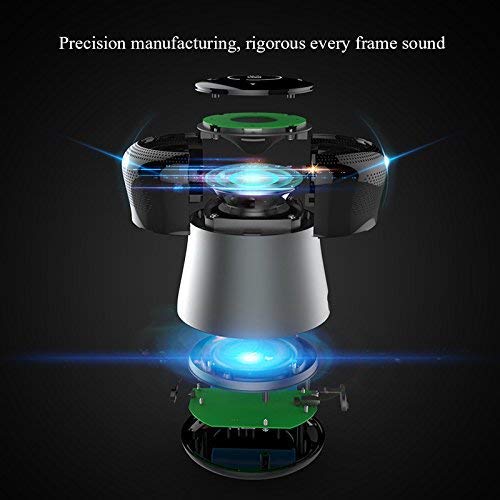
شکل 3: An exploded diagram of the MIFA A3 speaker, illustrating its internal components and structural design, emphasizing precision manufacturing.
| ماډل | میفا اې۹۰ |
| د تولید بریښنا | 10W |
| ارتباط | Bluetooth 4.2, AUX, Micro SD Card |
| بیټرۍ | 1800 mAh لی-ion |
| د لوبې وخت | تر 8 ساعتونو پورې (په 60٪ حجم کې) |
| د چارج کولو وخت | تقریبا 3-4 ساعته |
| مایکروفون | د لاسي وړیا تلیفونونو لپاره جوړ شوی |
| پنروک | Yes (as per product specifications, but general caution advised for ports) |
| د کنټرول طریقه | لمس |
| مطابقت لرونکې وسیلې | لپ ټاپ، کمپیوټر، سمارټ فون، ټابلیټ |
تضمین او ملاتړ
MIFA products are designed to provide reliable performance. For warranty information or technical support, please refer to the warranty card included with your purchase or visit the official MIFA webسایټ. د تضمین ادعاوو لپاره د پیرود ثبوت وساتئ.
For further assistance, you may contact MIFA customer support through their official channels.