
1. پیژندنه
The BNT Dummy Fake Security Camera is designed to provide a realistic visual deterrent against potential intruders. Its appearance closely mimics that of a functional surveillance camera, aiming to reduce the likelihood of criminal activity by creating the impression of active monitoring. This manual provides essential information for the proper setup, operation, and maintenance of your dummy camera.

Image 1.1: Two BNT white dummy fake security cameras, showcasinد دوی حقیقي ډیزاین.
۲. په بکس کې څه دي؟
Upon opening your package, you should find the following components:
- BNT Bullet Simulation Fake Camera (White) x 2
- د نصبولو لپاره پیچ
- د کارونکي لارښود (دا لاسوند)
- Warning Security Alert Sticker Decal x 2

Image 2.1: Package contents showing two dummy cameras, warning stickers, and screws.
3. ځانګړتیاوې
- ریښتینی ډیزاین: Mimics the appearance of a real surveillance camera.
- د LED څراغ روښانه کول: Features a built-in red LED light that illuminates at night, simulating active recording.
- د فوتو الیکټریک سینسر: Automatically activates the red LED light in low-light conditions.
- دوامدار ساختمان: Made from Acrylonitrile Butadiene Styrene (ABS) for indoor and outdoor use.
- د هوا ضد: IP65 International Protection Rating ensures resistance to water.
- اسانه نصب کول: No wiring required, mounts easily to ceilings or walls.
- د تنظیم وړ زاویه: Features 2-axis rotation for flexible positioning (360-degree rotation, 90-degree tilt).
- د بریښنا سرچینه: Operates on 2 AA batteries (not included).
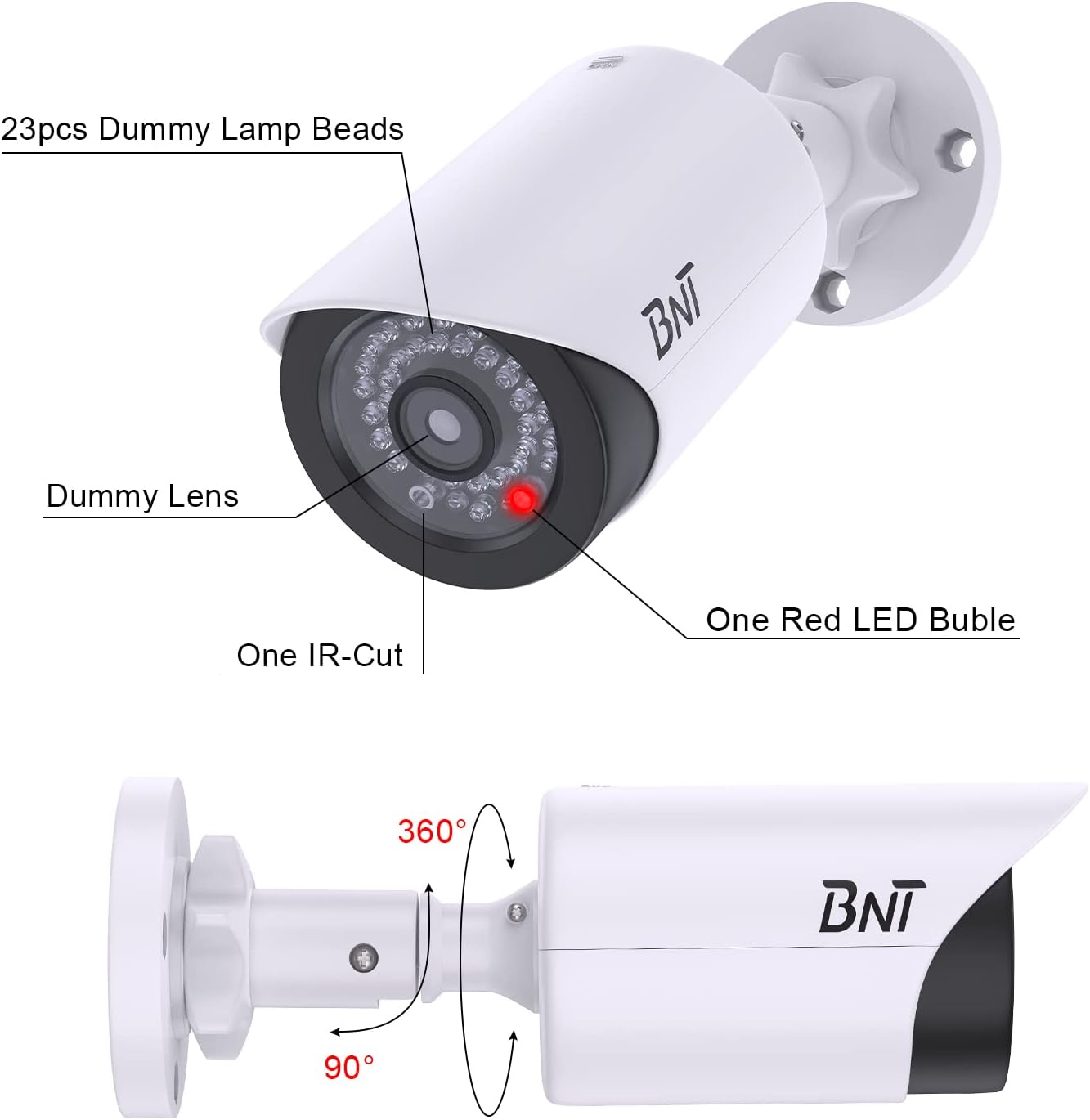
Image 3.1: Close-up of the dummy camera's front, showing the dummy lens, red LED, and rotation capabilities.
۱. تنظیم او نصب کول
4.1. د بیټرۍ نصب کول
- Locate the battery compartment on the camera. This is typically found by sliding open the back cover.
- دوه AA بیټرۍ (شاملې نه دي) په کمپارټمینټ کې دننه کړئ، د سم قطبیت ډاډ ترلاسه کول (+/-).
- د بیټرۍ کڅوړه په خوندي ډول وتړئ.

Image 4.1: Illustration of battery insertion into the dummy camera.
4.2. د کیمرې نصب کول
The camera can be easily installed on a ceiling or wall using the provided screws. No complex wiring is necessary.
- Choose a suitable location for installation, considering visibility and desired deterrent effect.
- Position the mounting base against the surface and mark the screw holes.
- Drill pilot holes if necessary, then secure the mounting base with the provided screws.
- کیمره د نصب شوي بیس سره وصل کړئ.
- Adjust the camera's angle using its 2-axis rotation feature to achieve the desired coverage.
Video: BNT Dummy Fake Security Camera Overview
دوهمه ویډیو: دا ویډیو عمومي معلومات وړاندې کويview of the BNT Dummy Fake Security Camera, highlighting its features and realistic appearance.
Video: Protecting Property with Fake Cameras
Video 4.2.2: This video demonstrates how fake cameras can be used to enhance property security and deter potential threats.
5. عملیاتي لارښوونې
The BNT Dummy Fake Security Camera is designed for simple, autonomous operation:
- Once batteries are installed, the built-in photoelectric sensor will detect ambient light levels.
- During daylight hours, the red LED light will remain off.
- As darkness falls, the photoelectric sensor will automatically activate the red LED light, causing it to illuminate. This simulates the operation of a real security camera's night vision or recording indicator.
- The camera provides 24/7 visual deterrence without any manual intervention after initial setup.

Image 5.1: The dummy camera's red LED light is active at night, providing a visual deterrent.
6. ساتنه
- د بیټرۍ بدلول: When the red LED light dims or stops illuminating, it is time to replace the batteries. Ensure to use high-quality AA batteries to prevent leakage and damage to the battery case.
- د چاپیریال ساتنه: When replacing batteries, take care to avoid exposing the internal components to rain or moisture to maintain the lifespan of the battery case.
- تخریب: Please dispose of used batteries properly according to local regulations to protect the environment.
- پاکول: Periodically wipe the camera's exterior with a soft, damp د دوړو او کثافاتو لرې کولو لپاره ټوکر. د سختو کیمیاوي موادو کارولو څخه ډډه وکړئ.
7. ستونزه حل کول
7.1. LED Light Not Illuminating at Night
- بیټرۍ چیک کړئ: Ensure that 2 AA batteries are correctly installed and are not depleted. Replace if necessary.
- Test Photoelectric Sensor: In a dark environment, cover the LED light with your hand. If the red LED light turns on, the product is functioning correctly. If it does not, check battery installation again.
- د چاپیریال عوامل: Ensure the camera is not installed in an area with ambient light at night (e.g., streetlights, porch lights) that might prevent the photoelectric sensor from detecting sufficient darkness to activate the LED.
8. مشخصات
| فیچر | تفصیل |
|---|---|
| د ماډل نوم | BNT Dummy (Model BNT-K8FaCam-2PW) |
| د کور دننه / بهر کارول | دننه، بهر |
| د بریښنا سرچینه | د بیټرۍ چلول (۳ AA بیټرۍ، شاملې نه دي) |
| مواد | اکریلونایتریل بوټاډین سټیرین (ABS) |
| د نصب کولو ډول | چت ، وال |
| Viewزاویه | 120 درجې |
| د نړیوال خوندیتوب درجه بندي | IP65 (واټر پروف) |
| د توکي ابعاد (L x W x H) | 7.6 x 5.4 x 2.9 انچه |
| د توکي وزن | ۰.۹۸۶ اونس (۲۷.۹۴ ګرامه) |
| ځانګړی ځانګړنه | Powered by 2 AA batteries (not included) |
9. تضمین او ملاتړ
BNT provides reliable 24-month after-sales service for this product. If you have any questions, concerns, or require assistance with your BNT Dummy Fake Security Camera, please contact our dedicated customer service team. We are committed to ensuring your satisfaction.