
1. محصول ختم شوview
The PAKITE PAT-590 is a wireless HDMI AV sender system designed to transmit audio and video signals between rooms without the need for cables. It consists of a transmitter and a receiver unit, enabling wireless sharing of content from devices such as DVD players, DVRs, CCTV cameras, IPTV, satellite receivers, or digital TV set-top boxes to TV sets in different locations.
This system utilizes smart 2.4/5GHz dual-band Wi-Fi wireless transmission, offering a long transmission distance, strong anti-interference capabilities, and high mobility. It also supports IR remote control functionality, allowing users to control the source device from the receiver end.
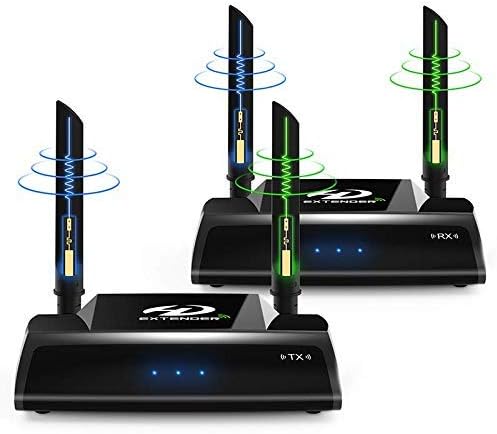
Image 1.1: The PAKITE PAT-590 Wireless HDMI Extender system, showing the transmitter and receiver units with their dual antennas.
2. د بسته محتويات
مهرباني وکړئ تصدیق کړئ چې لاندې ټول توکي ستاسو په کڅوړه کې شامل دي:
- 1 x د لیږدونکي واحد
- 1 x د ترلاسه کونکي واحد
- ۱ x د بریښنا اډاپټرونه (ډي سي ۵ وي/۱ اې)
- 2 x HDMI کیبلونه
- 1 x IR Extender Cable
- ۱ x د کارونکي لارښود (دا سند)
۴. د تنظیم لارښوونې
Follow these steps to set up your PAKITE PAT-590 Wireless HDMI Extender system. Ensure all devices are powered off before making connections.
3.1 د اجزاو پیژندنه

انځور ۲: تفصیلي view of the transmitter and receiver units, highlighting ports such as HDMI Input/Output, IR Extension Interface, Power Input, Reset Button, and Power Switch.
3.2 د پیوستون مرحلې
- ټرانسمیټر (TX) سره وصل کړئ:
- Connect one end of an HDMI cable to the HDMI output of your source device (e.g., DVD player, set-top box).
- د دې HDMI کیبل بل پای د د HDMI سیګنال داخلول port on the PAKITE PAT-590 Transmitter unit.
- If you wish to monitor the source locally, connect a second HDMI cable from the د HDMI سیګنال محصول port on the Transmitter to an HDMI input on a local display (optional).
- Connect the IR Extender Cable to the IR Extension Interface on the Transmitter. Position the IR emitter head near the IR sensor of your source device.
- Connect one power adapter to the د بریښنا انډول port of the Transmitter and plug it into an electrical outlet.
- رسیور (RX) سره وصل کړئ:
- د HDMI کیبل یوه پای له سره وصل کړئ د HDMI سیګنال محصول port on the PAKITE PAT-590 Receiver unit.
- Connect the other end of this HDMI cable to an HDMI input on your remote display (e.g., TV, monitor, projector).
- Connect the second power adapter to the د بریښنا انډول port of the Receiver and plug it into an electrical outlet.
- پاور آن: Once all connections are secure, switch on the power for both the Transmitter and Receiver units using their respective Power Switches. Then, power on your source device and display.

Image 3.2: Diagram illustrating the connection flow from an HDMI signal source to the transmitter, and wirelessly to the receiver and a remote display, including IR remote control setup.
Important Safety Hint: To prevent damage, always ensure the product is powered off before connecting or disconnecting any cables. Only power on the units after all connections are firmly established. Avoid plugging or unplugging cables while the units are powered on. If the product will not be used for an extended period, please turn it off.
4. عملیاتي لارښوونې
4.1 بنسټیز عملیات
After successful setup and powering on, the transmitter will automatically send the HDMI signal wirelessly to the receiver. The receiver will then output the signal to your connected display. The system supports HDMI resolutions from 480i/576i up to 1080P at 50/60Hz.
4.2 Dual-Band Transmission
The PAT-590 utilizes both 2.4GHz and 5GHz ISM bands for wireless transmission. This dual-band capability helps in achieving faster transmission speeds and improved anti-interference performance. The system automatically manages frequency selection to optimize signal quality.

Image 4.1: Illustration of the 2.4G and 5G dual-frequency transmission capabilities, indicating flexible frequency switching to avoid signal interference.
4.3 IR Remote Control Functionality
The built-in IR signal extension feature allows you to control your source device (e.g., DVD player, set-top box) remotely from the location of your receiver. Ensure the IR Extender Cable is properly connected to the transmitter and its emitter head is positioned correctly near the IR sensor of your source device. Point your original remote control towards the receiver, and the IR signal will be relayed back to the source.
4.4 OSD Display and Web ترتیب
The device supports an On-Screen Display (OSD) to monitor device status. Additionally, a web configuration interface is available for advanced settings, providing a simple way to manage the system.
5. ساتنه
To ensure the longevity and optimal performance of your PAKITE PAT-590 Wireless HDMI Extender, follow these general maintenance guidelines:
- پاکول: Use a soft, dry cloth to clean the units. Avoid using liquid cleaners or abrasive materials.
- چاپیریال: Keep the units in a dry environment, away from direct sunlight, extreme temperatures, and high humidity.
- بندول: If the system will not be used for an extended period, power off both the transmitter and receiver units and unplug their power adapters from the electrical outlets.
- وینټیلیشن: د ډیر تودوخې مخنیوي لپاره د واحدونو شاوخوا مناسب هوا ورکول ډاډمن کړئ. د هوا د تودوخې هیڅ خلاصې مه بندوئ.
6. ستونزه حل کول
If you encounter issues with your PAKITE PAT-590, please refer to the following troubleshooting tips:
- سیګنال نشته یا د انځور ضعیف کیفیت:
- Verify that all HDMI cables are securely connected to both the source device, transmitter, receiver, and display.
- Ensure both the transmitter and receiver units are powered on and their indicator lights are active.
- Check the distance between the transmitter and receiver. The maximum transmission distance is 100 meters in open space. Walls and other obstacles will reduce this range.
- Minimize obstructions between the transmitter and receiver.
- Check for potential interference from other wireless devices operating on 2.4GHz or 5GHz frequencies.
- Try repositioning the units or their antennas for better signal reception.
- IR Remote Control Not Working:
- Ensure the IR Extender Cable is firmly connected to the transmitter.
- Verify that the IR emitter head is correctly positioned directly over or very close to the IR sensor of your source device.
- Check the batteries in your original remote control.
- Video Delay/Lag:
- A slight delay of less than 0.2 seconds may occur due to data compression. This is normal for wireless transmission.
- This product is not recommended for PC gaming or other real-time applications where minimal latency is critical.
- وسیله ځواب نه ورکوي:
- Locate the Reset Button on the unit (refer to Image 3.1). Use a small, pointed object (like a paperclip) to press and hold the reset button for a few seconds to restart the unit.
- Power cycle the units by unplugging them from power for 30 seconds, then plugging them back in and powering them on.
7. مشخصات
| فیچر | مشخصات |
|---|---|
| Input/Output Jack | HDMI 1.4 / HDCP 1.4 |
| Output Image Resolution | 720/1080P at 50/60Hz |
| د HDMI آډیو بڼه | 1080P HQ |
| HDMI Max Transmission Standard | IEEE 802.11a / b / g / n |
| عملیاتي فریکونسی | 2.4GHz, 5GHz ISM Band |
| Max Wireless Transmission Rate | 2.4G 150Mbps, 5G 300Mbps |
| د لیږد واټن | 50-100m (open space accessibility) |
| د IR فریکونسي حد | 38KHz |
| د DC انټرنیټ | AC 100V-240V 50 / 60Hz |
| د DC وت | DC 5V/2A |
| د عملیاتي حرارت درجه | -10 ℃ تر +50 ℃ |
| عملیاتي رطوبت | 10-80% RH (غیر کنډیشن) |
| د محصول ابعاد | 158mm x 128mm x 37mm |
8. تضمین او ملاتړ
د محصول تضمین او د پیرودونکو ملاتړ په اړه معلومات د چمتو شوي محصول معلوماتو کې شتون نلري. مهرباني وکړئ د محصول بسته بندۍ یا د تولید کونکي چارواکي ته مراجعه وکړئ. webد تضمین پوښښ او د پیرودونکو ملاتړ سره د اړیکې نیولو څرنګوالي په اړه د جزیاتو لپاره سایټ.