
1. پیژندنه
This manual provides instructions for the Macally BTDYNAMOUSE Wireless Bluetooth Mouse. This device is designed for comfortable and quiet operation across various platforms.
The Macally BTDYNAMOUSE is a slim, ambidextrous Bluetooth mouse featuring silent click buttons and adjustable DPI settings. It connects wirelessly to compatible devices, offering a clutter-free workspace.
۲. په بکس کې څه دي؟
- Macally BTDYNAMOUSE Wireless Bluetooth Mouse
- 2 x AAA بیټرۍ
3. د محصول ب Featuresې
- د تنظیم وړ DPI: Switch between 800, 1200, and 1600 DPI for precise cursor control.
- د خاموش کلیک تڼۍ: Designed for quiet operation, reducing click noise by 90% compared to traditional mice.
- Slim and Ambidextrous Design: Comfortable for both left and right-handed users, with a low-profile د شکل فکتور.
- د بلوتوث بې سیم ارتباط: Connects wirelessly up to 10 meters (30 feet).
- د بیټرۍ اوږد ژوند: Two AAA batteries provide up to 3 months of use (based on 8 hours daily use). Battery life may vary.
- مطابقت: د وینډوز او macOS عملیاتي سیسټمونو سره کار کوي.
۴. د تنظیم لارښوونې
4.1. بیټرۍ نصب کړئ
1. Locate the battery compartment on the underside of the mouse.
2. د بیټرۍ کمپارټ پوښ خلاص کړئ.
3. Insert two AAA batteries, ensuring correct polarity (+/-).
4. د بیټرۍ پوښ پوښ وتړئ.

شکل 1: د بیټرۍ نصب کول
4.2. د بلوتوث جوړه کول
1. Turn on the mouse using the ON/OFF switch located on the underside.
2. Press and hold the Bluetooth pairing button (usually a small button near the ON/OFF switch or sensor) for 2-3 seconds until the LED indicator starts blinking, indicating it's in pairing mode.
3. On your computer or device (Mac, Windows, iPad, Tablet):
- د بلوتوټ ترتیباتو ته لاړ شئ.
- لټون نوې وسیلې.
- Select "Macally BTDYNAMOUSE" from the list of available devices.
- د جوړه کولو پروسې بشپړولو لپاره هر ډول د پردې پرامپټس تعقیب کړئ.
Once successfully paired, the LED indicator on the mouse will stop blinking and remain solid or turn off, depending on the mouse model.

Figure 2: Mouse with Laptop, indicating multi-device compatibility
5. عملیاتي لارښوونې
The Macally BTDYNAMOUSE features a standard 3-button layout with a scroll wheel for intuitive navigation.
- کیڼ کلیک: Primary action, typically used for selecting items or opening links.
- ښي کلیک: Secondary action, typically used to open context menus.
- سکرول ویل: د اسنادو له لارې د عمودی سکرول کولو لپاره کارول کیږي او web pages. The scroll wheel can also be pressed for a middle-click action, depending on software configuration.

Figure 3: Ergonomic Design for Comfortable Use

Figure 4: Quiet Click Buttons in Action
۴.۴. د DPI سمون
The mouse features a DPI switch button to adjust cursor sensitivity. This allows you to fine-tune the mouse's responsiveness to your preference.
To change the DPI setting, press the small button located behind the scroll wheel. Each press cycles through the available DPI levels: 800, 1200, and 1600.
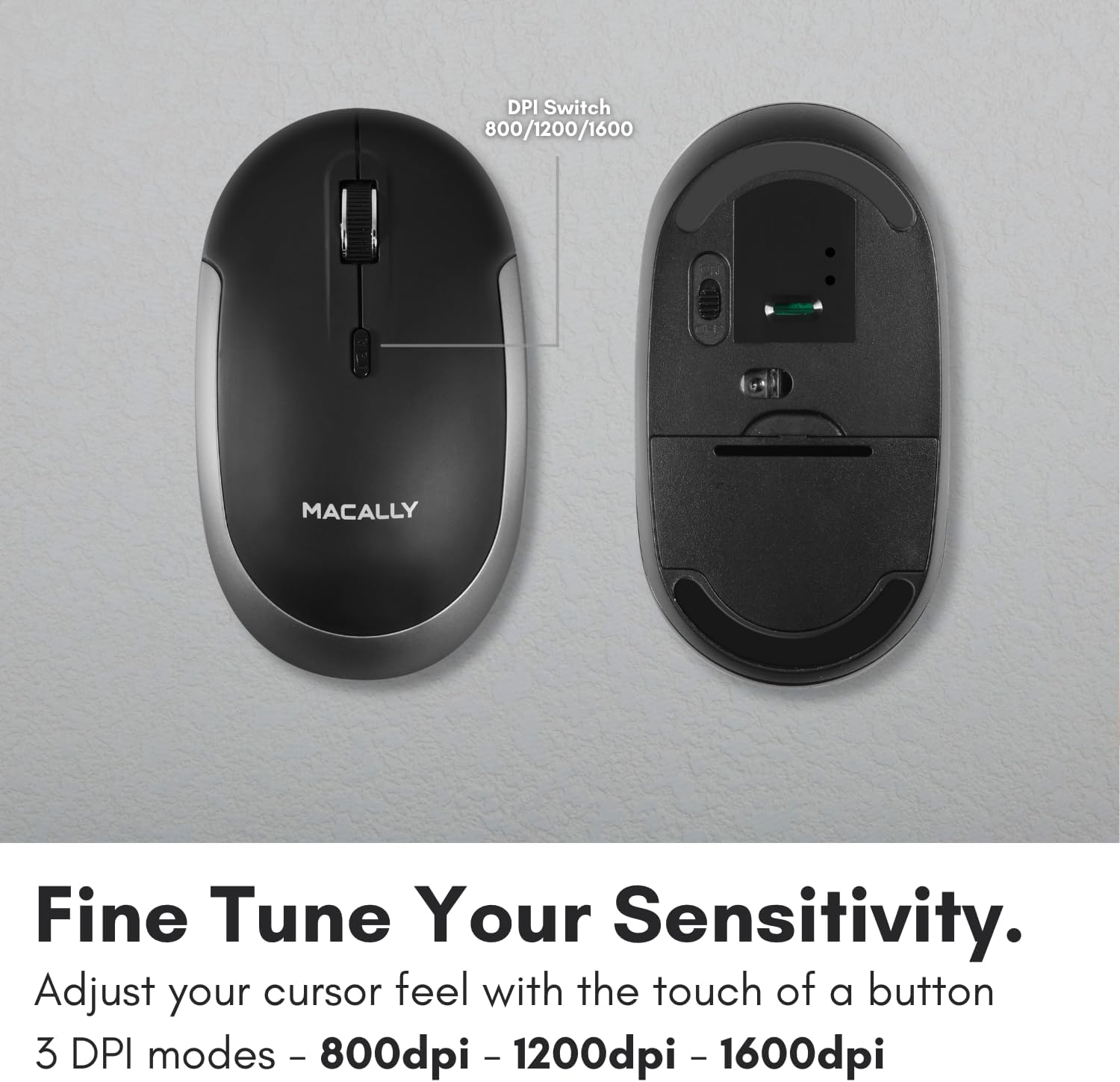
Figure 5: DPI Switch Location
7. د بیټرۍ معلومات
The Macally BTDYNAMOUSE uses two AAA batteries. For optimal performance and battery life, it is recommended to use high-quality alkaline batteries.
- د بیټرۍ ډول: 2 x AAA
- د بیټرۍ اټکل شوی ژوند: Up to 3 months (based on 8 hours of daily use). Actual battery life may vary based on usage patterns and computing conditions.
When the battery level is low, the mouse's LED indicator may flash or change color to alert you. Replace batteries promptly to ensure uninterrupted use.
8. ساتنه
To ensure the longevity and optimal performance of your Macally BTDYNAMOUSE, follow these maintenance guidelines:
- پاکول: د موږک د پاکولو لپاره نرم، وچ ټوکر وکاروئ. د سختې خاورې لپاره، یو څه damp ټوکر کارول کیدی شي، مګر ډاډ ترلاسه کړئ چې رطوبت وسیله ته ننوځي.
- د مایعاتو څخه ډډه وکړئ: موږک مایعاتو یا ډیر رطوبت ته مه ښکاره کوئ.
- ذخیره کول: موږک په یخ او وچ ځای کې وساتئ کله چې د اوږدې مودې لپاره نه کارول کیږي.
- د بیټرۍ بدلول: Replace batteries as needed. Dispose of old batteries according to local regulations.
9. ستونزه حل کول
| ستونزه | احتمالي لامل | د حل لاره |
|---|---|---|
| Mouse not connecting via Bluetooth | Mouse is off or batteries are low. Not in pairing mode. Device's Bluetooth is off. | Ensure mouse is on and batteries are fresh. Put mouse in pairing mode. Check device's Bluetooth settings. Try re-pairing. |
| Cursor is erratic or unresponsive | Dirty optical sensor. Mouse used on unsuitable surface. Low battery. | Clean the optical sensor. Use a mouse pad or a smooth, non-reflective surface. Replace batteries. |
| Mouse clicks are not silent | This mouse is designed for 90% noise reduction, not complete silence. | The mouse provides a significantly quieter click than standard mice, but a faint sound may still be audible. |
| د بیټرۍ لنډ ژوند | Frequent usage. Low-quality batteries. | Use high-quality alkaline batteries. Turn off the mouse when not in use for extended periods. |
10. مشخصات
| فیچر | تفصیل |
|---|---|
| برانډ | په مکروري ډول |
| د ماډل نوم | BTDYNAMOUSE |
| د ارتباط ټیکنالوژي | بلوتوث، بېسیم |
| د حرکت کشف ټیکنالوژي | نظري |
| د DPI تنظیمات | 800 / 1200 / 1600 |
| تڼۍ | ۴ (کیڼ، ښي، سکرول کلیک، د DPI سویچ) |
| د لاس لارښوونه | متضاد |
| مطابقت لرونکې وسیلې | Laptop, Personal Computer (Windows, macOS) |
| د بیسیم رینج | تر 10 متر (30 فوټ) پورې |
| د بیټرۍ ډول | 2 x AAA (شامل) |
| د بیټرۍ ژوند | Up to 3 months (estimated) |
| د توکي وزن | 73 ګرامه |
| مواد | Silicone (Enclosure) |
| رنګ | تور |
۸. د محصول رسمي ویډیوګانې
11.1. Bluetooth Optical Silent Click Mouse - White
دا ویډیو یو اوور وړاندې کويview of the Macally BTDYNAMOUSE, highlighting its slim design, ambidextrous body, simple 3-button layout, 90% noise reduction, and easy DPI adjustability (800/1200/1600).
11.2. Macally Wireless Bluetooth Mouse for Windows PC and Mac
This video demonstrates the Macally BTDYNAMOUSE's features, including its Bluetooth wireless technology, comfortable ambidextrous design, simple 3-button/scroll wheel layout, silent click buttons, and easy DPI adjustability.
12. تضمین او ملاتړ
For warranty information and technical support, please refer to the official Macally webسایټ ته مراجعه وکړئ یا د دوی د پیرودونکو خدماتو سره اړیکه ونیسئ. د تضمین ادعاوو لپاره خپل د پیرود رسید وساتئ.