
پیژندنه
The Xiaomi Mi Home Cam MJSXJ05CM is an indoor wireless surveillance camera designed for home security and monitoring. It features intelligent detection, Full HD 1080p resolution, a 130° ultra-wide-angle lens, and 10m infrared night vision. The camera supports two-way voice communication and offers zoning classification for smart detection. This manual provides essential information for setting up, operating, maintaining, and troubleshooting your device.
د بسته محتويات
مهرباني وکړئ تصدیق کړئ چې ټول توکي په کڅوړه کې شتون لري:
- Xiaomi MI Home Camera
- د چارج کیبل
- د بریښنا اډاپټر
- د کارن لارښود
- د نصبولو هارډویر
محصول پای ته ورسیدview
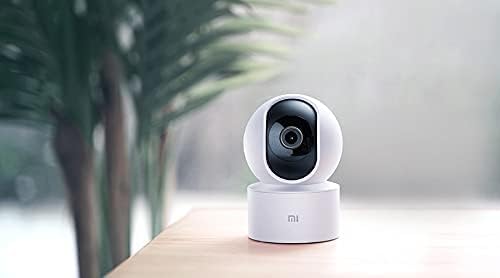
The Xiaomi Mi Home Cam MJSXJ05CM offers a comprehensive view of your indoor space with its 360-degree panoramic rotation and 1080p resolution. It includes an integrated microphone and speaker for two-way dialogue, allowing remote communication. The camera is equipped with advanced person detection and instant alerts.

شکل 1: مخکی view of the Xiaomi Mi Home Cam MJSXJ05CM, showing the camera lens and status indicator light.

شکل 2: شاته view of the Xiaomi Mi Home Cam MJSXJ05CM, highlighting the speaker grille and micro-USB power port.
چمتو کول
- پاور آن: Connect the camera to a power outlet using the provided charging cable and power adapter. The camera will power on automatically.
- د Mi Home اپلیکیشن ډاونلوډ کړئ: Download the Mi Home app from your device's app store. The app is compatible with Android 4.0 and above, and iOS 7.0 and above.
- حساب جوړول/ننوتل: Open the Mi Home app and create a new account or log in with an existing one.
- وسیله اضافه کړئ: In the app, tap the '+' icon to add a new device. Select the Xiaomi Mi Home Cam from the list of available devices.
- وائی فای سره وصل کړئ: Follow the on-screen instructions in the app to connect the camera to your home Wi-Fi network. Ensure your Wi-Fi signal is strong in the camera's intended location.
- جوړه کول: دا اپلیکیشن به تاسو ته د جوړې کولو پروسې له لارې لارښوونه وکړي، چې ممکن ستاسو په تلیفون کې د کیمرې سره ښودل شوي QR کوډ سکین کول پکې شامل وي.
- ځای په ځای کول: Place the camera on a flat surface or mount it using the provided hardware. Ensure it has a clear field of view.
شکل 3: A smartphone displaying the live video feed from the Mi Home Cam, demonstrating remote monitoring capabilities.
عملیاتي لارښوونې
- ژوندی View: Open the Mi Home app and select your camera to view ژوندی خواړه
- د پین/ټيلټ کنټرول: Use the controls within the app to remotely rotate the camera horizontally (pan) and vertically (tilt) to achieve a 360-degree panoramic view.
- دوه طرفه آډیو: د کیمرې د سپیکر له لارې د خبرو کولو لپاره په اپلیکیشن کې د مایکروفون آیکون باندې کلیک وکړئ، او د کیمرې مایکروفون څخه آډیو واورئ.
- د شپې لید: کیمره په اتوماتيک ډول په ټیټ رڼا شرایطو کې انفراریډ د شپې لید ته بدلیږي، تر 10 مترو پورې روښانه تور او سپین انځورونه چمتو کوي.
- د حرکت کشف او خبرتیاوې: Enable motion detection in the app settings. You will receive instant alerts on your smartphone when motion is detected. You can configure detection zones and sensitivity.
- Recording & Storage: The camera supports local storage via a microSD card (up to 128GB, not included). Recordings can also be accessed and managed through the Mi Home app.

شکل 4: A smartphone displaying a list of motion detection alerts and recorded events from the Mi Home Cam.
ساتنه
- پاکول: د کیمرې لینز او بدن په نرمۍ سره د نرم او وچ ټوکر سره پاک کړئ. د مایع پاکوونکو یا کثافاتو موادو څخه کار مه اخلئ.
- د سافټویر تازه معلومات: Regularly check the Mi Home app for firmware updates. Keeping your camera's software up-to-date ensures optimal performance and security.
- د بریښنا دوره: که کیمره ستونزه ولري، هڅه وکړئ چې د څو ثانیو لپاره یې د بریښنا سرچینې څخه خلاص کړئ او بیا یې بیرته ولګوئ.
د ستونزو حل کول
- کیمره له وای فای سره نه نښلي:
- Ensure your Wi-Fi network is 2.4GHz (5GHz is not supported by all models). Check that the Wi-Fi signal strength is adequate at the camera's location. Try restarting your router. Some users have reported success by temporarily disabling 'Dark Mode' on their smartphone during the setup process if encountering network issues.
- Camera frequently disconnects:
- This often indicates a weak Wi-Fi signal. Try moving the camera closer to your Wi-Fi router or using a Wi-Fi extender. Ensure there are no major obstructions between the camera and the router.
- هیڅ انځور یا تور سکرین نشته:
- Check the power connection. Restart the camera by unplugging and replugging it. Ensure the lens is clean and unobstructed.
- د کیمرې بیا تنظیم کول:
- Locate the reset button (often a small pinhole on the back or bottom of the camera, visible in Figure 2). Use a pin or paperclip to press and hold the reset button for approximately 5-10 seconds until the indicator light changes or you hear a voice prompt. This will restore factory settings.
مشخصات
| برانډ | XIAOMI |
| د ماډل نوم | MJSXJ05CM |
| د ارتباط ټیکنالوژي | بېسیم |
| ځانګړی ځانګړنه | HD ریزولوشن، د شپې لید |
| د کور دننه / بهر کارول | دننه |
| مطابقت لرونکې وسیلې | کمپیوټر، سمارټ فون، ټابلیټ |
| د بریښنا سرچینه | د AC بریښنا |
| د کنټرول طریقه | ریموټ کنټرول (د اپلیکیشن له لارې) |
| د مؤثره ویډیو حل | 1080p |
| Viewزاویه | 360 درجې |
| نظری زوم | 3x |
| Installed Flash Memory Size | 128 GB (MicroSD card slot) |
| د توکي ابعاد (L x W x H) | 25.4 x 25.4 x 25.4 سانتي متره |
| د توکي وزن | ۳۷۰ ګرامه (۱۳.۰۵ اونس) |
| د شپې لید | Color Night Vision (Infrared) |
| د خبرتیا ډول | یوازې حرکت |
| رنګ | سپین |
د تضمین معلومات
The Xiaomi Mi Home Cam MJSXJ05CM comes with a manufacturer's warranty of 1 year. Please retain your proof of purchase for warranty claims. For specific terms and conditions, refer to the warranty card included in your product packaging or visit the official Xiaomi webسایټ
ملاتړ
For further assistance, technical support, or to report issues not covered in this manual, please visit the official Xiaomi support website or contact their customer service. You can usually find contact information on the Xiaomi website or in the Mi Home app's 'Help & Feedback' section.