
1. پیژندنه او وروستهview
The ARGO Milo Plus is a versatile portable air conditioner designed to provide optimal climate control for your indoor spaces. Featuring both cooling and heating capabilities, along with ventilation and dehumidification modes, it ensures comfort throughout the year. Its compact design, multi-directional wheels, and integrated Wi-Fi connectivity make it a convenient and efficient solution for various environments. This manual provides essential information for safe operation, installation, maintenance, and troubleshooting.
2. د خوندیتوب معلومات
Before operating the ARGO Milo Plus, carefully read all safety instructions to prevent injury or damage. Keep this manual for future reference.
- ډاډ ترلاسه کړئ چې واحد په مستحکم، سطحه سطحه کېښودل شوی.
- Do not block air inlets or outlets. Maintain at least 30 cm of clear space around the unit.
- Always unplug the unit from the power outlet before cleaning, maintenance, or moving.
- Do not operate the unit with a damaged cord or plug. Contact qualified service personnel for repairs.
- Keep out of reach of children and pets. This appliance is not intended for use by persons with reduced physical, sensory or mental capabilities unless supervised.
- یوازې د ټاکل شوي حجم سره وکاروئtage (230V).
- په هوا کې شیان مه داخل کړئ.
- دا واحد په لوند چاپیریال یا اوبو ته نږدې مه کاروئ.
- The unit contains R290 refrigerant. Do not attempt to service the refrigerant circuit yourself.
3. د محصول اجزا
The ARGO Milo Plus package includes the following components:
- ARGO Milo Plus Main Unit
- د انعطاف وړ اخراج نلی
- د کړکۍ اډاپټر
- Kit for Fixed Glass Installation
- Multifunction Remote Control with LED Display
- د کارونکي لارښود (دا لاسوند)

شکل 3.1: مخکی view of the ARGO Milo Plus portable air conditioner.

Figure 3.2: ARGO Milo Plus highlighting key features such as Wi-Fi connectivity, memory function, sleep mode, timer, remote control, energy efficiency, and cooling/heating capacity.

شکل 3.3: اړخ view of the unit, illustrating the air intake and exhaust grilles.

Figure 3.4: Close-up of the digital control panel on the top of the unit.

Figure 3.5: Included accessories: exhaust hose, window kit components, and remote control.
4. ترتیب او نصب کول
Proper setup is crucial for the efficient operation of your ARGO Milo Plus.
4.1 پاکول او ځای پرځای کول
- په احتیاط سره واحد او ټول لوازم له بسته بندۍ څخه لرې کړئ.
- Position the air conditioner on a flat, stable surface, ensuring at least 30 cm of clear space around the unit for proper airflow. The unit is equipped with multi-directional wheels for easy movement.
۳.۳ د وتلو نلی نصب کول
The exhaust hose expels hot air (during cooling) or cold air (during heating) from the room. Proper installation is essential for efficiency.
- Connect one end of the flexible exhaust hose to the air outlet on the rear of the main unit. Twist clockwise until secure.
- Attach the window adapter or the fixed installation kit components to the other end of the exhaust hose.
- Extend the hose to the nearest window or pre-installed vent. Use the provided window adapter or fixed installation kit to seal the opening and prevent hot air (or cold air in heating mode) from re-entering the room.
- Ensure the hose is as straight and short as possible to maximize efficiency. Avoid sharp bends or kinks, as this can reduce performance and potentially damage the unit.

شکل 4.1: مثالample placement of the ARGO Milo Plus in a room.

Figure 4.2: Dimensional diagram of the unit.

Figure 4.3: Unit dimensions in centimeters.
5. عملیاتي لارښوونې
Your ARGO Milo Plus can be operated via the control panel on the unit, the remote control, or through the dedicated Wi-Fi app.
۴.۱ د کنټرول پینل او ریموټ کنټرول
The control panel on the top of the unit and the remote control share similar functions.
- آن/بند تڼۍ: د واحد د فعال یا بندولو لپاره فشار ورکړئ.
- د حالت تڼۍ: Cycle through operating modes: Cooling (Cool), Heating (Heat), Fan (Ventilation), Dehumidification (Dry), and Auto.
- د تودوخې تنظیم (+/-): د مطلوب تودوخې تنظیم تنظیم کړئ.
- د فین سرعت تڼۍ: Select fan speed (Low, Medium, High, Auto).
- د تللو تڼۍ: Activates or deactivates the automatic oscillation of the upper air flap.
- د ټایمر تڼۍ: Set a 24-hour timer for automatic power on or off.
- د خوب فعالیت: Optimizes operation for quiet night-time use.
- د حافظې دنده: Recalls previous settings after power interruption.
- X-Fan Function: Continues fan operation after shutdown to dry internal components and prevent mold.
- Intelligent Pre-heating: In heating mode, the unit pre-heats before blowing air to prevent cold drafts.
۵.۸ د وای فای اتصال او د اپلیکیشن کنټرول
The ARGO Milo Plus features integrated Wi-Fi for remote control via a smartphone app.
- Download the official ARGO app from your smartphone's app store.
- Follow the in-app instructions to pair your device with the air conditioner. This typically involves putting the unit into pairing mode (often by pressing the Wi-Fi button on the control panel) and connecting to your home Wi-Fi network.
- Once connected, you can control all functions of the unit remotely, including mode selection, temperature, fan speed, and timer settings.
6. ساتنه او پاکول
منظم ساتنه غوره فعالیت تضمینوي او ستاسو د واحد عمر اوږدوي.
۵.۱ د هوا فلټر پاکول
The air filter should be cleaned regularly, ideally every two weeks or more frequently depending on usage and air quality.
- واحد د بریښنا له سایټ څخه خلاص کړئ.
- د واحد له شا څخه د هوا فلټر ومومئ او لرې کړئ.
- فلټر په ګرمو اوبو او یو معتدل صابون سره ومینځئ. په ښه توګه یې ومینځئ.
- Allow the filter to dry completely in a shaded area before reinserting it into the unit. Do not expose to direct sunlight.
6.2 د اوبو ویستل
In dehumidification mode or during heating, the internal water tank may accumulate condensate. When full, the unit will stop operating and indicate a full tank.
- لاسي بمبه: Place a shallow pan or container under the drainage port located at the bottom rear of the unit. Remove the drainage plug to allow water to flow out. Replace the plug securely once drained.
- Continuous Drainage (Dehumidification Mode): For continuous dehumidification, connect a drainage hose (not always included, check accessories) to the continuous drainage outlet. Ensure the hose is sloped downwards to allow gravity drainage.
6.3 عمومي پاکول
د یونټ بهرنۍ برخه په نرمۍ سره مسح کړئamp ټوکر. سخت کیمیاوي مواد، خارښ کوونکي مواد، یا محلولونه مه کاروئ، ځکه چې دا کولی شي سطح ته زیان ورسوي.
7. ستونزه حل کول
د پیرودونکو ملاتړ سره د تماس نیولو دمخه، مهرباني وکړئ د عامو ستونزو لپاره لاندې د ستونزو حل کولو لارښود ته مراجعه وکړئ.
| ستونزه | احتمالي لامل | د حل لاره |
|---|---|---|
| واحد نه خلاصیږي | No power supply; Timer function active; Power cord not fully inserted. | Check power connection and wall outlet; Deactivate timer; Ensure plug is securely inserted. |
| ناکافي یخول/تودوخه | Windows/doors open; Exhaust hose improperly installed/sealed; Dirty air filter; Room size too large. | Close all windows and doors; Ensure exhaust hose is short, straight, and sealed; Clean air filter; Consider unit capacity for room size. |
| ډیر شور | Unit not on a flat surface; Obstructions in air vents. | Place unit on a stable, level surface; Check and remove any obstructions from vents. |
| د اوبو لیک | Drainage plug not securely closed; Drainage hose kinked/blocked (if used). | Ensure drainage plug is tightly closed; Check drainage hose for kinks or blockages. |
| د وائی فای اتصال مسلې | Incorrect Wi-Fi password; Unit too far from router; Router issues. | Verify Wi-Fi password; Move unit closer to router; Restart router and unit. |
8. مشخصات
Key technical specifications for the ARGO Milo Plus portable air conditioner:
- ماډل: MILO PLUS
- د یخولو ظرفیت: 13000 BTU/H
- د تودوخې ظرفیت: 13000 BTU/H (with heat pump)
- د بریښنا رسول: 230 وی
- واټtage (Cooling): 1083 W
- ابعاد (W x D x H): 40.5 x 38.5 x 83.5 سانتي متره
- وزن: 36 کیلو ګرامه
- د شور کچه: 65 dB
- د انرژی موثریت ټولګی (کولینګ): A
- Energy Efficiency Class (Heating): A++
- یخچال: R290
For detailed energy information and product fiche, please refer to the EPREL database:
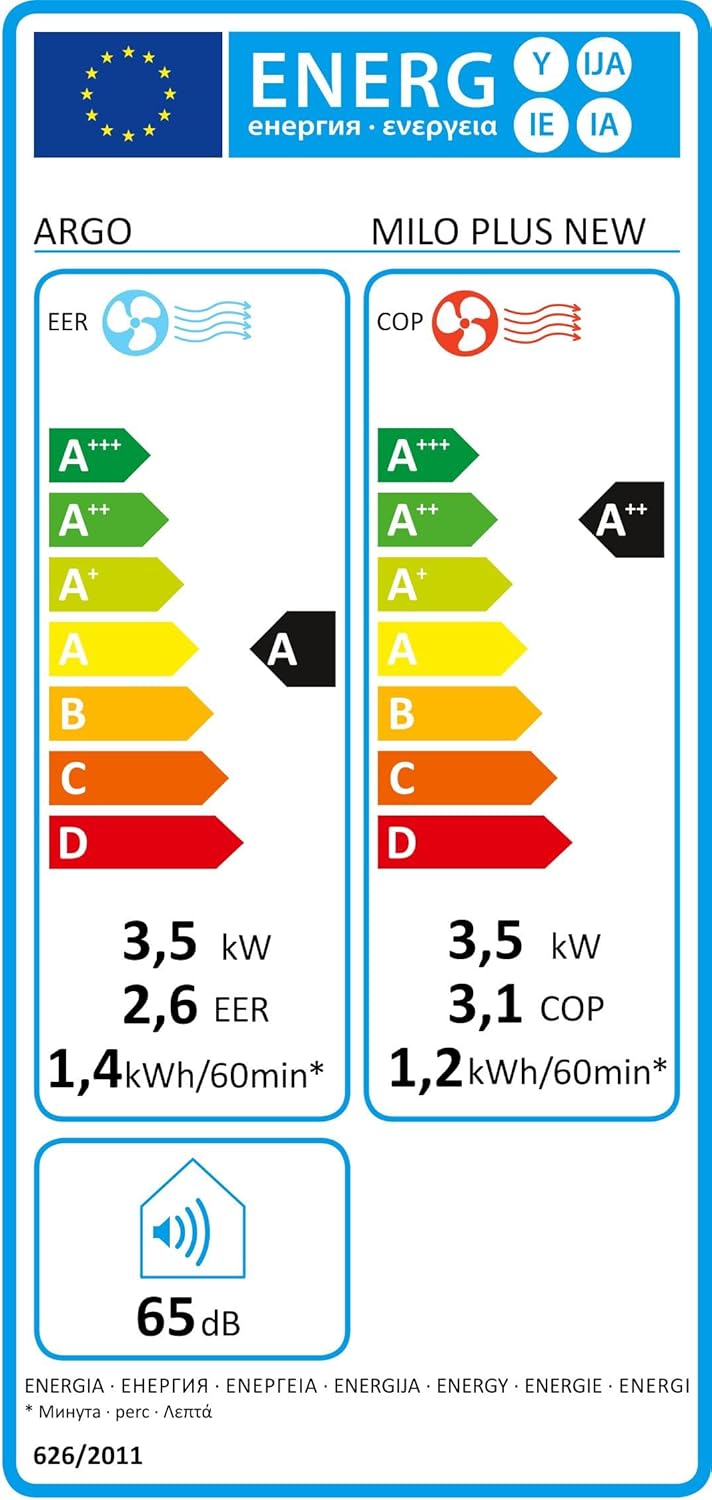
Figure 8.1: Energy Label (Cooling).

Figure 8.2: Energy Label (Heating).
9. تضمین او ملاتړ
This product comes with a standard manufacturer's warranty. Please refer to the warranty card included in the packaging for specific terms and conditions, including the warranty period and coverage details.
For technical assistance, spare parts, or warranty claims, please contact your local authorized service center or the retailer where the product was purchased. Always keep your purchase receipt as proof of purchase.