
Amazon Basics ABMT1000
د ایمیزون اساساتو لاین متقابل UPS 1000VA/550W کارونکي لارښود
Model: ABMT1000
پیژندنه
This manual provides essential information for the safe and efficient operation of your Amazon Basics Line Interactive Uninterruptible Power Supply (UPS) 1000VA/550W. A UPS provides battery backup power and surge protection for connected electronic devices, safeguarding against power outages، سرجونه، او بدلونونه. مهرباني وکړئ دا لارښود د نصبولو او کارولو دمخه په بشپړه توګه ولولئ، او د راتلونکي حوالې لپاره یې وساتئ.

Image: The Amazon Basics Line Interactive UPS 1000VA/550W positioned on a desk, providing power protection for a computer setup.
د خوندیتوب مهمې لارښوونې
Please adhere to these safety guidelines to prevent injury or damage to the UPS and connected equipment:
- This UPS is designed for indoor use only.
- Do not install the UPS in direct sunlight, near heat-emitting appliances, or in areas with excessive humidity or dust.
- ډاډ ترلاسه کړئ چې UPS د ځمکې لاندې AC بریښنا سایټ سره وصل دی.
- د UPS سي مه خلاصوئasinج. دننه د کارونکي لپاره د خدمت وړ برخې نشته. ټولې خدمتونه وړ خدماتو پرسونل ته راجع کړئ.
- Risk of electric shock. Do not connect or disconnect the UPS during a thunderstorm.
- The battery inside the UPS is not user-replaceable. Attempting to replace the battery yourself may void the warranty and pose a safety risk.
- In case of fire, use a dry chemical fire extinguisher. Water may cause electrical hazards.
د بسته محتويات
ډاډ ترلاسه کړئ چې ټول توکي ستاسو په کڅوړه کې شتون لري:
- Amazon Basics Line Interactive UPS 1000VA/550W Unit
- د USB مخابراتو کیبل
- د کارونکي لارښود (دا لاسوند)

Image: USB Communication Cable included with the UPS.
محصول پای ته ورسیدview
مخکینۍ پینل

انځور: مخکینۍ برخه view of the Amazon Basics Line Interactive UPS 1000VA/550W, showing the power button, mute button, and LED indicators.
- د بریښنا تڼۍ: Press to turn the UPS ON or OFF.
- تteۍ غږول: Press to silence audible alarms.
- د LED شاخصونه:
- آنلاین: Illuminates when the UPS is providing utility power to connected devices.
- په بیټرۍ: کله چې UPS د بیټرۍ په بریښنا کار کوي نو روښانه کیږي.
- AVR (اتوماتیک حجمtagای مقررات): Illuminates when the UPS is correcting minor voltage fluctuations without switching to battery power.
- اوورلوډ: Illuminates if connected equipment exceeds the UPS's capacity.
شاته پینل
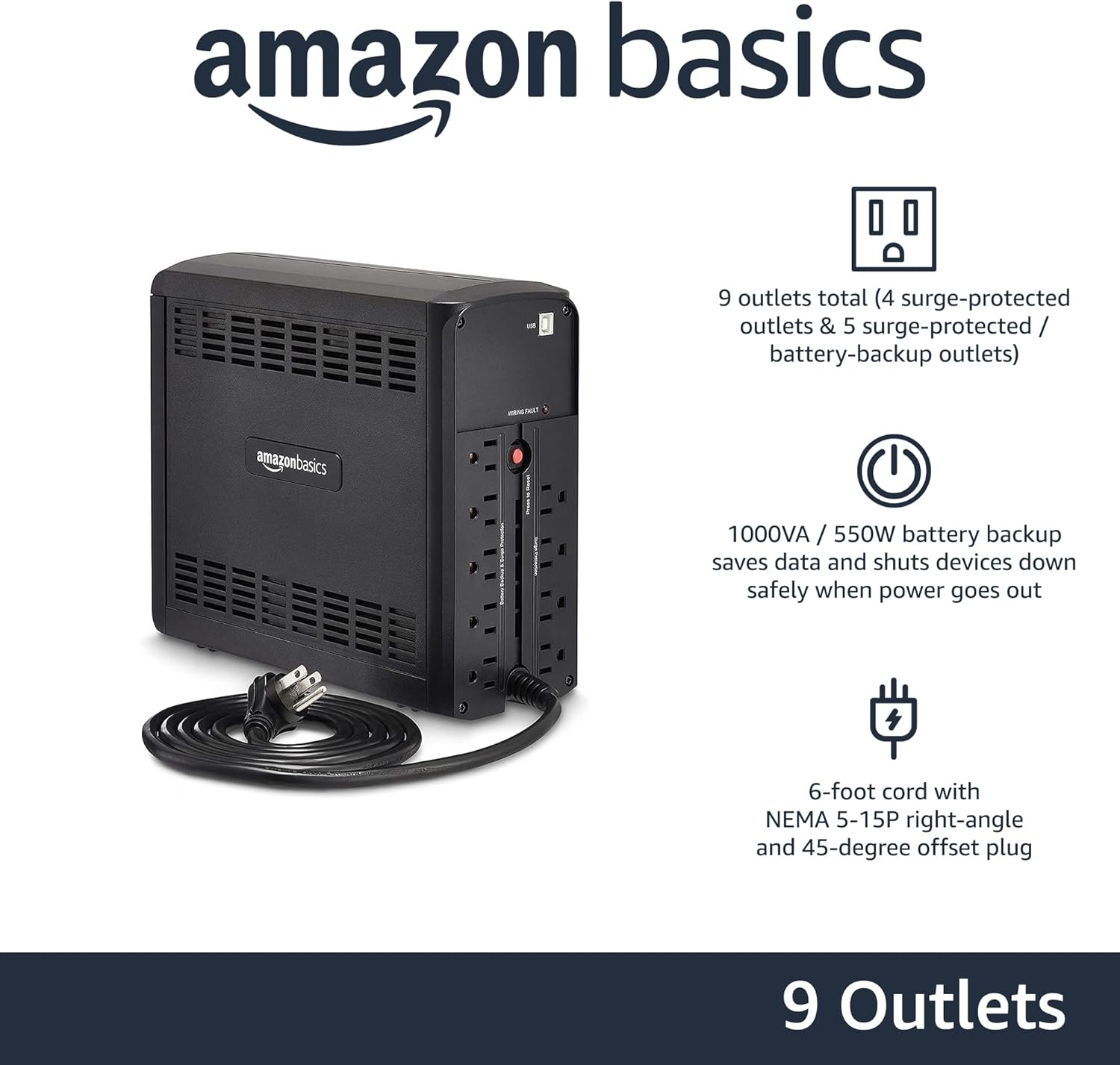
انځور: شاته view of the Amazon Basics Line Interactive UPS 1000VA/550W, displaying the power cord, battery backup outlets, and surge-only outlets.
- Battery Backup & Surge Protected Outlets (5 outlets): These outlets provide both battery backup power during outages and surge protection. Connect critical devices such as computers, monitors, and network equipment here.
- Surge Protected Outlets (4 outlets): These outlets provide surge protection only. Connect non-critical devices like printers or scanners here.
- د USB مخابراتو بندر: Connects to a computer for power management software (e.g., CyberPower PowerPanel Personal).
- د AC ان پټ بریښنا تار: UPS د دیوال له لارې سره وصل کوي.
چمتو کول
- خلاصول او معاینه کول: Carefully remove the UPS from its packaging. Inspect for any shipping damage. If damage is found, do not use the unit and contact customer support.
- د بیټرۍ لومړنی چارج: Before initial use, connect the UPS to a standard wall outlet and allow it to charge for at least 8 hours. This ensures the battery is fully charged and ready to provide optimal backup power. The UPS will charge whether it is turned ON or OFF.
- د وسیلو نښلول:
- Plug critical equipment (e.g., computer, monitor, router) into the د بیټرۍ بیک اپ او سرج محافظت شوي دکانونه.
- Plug non-critical equipment (e.g., printer, desk lamp) ته د سرج محافظت ځایونه.
- احتیاط: Do not plug laser printers into battery backup outlets, as their high power draw can overload the UPS.
- کمپیوټر سره وصل شئ (اختیاري): Use the provided USB cable to connect the UPS's USB port to your computer's USB port. This allows for power management software installation, enabling features like automatic shutdown during extended power outages.
- پاور آن: Press and hold the Power Button on the front panel for approximately 2 seconds until you hear a beep and the UPS powers on.
عملیاتي لارښوونې
Turning the UPS On/Off
- د فعالولو لپاره: Press and hold the Power Button for 2 seconds. The UPS will beep, and the ONLINE LED will illuminate.
- بندول: Press and hold the Power Button for 2 seconds. The UPS will beep, and all LEDs will turn off.
Understanding LED Indicators and Alarms
- ONLINE (Green LED): Solid green indicates the UPS is receiving utility power and providing it to connected devices.
- ON BATTERY (Yellow LED): Solid yellow indicates the UPS is supplying battery power. An audible alarm will sound (beeping every 10 seconds).
- AVR (Yellow LED): Solid yellow indicates the UPS is automatically regulating input voltage د بیټرۍ بریښنا کارولو پرته.
- OVERLOAD (Red LED): Solid red indicates that the connected load exceeds the UPS's capacity. An audible alarm will sound continuously. Immediately disconnect non-essential equipment from the battery backup outlets until the alarm stops.
- ټیټ بیټرۍ: When the UPS is on battery power and the battery level is low, the ON BATTERY LED will flash, and the alarm will beep more frequently (every 1 second).
- خاموش الارم: Press the Mute Button to silence audible alarms. The alarm will reactivate if the condition changes (e.g., low battery).
د بیټرۍ چلولو وخت
The battery runtime depends on the power consumption of the connected devices. For this 1000VA/550W model:
- At half load (500VA/275W), the UPS provides approximately 7 دقيقو of backup power.
- At full load (1000VA/550W), the UPS provides approximately ۱ دقیقه of backup power.
It is recommended to save your work and safely shut down your computer during a power outagد معلوماتو له لاسه ورکولو مخنیوي لپاره.
ساتنه
د بیټرۍ پاملرنه
- To maintain optimal battery life, keep the UPS connected to an AC outlet at all times.
- که چیرې UPS د اوږدې مودې لپاره زیرمه شي، نو د بیټرۍ د تخریب مخنیوي لپاره په هرو دریو میاشتو کې لږترلږه د 8 ساعتونو لپاره بیټرۍ چارج کړئ.
- Batteries have a finite lifespan and will eventually require replacement. If you notice a significant decrease in runtime, contact Amazon Basics customer support for guidance on battery replacement options.
پاکول
- Always unplug the UPS from the wall outlet before cleaning.
- Use a soft, dry cloth to wipe the exterior surfaces of the UPS.
- Do not use liquid or aerosol cleaners, as they may contain flammable substances or cause electrical shock.
د ستونزو حل کول
| ستونزه | احتمالي لامل | د حل لاره |
|---|---|---|
| UPS نه چالانېږي. | Battery is discharged or not connected. | Connect the UPS to an AC outlet and allow it to charge for 8 hours. Ensure the power cord is securely plugged in. |
| UPS is beeping continuously and OVERLOAD LED is on. | Too many devices connected to battery backup outlets. | Disconnect non-essential equipment from the battery backup outlets until the alarm stops. Ensure total load does not exceed 550W. |
| UPS په مکرر ډول د بیټرۍ حالت ته ځي. | Unstable utility power or voltage تغیرات. | This is normal operation for a line interactive UPS. The AVR function is working. If it happens excessively, consult an electrician about your home's wiring. |
| د بیټرۍ لنډ وخت. | بیټرۍ زوړ ده یا په بشپړه توګه چارج شوې نه ده. | Ensure the battery is fully charged (8 hours). If the battery is several years old, it may need replacement. Contact Amazon Basics support. |
| UPS وصل شویو وسیلو ته بریښنا نه ورکوي. | UPS is off, or outlets are surge-only. | Ensure the UPS is turned on. Verify devices are plugged into the correct battery backup outlets. |
مشخصات
| فیچر | تفصیل |
|---|---|
| د ماډل شمیره | ABMT1000 |
| ظرفیت | 1000VA / 550W |
| ننوتۍ جلدtage | 120 وولټ AC |
| بهر | 9 total (5 Battery Backup & Surge Protected, 4 Surge Protected) |
| د بیټرۍ ډول | مهر شوي لیډ اسید |
| د عادي ریچارج وخت | له 8 ساعتونو څخه تر 90. ظرفیت |
| ابعاد (D x W x H) | 10.2 x 3.9 x 9 انچه (25.91 x 9.91 x 22.86 سانتي متره) |
| وزن | ۶ پونډه (۳ کیلو ګرامه) |
| رنګ | تور |

Image: Diagram showing the dimensions of the Amazon Basics Line Interactive UPS 1000VA/550W.
تضمین او ملاتړ
This Amazon Basics UPS is backed by a limited 1-year warranty, which includes the battery. For warranty claims, technical support, or questions regarding battery replacement, please contact Amazon Basics customer support through the Amazon webسایټ یا ستاسو د پیرود پلیټ فارم.
For the most up-to-date support information, please visit the official Amazon Basics support page or refer to your purchase documentation.
Ask a question about this manual
Ask about setup, troubleshooting, compatibility, parts, safety, or missing instructions. Manuals+ will review the question and use this page’s manual context to help answer it.