
1. پیژندنه
This manual provides essential information for setting up, operating, maintaining, and troubleshooting your Lenovo ThinkPad E495 laptop. Please read this guide thoroughly to ensure proper use and to maximize the performance and longevity of your device.
The Lenovo ThinkPad E495 is a 14-inch Full HD laptop powered by an AMD Ryzen 5 3500U processor, equipped with 8GB of memory and a 256GB SSD, running Windows 10 Pro.
2. محصول ختم شوview
Familiarize yourself with the main components of your ThinkPad E495 laptop.
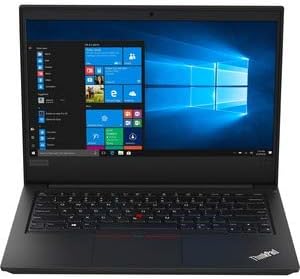
شکل 2.1: مخکی view of the Lenovo ThinkPad E495 laptop, open with the screen displaying the Windows 10 desktop and the keyboard visible.
2.1 مهمې برخې
- ښکاره کول: 14-inch Full HD (1920x1080) LCD screen.
- کیبورډ: Chiclet-style keyboard with TrackPoint.
- ټچ پیډ: Multi-touch enabled touchpad for navigation.
- Webکیم: یوځای شوی webد ویډیو کنفرانس لپاره کیم.
- بندرونه: USB ports, HDMI output, Ethernet, Audio jack.
- د بریښنا تڼۍ: Located on the side or top deck.
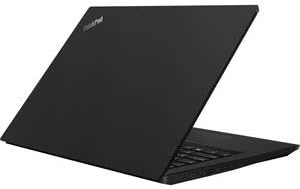
شکل 2.2: اړخ view of the Lenovo ThinkPad E495 laptop in a closed position, highlighting its slim profile.
3. ترتیب کول
3.1 ان باکس کول
په احتیاط سره لپ ټاپ او ټول لوازم له بسته بندۍ څخه لرې کړئ. ډاډ ترلاسه کړئ چې لاندې توکي شتون لري:
- د لینوو تھنک پیډ E495 لیپ ټاپ
- AC اډاپټر
- د بریښنا کیبل
- Battery (may be integrated)
3.2 د نښلولو بریښنا
- د بریښنا کیبل د AC اډاپټر سره وصل کړئ.
- د AC اډاپټر د بریښنا په ځای کې ولګوه.
- Connect the AC adapter's output plug to the power input port on your laptop.
- بیټرۍ ته اجازه ورکړئ چې لږترلږه د 30 دقیقو لپاره د لومړني کارونې دمخه چارج شي، یا تر هغه چې د بیټرۍ شاخص کافي چارج وښيي.
3.3 Initial Boot-Up and Windows Setup
- د لیپ ټاپ د چالانولو لپاره د بریښنا تڼۍ فشار ورکړئ.
- Follow the on-screen instructions to complete the Windows 10 Pro setup process. This typically involves selecting your region, language, accepting terms, and creating a user account.
- کله چې غوښتنه وشي نو د وای فای شبکې سره وصل شئ ترڅو ډاډ ترلاسه کړئ چې تازه معلومات ډاونلوډ کیدی شي.
۳. ستاسو د لپ ټاپ چلول
4.1 د بریښنا مدیریت
- پاور آن: د بریښنا تڼۍ فشار ورکړئ.
- د خوب حالت: پوښ وتړئ یا فشار ورکړئ Fn + F4 (or equivalent sleep key).
- بندول: د سټارټ تڼۍ کلیک وکړئ، بیا پاور > بند کړئ.
- بیا پیل کول: د سټارټ تڼۍ کلیک وکړئ، بیا پاور> بیا پیل کړئ.
۳.۱ کیبورډ او ان پټ وسایل
- کیبورډ: Use the full-sized keyboard for typing. Function keys (F1-F12) often have secondary functions accessible via the Fn کلید
- د تعقیب نقطه: The red pointing stick in the center of the keyboard allows for precise cursor control. Use the associated buttons below the spacebar for left, right, and middle clicks.
- ټچ پیډ: The multi-touch touchpad supports gestures for scrolling, zooming, and other functions. Refer to Windows settings for customization.
4.3 د پردیو سره نښلول
Your ThinkPad E495 supports various external devices:
- د USB وسایل: Connect USB drives, mice, keyboards, or other USB accessories to the available USB ports.
- HDMI: Use the HDMI port to connect to an external monitor or projector.
- وای فای: Connect to wireless networks via the built-in Wi-Fi. Access Wi-Fi settings through the Windows taskbar network icon.
- بلوتوث: Pair Bluetooth-enabled devices such as headphones, speakers, or mice. Enable Bluetooth in Windows settings.
- ایترنیټ: Connect to a wired network using the Ethernet port.

Figure 4.1: The Lenovo ThinkPad E495 laptop in use, displaying a video conference application on its screen.
5. ساتنه
۴.۱ د خپل لپ ټاپ پاکول
- سکرین: د نرم، لینټ پاک ټوکر څخه په روښانه توګه کار واخلئampپه اوبو یا د سکرین پاکونکي سره مینځل شوی. په مستقیم ډول په سکرین باندې مایع مه سپری کوئ.
- کیبورډ او چیسس: یو نرم ټوکر وکاروئ، لږ څهampened with water or a mild cleaning solution. Avoid excessive moisture. An air duster can remove debris from between keys.
- بندرونه: بندرونه له دوړو او کثافاتو څخه پاک وساتئ. که اړتیا وي نو فشار شوي هوا وکاروئ.
5.2 د سافټویر تازه معلومات
خپل عملیاتي سیسټم او ډرایورونه په منظم ډول تازه کړئ ترڅو غوره فعالیت او امنیت ډاډمن کړئ.
- د وینډوز تازه معلومات: د پیل> ترتیبات> تازه معلومات او امنیت> وینډوز تازه معلوماتو ته لاړ شئ.
- د موټر چلوونکي تازه معلومات: د لینوو رسمي ملاتړ ته مراجعه وکړئ website for the latest drivers for your ThinkPad E495 model.
5.3 د معلوماتو بیک اپ
د معلوماتو د ضایع کیدو مخنیوي لپاره په منظم ډول خپل مهم معلومات په بهرني ډرایو یا کلاوډ ذخیره کې بیک اپ کړئ.
6. ستونزه حل کول
| ستونزه | د حل لاره |
|---|---|
| لیپ ټاپ نه چالانېږي. | ډاډ ترلاسه کړئ چې د AC اډاپټر په خوندي ډول د لپ ټاپ او د کار کولو بریښنا ساکټ دواړو سره وصل دی. وګورئ چې د بریښنا ساکټ فعال دی که نه. د بریښنا بل ساکټ هڅه وکړئ. |
| Screen is blank or not displaying. | مطبوعاتي Fn + F7 (or the display toggle key) to cycle through display modes. Ensure the laptop is not in sleep mode. Connect to an external monitor to check if the issue is with the laptop's display. |
| د وای فای اتصال ستونزې. | Check if Wi-Fi is enabled in Windows settings. Restart your router and modem. Ensure you are within range of a Wi-Fi network. Update Wi-Fi drivers from the Lenovo support webسایټ |
| کیبورډ یا ټچ پیډ ځواب نه ورکوي. | لیپ ټاپ بیا چالان کړئ. د هر ډول فزیکي خنډونو لپاره وګورئ. ډاډ ترلاسه کړئ چې چلوونکي تازه دي. |
| سیسټم ورو یا بې ځوابه دی. | Close unnecessary applications. Check Task Manager for processes consuming high CPU or memory. Run a virus scan. Ensure Windows and drivers are updated. Consider freeing up disk space. |
د نورو تفصيلي ستونزو حلولو لپاره، د لینوو ملاتړ ته مراجعه وکړئ webسایټ یا د پیرودونکي خدمت سره اړیکه ونیسئ.
7. مشخصات
| فیچر | تفصیل |
|---|---|
| برانډ | Lenovo |
| د ماډل نوم | Lenovo ThinkPad E495 |
| د ماډل شمیره | 20NE0002US |
| د سکرین اندازه | ۷۸۷ انچه |
| د ښودلو ریزولوشن | 1920 x 1080 پکسلز (بشپړ HD) |
| د CPU ماډل | AMD Ryzen 5 3500U (2.1 GHz، تر 3.7 GHz پورې) |
| د RAM حافظه | ۳۲ جي بي ډي ډي آر ۵ (۸۴۰۰ ميګاهيرتزه) |
| د هارډ ډیسک اندازه | 256 GB SSD |
| عملیاتي سیسټم | وینډوز 10 پرو |
| د ګرافیک کاپروسیسر | د AMD راډون ویګا ۸ (مدغم) |
| ارتباط | Bluetooth 5.0, Ethernet (1 Gbps), USB, Wi-Fi |
| بندرونه | HDMI, USB ports, Headphones (Audio Output) |
| Webکمره | هو |
| بیټرۍ | 3-cell, 45 Watt Hours |
| د توکي وزن | 3.86 پونډه |
| ابعاد (L x W x Th) | ۸۳.۸" x ۵۵.۷" x ۴۴.۱" |
| UPC | 193386253563 |
8. تضمین او ملاتړ
8.1 د محصول تضمین
Your Lenovo ThinkPad E495 laptop comes with a 1-year limited warranty. This warranty covers manufacturing defects and hardware failures under normal use conditions. For specific terms and conditions, please refer to the warranty documentation included with your product or visit the official Lenovo support webسایټ
8.2 د پیرودونکي ملاتړ
For technical assistance, warranty claims, or additional support, please visit the official Lenovo support webسایټ. تاسو کولی شئ هلته د موټر چلوونکي، FAQs، او د پیرودونکو خدماتو لپاره د اړیکو معلومات ومومئ.
د لینوو ملاتړ Webسایټ: ملاتړ.lenovo.com