
1. پیژندنه
This manual provides essential instructions for the safe and effective use of your DT321B Digital Multimeter. This portable device is designed for measuring AC/DC voltage, DC current, resistance, and includes features for diode testing, continuity, battery testing, and transistor (hFE) measurements. Please read this manual thoroughly before operation and retain it for future reference.
2. د خوندیتوب معلومات
د دې ملټي میټر کارولو په وخت کې تل د خوندیتوب لومړني احتیاطي تدابیر په پام کې ونیسئ ترڅو د اور، بریښنا شاک، یا شخصي ټپي کیدو خطر کم کړئ.
- د والیت غوښتنه مه کوئtage یا هغه جریان چې د ملټي میټر لپاره له ټاکل شوي اعظمي حد څخه تیریږي.
- ډاډ ترلاسه کړئ چې د ازموینې لیډونه په ښه حالت کې دي او د هر ډول اندازه کولو دمخه په سمه توګه وصل دي.
- Never use the multimeter if it appears damaged or if the test leads are damaged.
- محتاط اوسئ کله چې د حجم سره کار کوئtagد 30V AC RMS، 42V چوکۍ، یا 60V DC څخه پورته. دا حجمونهtagد شاک خطر رامنځته کوي.
- Always disconnect power to the circuit under test before measuring resistance or continuity.
- ملټي میټر په چاودیدونکي فضا کې مه چلوئ.
- کله چې د بیټرۍ ټیټ شاخص څرګند شي نو بیټرۍ بدل کړئ ترڅو دقیق لوستل ډاډمن شي.
3. محصول ختم شوview
The DT321B Digital Multimeter features a clear LCD display and a rotary switch for selecting various measurement functions. Input jacks are provided for connecting test leads.

شکل 3.1: مخکی view of the DT321B Digital Multimeter with key components labeled. The display shows numerical readings, the hold button freezes the current reading, and the rotary switch selects measurement functions. The '10A' jack is for high current measurements, 'COM' is the common ground, and 'VΩmA' is for voltage، مقاومت، او ټیټ جریان اندازه کول.
The multimeter includes a blue backlight for improved visibility in low-light conditions and a data hold function to freeze the displayed reading.
4. ترتیب کول
4.1 د بیټرۍ نصب کول
The DT321B Digital Multimeter requires two 1.5V batteries (Type 7, typically AAA) for operation. To install or replace batteries:
- ډاډ ترلاسه کړئ چې ملټي میټر بند دی.
- د بیټرۍ د برخې پوښ د واحد په شا کې ومومئ.
- د ساتلو سکرو خلاص کړئ او پوښ لرې کړئ.
- Insert the two 1.5V batteries, observing the correct polarity (+ and -) as indicated inside the compartment.
- د بیټرۍ د برخې پوښ بدل کړئ او د سکرو سره یې خوندي کړئ.
5. عملیاتي لارښوونې
Before making any measurements, ensure the test leads are securely plugged into the correct input jacks.

Figure 5.1: The DT321B Multimeter with test probes connected. The black probe is connected to the 'COM' (common) jack, and the red probe is connected to the 'VΩmA' jack for most voltage، مقاومت، او ټیټ جریان اندازه کول.
5.1 د DC حجم اندازه کولtagای (وی–)
- سور ټیسټ لیډ په 'VΩmA' جیک کې او تور ټیسټ لیډ په 'COM' جیک کې دننه کړئ.
- د روټري سویچ مطلوب DC حجم ته تنظیم کړئtage (V–) range (e.g., 200m, 2, 20, 200, 1000V). If the voltage is unknown, start with the highest range and work downwards.
- د ازموینې پروبونه د هغه برخې یا سرکټ په اوږدو کې وصل کړئ چې اندازه کیږي.
- ټوک ولولئtagد LCD نندارې ارزښت.
5.2 اندازه کول د AC حجمtagای (وی ∼)
- سور ټیسټ لیډ په 'VΩmA' جیک کې او تور ټیسټ لیډ په 'COM' جیک کې دننه کړئ.
- د روټري سویچ مطلوب AC حجم ته تنظیم کړئtage (V∼) range (e.g., 200, 750V).
- د ازموینې پروبونه د هغه برخې یا سرکټ په اوږدو کې وصل کړئ چې اندازه کیږي.
- ټوک ولولئtagد LCD نندارې ارزښت.
۶.۳ د ډي سي جریان اندازه کول (A–)
احتیاط: To avoid damage to the multimeter or the circuit, never connect the test leads in parallel across a voltage source when measuring current. Always connect in series.
- For currents up to 200mA, insert the red test lead into the 'VΩmA' jack. For currents up to 10A, insert the red test lead into the '10A MAX' jack. The black test lead always goes into the 'COM' jack.
- Set the rotary switch to the desired DC Current (A–) range (e.g., 200u, 2m, 20m, 200m, 10A).
- هغه سرکټ پرانیزئ چیرې چې جریان اندازه کیږي او ملټي میټر په لړۍ کې د سرکټ سره وصل کړئ.
- په LCD نندارې کې اوسنی ارزښت ولولئ.
۵.۴ د مقاومت اندازه کول (Ω)
احتیاط: Ensure the circuit under test is completely de-energized before measuring resistance.
- سور ټیسټ لیډ په 'VΩmA' جیک کې او تور ټیسټ لیډ په 'COM' جیک کې دننه کړئ.
- Set the rotary switch to the desired Resistance (Ω) range (e.g., 200, 2k, 20k, 200k, 2M).
- د ازموینې پروبونه د اندازه کولو لپاره د برخې په اوږدو کې وصل کړئ.
- په LCD ډسپلې کې د مقاومت ارزښت ولولئ.
5.5 د ډایډ ټیسټ
- سور ټیسټ لیډ په 'VΩmA' جیک کې او تور ټیسټ لیډ په 'COM' جیک کې دننه کړئ.
- Set the rotary switch to the diode symbol (→|).
- سور پروب د انود سره او تور پروب د ډایډ کیتوډ سره وصل کړئ. ښودنه به د مخکینۍ حجم وښييtage غورځول.
- Reverse the probes. The display should show 'OL' (open loop) for a good diode.
5.6 د دوام ازموینه
- سور ټیسټ لیډ په 'VΩmA' جیک کې او تور ټیسټ لیډ په 'COM' جیک کې دننه کړئ.
- Set the rotary switch to the continuity symbol (♫).
- Connect the test probes across the circuit or component. If continuity exists (resistance below a certain threshold), the buzzer will sound.
5.7 Battery Testing (1.5V / 9V)
- سور ټیسټ لیډ په 'VΩmA' جیک کې او تور ټیسټ لیډ په 'COM' جیک کې دننه کړئ.
- Set the rotary switch to the '1.5V BATT' or '9V BATT' position.
- سور پروب د مثبت ټرمینل سره او تور پروب د بیټرۍ منفي ټرمینل سره وصل کړئ.
- د بیټرۍ حجم ولولئtage په ننداره کې.
۷.۶ ټرانزیسټر (hFE) ازموینه
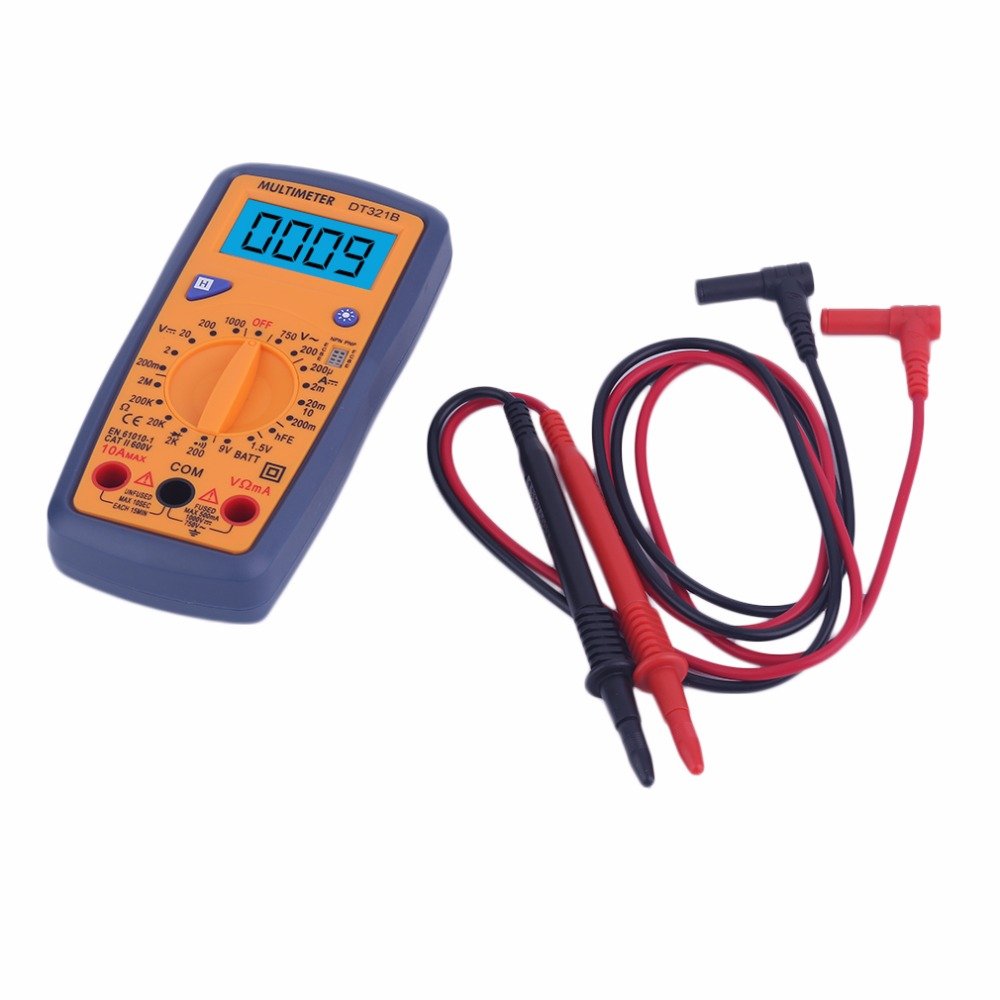
Figure 5.2: The DT321B Multimeter in use, with an inset showing a transistor being tested. The multimeter can measure the hFE (current gain) of NPN and PNP transistors.
- Set the rotary switch to the 'hFE' position.
- Identify the NPN or PNP type of the transistor.
- Insert the transistor leads (Emitter, Base, Collector) into the corresponding sockets in the 'hFE' test socket on the multimeter.
- د LCD ډسپلې په اړه د hFE ارزښت ولولئ.
5.9 د ډیټا هولډ فعالیت
Press the 'Hold' button to freeze the current reading on the display. Press it again to release the hold function and resume live readings.
۷.۶ د شاته رڼا فعالیت
The multimeter features a blue backlight. Press the backlight button (often integrated with the 'Hold' button or a separate button with a light symbol) to turn the backlight on or off for improved visibility.
6. ساتنه
6.1 پاکول
قضیه د اعلان سره پاک کړئamp ټوکر او یو معتدل صابون. د کثافاتو یا محلولونو څخه کار مه اخلئ. ډاډ ترلاسه کړئ چې ملټي میټر د کارولو دمخه په بشپړه توګه وچ دی.
6.2 د بیټرۍ بدلول
When the low battery symbol appears on the display, replace the batteries as described in Section 4.1. Remove batteries if the multimeter is not used for extended periods to prevent leakage.
7. ستونزه حل کول
- هیڅ ښودنه یا کمزوری ښودنه نشته: د بیټرۍ نصب او چارج وګورئ. که اړتیا وي نو بیټرۍ بدل کړئ.
- ناسم لوستل: Ensure the rotary switch is set to the correct function and range. Check test lead connections. Verify the circuit under test is properly prepared (e.g., de-energized for resistance).
- 'OL' (اوورلوډ) ښودل شوی: اندازه شوی ارزښت د ټاکل شوي حد څخه ډیر دی. لوړې حد ته لاړ شئ یا د خلاص سرکټ لپاره وګورئ.
- No continuity buzzer: Ensure the multimeter is in continuity mode and the circuit is closed.
8. مشخصات
| اندازه کول | رینج | دقت |
|---|---|---|
| DC Voltage | 200mV، 2V، 20V، 200V، 1000V | ±0.5% |
| AC Voltage | 200V، 750V | ±1.0% |
| DC اوسنی | 200uA, 2mA, 20mA, 200mA, 10A | ±1.8% |
| مقاومت | 200Ω، 2kΩ، 20kΩ، 200kΩ، 2MΩ | ±1.0% |
عمومي مشخصات:
- د LCD سکرین اندازه: 45x23mm
- د محصول اندازه: 160x76x32mm
- د بریښنا رسول: 2 x 1.5V batteries (Type 7 / AAA)
- ټیټ والیومtage Symbol Display: هو
- د اوورلوډ محافظت: هو
- Diode Detection: هو
- On-off Detection & Buzzer: هو
- د بیټرۍ ظرفیت کشف: 1.5V / 9V
- Transistor Detection (hFE): هو
- د معلوماتو ساتل: هو
- د شاته څراغ ښودنه: هو
9. تضمین او ملاتړ
Specific warranty and support information for the DT321B Digital Multimeter is not available in the provided product details. Please refer to the retailer or manufacturer's website for any applicable warranty terms or customer support contacts.