
1. پیژندنه
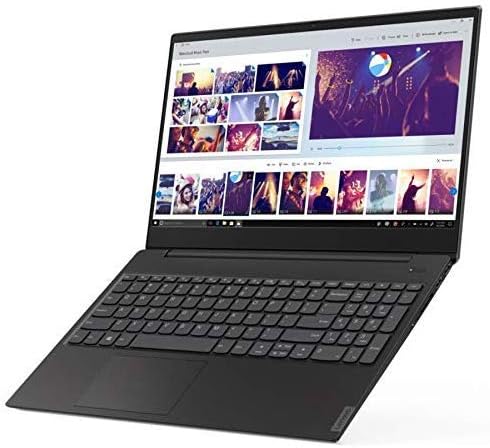
This manual provides essential information for setting up, operating, maintaining, and troubleshooting your Lenovo Flex 14 2-in-1 Convertible Laptop. Designed for versatility, this device combines the functionality of a laptop with the flexibility of a tablet, powered by an AMD Ryzen 5 3500U processor and featuring a 14-inch Full HD touchscreen display.
For additional support and resources, please visit the official Lenovo support webسایټ
۲. په بکس کې څه دي؟
Upon opening your Lenovo Flex 14 package, ensure all the following items are present:
- Lenovo Flex 14 2-in-1 Convertible Laptop
- د بریښنا اډاپټر
- د بریښنا کیبل
- فعال قلم
- د چټک پیل لارښود (که شامل وي)
که کوم توکي ورک یا زیانمن شوي وي، مهرباني وکړئ سمدلاسه خپل پرچون پلورونکي یا د لینوو ملاتړ سره اړیکه ونیسئ.
3. کلیدي ځانګړتیاوې
The Lenovo Flex 14 is engineered to provide a versatile and powerful computing experience:
- ۱۵.۶ انچه بشپړ ایچ ډي ټچ سکرین ډسپلې: Experience vibrant visuals and intuitive interaction with the 1920 x 1080 resolution display.
- د AMD Ryzen 5 3500U پروسیسر: Enjoy powerful and efficient performance for multitasking, streaming, and gaming, complemented by Radeon Vega 8 graphics for enhanced visual tasks.
- 12GB DDR4 RAM & 256GB NVMe SSD: Benefit from fast boot times, quick application loading, and ampد اسانه عملیاتو لپاره حافظه.
- Windows 10 Operating System: Comes with comprehensive, built-in security features, including firewall and Internet protections.
- د محرمیت بندول: یو فزیکي webcam shutter allows you to cover the camera for enhanced privacy when not in use.
- Active Pen Support: The included active pen enables direct drawing or note-taking on the touchscreen.
- Long Battery Life with Rapid Charge: Up to 10 hours of battery life with technology to recharge up to 80% in just one hour.
- څو اړخیز ارتباط: Includes HDMI, USB-C, and USB 3.1 inputs for connecting various peripherals.
4. د تنظیم کولو لارښود
4.1. ان باکسینګ او ابتدايي معاینه
Carefully remove the laptop and all accessories from the packaging. Inspect the device for any physical damage. Keep the packaging for future transport or warranty claims.

۲. د بریښنا فعالول او ابتدايي چارج کول
- د بریښنا اډاپټر د لپ ټاپ د چارج کولو پورټ سره وصل کړئ او بیا د بریښنا آوټ لیټ سره.
- Press the power button, located on the right side of the laptop, to turn on the device.
- Allow the battery to charge fully before its first use, although you can begin setup immediately.
4.3. Windows 10 Setup
Follow the on-screen instructions to complete the Windows 10 initial setup. This includes selecting your region, language, connecting to a Wi-Fi network, and creating a user account. Ensure you have a stable internet connection during this process.
4.4. د پردیو نښلول
You can connect external devices such as mice, keyboards, external storage, and displays using the available ports:
- USB پورټونه: د USB وسیلو د نښلولو لپاره.
- د HDMI پورټ: For connecting to an external monitor or TV.
- د USB-C پورټ: د معلوماتو لیږد او د مطابقت لرونکي USB-C وسیلو سره وصل کولو لپاره.
- آډیو جیک: د هیډفونونو یا بهرنیو سپیکرو لپاره.

5. Operating Your Lenovo Flex 14
۱. د بدلولو وړ حالتونه
Your Flex 14 offers multiple modes to adapt to your needs:
- د لپ ټاپ حالت: د ټایپ کولو او دودیز کمپیوټر لپاره معیاري لیپ ټاپ ترتیب.
- د خیمې حالت: Fold the screen back to form an A-frame, ideal for watching videos or presentations.
- د ولاړ حالت: Fold the screen back further, with the keyboard facing down, for a tablet-like experience with a stand.
- د ټابلیټ حالت: Fold the screen completely back against the base for a full tablet experience, perfect for drawing or touch-based applications.

5.2. Touchscreen and Active Pen Usage
The Full HD touchscreen allows for direct interaction with Windows 10. Use multi-touch gestures for navigation, zooming, and scrolling. The included Active Pen provides precision for writing, drawing, and annotating directly on the screen. Ensure the pen has power (if applicable) and is paired with your device according to its specific instructions.
5.3. د محرمیت شټر
د فعال یا غیر فعالولو لپاره webcam, slide the physical privacy shutter located above the camera lens. This provides an immediate and secure way to ensure your privacy.
۳.۲. د ګوتو نښې لوستونکی
For quick and secure login, configure the fingerprint reader through Windows Hello settings. Once set up, you can unlock your laptop by simply placing your registered finger on the sensor.
6. ساتنه
۵.۱. د خپل لیپ ټاپ پاکول
- د نرم، لینټ پاک ټوکر څخه لږ څه کار واخلئampد اوبو یا سکرین پاکونکي سره مینځل ترڅو سکرین پاک کړي.
- د کیبورډ او چیسس لپاره، نرم ټوکر وکاروئ. د سختو کیمیاوي موادو یا کثافاتو موادو څخه ډډه وکړئ.
- Regularly clean the fan vents to prevent dust buildup, which can affect performance.
6.2. د سافټویر تازه معلومات
Keep your operating system and drivers updated to ensure optimal performance and security. Windows Update will automatically manage most updates, but you can manually check for updates through the Settings menu.
6.3. د بیټرۍ پاملرنه
To prolong battery life, avoid extreme temperatures and fully discharging the battery frequently. For long-term storage, charge the battery to about 50-60% and store the device in a cool, dry place.
7. ستونزه حل کول
Here are solutions to some common issues:
- لیپ ټاپ نه چالانېږي: ډاډ ترلاسه کړئ چې د بریښنا اډاپټر په خوندي ډول وصل دی او بیټرۍ کافي چارج لري. د هارډ ری سیٹ ترسره کولو لپاره د 10-15 ثانیو لپاره د بریښنا تڼۍ ونیسئ.
- د ښودلو مسلې: If the screen is blank or flickering, try connecting an external monitor to check if the issue is with the laptop's display or graphics card. Adjust display settings in Windows.
- ورو فعالیت: Close unnecessary applications, check for malware, ensure sufficient free storage space, and update your operating system and drivers.
- د وای فای اتصال ستونزې: Restart your router and laptop. Check network settings in Windows and ensure Wi-Fi drivers are up to date.
- Touchscreen or Pen Not Responding: Restart the laptop. Ensure the Active Pen has power and is properly paired. Check for driver updates for the touchscreen and pen.
که ستونزې دوام ومومي، د لینوو ملاتړ ته مراجعه وکړئ webسایټ یا د پیرودونکي خدمت سره اړیکه ونیسئ.
8. مشخصات
| فیچر | مشخصات |
|---|---|
| برانډ | Lenovo |
| د ماډل نوم | فلیکس 14 |
| د ماډل شمیره | 81SS0005US |
| د سکرین اندازه | ۷۸۷ انچه |
| د ښودلو ریزولوشن اعظمي | ۱۹۲۰x۱۰۸۰ (بشپړ HD) |
| د CPU ماډل | Ryzen 5 4600H (Note: Product description mentions 3500U, please verify actual CPU model) |
| د پروسیسر سرعت | 2.1 GHz (up to 3.7 GHz max) |
| د RAM حافظې نصب شوې اندازه | 12 GB DDR4 |
| د هارډ ډیسک اندازه | 256 GB SSD |
| عملیاتي سیسټم | وینډوز ۱۱ |
| د ګرافیک کاپروسیسر | د AMD راډون ویګا ۳ |
| د بیټرۍ ژوند | 10 Hours (Average Standby) |
| د توکي وزن | 3.5 پونډه |
| د توکي ابعاد (L x W x ضخامت) | ۸۰"لیتره x ۶۰"واټه x ۱۰"ثانيه |
| د ارتباط ټیکنالوژي | بلوتوث، HDMI، USB، وای فای |
| ځانګړی ځانګړنه | Support Stylus |
9. تضمین او ملاتړ
9.1. د تضمین معلومات
Your Lenovo Flex 14 2-in-1 Convertible Laptop comes with a 1 Year Limited Parts and Labor Warranty. Please retain your proof of purchase for warranty claims. For detailed terms and conditions, refer to the warranty documentation included with your product or visit the official Lenovo support webسایټ
9.2. د پیرودونکي ملاتړ
For technical assistance, troubleshooting, or service requests, please contact Lenovo Customer Support. You can find contact information and additional resources on the official Lenovo webسایټ: www.lenovo.com/support.