
1. پیژندنه
د پیرودلو لپاره مننهasing the MUSE M-10 Red Radio Alarm Clock. This manual provides essential information for the safe and efficient operation of your device. Please read these instructions carefully before use and retain them for future reference.

Figure 1: MUSE M-10 Red Radio Alarm Clock. This image shows the front view of the red alarm clock with its digital LED display showing '12:00' and various control buttons on the top panel.
2. د خوندیتوب لارښوونې
- د وسیلې له چلولو دمخه ټولې لارښوونې ولولئ.
- دا وسیله د باران یا رطوبت سره مه مخ کوئ ترڅو د اور یا شاک خطرونو مخه ونیسئ.
- ډاډ ترلاسه کړئ چې د بریښنا اډاپټر په اسانۍ سره د لاسرسي وړ دی.
- یوازې د جوړونکي لخوا مشخص شوي ضمیمې / لوازم وکاروئ.
- محصول په مستقیم لمر یا د تودوخې سرچینو ته نږدې مه کېږدئ.
- Avoid placing the product on surfaces that are unstable or subject to vibration.
- سي مه خلاصوهasinز؛ ټولې خدمتونه وړ پرسونل ته راجع کړئ.
- کارول شوي بیټرۍ په مسؤلیت سره تصفیه کړئ، د ځایی مقرراتو په تعقیب.
3. محصول ختم شوview
۴.۱ مخکینۍ پینل او ښودنه
The front panel features a clear 0.6-inch white LED display for time and alarm indicators.
۴.۳ د پورتنۍ پینل کنټرولونه
The top panel houses all control buttons for easy access:
- MEM: Memory button for saving and recalling radio presets.
- سیټ: Button for setting time and alarm parameters.
- AL1: Alarm 1 setting button.
- AL2: Alarm 2 setting button.
- << HR: Hour adjustment button (backward).
- MIN >>: Minute adjustment button (forward).
- ننوز Activates the snooze function during an alarm.
- خوب: د خوب ټایمر فعالیت فعالوي.
- ډیمر: د نندارې روښانتیا تنظیموي.

شکل 2: پایview of the MUSE M-10 Red Radio Alarm Clock's functions, including its 0.6-inch white LED display, PLL radio, 20 FM presets, dimmer, dual alarm, snooze, and sleep features.
4. ترتیب کول
4.1 د بریښنا نښلول
Connect the provided AC adapter to the DC IN jack on the rear of the unit and then plug it into a standard wall outlet. The unit will power on and the display will light up.
۵.۲ د بیټرۍ بیک اپ نصب کول
For time and alarm settings backup during a power outage, install 2 x AAA batteries (not included) into the battery compartment located on the bottom of the unit. Ensure correct polarity (+/-) when inserting batteries.
5. عملیاتي لارښوونې
5.1 د وخت ټاکل
- فشار ورکړئ او ونیسئ SET تڼۍ تر هغه وخته پورې چې د ساعت شمېرې روښانه شي.
- د کارولو << HR or MIN >> د ساعت تنظیم کولو لپاره تڼۍ.
- مطبوعاتي SET بیا، او دقیقې عددونه به روښانه شي.
- د کارولو << HR or MIN >> د دقیقو تنظیم کولو لپاره تڼۍ.
- مطبوعاتي SET یو ځل بیا د تایید لپاره او د وخت تنظیم کولو حالت څخه وتلو لپاره.
۶.۲ د الارمونو تنظیم کول (الارم ۱ او الارم ۲)
دا واحد دوه خپلواک الارمونه لري.
- فشار ورکړئ او ونیسئ AL1 (یا AL2) button until the alarm hour digits flash.
- د کارولو << HR or MIN >> د مطلوب الارم ساعت تنظیم کولو لپاره تڼۍ.
- مطبوعاتي AL1 (یا AL2) again, and the alarm minute digits will flash.
- د کارولو << HR or MIN >> د مطلوب الارم دقیقې تنظیم کولو لپاره تڼۍ.
- مطبوعاتي AL1 (یا AL2) again to select the alarm source: بزر or راډیو.
- مطبوعاتي AL1 (یا AL2) once more to confirm and activate the alarm. An alarm icon will appear on the display.
د ۶.۵ ایف ایم راډیو عملیات
The unit has a PLL FM radio with 20 preset stations.
- ه هماهن: فشار ورکړئ << HR or MIN >> buttons to manually tune the radio frequency. Press and hold these buttons for automatic scanning to the next available station.
- د پریزیټ خوندي کول: خپل مطلوب سټیشن ته غږ ورکړئ. فشار ورکړئ او ونیسئ MEM button until 'P01' (or the next available preset number) flashes. Use << HR or MIN >> د مخکینۍ شمېرې د غوره کولو لپاره، بیا فشار ورکړئ MEM بیا خوندي کول.
- د وړاندې کولو یادول: په لنډه توګه فشار ورکړئ MEM د خوندي شوي مخکیني سټیشنونو له لارې د سایکل کولو لپاره تڼۍ.
5.4 د سنوز فعالیت
کله چې الارم غږیږي، فشار ورکړئ لنډول د نږدې ۹ دقیقو لپاره د لنډمهاله لپاره د الارم د خاموشولو لپاره تڼۍ. الارم به د دې مودې وروسته بیا غږ شي.
۶.۵ د خوب وخت ټاکلو فعالیت
فشار ورکړئ خوب button repeatedly to set a sleep timer (e.g., 90, 60, 30, 15 minutes, or OFF). The radio will play for the selected duration and then automatically turn off.
۷.۵ د ښودلو ډیمر
فشار ورکړئ DIMMER button repeatedly to cycle through display brightness levels: High, Low, or Off.

Figure 3: Key features of the MUSE M-10 Red Radio Alarm Clock, including snooze, radio or buzzer alarm, dimmable display, and FM PLL radio with 20 presets.
6. ساتنه
- پاکول: واحد د نرم او وچ ټوکر سره پاک کړئ. د کثافاتو پاکوونکو یا محلولونو څخه کار مه اخلئ.
- د بیټرۍ بدلول: Replace backup batteries annually or when the display shows signs of dimming during power outages.
- ذخیره کول: که چیرې یونټ د اوږدې مودې لپاره ذخیره کوئ، نو د لیکیدو مخنیوي لپاره د بیک اپ بیټرۍ لرې کړئ.
7. ستونزه حل کول
| ستونزه | احتمالي لامل | د حل لاره |
|---|---|---|
| هیڅ بریښنا/ډیسپلی بند نه دی | د بریښنا اډاپټر نه دی وصل شوی یا خراب شوی دی. | د بریښنا اډاپټر اتصال وګورئ. یو بل سایټ هڅه وکړئ. |
| الارم غږ نه کوي | الارم فعال شوی نه دی یا په غلط ډول تنظیم شوی دی. | Ensure alarm icon is visible on display. Re-check alarm time and source settings. |
| د راډیو ضعیف استقبال | د ایف ایم انتن غځول شوی نه دی یا د سیګنال ساحه یې کمزورې ده. | Fully extend the FM wire antenna. Adjust its position for better reception. |
| د بریښنا بندیدو وروسته وخت/ترتیبات له لاسه ورکړل شولtage | د بیک اپ بیټرۍ نصب شوي یا ختم شوي ندي. | د بیک اپ لپاره نوي AAA بیټرۍ نصب کړئ. |
8. مشخصات
- ماډل: ایم-۱۰ ریډ
- نښه: میوز
- ښکاره کول: 0.6-inch White LED, Digital
- راډیو: FM PLL Radio with 20 Presets
- الارم: دوه ګونی الارم (بزر یا راډیو)
- ځانګړي ځانګړتیاوې: Snooze, Sleep Timer, Display Dimmer (High/Low/Off)
- د بریښنا سرچینه: AC Adapter (included), 2 x AAA batteries for backup (not included)
- ابعاد (L x W x H): ۳۷.۵ x ۲۶.۵ x ۳۴ سانتي متره (تقریبا ۱۴.۷۶ x ۱۰.۴۳ x ۱۳.۳۹ انچه)
- وزن: ۷۷۰ ګرامه (تقریبا ۱.۷ پونډه)
- مواد: پلاستیک
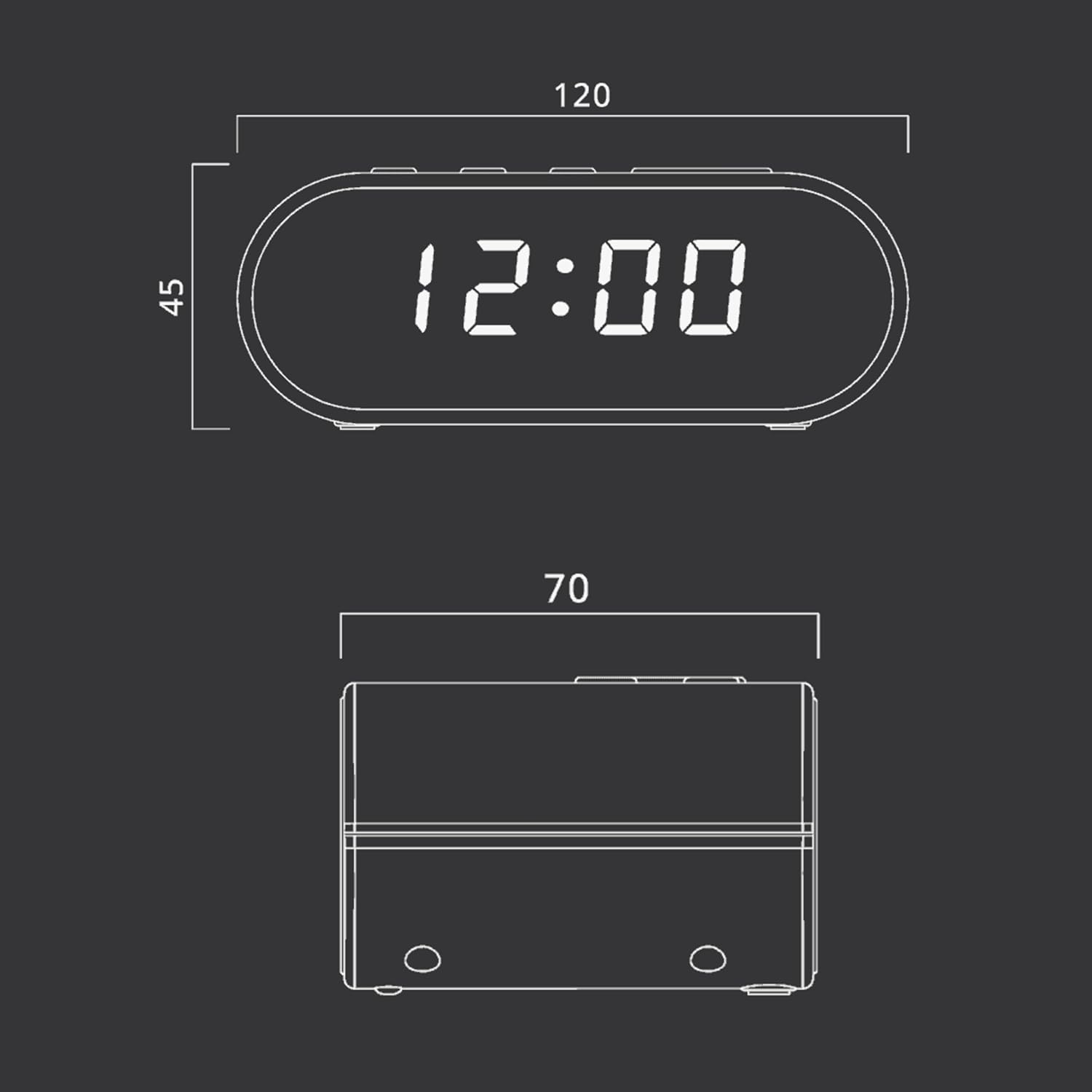
Figure 4: Dimensional drawing of the MUSE M-10 Red Radio Alarm Clock, showing its length (120mm), width (70mm), and height (45mm).
9. تضمین او ملاتړ
For warranty information or technical support, please refer to the warranty card included with your product or contact your local MUSE distributor. Keep your purchase receipt as proof of purchase.