
پیژندنه
Thank you for choosing the Zelotes F-35 2.4GHz Vertical Wireless Rechargeable Gaming Mouse. This ergonomic mouse is designed to provide a comfortable and efficient user experience, reducing wrist strain during extended use. Featuring multiple connectivity options and customizable buttons, it is ideal for both productivity and gaming on various devices.
د محصول ځانګړتیاوې
- ارګونومیک عمودی ډیزاین: Positions the hand in a natural handshake posture to minimize wrist and forearm strain.
- څو اړخیزه اړیکه: Supports 2.4GHz wireless via USB dongle, Bluetooth 1, and Bluetooth 2 for versatile device pairing.
- د چارج وړ بیټرۍ: Built-in rechargeable battery for convenience.
- د تنظیم وړ DPI: Up to 2400 DPI for precise cursor control, suitable for various tasks and gaming.
- 6 د پروګرام وړ بټنونه: Includes left/right click, scroll wheel, DPI button, and forward/backward buttons for enhanced functionality.
- نظری سینسر: Reliable and accurate tracking on most surfaces.
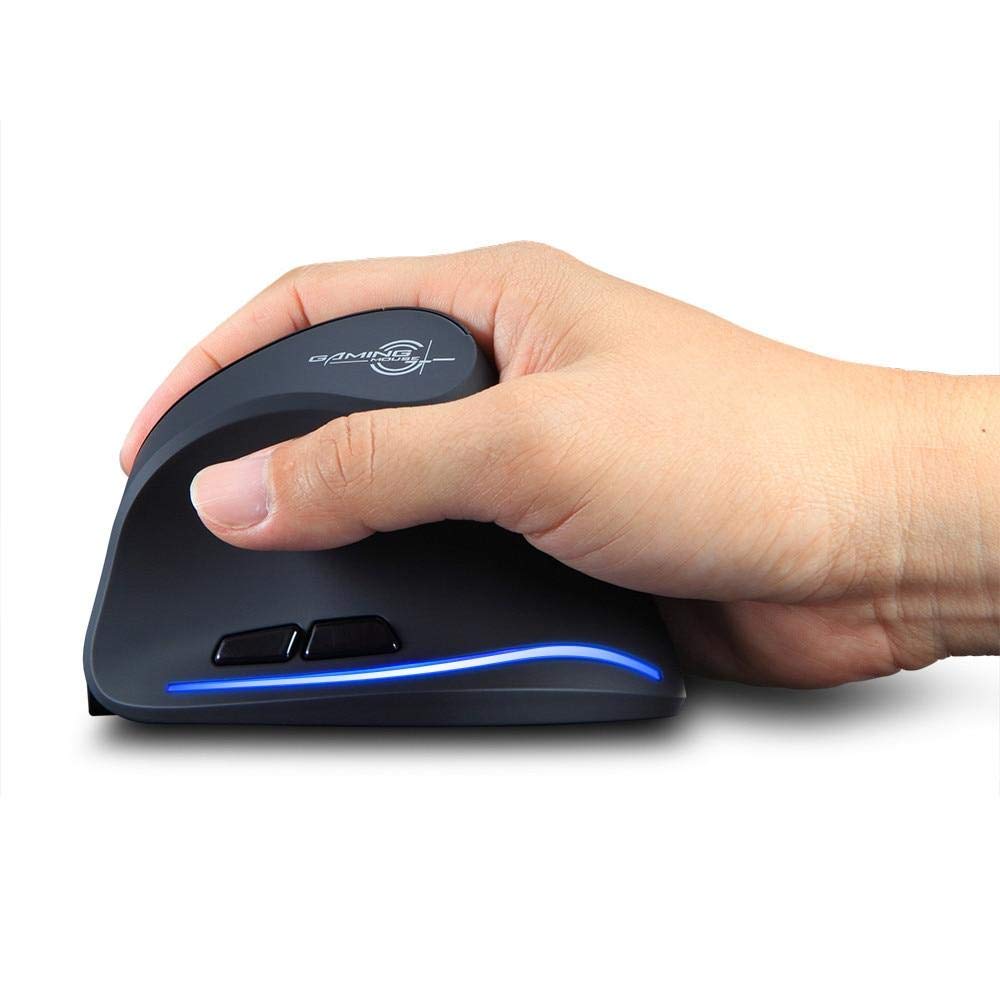
Image: The Zelotes F-35 Vertical Wireless Gaming Mouse, showcasing its unique ergonomic shape and illuminated accents.

Image: A visual comparison illustrating the natural hand position with a vertical mouse versus the twisted wrist position with a traditional horizontal mouse, highlighting the ergonomic benefits.
د تنظیم کولو لارښوونې
- پاور آن: Locate the ON/OFF switch on the bottom of the mouse and slide it to the 'ON' position.
- د اتصال حالت غوره کړئ: The mouse supports three connection modes: 2.4GHz wireless (via USB dongle), Bluetooth 1, and Bluetooth 2. Use the 'Mode Switch' button on the bottom of the mouse to cycle through these options. The corresponding indicator light will illuminate.
- 2.4GHz بې سیم اتصال:
- Remove the USB receiver dongle from its storage slot on the bottom of the mouse.
- د USB ریسیور په خپل کمپیوټر یا لپ ټاپ کې موجود USB پورټ کې ولګوئ.
- موږک باید په اتوماتيک ډول وصل شي.
- د بلوتوث اتصال (BT1/BT2):
- Switch the mouse to either Bluetooth 1 or Bluetooth 2 mode using the 'Mode Switch'.
- په خپل کمپیوټر یا لیپ ټاپ کې، د بلوتوث ترتیباتو ته لاړ شئ او د نویو وسایلو لټون وکړئ.
- Select 'Zelotes F-35' from the list of available devices to pair.

Image: The underside of the Zelotes F-35 mouse, highlighting the ON/OFF switch, mode switch, and the integrated storage slot for the 2.4GHz USB receiver dongle.
عملیاتي لارښوونې
The Zelotes F-35 mouse features 6 buttons designed for intuitive control and enhanced productivity:
- د کیڼ کلیک تڼۍ: د معیاري لومړني کلیک فعالیت.
- د ښي کلیک تڼۍ: د معیاري ثانوي کلیک فعالیت.
- سکرول ویل: Scroll up or down for navigation. Can also be pressed for a middle-click function.
- د DPI تنظیم کولو تڼۍ: Located near the scroll wheel, press to cycle through different DPI settings (e.g., 800/1200/1600/2400) to adjust cursor sensitivity.
- د وړاندې کولو تڼۍ: Located on the thumb rest, typically navigates forward in web براوزرونه یا file سپړونکي
- شاته تڼۍ: Located on the thumb rest, typically navigates backward in web براوزرونه یا file سپړونکي
چارج او بیټرۍ
The Zelotes F-35 mouse is equipped with a rechargeable battery for continuous use.
- د چارج کولو بندر: The mouse features a USB-C charging port, typically located at the front base of the mouse.
- چارج کول: Connect the provided USB-C cable to the mouse and the other end to a USB power source (e.g., computer USB port, wall adapter).
- د بیټرۍ شاخص: The mouse may have an indicator light to show charging status or low battery. Refer to the product packaging for specific indicator behavior.
- د بیټرۍ ژوند: The average battery life is approximately 12 months, depending on usage.
ساتنه
- پاکول: د موږک سطحه پاکولو لپاره نرم، وچ ټوکر وکاروئ. د سختې خاورې لپاره، یو څه damp ټوکر کارول کیدی شي، ډاډ ترلاسه شي چې رطوبت داخلي برخو ته ننوځي.
- د سینسر پاملرنه: د موږک په ښکته برخه کې نظري سینسر پاک او د دوړو یا کثافاتو څخه پاک وساتئ ترڅو دقیق تعقیب ډاډمن شي.
- ذخیره کول: When not in use for extended periods, turn off the mouse to conserve battery life. Store the USB receiver in its designated slot to prevent loss.
د ستونزو حل کول
- موږک ځواب نه ورکوي:
- ډاډ ترلاسه کړئ چې موږک چالان دی.
- د بیټرۍ کچه وګورئ او که اړتیا وي نو چارج یې کړئ.
- For 2.4GHz connection, ensure the USB receiver is securely plugged into the computer.
- For Bluetooth connection, ensure Bluetooth is enabled on your device and the mouse is correctly paired. Try re-pairing if issues persist.
- ناسم تعقیب:
- د موږک په ښکته برخه کې نظري سینسر پاک کړئ.
- ډاډ ترلاسه کړئ چې تاسو موږک په مناسب سطحه کاروئ (غیر انعکاس کوونکی، غیر شیشه).
- Adjust the DPI setting to a comfortable level.
- د اتصال کمښت:
- Ensure the mouse is within the effective range of your device (typically up to 10 meters for wireless).
- د نورو بېسیم وسیلو مداخله کمه کړئ.
مشخصات
| فیچر | تفصیل |
|---|---|
| برانډ | Zelotes |
| ماډل | F-35 |
| ډول | 2.4GHz بې سیم، بلوتوټ |
| د عملیاتو حالت | آپټو - الکترونیکي |
| د تڼیو شمیر | 6 |
| د رولرونو شمیر | 1 |
| د لاس لارښوونه | سمه ده |
| د انٹرفیس ډول | USB |
| DPI | 2400 |
| ځانګړی ځانګړنه | د چارج وړ، بېسیم |
| د خوځښت کشف | نظري |
| مطابقت لرونکې وسیلې | لپ ټاپ، شخصي کمپیوټر |
| عملیاتي سیسټم | Linux, Windows 7 (and newer) |
| د بیټرۍ اوسط ژوند | 12 میاشتې |
| د بریښنا سرچینه | د بیټرۍ چلول |
| رنګ | تور |
| د اصلي هیواد | چین |
تضمین او ملاتړ
For warranty information and technical support, please refer to the documentation included with your product or visit the official Zelotes webسایټ. تاسو کولی شئ د مرستې لپاره له هغه پرچون پلورونکي سره هم اړیکه ونیسئ چیرې چې تاسو محصول اخیستی.