
1. پیژندنه
This manual provides essential information for the installation, operation, maintenance, and troubleshooting of your Chieftec Polaris 650W 80Plus Certified Power Supply Unit (PSU). Please read this manual thoroughly before installing and using the product to ensure proper function and safety. The Chieftec Polaris 650W PSU is designed to provide stable and efficient power to your personal computer system.
2. د خوندیتوب معلومات
تل د خپلو تجهیزاتو د ټپي کیدو یا زیان څخه د مخنیوي لپاره لاندې خوندیتوب احتیاطي تدابیر په پام کې ونیسئ:
- مه کوه د PSU c خلاص کړئasinج. لوړ حجمtages inside can cause electric shock. There are no user-serviceable parts inside.
- مه کوه insert any objects into the PSU's ventilation openings.
- مه کوه PSU اوبو، رطوبت، یا لوړ رطوبت ته ښکاره کړئ.
- Ensure the PSU is installed in a well-ventilated area, free from obstructions to airflow.
- Always disconnect the AC power cord from the wall outlet before installing, removing, or cleaning the PSU.
- Use only the modular cables provided with your Chieftec Polaris 650W PSU. Using incompatible cables may damage the PSU or connected components.
- ډاډ ترلاسه کړئ چې د سیسټم د بریښنا ورکولو دمخه ټول کیبل اتصالونه خوندي دي.
3. د بسته محتويات
ډاډ ترلاسه کړئ چې ټول توکي ستاسو په کڅوړه کې شتون لري:
- Chieftec Polaris 650W Power Supply Unit
- Modular Cable Set (e.g., 24-pin ATX, 8-pin EPS/CPU, PCIe, SATA, Molex)
- د AC بریښنا تار
- د سکرو نصب کول
- د کارونکي لارښود (دا لاسوند)
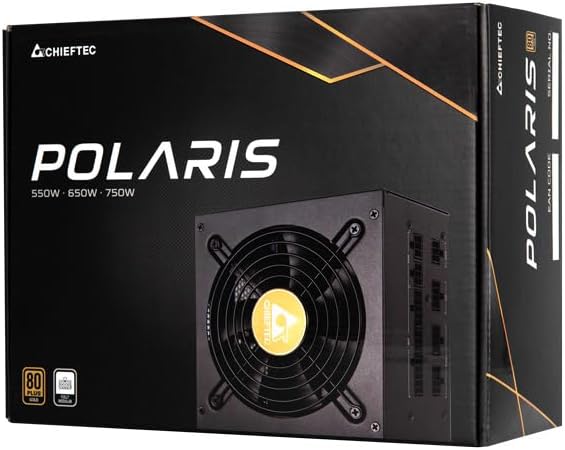
Image: The Chieftec Polaris 650W Power Supply Unit and its retail packaging.
4. ترتیب او نصب کول
Follow these steps to install your Chieftec Polaris 650W PSU into your personal computer system:
- خپل سیسټم چمتو کړئ: ډاډ ترلاسه کړئ چې ستاسو کمپیوټر په بشپړ ډول بند دی او د دیوال له ساکټ څخه خلاص شوی دی. د PSU نصبولو ساحې ته د لاسرسي لپاره د خپل کمپیوټر کیس خلاص کړئ.
- زوړ PSU لرې کړئ (که چیرې تطبیق شي): If replacing an existing PSU, disconnect all cables from the components and motherboard, then unscrew and remove the old PSU.
- نوی PSU نصب کړئ: Carefully slide the Chieftec Polaris 650W PSU into the designated PSU bay in your computer case. Ensure the fan faces the correct direction (typically downwards for bottom-mounted PSUs, or as per case design for optimal airflow). Secure the PSU with the provided mounting screws.
- ماډلر کیبلونه وصل کړئ: Identify the necessary modular cables for your system components (motherboard, CPU, graphics card, storage drives). Connect these cables to the corresponding ports on the back of the PSU. Refer to the image below for connector identification.
- له اجزاو سره وصل شئ: Connect the other end of the modular cables to your motherboard (24-pin ATX and 8-pin EPS/CPU), graphics card(s) (PCIe), and storage devices (SATA/Molex). Ensure all connections are firm and fully seated.
- د کیبل مدیریت: ستاسو په قضیه کې د هوا جریان او جمالیات ښه کولو لپاره کیبلونه په ښه توګه تنظیم کړئ.
- وروستۍ چکونه: Double-check all connections. Ensure no loose cables are obstructing fans. Close your computer case.
- د AC بریښنا سره وصل کړئ: Plug the AC power cord into the PSU's power inlet and then into a wall outlet.

انځور: شاته view of the Chieftec Polaris 650W PSU showing modular cable connection ports for M/B, SATA, PCIe, and CPU.

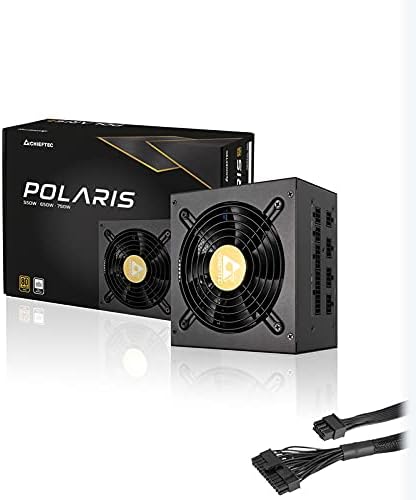
Image: The Chieftec Polaris 650W Power Supply Unit with its modular cables connected, ready for installation.
5. عملیاتي لارښوونې
Once the Chieftec Polaris 650W PSU is correctly installed and all connections are secure:
- پاور آن: Locate the power switch on the back of the PSU (next to the AC power inlet). Ensure it is in the 'I' (On) position.
- د سیسټم پیل کول: Press the power button on your computer case. The system should power on, and the PSU fan will begin to spin, indicating normal operation.
- د فین عملیات: The PSU features an air cooling method. The fan will operate to dissipate heat generated by the power supply components. Its speed may vary depending on the load and temperature to maintain optimal cooling and noise levels.
- بندول: To shut down your system, use the operating system's shutdown procedure. For a complete power cut, switch the PSU's power switch to the 'O' (Off) position and unplug the AC power cord.
انځور: پورته-ښکته view of the Chieftec Polaris 650W Power Supply, highlighting the cooling fan and protective grille.
6. ساتنه
مناسب ساتنه ستاسو د PSU اوږد عمر او غوره فعالیت تضمینوي:
- د دوړو پاکول: Periodically (e.g., every 3-6 months), power off your computer, unplug the AC cord, and open the case. Use compressed air to gently blow dust out of the PSU's fan and ventilation grilles. مه کوه use a vacuum cleaner directly on the PSU as it can generate static electricity.
- د چاپیریال شرایط: Ensure the computer operates in a clean, dry, and well-ventilated environment. Avoid extreme temperatures and direct sunlight.
- د کیبل بشپړتیا: Occasionally check that all modular cables are securely connected and not frayed or damaged.
7. ستونزه حل کول
If you encounter issues with your Chieftec Polaris 650W PSU, consider the following troubleshooting steps:
- ځواک نشته:
- ډاډ ترلاسه کړئ چې د AC بریښنا تار په خوندي ډول د PSU او دیوال آوټ لیټ دواړو سره وصل دی.
- Check that the PSU's power switch on the back is in the 'I' (On) position.
- د بل وسیلې په لګولو سره د دیوال آوټ لیټ فعال دی تصدیق کړئ.
- Confirm all internal power cables (24-pin ATX, 8-pin EPS/CPU) are firmly connected to the motherboard.
- د سیسټم بې ثباتي/تصادفي بندونه:
- Ensure the PSU is adequately ventilated and not overheating.
- Check all power connections to components (graphics card, storage) for looseness.
- If possible, test the PSU with a different set of components or in another system to rule out other hardware issues.
- غیر معمولي غږونه:
- A rattling or grinding noise may indicate a fan issue. Power off the system and inspect the PSU fan for obstructions (e.g., loose cables).
- If the noise persists and is not due to an obstruction, contact support.
If these steps do not resolve the issue, please refer to the Warranty and Support section.
8. مشخصات
| فیچر | مشخصات |
|---|---|
| برانډ | چیف ټیک |
| د ماډل نوم | پولاریس |
| د توکي ماډل شمیره | IN-ACT-ZDLCHFOBU0087 |
| د واټ محصولtage | 650 واټ |
| د فارم فکتور | ATX |
| د یخولو طریقه | هوا |
| د نښلونکي ډول | ATX |
| مطابقت لرونکې وسیلې | شخصي کمپیوټر |
| د محصول ابعاد (L x W x H) | 8.66 x 3.15 x 1.18 انچه (22 x 8 x 3 سانتي متره) |
| د توکي وزن | ۷.۹۶ پونډه (۳.۶۲ کیلوګرامه) |
| تصدیق | 80 پلس تصدیق شوی |
9. تضمین او ملاتړ
Chieftec products are manufactured to high-quality standards. For specific warranty terms and conditions, please refer to the warranty card included with your product or visit the official Chieftec webسایټ. د تضمین موده او پوښښ ممکن د سیمې او محصول له مخې توپیر ولري.
For technical support, product inquiries, or warranty claims, please contact Chieftec customer service through their official website or the contact information provided in your product documentation. When contacting support, please have your product model number (IN-ACT-ZDLCHFOBU0087) and proof of purchase readily available.