
1. پیژندنه
This manual provides detailed instructions for the installation, operation, and maintenance of your Cooler Master RR-A71C-18PA-R1 CPU Cooler. This air cooler is designed to efficiently dissipate heat from your desktop CPU, featuring a PWM controlled fan for optimized performance and addressable RGB lighting for customizable aesthetics. Please read this manual thoroughly before proceeding with installation to ensure proper setup and safe operation.
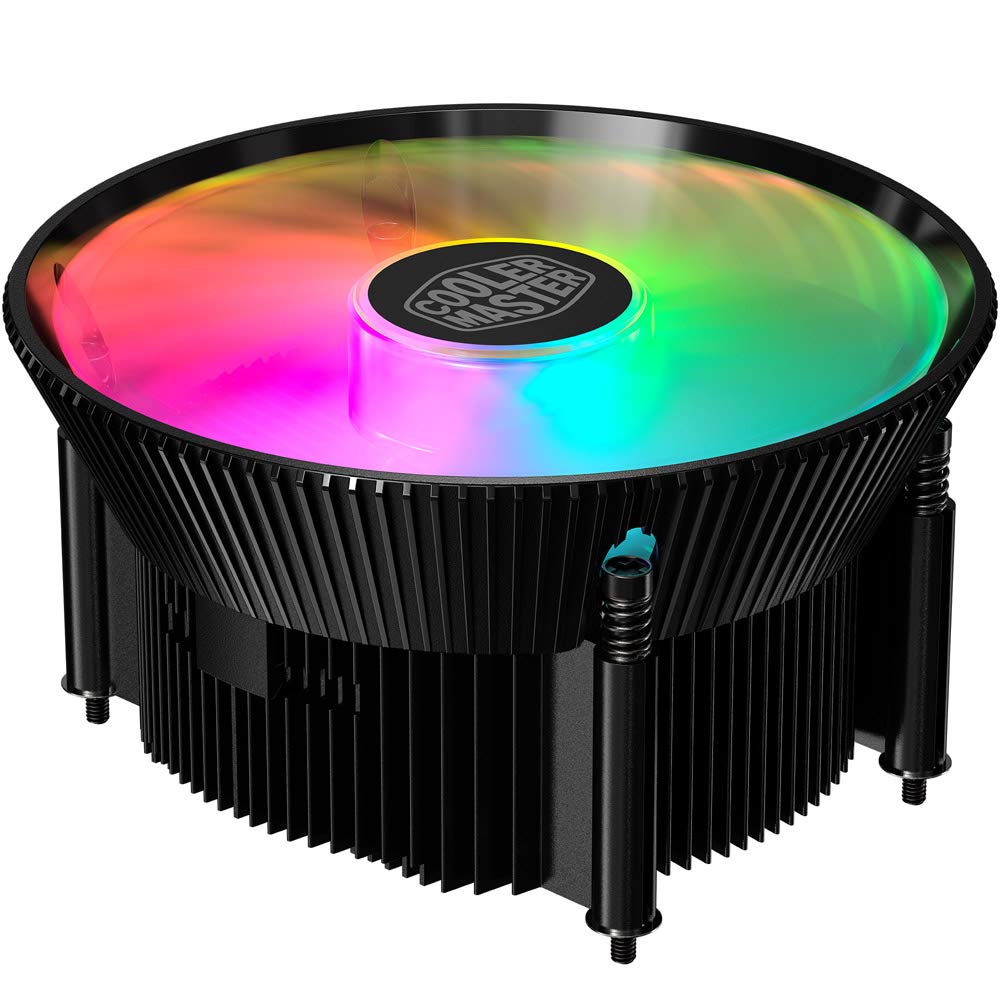
انځور ۴.۱: پورته view of the Cooler Master RR-A71C-18PA-R1 CPU Cooler showcasing its addressable RGB fan.
2. د خوندیتوب معلومات
د محصول د زیان یا ځان ته د زیان رسولو مخنیوي لپاره لاندې خوندیتوب احتیاطي تدابیر په پام کې ونیسئ:
- ډاډ ترلاسه کړئ چې ستاسو د کمپیوټر سیسټم د نصب یا ساتنې دمخه د دیوال له سایټ څخه بند او خلاص شوی دی.
- Avoid touching the fan blades while the system is operating.
- Handle the cooler and its components with care to prevent damage.
- د ماشومانو د لاسرسي څخه لرې وساتئ.
- د کولر یا د هغې د اجزاو د تعدیل هڅه مه کوئ. غیر مجاز تعدیلات ممکن ستاسو تضمین باطل کړي او د خوندیتوب خطرونه رامینځته کړي.
3. د بسته محتويات
ډاډ ترلاسه کړئ چې ټول توکي ستاسو په کڅوړه کې شتون لري:
- Cooler Master RR-A71C-18PA-R1 CPU Cooler Assembly
- Mounting Hardware (for compatible CPU sockets)
- حرارتي پیسټ (مخکې له مخکې کارول شوی یا په ټیوب کې)
- د کارونکي لارښود (دا لاسوند)
4. ترتیب او نصب کول
Follow these steps for proper installation of the CPU cooler:
- د مور بورډ چمتو کول:
Ensure your motherboard is removed from the PC case or has sufficient access for cooler installation. Refer to your motherboard's manual for specific CPU socket preparation.
- حرارتي پیسټ تطبیق کړئ:
If thermal paste is not pre-applied to the cooler's base, apply a small, pea-sized amount to the center of your CPU's integrated heat spreader (IHS). Do not spread it manually; the pressure from the cooler will distribute it evenly.

انځور ۲.۱: ښکته view of the CPU cooler, illustrating the fan and copper contact base. Ensure this surface is clean before applying thermal paste.
- کولر نصب کړئ:
Carefully align the cooler with the mounting holes on your motherboard. Gently place the cooler onto the CPU, ensuring even contact. Secure the cooler using the provided mounting hardware. Tighten screws in a diagonal pattern (e.g., top-left, bottom-right, top-right, bottom-left) until snug, but do not overtighten.
- د فین کیبل سره وصل کړئ:
Locate the 4-pin PWM fan connector on the cooler. Connect this cable to the "CPU_FAN" header on your motherboard. Refer to your motherboard manual for the exact location of this header.
- Connect RGB Cable:
Locate the addressable RGB (ARGB) connector on the cooler. Connect this cable to a compatible 3-pin 5V ARGB header on your motherboard. خبرداری: Do not connect to a 4-pin 12V RGB header, as this will damage the LEDs.
- وروستۍ چکونه:
Double-check all connections. Ensure no cables are obstructing the fan blades or other components. Reinstall your motherboard into the PC case if it was removed.
5. عملیاتي لارښوونې
Once installed, the Cooler Master RR-A71C-18PA-R1 CPU Cooler operates automatically, but its performance and aesthetics can be managed:
- د فین سرعت کنټرول (PWM):
The fan's speed is controlled by your motherboard's BIOS/UEFI settings or through motherboard software. PWM (Pulse Width Modulation) allows for dynamic fan speed adjustments based on CPU temperature, providing optimal cooling and noise levels. Consult your motherboard manual for instructions on configuring fan curves.
- Addressable RGB Lighting Control:
The addressable RGB lighting can be controlled via your motherboard's RGB software (e.g., ASUS Aura Sync, MSI Mystic Light Sync, Gigabyte RGB Fusion, ASRock Polychrome Sync) or a dedicated ARGB controller (not included). Ensure the ARGB cable is correctly connected to a 3-pin 5V ARGB header. Refer to your motherboard's software documentation for lighting customization options.
6. ساتنه
منظم ساتنه ستاسو د CPU کولر غوره فعالیت او اوږد عمر تضمینوي:
- د دوړو لرې کول:
Periodically (every 3-6 months, depending on environment) power off your computer and unplug it. Use compressed air to gently blow dust out of the heatsink fins and fan blades. Hold the fan blades to prevent them from spinning rapidly during cleaning, which can damage the bearings.
- اړیکې چیک کړئ:
Occasionally verify that the fan and RGB cables are securely connected to their respective headers on the motherboard.
- د تودوخې پیسټ بیا کارول:
If you remove the cooler for any reason, it is recommended to clean off the old thermal paste from both the CPU and the cooler base and apply fresh thermal paste before reinstallation.
7. ستونزه حل کول
که تاسو د خپل CPU کولر سره ستونزې سره مخ شئ، لاندې عامې ستونزې او حل لارې وګورئ:
| ستونزه | احتمالي لامل | د حل لاره |
|---|---|---|
| فین نه ګرځی |
|
|
| No RGB lighting |
|
|
| د CPU لوړه تودوخه |
|
|
8. مشخصات
Detailed technical specifications for the Cooler Master RR-A71C-18PA-R1 CPU Cooler:
| فیچر | ارزښت |
|---|---|
| د محصول ابعاد | ۷۱"لیتر x ۲۳.۶"واټه x ۲۴.۴"هوا |
| برانډ | کولر ماسټر |
| د بریښنا نښلونکی ډول | 4-PIN (PWM) |
| والیtage | 12 ولټه |
| واټtage | ۴۵ واټه |
| د یخولو طریقه | هوا |
| مطابقت لرونکې وسیلې | ډیسټاپ |
| د شور کچه | ۴۵ ډیسیبلونه |
| مواد | المونیم، مسو |
| اعظمي گردش سرعت | 2500 RPM |
| د توکي وزن | 0.42 کیلوګرامه |
| د واحد شمیره | 1.0 شمېره |
| UPC | 884102066931 |
9. تضمین او ملاتړ
د کولر ماسټر محصولات د محدود تضمین سره راځي. د تضمین تفصيلي معلوماتو لپاره، مهرباني وکړئ رسمي کولر ماسټر ته مراجعه وکړئ. website or the warranty card included with your product. If you encounter any issues not covered in this manual or require further assistance, please contact Cooler Master customer support:
- Webسایټ: www.coolermaster.com/support/
- اړیکه: د ملاتړ برخې ته مراجعه وکړئ webد سیمه ایزو اړیکو معلوماتو لپاره سایټ.