
1. پیژندنه
Thank you for choosing the iClever BK10 Bluetooth Keyboard. This manual provides essential information for setting up, operating, maintaining, and troubleshooting your new wireless keyboard. Please read it carefully to ensure optimal performance and longevity of your device.
په بکس کې څه دي
- iClever BK10 بلوتوټ کیبورډ
- د USB-C چارج کیبل
- د کارن لارښود
- Protective Silicone Cover (for key protection)

Figure 1: Included items with the iClever BK10 Bluetooth Keyboard.
2. کلیدي ځانګړتیاوې
- Sleek & Wireless Design: Constructed with stainless steel and ABS, featuring a 10-degree tilt for comfortable desktop use.
- Multi-Device & Multi-OS Compatibility: Seamlessly switch between up to 3 devices using Bluetooth 5.1 technology. Automatically recognizes and adapts to Windows, macOS, iPadOS, Android, iPhone, and Chromebooks.
- ځواب ویونکی او ټیټ مسلکيfile کلیدونه: Scissor-key mechanism provides enhanced feedback, stability, and quiet typing (below 50 dB). Optimized key-travel and anti-slip tapes ensure comfort and precision.
- Compact & Efficient: Full-size layout with a standard numeric keypad. Includes hotkeys for Calculator, Fn lock, Mute, Volume up/down, and more to boost productivity.
- USB-C Rechargeable & Energy Saving: Built-in rechargeable battery offers up to 45 days of use after a 2-hour charge. Features an automatic power-saving sleep mode after 30 minutes of inactivity.
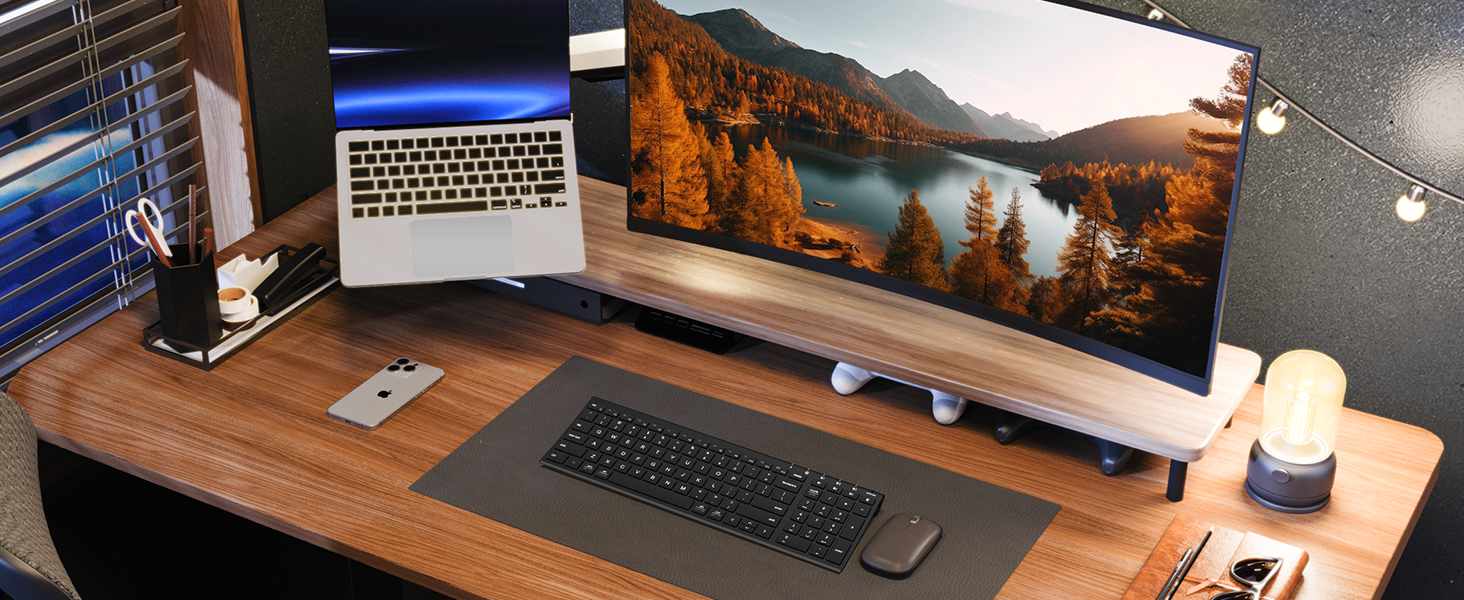
Figure 2: The sleek and wireless design of the iClever BK10 keyboard.
3. ترتیب کول
۳.۱ د کیبورډ چارج کول
Before initial use, fully charge the keyboard using the provided USB-C cable. Connect the USB-C end to the keyboard's charging port (located on the right side) and the USB-A end to a power source (e.g., computer USB port, USB wall adapter). The charging indicator light will illuminate during charging and turn off when fully charged.

Figure 3: USB-C charging port on the iClever BK10 keyboard.
3.2 بریښنا کول / بندول
Locate the ON/OFF switch on the top right side of the keyboard. Slide the switch to the 'ON' position to power on the keyboard. Slide it to 'OFF' when not in use to conserve battery life.
3.3 د بلوتوټ جوړه کول
The iClever BK10 keyboard supports pairing with up to three devices simultaneously. Follow these steps to pair your devices:
- د ON/OFF سویچ په کارولو سره کیبورډ چالان کړئ.
- Press and hold one of the Bluetooth channel keys (B1, B2, or B3) for 3-5 seconds until its indicator light starts flashing rapidly. This indicates the keyboard is in pairing mode.
- ستاسو په وسیله (کمپیوټر، ټابلیټ، سمارټ فون) کې، د بلوتوث ترتیباتو ته لاړ شئ او د شته وسایلو لټون وکړئ.
- د موندل شویو وسیلو له لیست څخه "iClever BK10" غوره کړئ.
- Follow any on-screen prompts to complete the pairing process. The indicator light on the keyboard will stop flashing and remain solid for a few seconds, then turn off, indicating successful pairing.
- Repeat these steps for up to two additional devices using the other Bluetooth channel keys (B2 and B3).

Figure 4: Multi-device connectivity of the iClever BK10 keyboard.
4. عملیاتي لارښوونې
۴.۱ د وسیلو ترمنځ بدلول
To switch between paired devices, simply press the corresponding Bluetooth channel key (B1, B2, or B3) once. The keyboard will connect to the selected device automatically.
4.2 Function Keys and Hotkeys
The iClever BK10 keyboard features a row of function keys (F1-F12) that also serve as hotkeys for various media and system controls. To use the hotkey functions, press the 'Fn' key simultaneously with the desired function key. Some common hotkeys include:
- Fn+F1: کور
- Fn+F2: د لټون
- Fn+F3: ټول وټاکئ
- Fn+F4: کاپي
- Fn+F5: پیسټ
- Fn+F6: کټ
- Fn+F7: مخکینی ټریک
- Fn+F8: پلی/ودرول
- Fn+F9: بله لار
- Fn+F10: خاموش
- Fn+F11: حجم ښکته
- Fn+F12: حجم پورته
The keyboard also includes dedicated keys for Calculator, Fn lock, and a standard numeric keypad for efficient data entry.

شکل 5: پایview of keyboard layout and multi-OS features.
4.3 Operating System Layout Recognition
The keyboard automatically recognizes different operating systems (Windows, macOS, iPadOS, Android) and adjusts its key layout accordingly. For example, the 'Win' key functions as 'Alt' on Mac, and 'Alt' functions as 'Cmd'.
5. ساتنه
5.1 پاکول
To clean your keyboard, power it off and disconnect any cables. Use a soft, lint-free cloth slightly dampened with water or a mild cleaning solution. Avoid excessive moisture and harsh chemicals. The included silicone cover can be removed and washed with mild soap and water.
5.2 د بیټرۍ پاملرنه
د بیټرۍ د عمر د اعظمي کولو لپاره:
- د بیټرۍ په مکرر ډول د بشپړ چارج کولو څخه ډډه وکړئ.
- کله چې د بیټرۍ شاخص ټیټ وي نو کیبورډ چارج کړئ.
- که چیرې د اوږدې مودې لپاره ونه کارول شي، نو کیبورډ په یخ او وچ ځای کې وساتئ.
- The keyboard enters a power-saving sleep mode after 30 minutes of inactivity. Press any key to wake it up.
6. ستونزه حل کول
۵.۱ کیبورډ نه نښلي/جوړه کوي
- ډاډ ترلاسه کړئ چې کیبورډ فعال دی او په بشپړ ډول چارج شوی دی.
- ډاډ ترلاسه کړئ چې ستاسو په وسیله بلوتوټ فعال شوی.
- Place the keyboard within the effective range (typically 10 meters) of your device.
- If already paired, try unpairing the keyboard from your device's Bluetooth settings and then re-pairing it.
- هڅه وکړئ چې کیبورډ او خپل وسیله دواړه بیا پیل کړئ.
۸.۴ کیلي ځواب نه ورکوي
- Check if the keyboard is connected to the correct device (verify the active Bluetooth channel).
- ډاډ ترلاسه کړئ چې بیټرۍ خورا ټیټه نه ده.
- Clean any debris from around the affected keys.
6.3 Connectivity Issues/Lag
- Reduce interference by moving away from other wireless devices (e.g., Wi-Fi routers, cordless phones).
- ډاډ ترلاسه کړئ چې ستاسو د وسیلې بلوتوث چلوونکي تازه دي.
- Try connecting to a different Bluetooth channel on the keyboard.
7. مشخصات
| فیچر | تفصیل |
|---|---|
| د ماډل شمیره | BK10 |
| د ارتباط ټیکنالوژي | بلوتوث 5.1 |
| مطابقت لرونکې وسیلې | Windows laptops/desktops, MacBook/iMac, iPad/iPhone, Android tablets/phones, Chromebooks |
| د کلیدونو شمیر | 104 |
| د کیلي سویچ ډول | کینچی سویچ |
| د شور کچه | <50 dB |
| د بریښنا سرچینه | د چارج وړ بیټرۍ (USB-C) |
| د بیټرۍ ژوند | Up to 45 days (after 2 hours charging) |
| د محصول ابعاد (L x W x H) | ۸۳.۸" x ۵۵.۷" x ۴۴.۱" |
| مواد | Acrylonitrile Butadiene Styrene، المونیم |
8. تضمین او ملاتړ
8.1 د تضمین معلومات
The iClever BK10 Bluetooth Keyboard comes with a د 12 میاشتو تضمین from the date of purchase. This warranty covers manufacturing defects and ensures your product is free from material and workmanship flaws under normal use.
8.2 د پیرودونکي ملاتړ
If you encounter any issues or have questions regarding your iClever BK10 Bluetooth Keyboard, please refer to the contact information provided in your product packaging or visit the official iClever support webد مرستې لپاره سایټ.