
پیژندنه
Thank you for choosing the IMICE X9 Wired Optical Gaming Mouse. This manual provides detailed instructions for setting up, operating, maintaining, and troubleshooting your new gaming mouse. Please read this manual carefully to ensure optimal performance and longevity of your device.
محصول پای ته ورسیدview
The IMICE X9 is a high-performance wired optical gaming mouse designed for precision and comfort. It features adjustable DPI settings, 6 programmable buttons, and vibrant LED lighting to enhance your gaming experience. Its ergonomic design ensures comfortable use during extended gaming sessions.
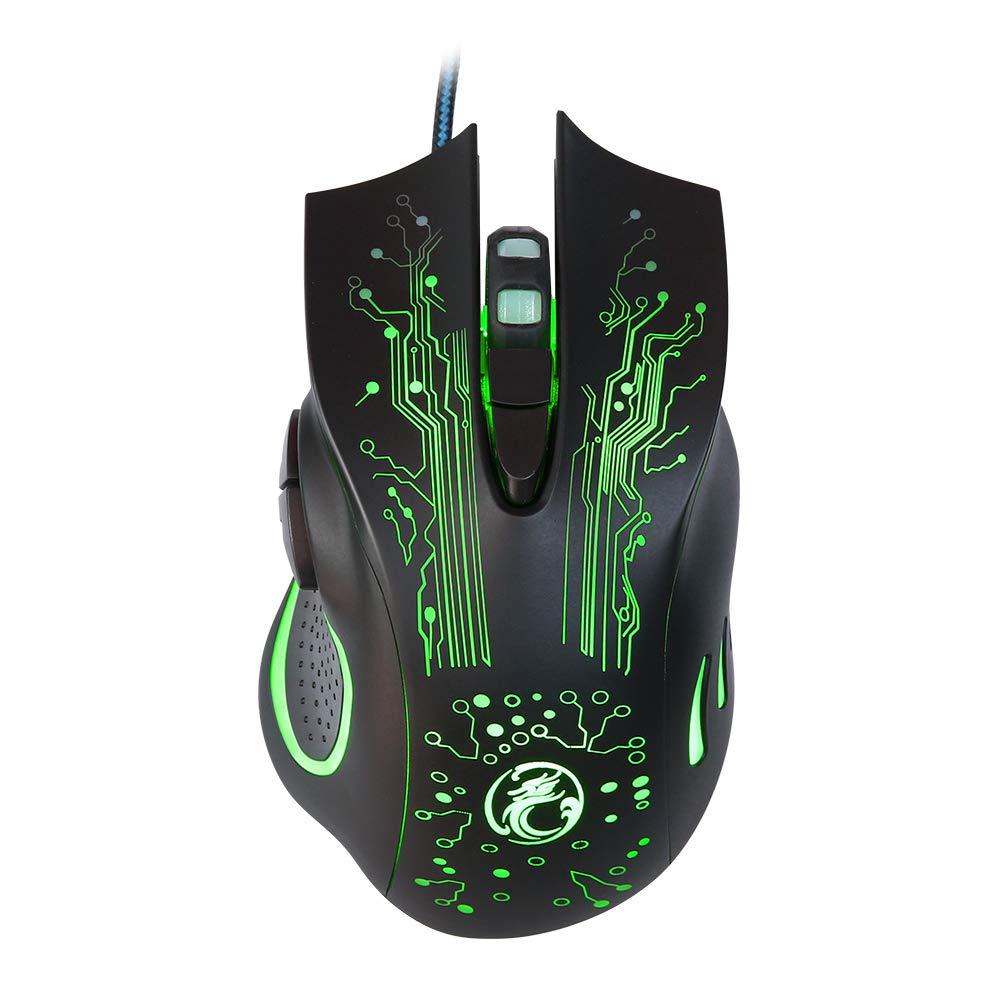
Image: The IMICE X9 gaming mouse showcasing its ergonomic design and dynamic LED lighting.
چمتو کول
Setting up your IMICE X9 gaming mouse is a simple plug-and-play process.
- موږک خلاص کړئ: Carefully remove the IMICE X9 gaming mouse from its packaging.
- کمپیوټر سره وصل کړئ: Locate an available USB port on your computer (desktop or laptop). Insert the USB connector of the IMICE X9 mouse firmly into the USB port.
- د ډرایور نصب کول: Your operating system (Windows, Linux) should automatically detect and install the necessary drivers. This process may take a few moments.
- د استعمال لپاره چمتو: Once the drivers are installed, the mouse's LED lighting will illuminate, and it will be ready for immediate use.
عملیاتي لارښوونې
بنسټیز فعالیت
- کیڼ کلیک: لومړنۍ کړنه، انتخاب.
- ښي کلیک: دوهم عمل، د شرایطو مینو.
- سکرول ویل: Scroll up/down in documents and web pages. Pressing the scroll wheel acts as a middle click.
د DPI تعدیل
The IMICE X9 mouse features adjustable DPI (Dots Per Inch) settings, allowing you to change cursor sensitivity on the fly. The available DPI settings range from 800 to 2400 DPI.

انځور: پورته view of the IMICE X9 mouse, showing the DPI adjustment button located behind the scroll wheel.
- د DPI تڼۍ: Press the dedicated DPI button (usually located behind the scroll wheel) to cycle through the available DPI settings. Each press will change the sensitivity, often indicated by a change in LED color or a brief flicker.
اضافي تڼۍ
The IMICE X9 includes additional buttons for enhanced productivity and gaming.

انځور: اړخ view of the IMICE X9 mouse, illustrating the placement of the two thumb buttons.
- د وړاندې کولو تڼۍ: Typically located on the side, this button allows you to navigate forward in web براوزرونه یا file سپړونکي
- شاته تڼۍ: Also located on the side, this button allows you to navigate backward in web براوزرونه یا file سپړونکي
ساتنه
Proper maintenance ensures the longevity and performance of your IMICE X9 gaming mouse.
- پاکول: د موږک سطحه د پاکولو لپاره نرم، وچ ټوکر وکاروئ. د سختې خاورې لپاره، لږ څهampټوکر د اوبو یا نرم پاکولو محلول سره ومینځئ. د سختو کیمیاوي موادو څخه ډډه وکړئ.
- نظری سینسر: د موږک په ښکته برخه کې نظري سینسر پاک او له دوړو یا کثافاتو څخه پاک وساتئ. که اړتیا وي نو د پنبې سویب یا فشار شوي هوا وکاروئ.
- د کیبل پاملرنه: د زیان څخه د مخنیوي لپاره د USB کیبل د تیزو کږو یا ډیر کشولو څخه ډډه وکړئ.
- ذخیره کول: کله چې په کارولو کې نه وي، موږک په پاک او وچ چاپیریال کې د سختې تودوخې څخه لرې وساتئ.
د ستونزو حل کول
If you encounter issues with your IMICE X9 gaming mouse, refer to the following common solutions:
| ستونزه | احتمالي لامل | د حل لاره |
|---|---|---|
| موږک ځواب نه ورکوي | د USB اتصال خراب دی، د USB پورټ خراب دی، د موټر چلوونکي ستونزه. | Try reconnecting the USB cable. Use a different USB port. Restart your computer. Check Device Manager for driver status. |
| د کرسر حرکت بې نظمه یا ناڅاپي دی | ناپاک نظري سینسر، د موږک پیډ نامناسب سطح. | Clean the optical sensor. Use a clean, non-reflective mouse pad. |
| LED lights are off or flickering | Power issue, software conflict. | Ensure the mouse is properly connected. Try a different USB port. Restart your computer. |
| د DPI سمون کار نه کوي | Button malfunction, temporary software glitch. | Press the DPI button firmly. Restart your computer. |
که چیرې د دې حل لارو هڅه کولو وروسته هم ستونزه دوام ومومي، مهرباني وکړئ د پیرودونکو ملاتړ سره اړیکه ونیسئ.
مشخصات
Detailed technical specifications for the IMICE X9 Wired Optical Gaming Mouse:
- نښه: IMICE
- ماډل: X9
- د ارتباط ټیکنالوژي: USB (ویر شوی)
- د DPI ترتیبات: ۸۰۰-۲۴۰۰ DPI (د تعدیل وړ)
- د تعقیب طریقه: نظري
- د تڼیو شمیر: 6
- د لاسونو لارښوونه: متضاد
- ځانګړي ځانګړتیاوې: Ergonomic Design, LED Lighting
- وړاندیز شوي استعمالونه: لوبې کول
- مطابقت لرونکي وسایل: لپ ټاپ، شخصي کمپیوټر
- مناسب عملیاتي سیسټمونه: لینکس، وینډوز 10
- سټایل: عصري
- پلیټ فارم: PC
- بیټرۍ شاملې دي: نه
- د تولید کونکي برخې شمیره: YX1560214

Image: A display of three IMICE X9 gaming mice, highlighting the different LED color options (red, blue, green).
تضمین او ملاتړ
The IMICE X9 Wired Optical Gaming Mouse comes with a standard manufacturer's warranty. For specific warranty terms and conditions, please refer to the warranty card included with your product or visit the official IMICE website. For technical support, troubleshooting assistance beyond this manual, or warranty claims, please contact IMICE customer service through their official channels.