
پیژندنه
The Perel EDIN305N is a 230V 16A 3600W DIN-rail mount digital weekly timer designed for indoor use. This device allows for precise, programmable control of electrical circuits, enabling automatic switching ON and OFF of connected appliances or lighting systems over a weekly cycle. It features a clear digital display and multiple programming options to suit various scheduling needs.
د خوندیتوب احتیاطونه
خبرداری: Electrical installation should only be performed by a qualified electrician. Incorrect wiring can lead to electric shock, fire, or damage to the device and connected equipment. Always disconnect power at the main circuit breaker before installation or maintenance.
- Ensure the power supply matches the device's specifications (230V~50Hz).
- د اعظمي بار ظرفیت 16A / 3600W څخه ډیر مه کوئ.
- This device is designed for indoor use only. Avoid exposure to moisture, dust, or extreme temperatures.
- د وسیلې د خلاصولو یا ترمیم کولو هڅه مه کوئ. ټولې خدمتونه وړ پرسونل ته راجع کړئ.
- د ماشومانو د لاسرسي څخه لرې وساتئ.
محصول پای ته ورسیدview
The Perel EDIN305N digital timer consists of a main body with a digital display, control buttons, and terminal blocks for electrical connections. A transparent cover protects the display and buttons.
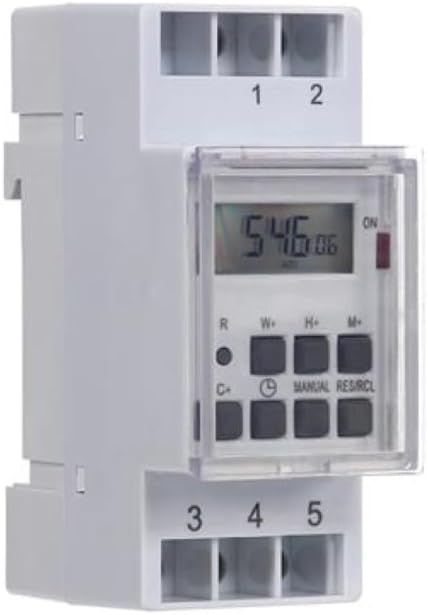
شکل 1: مخکی view of the Perel EDIN305N Digital Weekly Timer. The image displays the LCD screen, control buttons (R, W+, H+, M+, C+, Clock, Manual, RES/RCL), and numbered terminal blocks (1, 2 at the top, 3, 4, 5 at the bottom).
د کنټرول تڼۍ:
- R: Reset button (recessed).
- W+: Weekday setting.
- H+: د ساعت ترتیب.
- M+: Minute setting.
- C+: Clear program.
- د ساعت آیکون: Used to set current time and day, and to exit programming mode.
- لارښود: Manual override for ON/AUTO/OFF modes.
- RES/RCL: Reset/Recall program.
ترمینل بلاکونه:
- 1 ، 2: Power supply input (N, L).
- 3 ، 4 ، 5: Output terminals for controlled circuit (Common, Normally Open, Normally Closed).
تخنیکي مشخصات
| پیرامیټر | ارزښت |
|---|---|
| د ماډل شمیره | EDIN305N |
| والیtage | 230V ~ 50Hz |
| Max. اوسنۍ | 16A |
| Max. ځواک | 3600W |
| د ترتیباتو شمیر | ۱۶ (د فعالولو/بندولو پروګرامونه) |
| د نصب کولو ډول | DIN- ریل |
| ابعاد (L x W x H) | 2.36 x 3.54 x 1.57 انچه (60 x 90 x 40 mm) |
| وزن | 0.12 کیلو ګرامه (4.2 اونس) |
| مواد | پلاستیک |
| رنګ | سپین |
| بیټرۍ ته اړتیا ده | No (internal battery for memory backup) |
نصب کول
1. پورته کول
The Perel EDIN305N is designed for DIN-rail mounting. Securely attach the timer to a standard 35mm DIN-rail within an electrical enclosure. Ensure sufficient space for wiring and ventilation.
2. وایرول
مهم: Ensure power is disconnected at the main circuit breaker before proceeding with wiring. Follow local electrical codes and regulations.
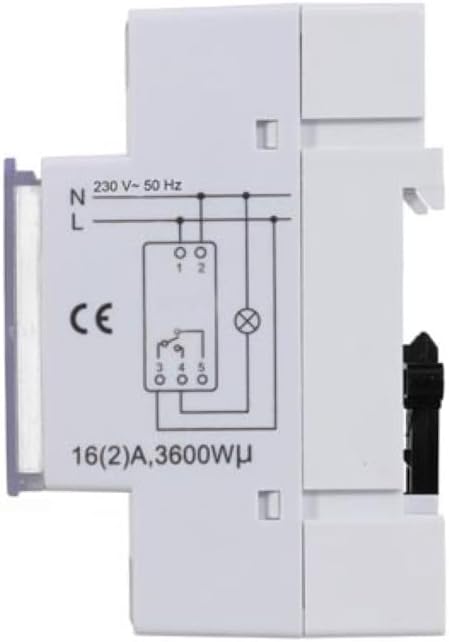
شکل 2: اړخ view of the Perel EDIN305N Digital Weekly Timer showing the electrical wiring diagram. It illustrates connections for Neutral (N), Live (L), and the output contacts (1, 2, 3, 4, 5) for controlling a load.
Refer to the wiring diagram (Figure 2) and the terminal block labels on the device:
- Connect the Neutral (N) wire of your 230V AC supply to terminal 1.
- Connect the Live (L) wire of your 230V AC supply to terminal 2.
- For the controlled circuit:
- Terminal 3: Common contact for the relay output.
- Terminal 4: Normally Open (NO) contact. The circuit connected here will be ON when the timer is active.
- Terminal 5: Normally Closed (NC) contact. The circuit connected here will be OFF when the timer is active.
- Connect the load (e.g., light, appliance) between the Live (L) supply and either terminal 4 (for NO operation) or terminal 5 (for NC operation), with terminal 3 connected to the Live (L) supply. Alternatively, connect the load between terminal 4 or 5 and the Neutral (N) supply, with terminal 3 connected to the Live (L) supply. Consult a qualified electrician for specific load wiring configurations.
ابتدايي ترتیب او عملیات
1. Power On and Reset
After wiring and restoring power, the display will illuminate. If the display is blank or shows erratic characters, press the recessed R (Reset) button using a pointed non-metallic object (e.g., a pen tip). This will clear all settings and restore default values.
۵.۱. د اوسني وخت او ورځې ټاکل
- فشار ورکړئ او ونیسئ د ساعت آیکون تڼۍ
- د ساتلو په وخت کې د ساعت آیکون ت buttonۍ ، ت .ۍ W+ to set the current day of the week (1=Monday, 7=Sunday).
- د ساتلو په وخت کې د ساعت آیکون ت buttonۍ ، ت .ۍ H+ د اوسني ساعت (0-23) تنظیم کولو لپاره.
- د ساتلو په وخت کې د ساعت آیکون ت buttonۍ ، ت .ۍ M+ د اوسني دقیقې (0-59) تنظیم کولو لپاره.
- خوشې کړئ د ساعت آیکون button. The time and day are now set.
۲. د فعال/بند سایکلونو پروګرام کول
ټایمر تر ۲۰ پورې د فعال/بند پروګرامونو ملاتړ کوي. هر پروګرام د فعال وخت او بند وخت څخه جوړ دی.
- فشار ورکړئ د ساعت آیکون button once to enter programming mode. The display will show "1 ON".
- مطبوعاتي W+ to select the day(s) for this program. You can choose a single day, a block of days (e.g., Mon-Fri), or all days.
- مطبوعاتي H+ to set the ON hour for program 1.
- مطبوعاتي M+ to set the ON minute for program 1.
- فشار ورکړئ د ساعت آیکون بیا تڼۍ. ښودنه به "1 بند" وښيي.
- Repeat steps 2-4 to set the OFF day(s), hour, and minute for program 1.
- To set additional programs (2-7), press the د ساعت آیکون button to cycle through "2 ON", "2 OFF", etc., and repeat the setting process.
- د ټولو مطلوبو پروګرامونو تنظیم کولو وروسته، فشار ورکړئ لارښود د پروګرام کولو حالت څخه د وتلو او اوسني وخت نندارې ته د بیرته راستنیدو لپاره تڼۍ.
4. لارښود اوورایډ
فشار ورکړئ لارښود button repeatedly to cycle through the operating modes:
- په: The output is continuously ON, overriding all programs.
- اتو: ټایمر د پروګرام شوي ON/OFF دورې سره سم کار کوي.
- بند: The output is continuously OFF, overriding all programs.
ډاډ ترلاسه کړئ چې ټایمر ټاکل شوی دی آټو د پروګرام شوي عملیاتو لپاره.
5. Clearing Programs
To clear a specific program:
- Enter programming mode by pressing the د ساعت آیکون button until the desired program number (e.g., "3 ON") is displayed.
- فشار ورکړئ C+ button. This will clear both the ON and OFF times for that specific program.
- د اړتیا په صورت کې د نورو پروګرامونو لپاره تکرار کړئ.
- مطبوعاتي لارښود د پروګرام کولو حالت څخه د وتلو لپاره.
To clear all programs and reset the device, use the recessed R (ری سیٹ) تڼۍ.
ساتنه
- وسیله د نرم او وچ ټوکر سره پاکه کړئ. د کثافاتو پاکوونکي یا محلول مه کاروئ.
- Ensure the transparent cover is closed to protect the display and buttons from dust and splashes.
- Regularly check electrical connections for tightness, especially in high-vibration environments.
د ستونزو حل کول
| ستونزه | احتمالي لامل | د حل لاره |
|---|---|---|
| ښودنه خالي ده. | برېښنا نشته؛ داخلي بیټرۍ خالي شوې ده. | Check power connections (terminals 1 & 2). Ensure main power is ON. If power is present, press the R (Reset) button. The internal battery recharges when connected to power. |
| ټایمر د پروګرام سره سم نه چالانیږي/بند کیږي. | Incorrect program settings; timer in manual ON/OFF mode. | Verify program settings (time, day, ON/OFF). Ensure the timer is in آټو په فشارولو سره حالت لارښود تڼۍ |
| Connected appliance not receiving power. | Incorrect wiring; appliance fault; timer fault. | Check wiring according to Figure 2. Test the appliance directly. If wiring and appliance are fine, the timer may be faulty. |
| Buttons unresponsive or display erratic. | Software glitch; low internal battery. | Press the recessed R (Reset) button. Ensure the timer has been connected to power for at least 24 hours to fully charge the internal battery. |
تخریب
Do not dispose of this product with general household waste. This electronic device contains materials that can be recycled. Please dispose of it at a designated collection point for electrical and electronic equipment waste, in accordance with local regulations.
تضمین او ملاتړ
Perel products are manufactured to high quality standards. For warranty information, technical support, or service inquiries, please refer to the documentation provided with your purchase or contact your local Perel distributor or retailer. Please have your model number (EDIN305N) and purchase details ready when contacting support.