
پیژندنه
د پیرودلو لپاره مننهasing the Muse M-1935 DJ Bluetooth Party Speaker. This powerful audio system is designed to deliver high-quality sound with dynamic light effects, perfect for any gathering. Featuring Bluetooth connectivity, USB playback, AUX input, and a microphone jack, it offers versatile entertainment options. Please read this manual carefully before using the device to ensure proper operation and to maximize its performance.
د خوندیتوب مهمې لارښوونې
- دا لارښوونې ولولئ.
- دا لارښوونې وساتئ.
- ټول اخطارونو ته پام وکړئ.
- ټولې لارښوونې تعقیب کړئ.
- دا وسیله د اوبو سره نږدې مه کاروئ.
- یوازې د وچې جامې سره پاک کړئ.
- د وینټیلیشن هیڅ خلاصون مه بندوئ. د جوړونکي لارښوونو سره سم نصب کړئ.
- د تودوخې کومې سرچینې ته نږدې مه نصب کړئ لکه ریډیټرونه، د تودوخې راجسترونه، بخارۍ، یا نور وسایل (په شمول ampلایفیر) چې تودوخه تولیدوي.
- د بریښنا تار د چلولو یا پنچ کیدو څخه خوندي کړئ، په ځانګړې توګه په پلګونو، د اسانتیاو استخراج، او هغه ځای چې دوی د وسایلو څخه وځي.
- یوازې د جوړونکي لخوا مشخص شوي ضمیمې / لوازم وکاروئ.
- دا آله د بریښنا د طوفانونو په جریان کې یا کله چې د اوږدې مودې لپاره نه کارول کیږي خلاص کړئ.
- ټول خدمتونه وړ خدمت پرسونل ته راجع کړئ. خدمت کول اړین دي کله چې وسایل په هر ډول زیانمن شوي وي، لکه د بریښنا رسولو تار یا پلګ زیانمن شوی وي، مایع توی شوي وي یا توکي په وسایلو کې راوتلي وي، وسیله د باران یا رطوبت سره مخ شوې وي، په نورمال ډول کار نه کوي. ، یا غورځول شوی دی.
د بسته محتويات
مهرباني وکړئ وګورئ چې لاندې ټول توکي ستاسو په بسته کې شامل دي:
- Muse M-1935 DJ Party Speaker
- ریموټ کنټرول
- AUX IN Cable (3.5mm)
- واړه مایکروفون
- د بریښنا کیبل
- د کارن لارښود

Image showing the Muse M-1935 DJ Party Speaker along with its standard accessories: a remote control, a 3.5mm AUX input cable, and a wired microphone. These components are essential for full functionality and versatile use of the speaker system.
محصول پای ته ورسیدview
The Muse M-1935 DJ is a tower-type party speaker featuring a robust design and multiple connectivity options. It includes an amber LED display for clear information, integrated color lights and flash effects for dynamic visuals, and various input ports for audio playback.
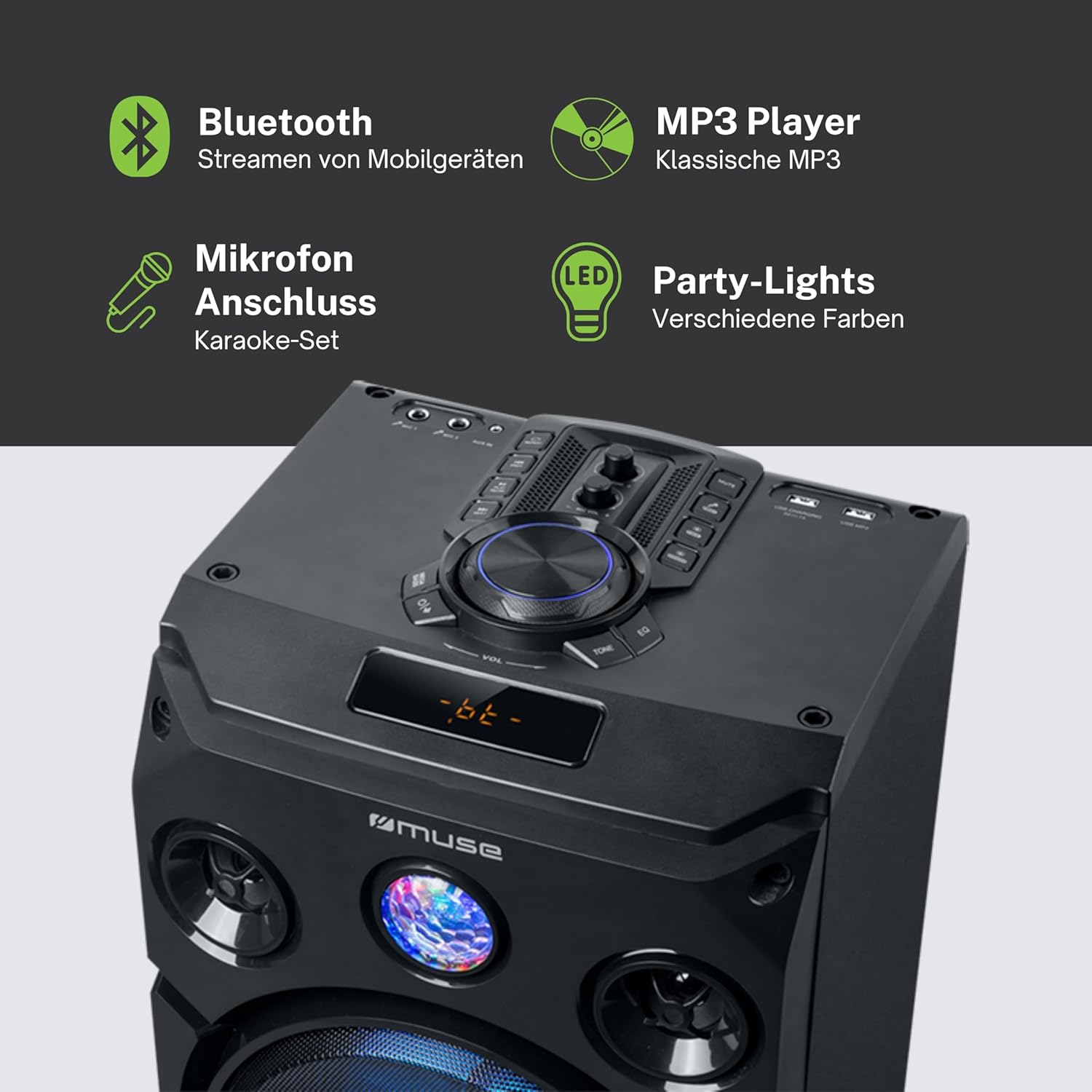
دا انځور تفصیل وړاندې کوي view of the speaker's key features, including the control panel at the top, the amber LED display, and the integrated party lights. Icons indicate support for Bluetooth streaming, MP3 playback via USB, microphone connection for karaoke, and dynamic party light effects.
چمتو کول
1. د بریښنا پیوستون
- Ensure the speaker is placed on a stable, flat surface.
- Connect the power cable to the AC IN port on the back of the speaker.
- د بریښنا کیبل بله پای په معیاري دیوال آوټ لیټ (AC 100-240V، 50/60Hz) کې ولګوئ.
2. Audio Connections (Optional)
- AUX داخلول: For connecting external audio devices (e.g., smartphone, tablet, MP3 player) via a 3.5mm audio cable. Insert one end of the AUX cable into the AUX IN port on the speaker and the other end into your device's headphone jack.
- USB پلیباک: یو USB فلش ډرایو دننه کړئ چې MP3 آډیو لري files into the USB port. The speaker will automatically detect and begin playing compatible files.
3. Microphone Connection (Optional)
- Connect the wired microphone to the MIC IN jack on the speaker. Adjust the microphone volume using the dedicated control on the speaker's panel.
عملیاتي لارښوونې
1. بریښنا کول/بندول
- فشار ورکړئ پاور د کنټرول پینل یا ریموټ کنټرول تڼۍ د سپیکر د فعالولو یا بندولو لپاره.
2. د بلوتوث جوړه کول
- Turn on the speaker. The LED display will show the current mode.
- فشار ورکړئ موډ button to select Bluetooth mode. The display will show "BT" and an indicator will flash, signifying it's ready for pairing.
- په خپل بلوتوث فعال شوي وسیله (سمارټ فون، ټابلیټ، او نور) کې، بلوتوث فعال کړئ او د شته وسایلو لټون وکړئ.
- Select "MUSE M-1935 DJ" from the list. Once paired, the speaker will emit a confirmation sound, and the Bluetooth indicator will stop flashing.
- تاسو اوس کولی شئ له خپل وسیله څخه سپیکر ته په بې سیم ډول آډیو واستوئ.
3. USB پلی بیک
- Insert a USB flash drive into the USB port. The speaker will automatically switch to USB mode and begin playing MP3 files.
- د کارولو پلی/پاز, بل، او پخوانۍ د پلې بیک کنټرول لپاره تڼۍ.
4. د AUX داخل
- Connect your external audio device to the AUX IN port using the provided 3.5mm cable.
- فشار ورکړئ موډ button to select AUX mode. Audio will now play through the speaker.
5. د ایف ایم راډیو عملیات
- فشار ورکړئ موډ د FM راډیو حالت غوره کولو لپاره تڼۍ.
- فشار ورکړئ او ونیسئ پلی/پاز button to initiate an automatic scan for FM stations. The speaker will save found stations as presets (up to 60 presets).
- د کارولو بل او پخوانۍ ت savedۍ د خوندي شوي سټیشنونو له لارې تګ راتګ لپاره.
6. د مایکروفون کارول
- Ensure the microphone is connected to the MIC IN jack.
- د وقف شوي په کارولو سره د مایکروفون حجم تنظیم کړئ مایک VOL د کنټرول پینل کې غوټۍ.
۲. د رڼا اغیزو کنټرول
- The speaker features integrated color lights and flash effects. Use the رڼا button on the control panel or remote to cycle through different light modes or turn them off.
8. Volume and Tone Control
- د لوی په کارولو سره د ماسټر حجم تنظیم کړئ حجم غوټۍ
- د کارولو باس او سخت controls (if available) to fine-tune the audio output.

This diagram visually represents the diverse functionalities of the speaker, such as dynamic color and flash lighting, the clear amber LED display, USB connectivity for MP3 playback and charging, built-in FM radio with extensive preset memory, and a versatile AUX input for external devices.
ساتنه
- پاکول: Disconnect the power before cleaning. Use a soft, dry cloth to wipe the exterior of the speaker. Do not use liquid cleaners or aerosol sprays.
- ذخیره کول: کله چې د اوږدې مودې لپاره نه کارول کیږي، سپیکر په یخ او وچ ځای کې وساتئ، د مستقیم لمر وړانګو او سختې تودوخې څخه لرې.
- د بیټرۍ پاملرنه: The speaker contains a Lithium-ion battery. For optimal battery life, avoid fully discharging the battery frequently and store the unit with a partial charge if not used for long periods.
د ستونزو حل کول
| ستونزه | احتمالي لامل | د حل لاره |
|---|---|---|
| هیڅ ځواک نشته | Power cable not connected; Power outlet faulty; Speaker turned off. | Ensure power cable is securely connected. Try a different power outlet. Press the POWER button to turn on the speaker. |
| غږ نشته | غږ ډېر ټیټ دی؛ د ننوتلو غلط حالت غوره شوی دی؛ د آډیو کیبل په سمه توګه نه دی وصل شوی (AUX)؛ بلوتوث نه دی جوړ شوی. | Increase volume. Select the correct input mode (Bluetooth, AUX, USB, FM). Check audio cable connections. Re-pair Bluetooth device. |
| بلوتوث جوړه ناکامه ده | سپیکر د جوړې کولو په حالت کې نه دی؛ وسیله ډیره لرې ده؛ مداخله. | Ensure speaker is in Bluetooth pairing mode. Move device closer to speaker (within 10m). Avoid obstacles and other wireless devices. |
| د USB پلے بیک کار نه کوي | د USB ډرایو په سمه توګه فارمیټ شوی نه دی؛ مطابقت نلري file ډولونه؛ د USB ډرایو خراب شوی. | Ensure USB drive is FAT32 formatted. Only MP3 files are supported. Try a different USB drive. |
| مایکروفون کار نه کوي | مایکروفون وصل نه دی؛ د مایک حجم ډېر ټیټ دی. | Ensure microphone is securely plugged into MIC IN. Increase the MIC VOL knob. |
مشخصات
| فیچر | مشخصات |
|---|---|
| د ماډل شمیره | M-1935 DJ |
| د تولید بریښنا | 400 واټ |
| د سپیکر ډول | ټاور |
| د ارتباط ټیکنالوژي | بلوتوث، USB، AUX |
| آډیو ان پټ | Microphone jacks, AUX IN (3.5mm) |
| ځانګړي ځانګړتیاوې | Bluetooth, Color Lights, Flash Effects, Amber LED Display, FM Radio (60 presets), USB Charging |
| د بریښنا سرچینه | Electric Cable, Built-in Lithium-ion Battery |
| مواد | پلاستیک |
| رنګ | تور |
| د محصول ابعاد (L x W x H) | 83.5 x 26.5 x 28.7 سانتي متره |
| د توکي وزن | 9.05 کیلوګرامه |
| جوړونکی | میوز |
| د اصلي هیواد | بیلجیم |

This technical drawing provides precise measurements of the Muse M-1935 DJ speaker, indicating its height (835mm), width (287mm), and depth (265mm). These dimensions are crucial for planning placement and transportation.
تضمین او ملاتړ
د جوړونکي تضمین
The Muse M-1935 DJ Party Speaker comes with a three-year warranty against manufacturing defects. Please retain your proof of purchase for warranty claims. This warranty covers defects in materials and workmanship under normal use. It does not cover damage caused by misuse, accidents, unauthorized modifications, or normal wear and tear.
د پرزو شتون
Spare parts for this product are guaranteed to be available for 2 years from the date of purchase within the EU.
د پیرودونکي ملاتړ
For technical assistance, warranty service, or general inquiries, please contact Muse customer support. Refer to the official Muse webد اړیکو د خورا تازه معلوماتو لپاره سایټ یا ستاسو د پیرود اسناد.