
1. پیژندنه
This manual provides comprehensive instructions for the IMILAB CMSXJ16A Smart Home Security Camera, a product of XIAOMI. It covers setup, operation, maintenance, and troubleshooting to ensure optimal performance and security monitoring. Please read this manual carefully before using the product and retain it for future reference.
2. محصول ختم شوview
2.1 د بسته محتويات
ډاډ ترلاسه کړئ چې ټول توکي په کڅوړه کې شتون لري:
- IMILAB Home Security Camera Basic x 1
- د لارښوونې لارښود x 1
- د بریښنا کیبل ایکس 1
- Power Adapter (UK/EU/US) x 1
- Wall Mounting Package x 1 (includes screws and wall plugs)
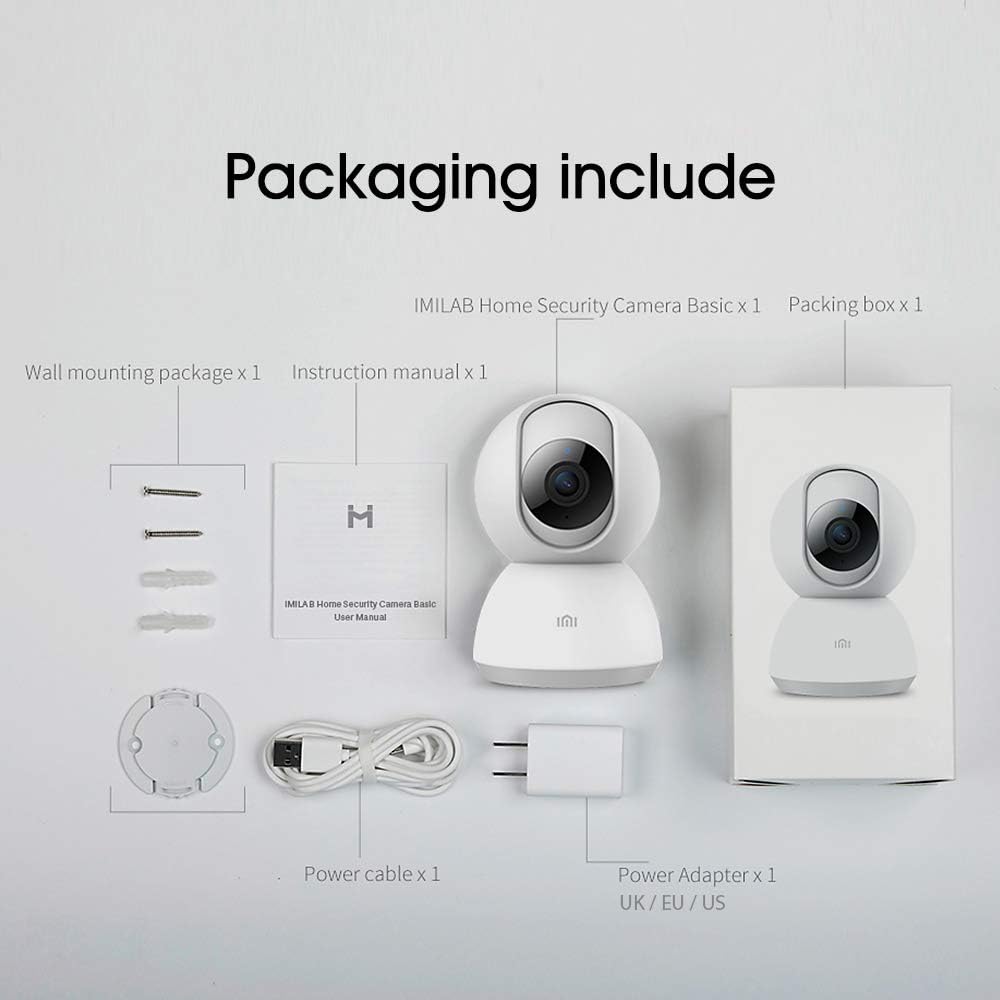
Image: Contents of the IMILAB CMSXJ16A camera package.
۳.۱ د کیمرې اجزا
The IMILAB CMSXJ16A camera features a compact, spherical design with a rotating base for 360-degree coverage. Key components include the lens, microphone, speaker, status indicator light, and power port.

انځور: مخکینۍ برخه view of the IMILAB CMSXJ16A camera.
2.3 کلیدي ځانګړتیاوې
- FHD (1080P) Resolution: Provides clear and detailed image quality.
- 360 ° گردش: پینورامیک وړاندیز کوي viewing for comprehensive area coverage.
- Glare-Free Night Vision: Equipped with F2.1 aperture and 8x 940mm infrared LEDs for a visible distance of 10m.
- True Color Night Vision: Maintains full color in low light conditions, even at 100 lumens.
- د انسان د AI کشف: Advanced AI reduces unnecessary alerts by 70% for more accurate notifications.
- Crying Baby Notification: Alerts you to the sound of a crying baby.
- د ذخیره کولو ډیری انتخابونه: Supports cloud storage, up to 64GB Micro TF card, and NAS storage.
- H.265 Video Encoding: Efficiently compresses video, saving storage space while maintaining quality.
3. ترتیب کول
3.1 فعالول
- د بریښنا کیبل د کیمرې د بریښنا پورټ سره وصل کړئ.
- د بریښنا اډاپټر په معیاري بریښنایی پلورنځي کې ولګوئ.
- The camera will power on, and the status indicator light will begin to flash, indicating it is ready for connection.
3.2 د نصب نصب
Download the official IMILAB Home Security app from your smartphone's app store. The app is compatible with Android 4.4 and above, and iOS 8.0 and above.
- لټون "IMILAB Home Security" in the Google Play Store (for Android) or Apple App Store (for iOS).
- اپلیکیشن ډاونلوډ او نصب کړئ.
- اپلیکیشن پرانیزئ او د حساب جوړولو یا ننوتلو لپاره په سکرین کې لارښوونې تعقیب کړئ.
3.3 د وای فای سره نښلول
Follow the in-app instructions to connect your camera to your home Wi-Fi network. This typically involves scanning a QR code generated by the app with the camera's lens.
3.4 د کیمرې پورته کول
The camera supports wall mounting. Use the provided wall mounting package for secure installation.
- د نصبولو لپاره مناسب ځای غوره کړئ، د پاکې ساحې ډاډ ترلاسه کول view او د بریښنا رسولو ته لاسرسی.
- Use the mounting base as a template to mark drill holes on the wall.
- سوري وکړئ او د دیوال پلګونه دننه کړئ.
- Secure the mounting base to the wall with screws.
- کیمره د نصب کولو اساس سره وصل کړئ.
4. عملیاتي لارښوونې
4.1 ژوندی View او ریموٹ کنټرول
Once connected, open the IMILAB Home Security app to access the live video feed from your camera. You can remotely control the camera's 360-degree rotation to view different areas of your space.

Image: Live view of the camera feed on mobile devices, demonstrating H.265 encoding efficiency.
4.2 د شپې لید
The camera automatically switches to night vision mode in low light conditions. It features glare-free infrared night vision and true color night vision for clear visibility even in very dim environments.

Image: Demonstration of glare-free and true color night vision capabilities.
4.3 AI Human Detection and Notifications
The camera utilizes AI to detect human movement, significantly reducing false alarms from pets or other non-human movements. You will receive precise notifications on your smartphone when human activity is detected.

Image: AI movement notification interface in the mobile application.
4.4 Crying Baby Detection
Enable the crying baby detection feature in the app to receive alerts if the camera detects the sound of a baby crying, providing an additional layer of monitoring for nurseries.
۴.۵ د ویډیو ثبت او ذخیره کول
The camera supports real-time video recording with multiple storage options:
- د بادل ذخیره کول: Subscribe to cloud services for secure off-site storage of your recordings.
- مایکرو TF کارت: Insert a Micro TF card (up to 64GB, not included) into the camera for local storage.
- د NAS ذخیره: Connect the camera to a Network Attached Storage (NAS) device for expanded local storage capabilities.
4.6 H.265 Video Encoding
The camera uses H.265 video encoding, which allows for more efficient compression of video files. This means you can save the same quality video with approximately 50% less file size compared to H.264, optimizing storage and bandwidth usage.
5. ساتنه
To ensure the longevity and optimal performance of your camera, follow these maintenance guidelines:
- پاکول: د کیمرې لینز او بدن په نرم او وچ ټوکر سره په نرمۍ سره پاک کړئ. سخت کیمیاوي مواد یا د کثافاتو پاکوونکي مه کاروئ.
- ځای په ځای کول: ډاډ ترلاسه کړئ چې کیمره په یو باثباته چاپیریال کې ځای پر ځای شوې ده، د مستقیم لمر وړانګو، سختې تودوخې او لوړې رطوبت څخه لرې.
- د فرم ویئر تازه معلومات: Regularly check the app for available firmware updates to ensure your camera has the latest features and security enhancements.
6. ستونزه حل کول
If you encounter issues with your IMILAB CMSXJ16A camera, refer to the following common solutions:
- کیمره نه نښلي: Ensure your Wi-Fi network is 2.4GHz (5GHz is not supported). Check Wi-Fi signal strength. Restart the camera and your router.
- د عکس ضعیف کیفیت: Clean the camera lens. Ensure adequate lighting in the environment. Check your internet connection speed.
- هیڅ خبرتیا نشته: Verify that notifications are enabled in both the camera app settings and your smartphone's system settings. Check network connectivity.
- کیمره آفلاین: Check the power connection. Ensure your Wi-Fi network is active and the camera is within range. Restart the camera.
- Micro TF Card Not Detected: Ensure the card is inserted correctly. Format the card through the app if it's new or has issues. Use a compatible Micro TF card (up to 64GB).
7. مشخصات
| فیچر | مشخصات |
|---|---|
| د ماډل شمیره | CMSXJ16A |
| ابعاد (L x W x H) | 10.8 x 7.6 x 7.6 سانتي متره |
| وزن | 211 ګرامه |
| د ویډیو حل | 1080p (FHD) |
| د ډګر View / Angle of View | 360 درجې |
| د شپې لید واټن | 10 متره |
| انفراریډ LEDs | 8 x 940mm |
| اپرچر | F2.1 |
| د ارتباط ټیکنالوژي | Wired, Wireless (Wi-Fi 2.4GHz) |
| د بریښنا سرچینه | Mains Powered (via 5V, 5W adapter) |
| مطابقت لرونکې وسیلې | سمارټ فون (انډرایډ ۵.۰+، iOS ۱۱+) |
| د ذخیره کولو اختیارونه | Cloud, Micro TF Card (max 64GB), NAS |
| د ویډیو نیول بڼه | MP4 (H.265 encoding) |
| د کور دننه / بهر کارول | دننه |
| د نصب کولو ډول | دیوال غر |
8. تضمین او ملاتړ
د تضمین معلوماتو او تخنیکي ملاتړ لپاره، مهرباني وکړئ رسمي IMILAB ته مراجعه وکړئ. webسایټ ته مراجعه وکړئ یا د دوی د پیرودونکو خدماتو سره اړیکه ونیسئ. د تضمین ادعاوو لپاره د پیرود ثبوت په توګه د پیرود رسید وساتئ.