
پیژندنه
The August Audar Smart Band KERi is a versatile health and fitness tracker designed to monitor various aspects of your well-being. This manual provides detailed instructions for setting up, operating, maintaining, and troubleshooting your device to ensure optimal performance and a seamless user experience. Please read this manual thoroughly before using your Smart Band.
چمتو کول
1. Charging the Smart Band
Before initial use, fully charge your Audar Smart Band KERi. The device features a convenient integrated USB charger. Simply remove the strap from one end of the tracker to reveal the USB connector.

Image: The Audar Smart Band KERi being plugged into a USB port for charging. The image highlights the integrated USB connector on the device.

انځور: یو مفصل view of the Audar Smart Band KERi's integrated USB charging port, showing how it connects to a power source.
- Connect the USB connector to any standard USB charging port (e.g., computer, USB wall adapter).
- په سکرین کې د بیټرۍ شاخص به د چارج کولو پرمختګ وښيي.
- A full charge can provide up to 30 days of battery life.
2. Installing the Audar App
To unlock the full potential of your Smart Band and view your health data, download the official Audar app on your smartphone.
- Scan the QR code provided in the product packaging or search for "Audar" in your device's app store.
- The app is compatible with both Android and iPhone devices.

Image: Screenshot of the Audar app interface, displaying health data and showing icons for Google Play and Apple App Store downloads.
۳.۳. ستاسو د سمارټ فون سره جوړه کول
- ډاډ ترلاسه کړئ چې ستاسو په سمارټ فون کې بلوتوټ فعال دی.
- Open the Audar app and follow the on-screen instructions to search for and connect to your KERi Smart Band.
- Confirm the pairing request on both your phone and the Smart Band if prompted.
4. ابتدايي ترتیب
- Once paired, the app will guide you through setting up your personal profile, including age, height, weight, and gender, for accurate data tracking.
- Synchronize the time and date with your phone.
عملیاتي لارښوونې
1. بنسټیز نیویګیشن
The Audar Smart Band KERi features a color touchscreen display for easy navigation.
- ټایپ: To select an option or wake the screen.
- سوائپ: To scroll through different menus and data screens.
۳. د فعالیت تعقیب
The Smart Band automatically tracks your daily activity.

Image: A person running outdoors with the Audar Smart Band KERi on their wrist, showing the display with steps, distance, and calorie data.
- ګامونه: په ټوله ورځ کې د اخیستل شویو ګامونو شمیر حسابوي.
- واټن: Estimates the distance covered based on your steps and profile ډاټا
- کالوري: Calculates calories burned during activity.
- د GPS تعقیب: When connected to your smartphone, the app can use your phone's GPS to map your route during outdoor activities.
۳. د روغتیا څارنه
The KERi Smart Band provides continuous and on-demand health monitoring.
- د زړه ضربان څارونکی: Measures your heart rate in real-time. Access this feature from the band's menu or through the app.
- د وینې فشار څارونکی: Provides an estimate of your blood pressure. For accurate medical readings, consult a healthcare professional.
- د وینې اکسیجن څارونکی: ستاسو د وینې د اکسیجن د اشباع کچه اندازه کوي.
- د خوب څارنه: ستاسو د خوب نمونې په اتوماتيک ډول تعقیبوي، پشمول د ژور خوب، سپک خوب، او د ویښیدو وختونه. View detailed analysis in the Audar app.
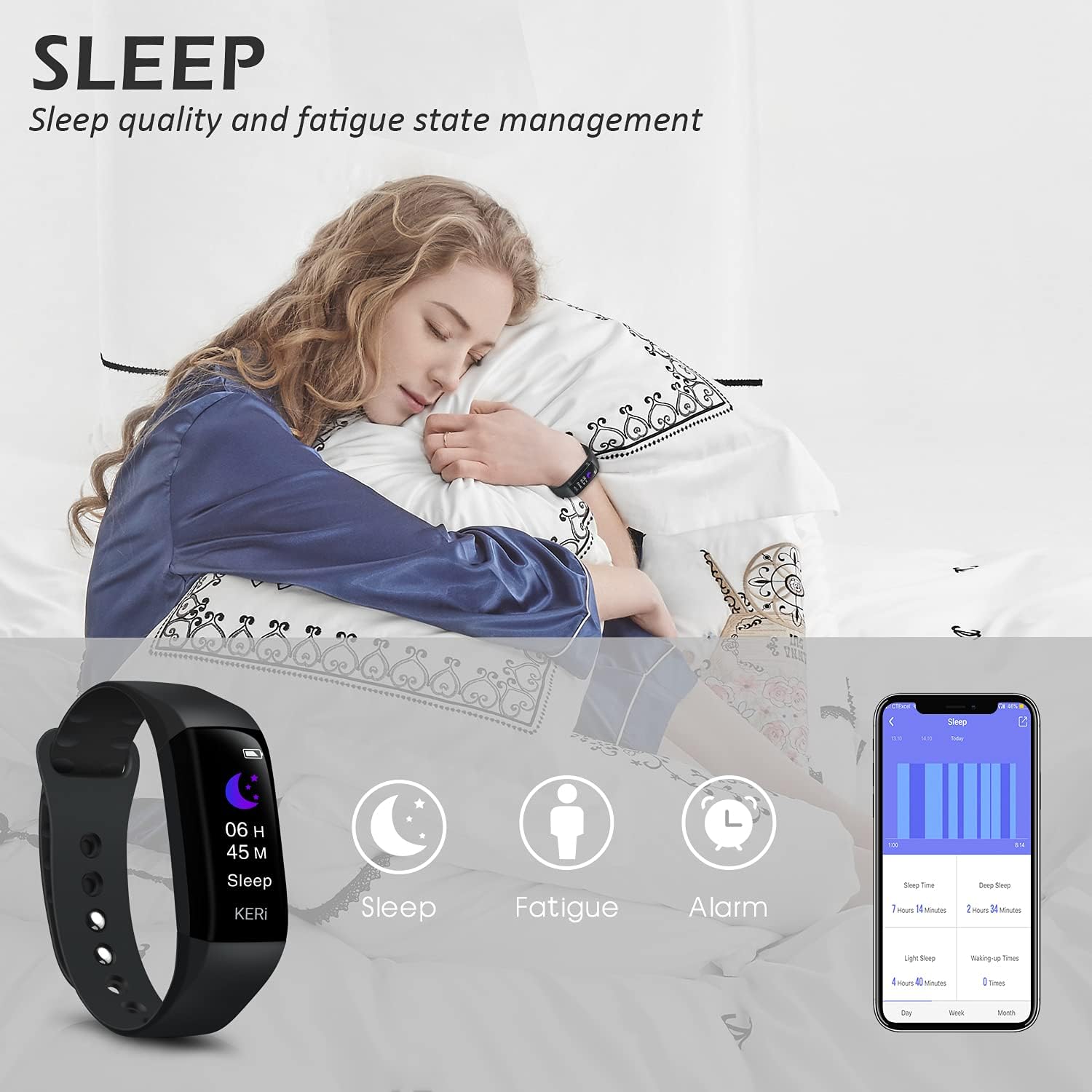
Image: A person sleeping with the Audar Smart Band KERi on their wrist, showing the band's display indicating sleep duration and an accompanying smartphone app displaying sleep analysis.
4. خبرتیاوې
Receive alerts directly on your wrist when connected to your smartphone.

Image: A close-up of a wrist wearing the Audar Smart Band KERi, with the screen showing an incoming call notification.
- د زنګ وهلو خبرتیاوې: Displays incoming call notifications.
- د پیغام خبرتیاوې: Shows notifications for SMS, WhatsApp, Messenger, and other selected apps.
- Configure which app notifications you wish to receive through the Audar app settings.
5. اضافي ځانګړتیاوې
- Remote Camera Control (Shake Shooting): Use the band to remotely trigger your smartphone's camera by shaking your wrist.
- زما تلیفون ومومئ: Activate this feature from the band to make your paired phone ring, helping you locate it.
- د الارم ساعت: د اپلیکیشن له لارې خاموش وایبریشن الارمونه تنظیم کړئ.
- CareMate Function: Share your health data with family members through the app, allowing them to monitor your well-being remotely.

Image: Screenshots of the Audar app demonstrating the CareMate function, showing how users can subscribe to and view family members' health data.
ساتنه
1. پاکول
- Regularly clean your Smart Band and strap to prevent skin irritation and maintain device hygiene.
- وسیله په نرمۍ سره مسح کړئ، دamp ټوکر د سختو کیمیاوي موادو یا خړوبولو پاکونکو کارولو څخه ډډه وکړئ.
- ډاډ ترلاسه کړئ چې د چارج کولو اړیکې د چارج کولو دمخه پاکې او وچې دي.
۳. د اوبو مقاومت
The Audar Smart Band KERi is IP67 waterproof.

Image: The Audar Smart Band KERi being splashed with water, illustrating its IP67 waterproof capability. Icons for heart rate, calories, steps, distance, SMS alerts, and blood oxygen are also visible.
- It is resistant to rain, sweat, and can be submerged up to 1 meter underwater for a limited time.
- It is suitable for showering and swimming in shallow water.
- Avoid prolonged exposure to hot water, steam, or high-velocity water.
3. ذخیره کول
- وسیله په یخ او وچ ځای کې ذخیره کړئ کله چې نه کارول کیږي.
- د سخت تودوخې څخه ډډه وکړئ.
د ستونزو حل کول
If you encounter issues with your Audar Smart Band KERi, refer to the following common solutions:
| ستونزه | احتمالي لامل | د حل لاره |
|---|---|---|
| Device does not turn on or respond | ټیټ بیټرۍ | وسیله لږترلږه د 30 دقیقو لپاره چارج کړئ. |
| د سمارټ فون سره جوړه نشي کیدی | بلوتوث بند دی، د اپلیکیشن ستونزه ده، وسیله له حد څخه بهر ده | Ensure Bluetooth is on. Restart phone and band. Reinstall app. Move band closer to phone. |
| ناسم روغتیایی لوستل | Improper fit, movement during measurement, sensor obstruction | Ensure band is snug but comfortable. Remain still during measurements. Clean sensor on back of band. |
| No data synchronization to app | Bluetooth connection lost, app not running in background | Check Bluetooth connection. Ensure app has necessary permissions and is running. Manually sync from app. |
| د بیټرۍ لنډ ژوند | Frequent notifications, continuous monitoring, old battery | Reduce notification frequency. Disable continuous monitoring for certain features. Ensure full charge. |
که ستونزه دوام ومومي، مهرباني وکړئ د نورو مرستو لپاره د ملاتړ برخې ته مراجعه وکړئ.
مشخصات

Image: A diagram illustrating the dimensions of the Audar Smart Band KERi, including screen size and band length.
| فیچر | تفصیل |
|---|---|
| د ماډل نوم | KERi |
| برانډ | اګست |
| د سکرین اندازه | ۷۸۷ انچه |
| د ښودلو ډول | LCD |
| قرارداد | 240 x 240 |
| د ارتباط ټیکنالوژي | بلوتوث، USB |
| د بې سیمه مواصلاتو معیار | بلوتوث |
| عملیاتي سیسټم | Android (Compatible with Android & iPhone) |
| اندازه شوي میتریکونه | Heart Rate, Blood Pressure, Sleep Duration, Blood Oxygen |
| ځانګړي ځانګړتیاوې | Alarm Clock, Calorie Tracker, Notifications, GPS (via phone), Remote Camera Control |
| د اوبو د مقاومت کچه | IP67 (Waterproof up to 1 meter) |
| د بیټرۍ حجرو ډول | لیتیم پولیمر |
| د بیټرۍ اوسط ژوند | تر 30 ورځو پورې |
| د بند موادو ډول | Rubber or Silicone |
| د قضیې موادو ډول | سیرامیک |
| د توکي وزن | 29 ګرامه |
| د توکي ابعاد | 25.8 x 2.2 x 1.3 سانتي متره |
| د بند اوږدوالی | 130 - 190 Millimetres |
| رنګ | تور |
د تضمین معلومات
For detailed warranty information regarding your August Audar Smart Band KERi, please refer to the warranty card included in your product packaging or visit the official August webسایټ. د تضمین شرایط او مقررات ممکن د سیمې او پرچون پلورونکي له مخې توپیر ولري.

Image: The contents of the Audar Smart Band KERi product box, showing the smart band, charging cable, and instruction manuals.
د پیرودونکي ملاتړ
If you require further assistance or have questions not covered in this manual, please contact August customer support through one of the following channels:
- آنلاین ملاتړ: Visit the official August webد FAQs، ملاتړي مقالو، او اړیکو فورمو لپاره سایټ.
- د بریښنالیک ملاتړ: Refer to your product packaging or the August webد پیرودونکو خدماتو بریښنالیک پتې لپاره سایټ.
- د برانډ پلورنځی: تاسو هم کولی شئ لیدنه وکړئ August Brand Store د نورو محصولاتو معلوماتو او ملاتړ سرچینو لپاره.