
1. پیژندنه
د پیرودلو لپاره مننهasinد موکي ایمAMP1 220W Bluetooth Dual Channel Power Ampژوندی کوونکی دا amplifier is designed to provide powerful and versatile audio amplification for various applications, including karaoke, home theater systems, and general audio playback. It features multiple input options, Bluetooth 5.0 connectivity, and intuitive controls for an enhanced audio experience. Please read this manual thoroughly before use to ensure proper operation and to maximize the product's performance.
2. د خوندیتوب لارښوونې
د بریښنا شاک، اور لګیدو، یا واحد ته د زیان رسولو مخنیوي لپاره، مهرباني وکړئ لاندې خوندیتوب احتیاطي تدابیر په پام کې ونیسئ:
- دا واحد باران یا رطوبت ته مه رسوئ.
- سي مه خلاصوهasinج. دننه د کارونکي لپاره د خدمت وړ برخې نشته. ټولې خدمتونه وړ پرسونل ته راجع کړئ.
- د بریښنا رسولو حجم ډاډمن کړئtage د واحد په اړه مشخص شوي اړتیاوې پوره کوي.
- Place the unit on a stable, flat surface with adequate ventilation. Do not block ventilation openings.
- Keep the unit away from heat sources, direct sunlight, and excessive dust.
- Disconnect the power plug from the outlet if the unit will not be used for an extended period.
- واحد په لاسي لاسونو مه کاروئ.
3. د بسته محتويات
ډاډ ترلاسه کړئ چې ټول توکي په کڅوړه کې شتون لري:
- موکي مAMP1 بریښنا Ampد ژوند کولو واحد
- ریموټ کنټرول
- FM انتن
- د کارن لارښود (دا سند)
4. محصول ختم شوview
4.1 Front Panel Controls and Functions
The front panel provides access to all primary controls and input ports for easy operation.

Image: Detailed diagram of the Moukey MAMP1 front panel, highlighting each control and port with corresponding numbers.
- د بریښنا سویچ: واحد فعال یا بندوي.
- USB / SD Slot: د آډیو غږولو لپاره files from USB drives (max 32GB) or SD cards (max 16GB).
- د حالت تڼۍ: د ان پټ موډونو (بلوتوث، USB، SD، AUX، FM) له لارې تیریږي.
- د BT تڼۍ: په مستقیم ډول بلوتوث حالت ته ځي.
- Prev Button: پخواني ټریک/سټیشن ته ځي.
- چلول / وقف تtonۍ: د آډیو پلې بیک غږوي یا یې بندوي.
- بل تڼۍ: بل ټریک/سټیشن ته ځي.
- د LED ښودنه: Shows current mode, track information, or frequency.
- Folder / Track: Navigates through folders or tracks on USB/SD.
- د ماسټر حجم نوب: د ټولیز محصول حجم تنظیموي.
- د سر غوږ جیک: 3.5mm output for monitor headphones.
- Microphone 1 Input: 6.35mm jack for microphone connection.
- Microphone 2 Input: 6.35mm jack for a second microphone connection.
- د مایکروفون حجم نوب: د وصل شوي مایکروفونونو حجم تنظیموي.
- اکو نوب: د مایکروفونونو لپاره د ایکو اغیز کنټرولوي.
- د باس غوټۍ: د ټیټ فریکونسۍ آډیو آوټ پټ تنظیموي.
- ټریبل نوب: د لوړ فریکونسۍ آډیو محصول تنظیموي.
- توازن نوب: د کیڼ/ښي چینل توازن تنظیموي.
- د AUX ان پټ جیک: د بهرني آډیو وسیلو لپاره 3.5 ملي میتر ان پټ.
- د ننوت ټاکونکی: Rotary switch to select between CD, AUX, DVD, and MP3/W inputs.
4.2 د شا پینل پیوستون
The rear panel houses the main audio input and output connections.

انځور: شاته view د موکي ایمAMP1 amplifier, showing all input and output ports.

Image: Detailed diagram of the Moukey MAMP1 rear panel, highlighting each connection point.
- Audio Input for DVD (RCA): Connect DVD players or other audio sources.
- Audio Input for CD (RCA): Connect CD players or other audio sources.
- لاین آوټ جیک (RCA): د بل سره د نښلولو لپاره ampژوندی یا ثبت کولو وسیله.
- د ایف ایم انټینا جیک: د راډیو استقبال لپاره شامل شوی FM انتن وصل کړئ.
- Speaker Output Jacks: Connect passive speakers (4-16 Ohm impedance).
- د بریښنا کیبل ننوت: د AC بریښنا تار وصل کړئ.
5. ترتیب کول
5.1 ځای پرځای کول
ځای په ځای کړئ amplifier on a flat, stable surface. Ensure there is sufficient space around the unit for proper ventilation to prevent overheating.
5.2 د بریښنا نښلول
Connect the power cable to the Power Cable Input on the rear panel of the amplifier, then plug the other end into a suitable AC power outlet (115V AC).
د سپیکر اتصال
د مAMP1 amplifier supports two sets of passive speakers with an impedance of 4-16 Ohms. Use appropriate speaker wire to connect your speakers to the Speaker Output Jacks on the rear panel.

Image: Diagram illustrating how to connect speakers to the amplifier's binding posts.
- Rotate and loosen the speaker knob on the binding post.
- Insert the bare wire (remove approximately 10mm of insulation) into the hole. Ensure correct polarity (+ to + and - to -).
- Tighten the knobs to secure the wires firmly.
5.4 Input Device Connection
Connect your audio sources (CD player, DVD player, tuner, etc.) to the corresponding RCA Audio Input jacks on the rear panel. For microphones, use the 6.35mm jacks on the front panel. For 3.5mm AUX devices, use the front panel AUX Input Jack.
6. عملیاتي لارښوونې
۸ پاور آن/بند
فشار ورکړئ د بریښنا سویچ په مخکینۍ تخته کې د ګرځولو لپاره ampلایفیر فعال یا بند. د LED ښودنه به هغه وخت روښانه شي کله چې واحد فعال شي.
6.2 د ننوتلو انتخاب
د کارولو د موډ تڼۍ on the front panel or the remote control to cycle through available input sources (Bluetooth, USB, SD, AUX, FM). Alternatively, use the د ننوتلو انتخاب کونکی knob on the front panel for RCA inputs (CD, AUX, DVD, MP3/W).
6.3 د حجم کنټرول
- د ماسټر حجم: وګرځوئ د ماسټر حجم نوب to adjust the overall output level of the ampلايف
- د مایکروفون حجم: د کارولو د مایکروفون حجم نوټ to control the volume of connected microphones independently.
6.4 د ټون کنټرول
Adjust the audio characteristics using the باس نوب او د خزان غوب to suit your preference. The د بیلانس نوب allows adjustment of the left and right channel output levels.

Image: Close-up of the Moukey MAMP1 showing the Bass and Treble adjustment knobs.
6.5 Echo Control
وګرځوئ اکو نوب to add or reduce the echo effect on the microphone inputs, suitable for karaoke applications.
6.6 د بلوتوټ جوړه کول
د بلوتوټ وسیله سره نښلولو لپاره:
- فشار ورکړئ د BT تtonۍ or cycle through modes until "BLUE" appears on the LED display.
- په خپل سمارټ فون، ټابلیټ یا کمپیوټر کې بلوتوث فعال کړئ.
- لټون "Moukey MAMP1" in your device's Bluetooth settings and select it to pair.
- Once paired, you can stream audio wirelessly. Playback will temporarily pause during phone calls to protect privacy.
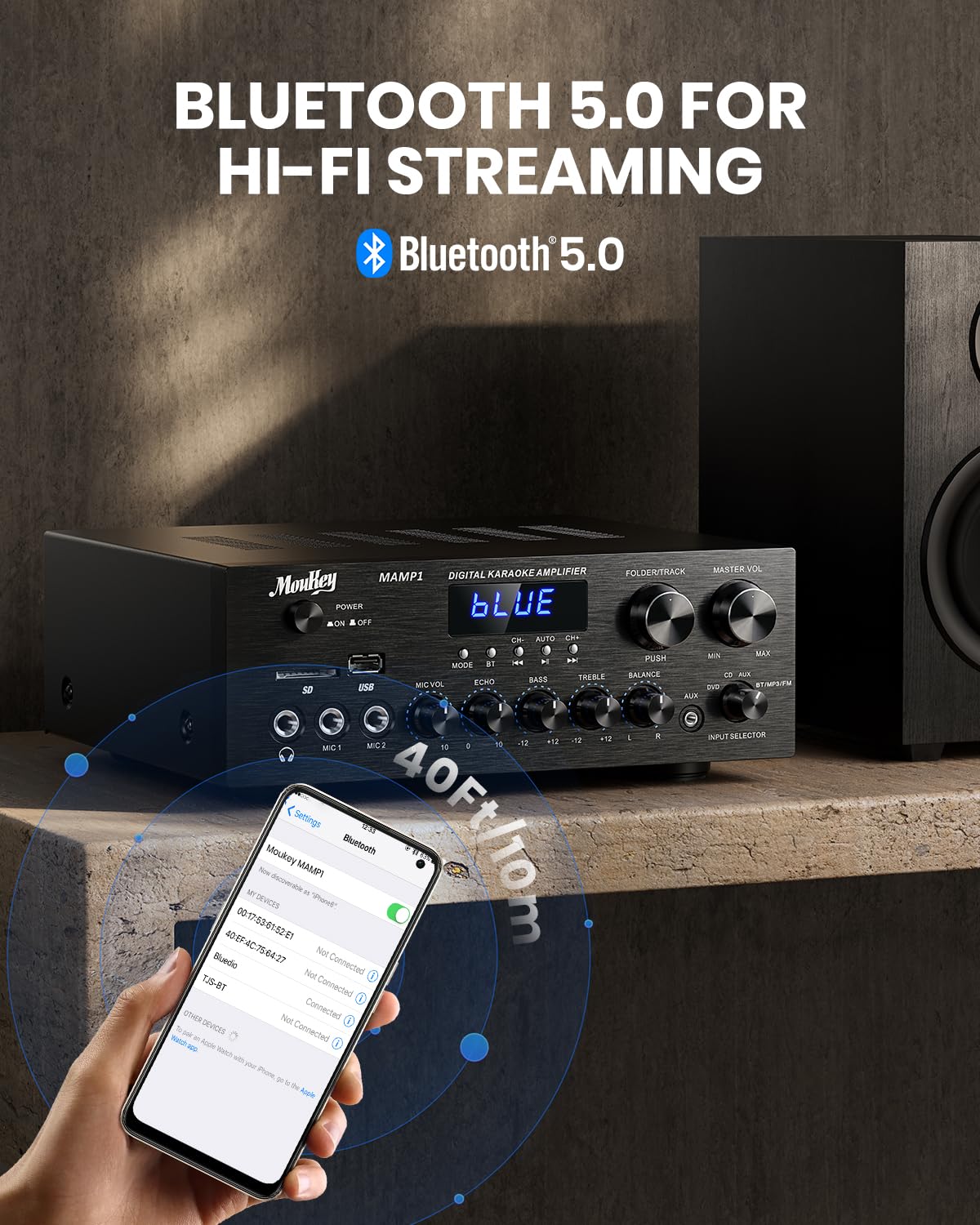
Image: The Moukey MAMP1 amplifier displaying "BLUE" on its screen, indicating Bluetooth mode, with a smartphone showing pairing options.
۶.۴ USB/SD پلے بیک
Insert a USB drive (max 32GB) or SD card (max 16GB) into the respective slot on the front panel. The amplifier will automatically switch to USB/SD mode and begin playback. Use the مخکینی, پلی/ودرول, بل، او Folder/Track د پلې بیک کنټرول لپاره تڼۍ.
6.8 ایف ایم راډیو
Ensure the FM antenna is connected to the rear panel. Select FM mode using the د موډ تڼۍ. د کارولو مخکینی او بل buttons to tune to radio stations. The LED display will show the current frequency.
7. ساتنه
ستاسو د فعالیت او ظاهري بڼې ساتلو لپاره ampژوندی:
- پاکول: د واحد بهرنۍ برخه د پاکولو لپاره نرم، وچ ټوکر وکاروئ. د مایع پاکوونکو یا کثافاتو کیمیاوي موادو څخه کار مه اخلئ.
- وینټیلیشن: ډاډ ترلاسه کړئ چې د هوا د بهېدو دروازې له دوړو او کثافاتو څخه پاکې دي.
- ذخیره کول: که چیرې یونټ د اوږدې مودې لپاره ذخیره کوئ، نو له بریښنا څخه یې جلا کړئ او په یخ او وچ ځای کې یې وساتئ.
8. ستونزه حل کول
If you encounter issues with your Moukey MAMP1 ampد ژوندي کوونکي لپاره، د عامو ستونزو او حل لارو لپاره لاندې جدول ته مراجعه وکړئ:
| ستونزه | احتمالي لامل | د حل لاره |
|---|---|---|
| هیڅ ځواک نشته | د برېښنا کیبل نه دی وصل شوی؛ د برېښنا ساکټ خراب دی؛ د برېښنا سویچ بند دی. | Ensure power cable is securely connected. Try a different power outlet. Press the power switch to ON. |
| د غږ تولید نشته | Incorrect input selected; Volume too low; Speakers not connected; Speaker wires loose; Mute function active. | Select the correct input source. Increase Master Volume. Check speaker connections and polarity. Ensure mute is off. |
| بلوتوث نه نښلي | Amplifier not in Bluetooth mode; Device too far; Device already paired to another unit. | ډاډ ترلاسه کړئ amplifier is in Bluetooth mode ("BLUE" on display). Move device closer to amplifier. Disconnect from other devices. |
| مایکروفون کار نه کوي | Microphone not connected; Mic volume too low; Echo knob set to minimum. | Connect microphone securely. Increase Microphone Volume. Adjust Echo knob. |
| د USB/SD پلې بیک ستونزې | بې ملاتړه file format; USB drive/SD card corrupted; Capacity exceeded. | غږ ډاډمن کړئ files are in supported formats (e.g., MP3). Try a different USB drive/SD card. Check capacity limits (USB max 32G, SD max 16G). |
که چیرې د دې حل لارو هڅه کولو وروسته هم ستونزه دوام ومومي، مهرباني وکړئ د پیرودونکو ملاتړ سره اړیکه ونیسئ.
9. مشخصات
| فیچر | مشخصات |
|---|---|
| برانډ | موکی |
| ماډل | MAMP1 |
| د تولید بریښنا | 220 واټ |
| چینلونه | 2 |
| والیtage | 115 وولټ (AC) |
| د سپیکر مخنیوی | 4-16 اومس |
| بلوتوث نسخه | 5.0 |
| د بلوتوټ رینج | له ۳۰ مترو (۹۹ فوټو) څخه زیات |
| د USB/SD کارت ملاتړ | USB: Max 32GB, SD: Max 16GB |
| ابعاد (L x W x H) | 25cm x 21.3cm x 9.5cm (approx. 10in x 8in x 4in) |
| UPC | 715802779039 |
| د اصلي هیواد | چین |

Image: The Moukey MAMP1 amplifier with its dimensions labeled.
10. تضمین او ملاتړ
This Moukey MAMP1 بریښنا Ampلایفیر د الف سره راځي 1 کلن تضمین د پیرود نیټې څخه. دا تضمین د عادي استعمال لاندې د تولید نیمګړتیاوې او کاري وړتیا پوښي.
تضمین نه پوښي:
- Damage caused by accident, abuse, misuse, flood, fire, or other natural causes.
- Damage caused by unauthorized modification or repair.
- Damage caused by improper installation or connection.
- Cosmetic damage, such as scratches, dents, and broken plastic on ports.
For warranty claims or technical support, please contact the retailer where you purchased the product or visit the official Moukey website for contact information. Please have your purchase receipt and product model number (MAMP1) ready when contacting support.