
GLIDiC TW-5000s
GLIDiC Sound Air TW-5000s True Wireless Earbuds Instruction Manual
Model: TW-5000s
1. پیژندنه
د پیرودلو لپاره مننهasing the GLIDiC Sound Air TW-5000s True Wireless Earbuds. This manual provides essential information for the safe and effective use of your device. Please read it thoroughly before use and retain it for future reference.
2. د خوندیتوب معلومات
- د غوږ بډونه یا د چارج کولو قضیه د سختې تودوخې، مستقیم لمر وړانګو، یا لوړې رطوبت سره مه مخ کوئ.
- Avoid dropping, impacting, or disassembling the device. This may cause damage and void the warranty.
- Keep the device away from water and liquids. While sweatproof, immersion can cause damage.
- یوازې چمتو شوی چارجینګ کیبل یا تصدیق شوی معادل وکاروئ.
- په لوړ غږ کې د اوږدې مودې لپاره اوریدل کولی شي د اوریدلو زیان ورسوي. غږ خوندي کچې ته تنظیم کړئ.
- د غوږۍ د کارولو پر مهال د خپل شاوخوا چاپیریال څخه خبر اوسئ، په ځانګړې توګه په ترافیک یا خطرناک چاپیریال کې.
3. د بسته محتويات
ډاډ ترلاسه کړئ چې ټول توکي ستاسو په کڅوړه کې شتون لري:
- GLIDiC Sound Air TW-5000s True Wireless Earbuds (Left and Right)
- د چارج کولو قضیه
- USB Charging Cable (Type-A to Micro-USB)
- د غوږونو ډیری اندازې (S, M, L)
- د لارښود لارښود (دا سند)
4. محصول ختم شوview
Familiarize yourself with the components of your GLIDiC Sound Air TW-5000s earbuds and charging case.

Figure 4.1: GLIDiC Sound Air TW-5000s Earbuds and Charging Case. The image displays the black charging case with the GLIDiC logo on top, positioned next to the two black earbuds.
د ایربډ اجزا
- ملټي بټن: Located on the outer surface of each earbud, used for playback control, call management, and voice assistant activation.
- د LED شاخص: Provides status information (pairing, charging, power).
- مایکروفون: For voice calls and voice assistant commands.
- د اړیکو چارج کول: Located on the underside of each earbud, for charging within the case.
- د غوږ لارښوونه: Silicone tip for in-ear comfort and sound isolation.
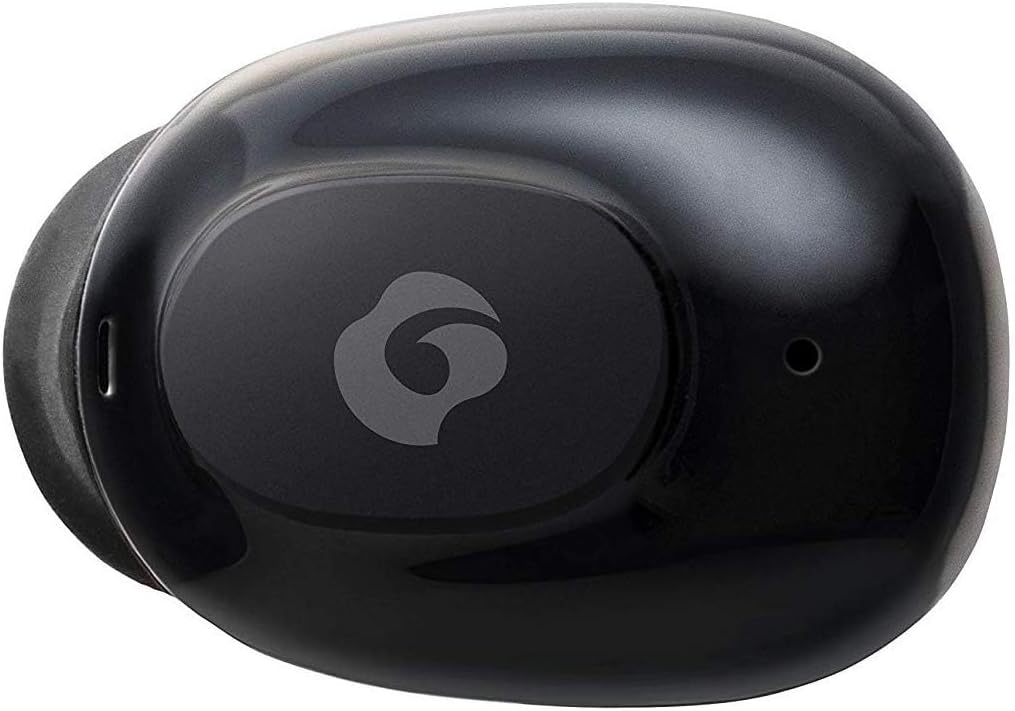
4.2 شکل: تړل view of a single GLIDiC earbud, highlighting the multifunction button with the GLIDiC logo and the microphone opening.
د چارج کولو قضیې اجزا
- د چارج کولو بندرونه: Internal contacts for earbuds, external port for case charging.
- د قضیې LED شاخص: د قضیې د چارج کولو حالت ښیي.
- پوښ: Protects earbuds and secures them during charging.
5. ترتیب کول
5.1 ابتدايي چارج کول
- Place both earbuds into the charging case. Ensure they are correctly seated, and the LED indicators on the earbuds illuminate.
- Connect the USB charging cable to the charging port on the case and plug the other end into a USB power source (e.g., computer, wall adapter).
- The case LED indicator will show charging status. Allow approximately 2 hours for a full charge of both earbuds and the case.
- Once fully charged, disconnect the charging cable. The earbuds offer up to 60 days of standby time when stored in the fully charged case.
۴.۲ د بلوتوث وسیلې سره جوړه کول
- ډاډ ترلاسه کړئ چې د غوږ بډونه چارج شوي دي.
- د چارج کولو قضیه پرانیزئ. د غوږ بډونه به په اتوماتيک ډول د جوړې کولو حالت ته ننوځي، او د دوی د LED شاخصونه به فلش شي.
- ستاسو د بلوتوث فعال شوي وسیلې (سمارټ فون، ټابلیټ، او نور) کې، د بلوتوث ترتیباتو ته لاړ شئ.
- لټون available devices. Select "GLIDiC TW-5000s" from the list.
- Once connected, the earbud LED indicators will stop flashing and may show a solid light or turn off, depending on the model. A voice prompt may also confirm the connection.
- If pairing fails, place the earbuds back in the case, close the lid, wait a few seconds, and then repeat the steps.
6. عملیاتي لارښوونې
۸ پاور آن/بند
- پاور آن: Open the charging case, or press and hold the multifunction button on each earbud for approximately 3 seconds.
- بندول: Place the earbuds back into the charging case and close the lid, or press and hold the multifunction button on each earbud for approximately 5 seconds.
6.2 د میوزیک غږ
- پلی کول / ودرول: په دواړو ایربډونو کې یو ځل د ملټي فنکشن تڼۍ فشار ورکړئ.
- بله لار: په ښي غوږۍ کې د څو فعالیت تڼۍ دوه ځله فشار ورکړئ.
- مخکینی لار په چپ غوږۍ کې د څو فعالیت تڼۍ دوه ځله فشار ورکړئ.
- حجم پورته کول: Triple-press the multifunction button on the right earbud.
- کموالی: Triple-press the multifunction button on the left earbud.
۶.۳ د زنګ وهلو مدیریت
- ځواب / پای کال: په دواړو ایربډونو کې یو ځل د ملټي فنکشن تڼۍ فشار ورکړئ.
- زنګ رد کړئ: Press and hold the multifunction button on either earbud for approximately 2 seconds.
6.4 د غږ مرسته
- د غږ همکار فعاله کړئ: Press and hold the multifunction button on either earbud for approximately 2 seconds (when not on a call).
6.5 Multi-Communication Mode
The GLIDiC Sound Air TW-5000s features a multi-communication mode that allows select ambient sounds to be heard without compromising audio quality. This enhances user awareness and safety.
- Activate/Deactivate Multi-Communication Mode: Consult the specific instructions provided with your device, as activation methods can vary. Typically, this involves a specific press sequence on the multifunction button or an option within a companion app if available.
7. ساتنه
7.1 پاکول
- د غوږ بډونه او د چارج کولو کیس د نرم، وچ، لینټ نه پاک ټوکر سره پاک کړئ.
- د کثافاتو پاکوونکي، الکول، یا کیمیاوي محلولونه مه کاروئ.
- د غوږونو څوکې په نرمۍ سره لرې کړئ او که اړتیا وي نو په نرم صابون او اوبو سره یې پاک کړئ. ډاډ ترلاسه کړئ چې د بیا نښلولو دمخه یې په بشپړه توګه وچ دي.
- Use a dry cotton swab to carefully clean the charging contacts on both the earbuds and the case.
7.2 ذخیره کول
- کله چې په کارولو کې نه وي، د غوږ بډونه د چارج کولو په قضیه کې وساتئ ترڅو دوی خوندي شي او ډاډ ترلاسه شي چې دوی چارج پاتې کیږي.
- وسیله په یخ او وچ ځای کې وساتئ، د مستقیم لمر وړانګو او سختې تودوخې څخه لرې.
8. ستونزه حل کول
If you encounter issues with your GLIDiC Sound Air TW-5000s, refer to the following common problems and solutions:
| ستونزه | احتمالي حل |
|---|---|
| د غوږونو غوږونه نه چالانېږي. | Ensure earbuds are charged. Place them in the charging case and connect the case to a power source. |
| ایربډونه د وسیلې سره نه جوړیږي. |
|
| یوازې یو غوږ بډ غږ لري. |
|
| د چارج کولو قضیه چارج نه کوي. |
|
| د غږ کیفیت خراب یا په وقفه ای ډول دی. |
|
9. مشخصات
| فیچر | تفصیل |
|---|---|
| د ماډل نوم | TW-5000s |
| د ارتباط ټیکنالوژي | بې سیم (بلوتوث) |
| د بلوتوټ رینج | 10 متره |
| د فریکونسی رینج | ۲۰ هرټز - ۲۰،۰۰۰ هرټز |
| Battery Life (Carrying Case Standby) | تر 60 ورځو پورې |
| د اوبو د مقاومت کچه | د اوبو په وړاندې مقاومت لرونکی (د خولې په وړاندې مقاومت لرونکی) |
| د کنټرول ډول | د رسنیو کنټرول، لمس، غږ |
| ځانګړي ځانګړتیاوې | Microphone Included, Noise Cancellation, Multi-communication mode |
| مواد | Plastic, TPE, and Silicone |
| ابعاد (د غوږ بډ) | 0.98 x 0.67 x 0.91 انچه (تقریبا) |
| د توکي وزن | ۴.۲ اونس (د ټول پیکج وزن) |
| UPC | 811559030024 |
10. تضمین او ملاتړ
GLIDiC products are designed for reliability and performance. For specific warranty details, please refer to the warranty card included with your purchase or visit the official GLIDiC website. If you require technical support or have questions not covered in this manual, please contact GLIDiC customer service through their official channels.
مهرباني وکړئ د تضمین ادعاګانو لپاره د پیرود ثبوت وساتئ.