
1. پیژندنه
This manual provides detailed instructions for the installation, operation, and maintenance of your Axis Communications M3064-V Mini Dome Camera. This camera is designed for indoor surveillance, offering HDTV 720p video quality, dust resistance, and IK08 impact protection. Please read this manual thoroughly before using the product to ensure proper functionality and safety.
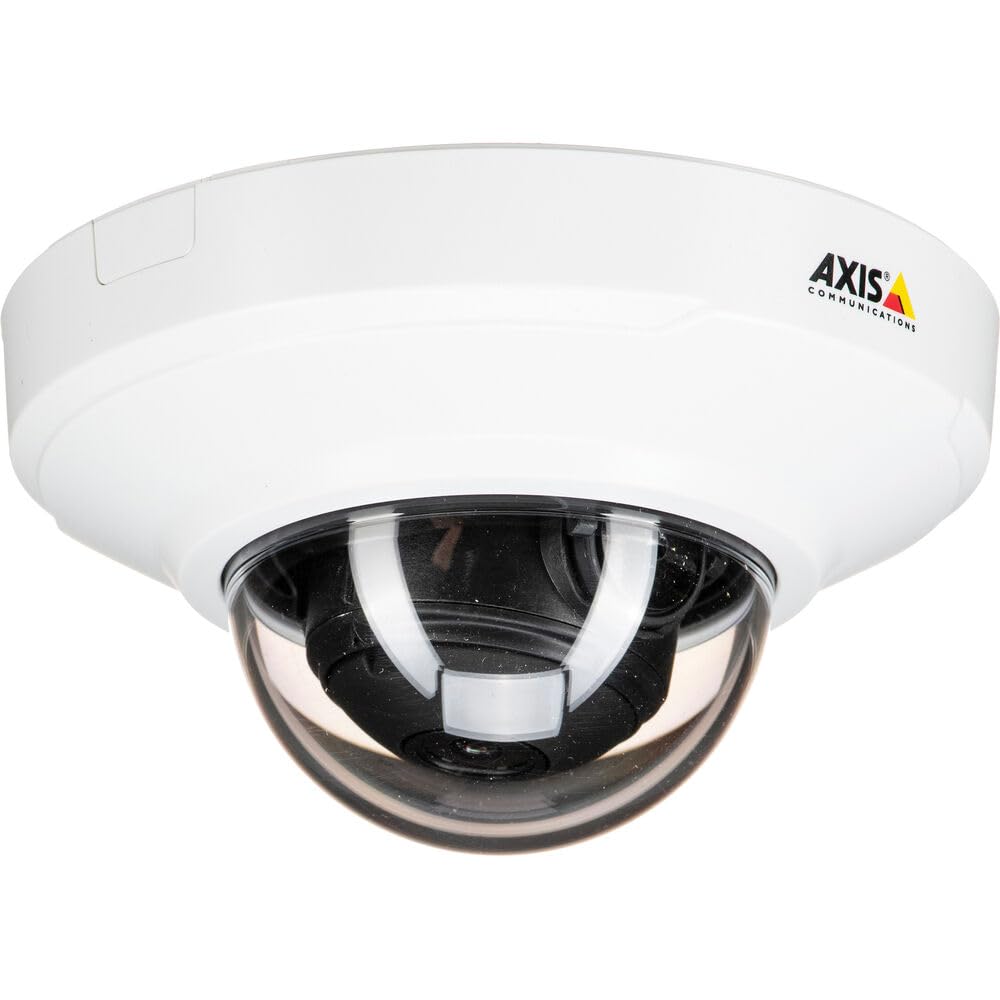
شکل 1: مخکی view of the Axis M3064-V Mini Dome Camera. This image shows the compact dome design suitable for discreet indoor surveillance.
2. د خوندیتوب معلومات
- د بریښنا رسول: Use only the specified power supply (AC/DC, 220 Volts, 1.6 Watts) to prevent damage or fire.
- لګول: Installation should be performed by qualified personnel and comply with all local electrical codes. Ensure the mounting surface can support the camera's weight.
- چاپیریال: This camera is designed for indoor use. While dust-resistant and IK08 rated, avoid exposing it to extreme temperatures, direct water spray, or corrosive substances.
- پاکول: د پاکولو دمخه بریښنا قطع کړئ. نرم او وچ ټوکر وکاروئ. مایع یا ایروسول پاکوونکي مه کاروئ.
- خدمت کول: د دې محصول پخپله خدمت کولو هڅه مه کوئ. ټول خدمتونه وړ خدماتي پرسونل ته راجع کړئ.
3. د بسته محتويات
ډاډ ترلاسه کړئ چې ټول توکي په کڅوړه کې شتون لري. که کوم توکي ورک یا زیانمن شوي وي، نو خپل عرضه کوونکي سره اړیکه ونیسئ.
- Axis M3064-V Mini Dome Camera (1 unit)
- د نصبولو لارښود
- د خولو لگول
- د نصبولو پیچونه او دیوال پلګونه
- Resistorx L-key
4. ترتیب او نصب کول
4.1 د کیمرې پورته کول
The Axis M3064-V camera can be mounted on a ceiling or wall. Ensure the mounting surface is stable and can support the camera's weight.
- سطحه چمتو کړئ: Choose a suitable location. Use the mounting bracket as a template to mark drill holes.
- سوراخونه: Drill pilot holes for the mounting screws. Insert wall plugs if necessary.
- بریکٹ ضمیمه کړئ: د چمتو شوي پیچونو په کارولو سره د نصب کولو بریکٹ سطحې ته خوندي کړئ.
- کیبلونه وصل کړئ: Route the network cable (wired connectivity) through the bracket and connect it to the camera's Ethernet port.
- کیمره ضمیمه کړئ: Secure the camera body to the mounting bracket. Ensure it clicks into place or is fastened according to the specific bracket design.

Figure 2: Illustrative diagram of the camera mounting process on a ceiling. This shows the steps from marking holes to securing the camera.
۳.۳ د بریښنا فعالول او د شبکې اتصال
- د تار نښلول: Connect an Ethernet cable from your network switch or router to the camera's Ethernet port. The camera supports Power over Ethernet (PoE), simplifying power delivery.
- د وای فای اتصال: The camera supports Wi-Fi connectivity. After initial wired setup, you can configure wireless settings via the camera's web انٹرفیس
- د بریښنا رسول: If not using PoE, connect a compatible AC/DC power adapter (220V, 1.6W) to the camera's power input.
- لومړنی لاسرسی: Once powered, the camera will obtain an IP address from your network (DHCP). Use an Axis IP Utility tool or your network router's client list to find the camera's IP address.
5. عملیاتي لارښوونې
5.1 Accessing the Camera Interface
خلاص a web browser (e.g., Chrome, Firefox) and enter the camera's IP address in the address bar. You will be prompted to create a new password for the root user upon first access. Follow the on-screen instructions.
5.2 ژوندی View and Video Settings
- ژوندی View: The main interface provides a live video feed. You can adjust the viewing angle remotely if the camera supports pan/tilt/zoom (PTZ) functions, though this model features a fixed dome with 3x optical zoom.
- قرارداد: The camera supports HDTV 720p video capture resolution. You can configure streaming profiles for different quality and frame rate needs.
- د شپې لید: The camera includes Night Color functionality, providing enhanced visibility in low-light conditions. This feature can be configured in the image settings.
- نظری زوم: Utilize the 3x optical zoom feature through the web interface to focus on specific areas within the 83-degree viewزاویه.
5.3 ثبتول او ذخیره کول
کیمره د ثبت کولو مختلف انتخابونه ملاتړ کوي:
- د څنډې ذخیره: The camera has 128 GB of flash memory installed for local recording. Insert a compatible microSD card (not included) for additional storage.
- د شبکې ویډیو ریکارډر (NVR): Integrate the camera with an NVR or video management system (VMS) for centralized recording and management.
- د پیښو پر بنسټ ثبت کول: Configure motion detection or other event triggers to start recording, saving storage space.
6. ساتنه
۵.۱ د کیمرې پاکول
منظم پاکول د غوره عکس کیفیت ساتلو کې مرسته کوي.
- بندول: Always disconnect the camera from its power source before cleaning.
- لینز: Gently wipe the lens cover with a soft, lint-free cloth. For stubborn dirt, slightly dampen the cloth with water or a mild lens cleaning solution. Avoid abrasive materials.
- کور: Wipe the camera housing with a soft, dry cloth. Do not use strong detergents or solvents.
6.2 د فرم ویئر تازه معلومات
په دوره یي ډول د اکسس مخابراتو وګورئ website for firmware updates. Keeping your camera's firmware up-to-date ensures optimal performance, security, and access to new features. Follow the instructions provided with the firmware update package.
7. ستونزه حل کول
| ستونزه | احتمالي لامل | د حل لاره |
|---|---|---|
| کیمره فعاله نه ده | No power supply; Faulty PoE switch/injector; Damaged cable. | Check power connection. Verify PoE functionality. Test with a different Ethernet cable or power adapter. |
| هیڅ ویډیو فیډ نشته | Network connectivity issue; Incorrect IP address; Firewall blocking access; Camera not configured. | Verify network connection. Confirm camera's IP address. Check firewall settings. Ensure camera is properly configured via its web انٹرفیس |
| د عکس ضعیف کیفیت | Dirty lens; Incorrect focus; Low light conditions; Network bandwidth issues. | Clean the lens. Adjust focus settings in the web interface. Ensure adequate lighting or verify Night Color settings. Check network bandwidth. |
| لاسرسی نشي کولی web انٹرفیس | Incorrect IP address; Network issue; Browser compatibility. | Confirm IP address. Ping the camera's IP. Try a different web براوزر. د براوزر زیرمه پاکه کړئ. |
8. مشخصات
| فیچر | تفصیل |
|---|---|
| د ماډل نوم | M3064-V |
| د ماډل شمیره | 01716-001 |
| برانډ | د محور مخابراتو |
| د فارم فکتور | گنبد |
| د ارتباط ټیکنالوژي | تار لرونکی، وای فای |
| د ویډیو نیول حل | 720p (HDTV) |
| اغیزمن لاهم حل | 64 MP (Note: This might refer to sensor resolution, actual video output is 720p) |
| د عکس سینسر حل | 5 MP |
| Viewزاویه | 83 درجې |
| نظری زوم | 3x |
| د شپې لید | د شپې رنګ |
| د پنروک درجه | IP42 (Dust-resistant) |
| د اغیزو ساتنه | IK08 |
| د بریښنا سرچینه | AC/DC، PoE |
| والیtage | 220 ولټه |
| واټtage | 1.6 واټ |
| د فلش حافظې نصب شوی اندازه | 128 جي بي |
| د توکي ابعاد (LxWxH) | 3.98 x 3.98 x 2.2 انچه |
| د توکي وزن | 150 ګرامه |
| رنګ | تور / سپین |
9. تضمین او ملاتړ
9.1 د محصول تضمین
Axis Communications products typically come with a limited manufacturer's warranty. Please refer to the warranty card included with your product or visit the official Axis Communications website for detailed warranty terms and conditions specific to the M3064-V model. Keep your proof of purchase for warranty claims.
9.2 تخنیکي ملاتړ
For technical assistance, troubleshooting beyond this manual, or service inquiries, please contact Axis Communications customer support. You can find contact information, FAQs, and additional resources on the official Axis Communications support website. When contacting support, please have your product model number (M3064-V or 01716-001) and serial number ready.
آنلاین سرچینې: www.axis.com/support