
1. محصول ختم شوview
The Alecto WS-1560 is a wireless weather station designed to provide accurate indoor and outdoor environmental data. Featuring a clear color display and a remote outdoor sensor, it offers comprehensive weather information and additional useful functions for your home.
کلیدي ځانګړتیاوې:
- Measures indoor and outdoor temperature and humidity.
- Long-range wireless outdoor sensor (up to 100 meters).
- 5.7-inch well-lit color display with animated weather forecast icons.
- Temperature and ice alarm functions.
- د الارم ساعت د سنوز فعالیت سره.
- Memory function for latest and highest readings.
- Moon phase indicator, date, day, and time display.
- Battery-operated main unit and outdoor sensor with backup batteries.

Figure 1.1: Alecto WS-1560 Main Unit and Wireless Outdoor Sensor.
2. د بسته محتويات
Ensure all components are present and in good condition upon unpacking:
- د الیکټو WS-1560 اصلي واحد (د کور دننه ښودنه)
- د بې سیم بیروني سینسر
- د کارن لارښود
- (Power adapter and batteries may be included depending on package)
Video 2.1: Illustrative video showing typical weather station components and basic setup. (Note: This video is for a related product and may not show the exact Alecto WS-1560 model.)
3. ترتیب او نصب کول
3.1. د بیټرۍ نصب کول
Both the main unit and the outdoor sensor require batteries for operation. Ensure you use the correct type and polarity.
- بهر سینسر:
- د بېسیم بهرنۍ سینسر په شا کې د بیټرۍ کڅوړه خلاص کړئ.
- د قطبي نښانونو (+/-) سره سم 2x AA بیټرۍ (شامل نه دي) دننه کړئ.
- د بیټرۍ کڅوړه په خوندي ډول وتړئ.
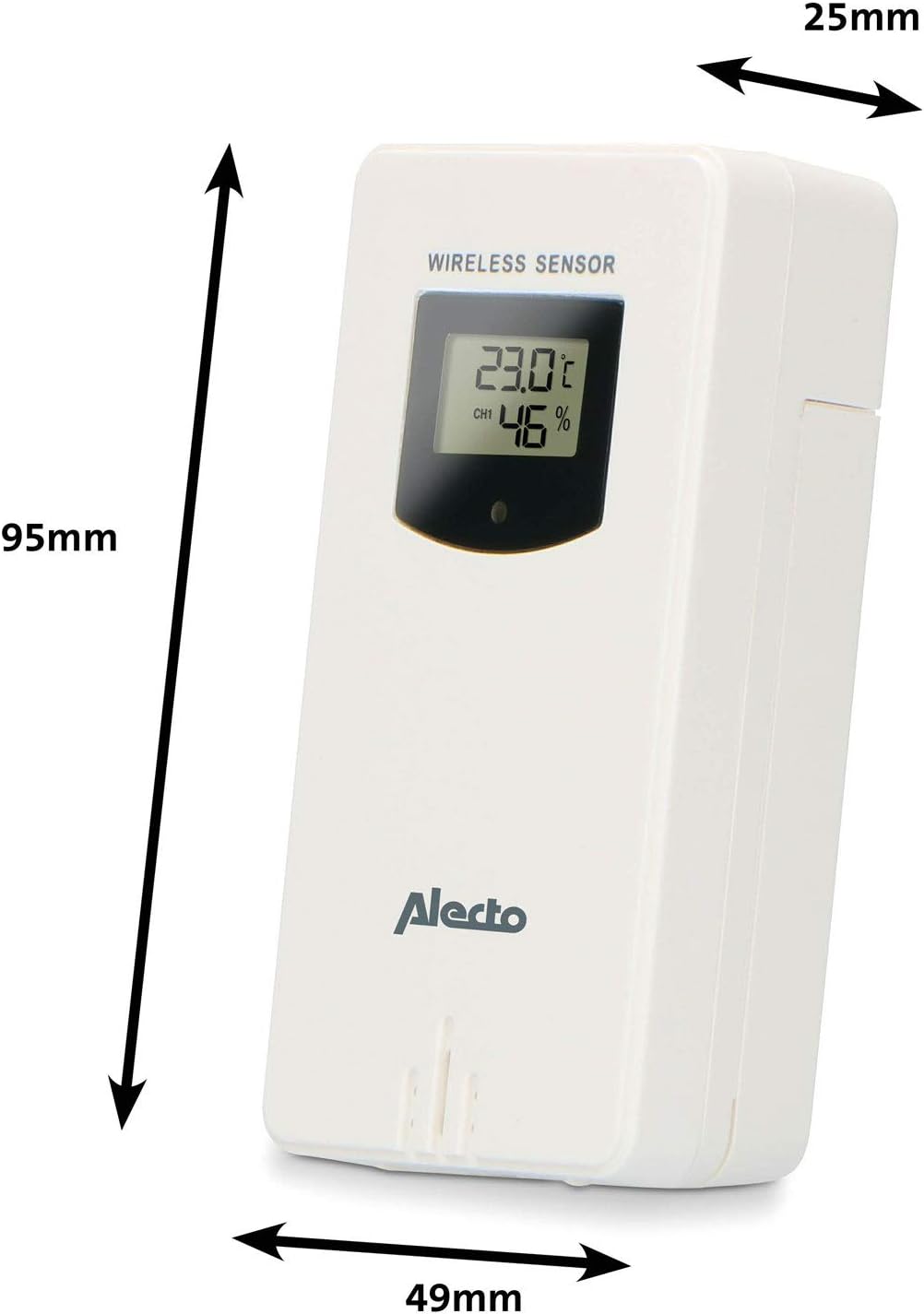
Figure 3.1: Wireless Outdoor Sensor dimensions and battery compartment location.
- اصلي واحد:
- د اصلي واحد په شا کې د بیټرۍ کڅوړه پرانیزئ.
- Insert 2x AA batteries (not included) according to the polarity markings (+/-). These serve as backup batteries.
- د بیټرۍ کڅوړه په خوندي ډول وتړئ.
- Connect the main unit to a power outlet using the provided power adapter (if included).

Figure 3.2: Main Unit dimensions and power input.
3.2. د سینسر ځای پرځای کول
For accurate outdoor readings, proper placement of the wireless sensor is crucial:
- Place the sensor in a shaded area, away from direct sunlight, to prevent inaccurate temperature readings.
- Ensure good air circulation around the sensor.
- سینسر په عمودي ډول نصب کړئ، تقریبا له ۱.۵ څخه تر ۲ مترو (۵ څخه تر ۶.۵ فوټو) پورې د ځمکې څخه پورته.
- Avoid placing the sensor near heat sources (e.g., vents, windows) or moisture sources.
- The maximum transmission range is 100 meters (328 feet) in open air. Walls and other obstacles will reduce this range.

شکل 3.3: مثالample of outdoor sensor placement on a wall.
۳. د سینسر سره د اصلي واحد جوړه کول
The main unit and sensor should automatically pair once both are powered on. If pairing does not occur:
- Ensure both units have fresh batteries and are within range.
- Press the "TX" button inside the outdoor sensor's battery compartment to manually send a signal.
- On the main unit, you may need to initiate a search for the outdoor sensor (refer to the "Operation" section for specific button functions).
4. عملیات
4.1. ب Displayه ښودل
The 5.7-inch color display provides a clear overview of all measured data. Key areas include:
- دباندې تودوخه او رطوبت: Displays current outdoor conditions.
- د کور دننه تودوخه او رطوبت: Displays current indoor conditions.
- Animated Weather Forecast: Icons predict upcoming weather (sunny, partly cloudy, cloudy, rainy, snowy).
- وخت او نیټه: Current time, day, and date.
- د بیرومیټریک فشار: د هوا اوسنی فشار.
- د سپوږمۍ پړاو: د اوسني سپوږمۍ پړاو ګرافیکي استازیتوب.
- Temperature/Ice Alarm Indicators: Alerts for specific temperature thresholds or potential ice conditions.

شکل 4.1: مفصل view of the main unit's color display.
4.2. د تڼۍ دندې
The main unit features several buttons for setting and adjusting functions. Common buttons include:
- سیټ: Enters setup mode for time, date, and other settings.
- لارښوونه: Switches between display modes or confirms settings.
- پورته/ښکته (یا +/-): Adjusts values during setup or cycles through channels.
- الارم: Sets or activates the alarm function.
- MEM: Displays maximum/minimum temperature and humidity records. Long press to clear records.
- لنډیز / ر /ا: Activates snooze during an alarm or adjusts backlight brightness.
Video 4.2: Illustrative video demonstrating various features and settings of a weather station. (Note: This video is for a related product and may not show the exact Alecto WS-1560 model.)
۲. د وخت او نیټې ټاکل
- Press and hold the "SET" button until the time display starts flashing.
- Use the "UP" or "DOWN" buttons to adjust the hour, then press "SET" to confirm and move to minutes.
- د دقیقو، کال، میاشتې او ورځې لپاره تکرار کړئ.
- Press "SET" again to exit the setting mode.
4.4. د الارم ترتیبات
- Press the "ALARM" button once to view د خطرې وخت.
- Press and hold the "ALARM" button until the alarm time starts flashing.
- Use the "UP" or "DOWN" buttons to set the desired alarm hour and minute.
- د تایید لپاره "الارم" فشار ورکړئ.
- To activate/deactivate the alarm, press the "ALARM" button briefly when the alarm time is displayed. An alarm icon will appear/disappear.
4.5. Max/Min Records
The weather station automatically records the maximum and minimum temperature and humidity values over a 24-hour period.
- Press the "MEM" button briefly to view the maximum recorded values.
- Press "MEM" again to view the minimum recorded values.
- Press "MEM" a third time to return to current readings.
- To clear the records, press and hold the "MEM" button for a few seconds.
5. ساتنه
- پاکول: د ښودنې او واحد سطحې د نرم، d سره پاک کړئamp ټوکر د کثافاتو پاکوونکي یا محلول مه کاروئ.
- د بیټرۍ بدلول: کله چې د ټیټ بیټرۍ شاخص په ډسپلې کې څرګند شي، په اصلي واحد او بهرني سینسر دواړو کې بیټرۍ بدل کړئ. تل ټولې بیټرۍ په ورته وخت کې د ورته ډول نوي سره بدل کړئ.
- د سینسر پاملرنه: Periodically check the outdoor sensor for debris or obstructions that might affect its readings. Ensure it remains in a shaded, well-ventilated area.
6. ستونزه حل کول
| ستونزه | احتمالي لامل | د حل لاره |
|---|---|---|
| No outdoor temperature/humidity reading (or "---" displayed) |
|
|
| د تودوخې/رطوبت ناسمې شمېرې |
|
|
| ښودنه تیاره یا خالي ده |
|
|
7. مشخصات
| د ماډل شمیره | WS-1560 |
| برانډ | الیکټو |
| د بریښنا سرچینه (اصلي واحد) | Power Adapter (if included) + 2x AA batteries (backup) |
| د بریښنا سرچینه (بیرونی سینسر) | 2x AA بیټرۍ |
| د محصول ابعاد (اصلي واحد) | 5.1 x 16.5 x 12.3 سانتي متره |
| د محصول وزن | 440 ګرامه |
| د بېسیم سینسر رینج | تر ۸۰ مترو پورې (خلاصه هوا) |
| د ښودلو اندازه | 5.7 انچه / 14.5 سانتي متره |
| اصل | چین |
8. تضمین او ملاتړ
For warranty information, technical support, or service inquiries, please refer to the warranty card included with your product or visit the official Alecto webسایټ. د پیرود ثبوت په توګه د پیرود رسید وساتئ.
الیکټو Webسایټ: www.alecto.nl (General Alecto website, specific support page may vary)