
1. پیژندنه
د پیرودلو لپاره مننهasing the Offices To Go L Shape Executive Office Desk with Height Adjustable Side Component. This manual provides essential information for the safe assembly, operation, and maintenance of your new office furniture. Please read these instructions carefully before beginning assembly and retain them for future reference.
This desk features a fixed main desk section and a height-adjustable side component, designed to offer flexibility and ergonomic benefits to your workspace.
2. د خوندیتوب معلومات
- تل د نصبولو لارښوونې په دقت سره تعقیب کړئ. ناسم نصب کول کولی شي د بې ثباتۍ او ټپي کیدو لامل شي.
- ډاډ ترلاسه کړئ چې ټول فاسټینرونه د کارولو دمخه په خوندي ډول ټینګ شوي دي. په دوره یي ډول وګورئ او د اړتیا په صورت کې بیا کلک کړئ.
- Do not overload the desk. Refer to specifications for weight limits.
- Keep children and pets away from the desk during assembly and when operating the height-adjustable mechanism.
- When adjusting the height, ensure no objects are obstructing the movement of the desk surface.
- د محافظتي کوسټرونو پرته په مستقیم ډول د میز په سطحه د مایعاتو د ایښودلو څخه ډډه وکړئ.
- Use only the provided components and hardware. Do not substitute parts.
3. د بسته محتويات
Before beginning assembly, verify that all components listed below are present and undamaged. If any parts are missing or damaged, contact Offices To Go customer support.
- Main Desk Surface (71"x36")
- Height-Adjustable Side Component Surface (48"x24")
- Main Desk Frame and Legs
- Height-Adjustable Side Component Frame and Legs
- 1 Mobile Locking Pedestal
- 1 Box/Box/File Full Pedestal
- Assembly Hardware (screws, bolts, tools, etc.)
- Control Panel for Height Adjustment
4. تنظیم او مجلس
Assembly is required for this product. It is recommended that two people assemble the desk to ensure safety and ease of construction. Clear a spacious area for assembly.
۳.۱ د بسته بندۍ خلاصول او چمتو کول
- ټول اجزا په احتیاط سره خلاص کړئ او په نرم، پاک سطح یې کېږدئ ترڅو د سکریچونو مخه ونیول شي.
- د بسته بندۍ د منځپانګې لیست په وړاندې ټولې برخې وپیژنئ.
4.2 Assembling the Main Desk
- Attach the main desk legs to the main desk frame using the provided hardware. Ensure all connections are firm.
- Carefully place the main desk surface onto the assembled frame and secure it with the designated screws.
4.3 Assembling the Height-Adjustable Side Component
- Assemble the height-adjustable frame and legs according to the specific instructions for the adjustable mechanism.
- Mount the height-adjustable side component surface onto its frame, securing it firmly.
- Connect the control panel to the height-adjustable mechanism as per the wiring diagram in the separate adjustable component manual (if provided).
4.4 Integrating Components and Pedestals
- Position the height-adjustable side component adjacent to the main desk, forming the L-shape. Secure the two sections together using the provided connectors, if applicable.
- Place the Mobile Locking Pedestal and the Box/Box/File Full Pedestal in their desired locations under the desk. The mobile pedestal can be moved and locked into place.
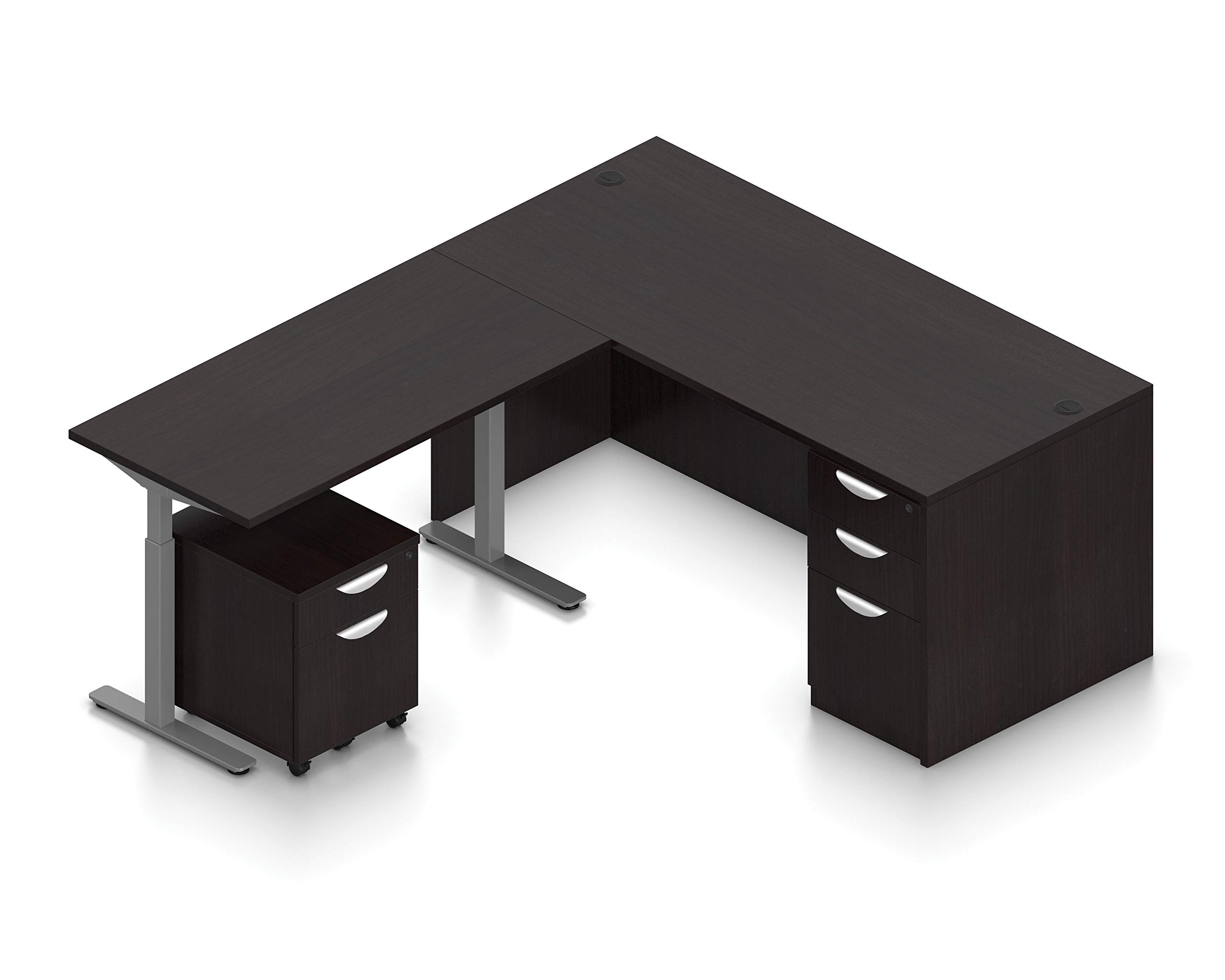
Image 1: Assembled Offices To Go L Shape Executive Office Desk with Height Adjustable Side Component and Pedestals. This image shows the complete desk setup in American Espresso finish, highlighting the L-shape configuration and the two included pedestals.
5. عملیاتي لارښوونې
The main desk section is fixed and not height adjustable. The side component offers height adjustment for flexible working positions.
5.1 Adjusting the Height-Adjustable Side Component
- Ensure the desk is clear of obstructions that could impede movement.
- Locate the control panel, typically mounted on the underside of the desk or on the front edge of the side component.
- فشار ورکړئ او ونیسئ UP button to raise the desk surface.
- فشار ورکړئ او ونیسئ ښکته button to lower the desk surface.
- کله چې مطلوب لوړوالی ته ورسیږي، تڼۍ خوشې کړئ.
- Some models may include memory presets. Refer to the specific control panel manual for programming and using these features.
یادونه: The height adjustment mechanism is designed for smooth operation. Do not force the desk if it encounters resistance. Check for obstructions.
6. ساتنه
منظم ساتنه به ستاسو د میز د ژوند او ظاهري بڼې په اوږدولو کې مرسته وکړي.
- پاکول: سطحونه په نرمۍ سره مسح کړئ، دamp ټوکر. د سختو کیمیاوي موادو یا خړوبونکو پاکوونکو څخه ډډه وکړئ، کوم چې کولی شي پای ته زیان ورسوي.
- هارډویر: Periodically check all screws and bolts to ensure they remain tight. Re-tighten as needed.
- د لوړوالي میکانیزم: Keep the moving parts of the height-adjustable component free from dust and debris. Do not lubricate unless specifically instructed by the manufacturer.
- څاڅکي: Clean up spills immediately to prevent staining or damage to the desk surface.
7. ستونزه حل کول
که تاسو په خپل میز کې ستونزې سره مخ شئ، نو لاندې عام د ستونزو حل کولو مرحلو ته مراجعه وکړئ:
- Desk not adjusting height:
- وګورئ چې آیا د بریښنا تار په خوندي ډول د میز او کاري بریښنا سایټ دواړو سره نښلول شوی دی.
- Ensure no objects are blocking the desk's movement.
- If the control panel has a reset function, follow its instructions.
- مېز په لړزېدو دی:
- Verify that all assembly screws and bolts are securely tightened.
- Ensure the desk is on a level surface. Adjust leg levelers if present.
- Drawers not opening/closing smoothly:
- Check for obstructions inside the drawer or along the slides.
- ډاډ ترلاسه کړئ چې د دراز سلایډونه په سمه توګه تنظیم شوي او خوندي دي.
If these steps do not resolve the issue, please contact Offices To Go customer support.
8. مشخصات
| فیچر | تفصیل |
|---|---|
| برانډ | د تګ لپاره دفترونه |
| د ماډل شمیره | B08C92CSNB |
| شکل | L-شکل |
| د میز ډیزاین | اجراییه میز |
| ټولیز ابعاد (D x W x H) | ۱۶"د x ۲۶"وچ x ۴۷"ح |
| Main Desk Section | 71"x36" (Not height adjustable) |
| Side Component | 48"x24" (Height adjustable) |
| رنګ | American Espresso |
| د درازونو شمیر | 3 (1 Mobile Locking Pedestal, 1 Box/Box/File Full Pedestal) |
| اساسی مواد | پتل |
| مجلس ته اړتیا ده | هو |
9. تضمین او ملاتړ
For warranty information and customer support, please refer to the official Offices To Go webسایټ ته مراجعه وکړئ یا مستقیم د دوی د پیرودونکو خدماتو څانګې سره اړیکه ونیسئ. د پیرود ثبوت په توګه د پیرود رسید وساتئ.
Offices To Go Customer Support:
- لیدنه وکړئ Offices To Go official webسایټ د اړیکو جزئیاتو او ملاتړ سرچینو لپاره.