
پیژندنه
This manual provides detailed instructions for the installation, operation, maintenance, and troubleshooting of the HP ProDesk 400 G3 MS-7957 motherboard. Please read this manual thoroughly before proceeding with any installation or operation to ensure proper functionality and safety.
د خوندیتوب معلومات
د مور بورډ د زیان یا ځان ته د زیان رسولو مخنیوي لپاره تل لاندې خوندیتوب احتیاطي تدابیر په پام کې ونیسئ:
- د هر ډول اجزاو نصبولو یا لرې کولو دمخه د دیوال له سایټ څخه د بریښنا رسولو قطع کړئ.
- د مدر بورډ د سمبالولو دمخه د جامد بریښنا خارجولو لپاره د انټي سټیټیک لاس تسمه واغوندئ یا په مکرر ډول د ځمکې لاندې فلزي شی ته لمس وکړئ.
- د مور بورډ د څنډو له لارې لاس ورکړئ ترڅو حساسو برخو ته لاس ورنه کړئ.
- Ensure proper ventilation within the computer case to prevent overheating.
- مور بورډ د رطوبت او سختې تودوخې څخه لرې وساتئ.
محصول پای ته ورسیدview
The HP ProDesk 400 G3 MS-7957 is a MicroATX motherboard designed for Intel processors with an LGA 1151 socket. It supports DDR4 RAM and features a B250 chipset, offering a reliable foundation for desktop computing.
کلیدي ځانګړتیاوې
- Compatible CPU Brand: Intel
- د ساکټ ډول: LGA 1151/Socket H4
- د فورم فکتور: MicroATX
- I/O نښلونکي: Ethernet (RJ-45), USB 2.0, USB 3.0, VGA, DisplayPort, HD Audio Jack
د اجزاوو پیژندنه
Familiarize yourself with the layout of the motherboard to facilitate proper installation and connection of components.

شکل ۳: زاویه لرونکی view of the HP ProDesk 400 G3 MS-7957 motherboard. This image highlights the CPU socket (LGA 1151), four DDR4 RAM slots, PCIe slots, and various headers for front panel connections and storage devices.
تنظیم او نصب کول
مخکې له دې چې تاسو پیل کړئ
- Ensure your computer case is compatible with the MicroATX form factor.
- Gather all necessary components: CPU, RAM, CPU cooler, power supply, storage devices, and graphics card (if not using integrated graphics).
- Prepare your workspace by ensuring it is clean, well-lit, and static-free.
د مور بورډ نصب کول
- Install the CPU into the LGA 1151 socket. Carefully align the CPU with the socket's notch and gently lower it into place. Close the retention arm.
- په CPU کې حرارتي پیسټ واچوئ او د CPU کولر د جوړونکي لارښوونو سره سم نصب کړئ.
- Install the DDR4 RAM modules into the designated slots. Ensure they are fully seated until the clips lock into place.
- Mount the motherboard into the computer case using the appropriate standoffs and screws.
- د خپل بریښنا رسولو څخه د مدر بورډ سره د اصلي 24-پن ATX بریښنا نښلونکی او د 4-پن یا 8-پن CPU بریښنا نښلونکی وصل کړئ.
- Install any expansion cards (e.g., graphics card) into the PCIe slots.

شکل ۴.۴: پورته څخه ښکته زاویه view of the HP ProDesk 400 G3 MS-7957 motherboard. This perspective provides a clear view of the processor socket, memory slots, and the layout of the various internal connectors and components.
د پردیو سره نښلول
- Connect SATA storage devices (HDDs/SSDs) to the SATA ports on the motherboard.
- Connect front panel headers (power button, reset button, USB ports, audio jacks) to their respective pins on the motherboard. Refer to your case manual for specific pin assignments.
- Connect external peripherals such as monitor, keyboard, mouse, and Ethernet cable to the rear I/O panel.
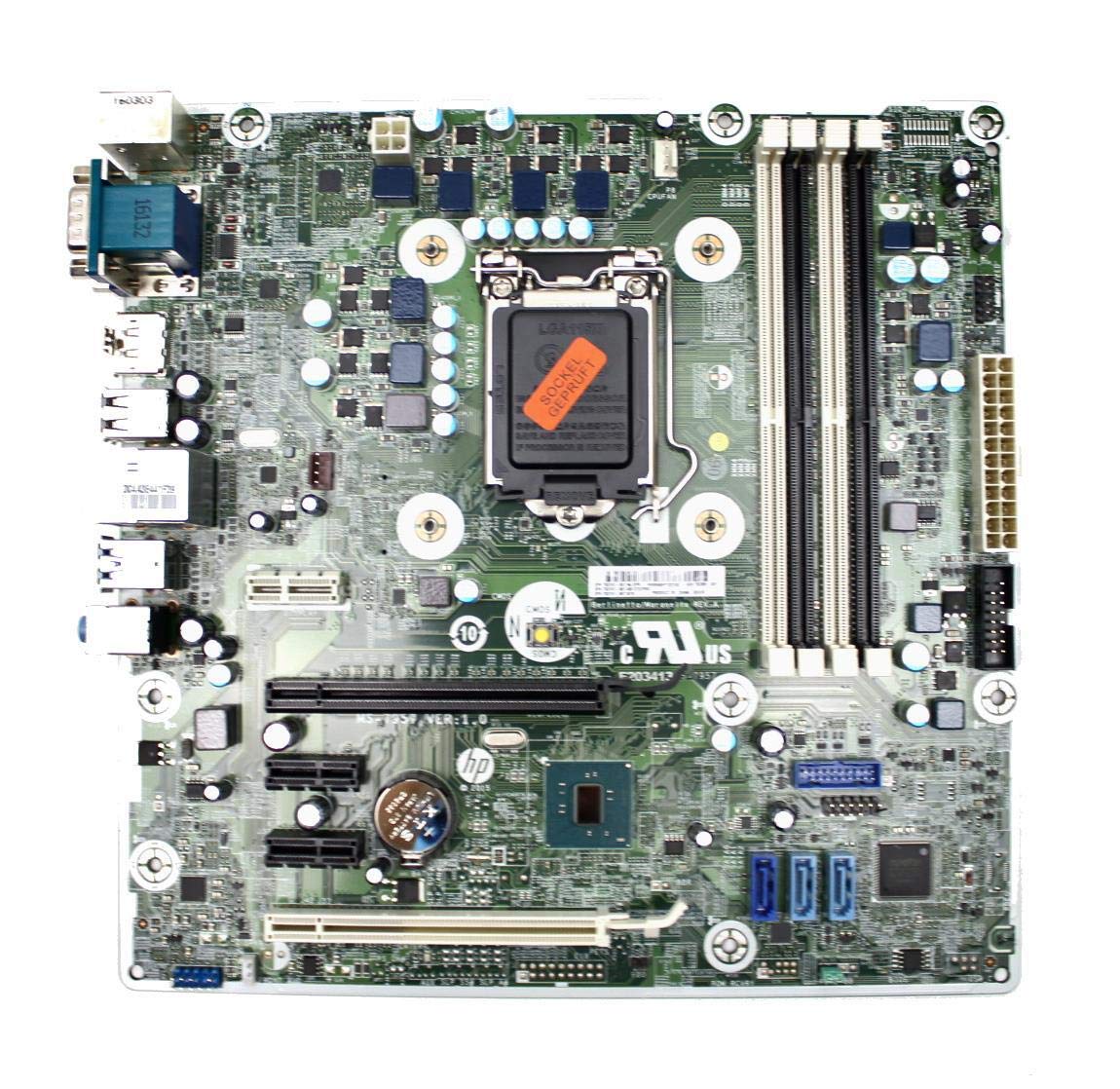
Figure 3: Rear I/O panel of the HP ProDesk 400 G3 MS-7957 motherboard. This image displays the available external connectivity options, including PS/2 ports, serial port, VGA, DisplayPort, USB 2.0, USB 3.0, Ethernet (RJ-45), and HD audio jacks.
عملیاتي لارښوونې
ابتدايي بریښنا فعاله ده
After all components are installed and connected, connect the power cable to the power supply and press the power button on your computer case. The system should initiate the boot process.
BIOS/UEFI Configuration
To access the BIOS/UEFI setup utility, press the designated key (commonly ډیل, F2, F10، یا F12) during the initial boot sequence. Here you can configure boot order, system time, and other hardware settings.
د ډرایور نصب کول
After installing your operating system, it is crucial to install the latest drivers for your motherboard's chipset, integrated graphics, audio, and network adapter. These drivers can typically be found on the HP support website or the chipset manufacturer's webسایټ
ساتنه
- پاکول: په منظم ډول د کمپریس شوي هوا په کارولو سره د مور بورډ او اجزاو څخه دوړې پاکې کړئ. ډاډ ترلاسه کړئ چې سیسټم د پاکولو دمخه بند او پلګ شوی دی.
- د BIOS/UEFI تازه معلومات: Periodically check for BIOS/UEFI updates from HP's official support website. Updates can improve stability, compatibility, and performance. Follow update instructions carefully to avoid system damage.
- د موټر چلوونکي تازه معلومات: Keep all system drivers updated to ensure optimal performance and compatibility with new software and hardware.
د ستونزو حل کول
دا برخه د هغو عامو ستونزو حلونه وړاندې کوي چې تاسو ورسره مخ کیدی شئ:
- ځواک نشته: Check all power connections, including the 24-pin ATX and CPU power cables. Ensure the power supply is switched on and the wall outlet is functional.
- نه ښودنه: Verify that your monitor is connected to the correct video output (VGA or DisplayPort) and is powered on. Reseat the graphics card (if applicable) and RAM modules.
- د سیسټم بې ثباتي/خرابی: This could be due to overheating, faulty RAM, or outdated drivers. Check CPU and GPU temperatures, run memory diagnostic tools, and update drivers.
- پردی نه دی موندل شوی: Ensure the peripheral is properly connected. Try a different port or update the relevant drivers.
- د BIOS/UEFI ستونزې: If you encounter issues after changing BIOS settings, try resetting the CMOS by removing the CMOS battery for a few minutes or using the clear CMOS jumper (refer to motherboard diagram for location).
مشخصات
| فیچر | مشخصات |
|---|---|
| برانډ | HP |
| د CPU ساکټ | LGA 1151 |
| مطابقت لرونکې وسیلې | ډیسټاپ کمپیوټر |
| د رام ټیکنالوژي | DDR4 |
| مطابقت لرونکي پروسیسرونه | Intel Core i3-6xxx, Intel Core i5-6xxx, Intel Core i7-6xxx, Intel Core i3-7xxx, Intel Core i5-7xxx, Intel Core i7-7xxx, Intel Core i3-8xxx, Intel Core i5-8xxx, Intel Core i7-8xxx |
| د چپسیټ ډول | Intel B250 |
| پلیټ فارم | وینډوز |
| د ماډل نوم | MS-7957 |
| د CPU ماډل | Core i3 (Note: Supports i3, i5, i7 as listed above) |
| د اصلي بریښنا نښلونکي ډول | 24 پنبه |
| د ګرافیک کارت انٹرفیس | د PCI ایکسپریس |
| Available Memory Slots | 4 |
| Total SATA Ports | 6 |
| ټول USB پورټونه | ۱(Note: Refers to internal headers, rear I/O has more) |
| ټول ایترنیټ بندرونه | 1 |
| Total PCIe Ports | 3 |
| جوړونکی | Computer Store Berlin (Reseller/Supplier) |
| برخه شمیره | 4061435962741 |
| ASIN | B08CS13PTQ |
تضمین او ملاتړ
دا محصول د الف سره راځي 1 کلن تضمین د پیرود نیټې څخه. دا تضمین د عادي کارونې الندې د موادو او کارموندنې نیمګړتیاوې پوښي.
For technical support, warranty claims, or further assistance, please contact your point of purchase or refer to the official HP support resources for the ProDesk 400 G3 series.