
پیژندنه
This manual provides detailed instructions for the installation, operation, and maintenance of your LoraTap WiFi Smart Blind Switch. This device allows you to control your electric blinds or roller shutters remotely via the Smart Life app, voice commands with Amazon Alexa or Google Home, and scheduled timers. Please read this manual thoroughly before installation and use to ensure safe and optimal performance.
محصول پای ته ورسیدview
The LoraTap WiFi Smart Blind Switch is designed to integrate seamlessly into your smart home system. It features a touch-sensitive glass panel for manual control and connects to your home's 2.4 GHz Wi-Fi network for smart functionalities. It is compatible with most 4-wire curtain motors and offers enhanced safety with its tempered glass panel.

Figure 1: LoraTap WiFi Smart Blind Switch (Front View)
ځانګړتیاوې
- د مهالویش دنده: Connect the smart switch to any 4-wire curtain motor to open/close curtains via your mobile phone at any time. Schedule work times to automatically open curtains in the morning.
- د اپلیکیشن ریموټ کنټرول: Download the free "Smart Life" app on your mobile phone. Connect to your 2.4 GHz Wi-Fi network to control your device remotely from anywhere, managing curtain opening/closing at any time.
- د لاسونو څخه پاک غږ کنټرول: Compatible with Amazon Alexa (Amazon Echo/Dot/Tap) and Google Assistant, allowing you to open and close curtains with voice commands for a smart, hands-free experience.
- د ګروپ کنټرول: Control multiple switches with one phone, or one switch with multiple phones. Group up to 20 switches to open/close all curtains in a room simultaneously with a single command.
- Safe Touch Panel Switch: Features a 4mm tempered glass panel for safe operation, even with wet hands. Supports a maximum power of 600W, compatible with most smart curtains, blinds, and projection screens with remote control functionality. CE and RoHS certified for safety.
د خوندیتوب معلومات
Always ensure the main power supply is turned off before performing any electrical work. Installation should be carried out by a qualified electrician if you are unsure. Do not exceed the maximum load capacity of 600W. The tempered glass panel provides enhanced safety, but avoid excessive force or sharp objects.

Figure 2: Tempered glass panel for child safety and easy operation.
چمتو کول
1. نصب او ویرینګ
The LoraTap Smart Blind Switch is designed for easy installation, compatible with standard Type 86 switch boxes without requiring wall modifications. Ensure power is disconnected before proceeding.

Figure 3: Wiring Diagram. Connect Live (L) and Neutral (N) inputs, and outputs for Open (L1) and Close (L2) to your 4-wire curtain motor.
The switch requires connection to a 4-wire curtain motor. Connect the Live (L) and Neutral (N) wires to the corresponding input terminals. Connect the motor's open (L1) and close (L2) wires to the respective output terminals on the switch. Secure all connections properly.

Figure 4: Product Dimensions (86mm x 86mm front panel, 49mm depth, 60mm mounting hole distance).
2. App Pairing (Smart Life)
- Download the "Smart Life" app from your mobile device's app store (iOS or Android).
- خپل سمارټ لایف حساب ته راجستر یا ننوتل.
- Ensure your mobile device is connected to a 2.4 GHz Wi-Fi network. The switch does not support 5 GHz Wi-Fi.
- Power on the LoraTap Smart Blind Switch. The indicator light should blink rapidly, indicating it's in pairing mode. If not, press and hold the 'Pause' button on the switch for 5-10 seconds until it blinks rapidly.
- په سمارټ لایف ایپ کې، د وسیلې اضافه کولو لپاره په پورتنۍ ښیې کونج کې د "+" آیکون باندې کلیک وکړئ.
- Select "Curtain Switch" or "Shutter Switch" from the device list.
- د خپل وای فای شبکې سره د سویچ د وصلولو لپاره په سکرین کې لارښوونې تعقیب کړئ.
- Once successfully paired, you can rename the device for easier control.
عملیاتي لارښوونې
1. لاسي کنټرول
The touch panel on the switch allows for direct control:
- Tap the "Up" arrow to open the blinds.
- Tap the "Down" arrow to close the blinds.
- Tap the "Pause" button to stop the blinds at any desired position.

Figure 5: Touch panel controls for Open, Pause, and Close functions.
2. App Control (Smart Life)
After successful pairing, you can control your blinds from anywhere using the Smart Life app:
- Open the Smart Life app and select your LoraTap Blind Switch.
- Use the virtual buttons to open, close, or pause your blinds.
- د پرانیستلو فیصدي تنظیم کړئtage (if supported by your motor and switch version).
۶.۳. د غږ کنټرول (الیکسا / ګوګل کور)
Integrate your LoraTap switch with Amazon Alexa or Google Home for hands-free control:
- په خپل الیکسا یا ګوګل کور ایپ کې د "سمارټ ژوند" مهارت فعال کړئ.
- خپل سمارټ لایف حساب سره وصل کړئ.
- Discover devices. Your LoraTap switch should appear.
- د لاندې امرونو څخه کار واخلئ:
- "الیکسا، پرده پرانیزه."
- "الیکسا، پرده وتړه."
- "Alexa, pause the curtain."
- "Hey Google, open the blinds."
- "Hey Google, close the blinds."

شکل ۷: د سمارټ مرستیالانو سره د غږ کنټرول ادغام.
Video 1: Demonstration of voice control for opening and closing blinds using a smart assistant.
۲. د مهالویش او ټایمر دندې
Set up schedules to automate your blinds' operation:
- In the Smart Life app, navigate to the device settings for your blind switch.
- Select "Schedule" or "Timer" to create new automation rules.
- Set specific times for opening or closing your blinds, for exampپه سهار ۷:۰۰ بجې پرانیستل کېږي او په شپه ۱۰:۰۰ بجې تړل کېږي.

Figure 7: Setting up daily schedules for automatic blind operation via the Smart Life app.
You can also configure the operating time for the blinds, typically from 1 to 120 seconds, which is useful for large blinds to ensure full opening or closing.
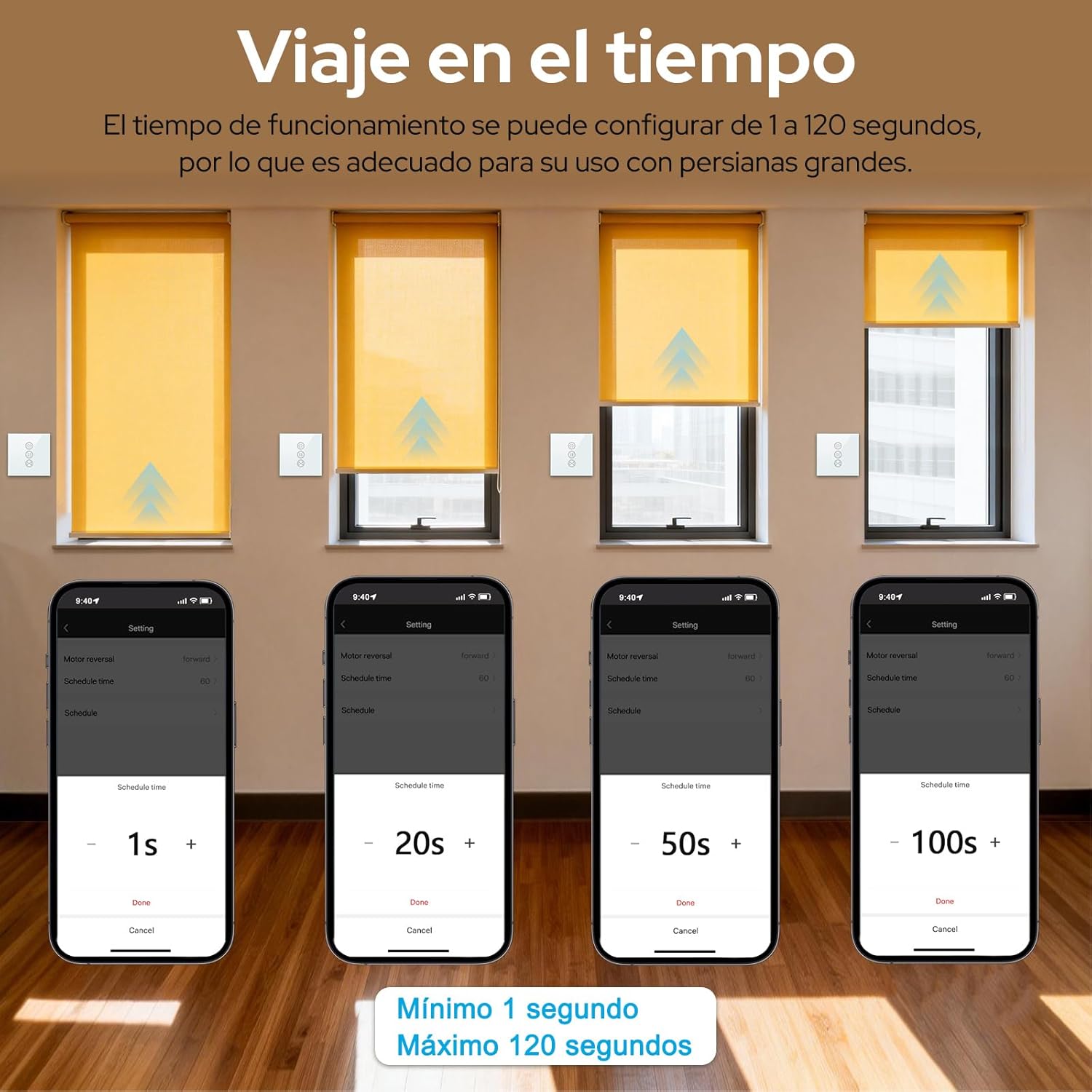
Figure 8: Adjusting the blind operation time within the app, from 1 to 120 seconds.
5. د ګروپ کنټرول
Control multiple LoraTap switches simultaneously by creating groups in the Smart Life app:
- In the Smart Life app, go to the main device list.
- Select "Create Group" and add the desired blind switches to the group.
- Once grouped, you can control all blinds in that group with a single command or tap.
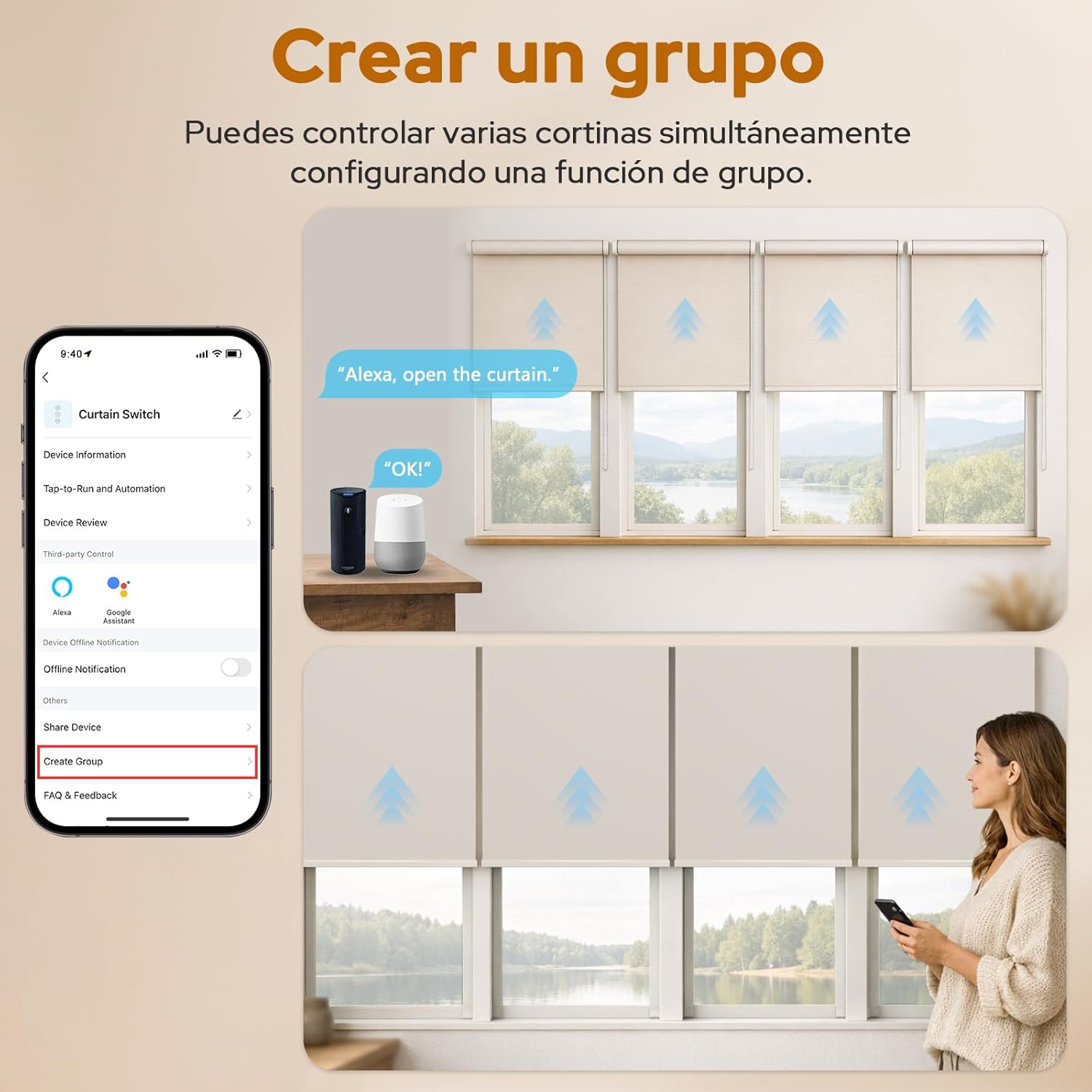
Figure 9: Creating a group in the Smart Life app to control multiple blinds simultaneously.
ساتنه
The LoraTap Smart Blind Switch requires minimal maintenance. Follow these guidelines:
- پاکول: د شیشې تختې په نرم سره پاک کړئ، دamp ټوکر. د کثافاتو پاکوونکو یا محلولونو څخه ډډه وکړئ کوم چې سطح ته زیان رسولی شي.
- د فرم ویئر تازه معلومات: Periodically check the Smart Life app for any available firmware updates for your switch to ensure optimal performance and security.
- بریښنایی خوندیتوب: If you notice any unusual behavior, such as flickering lights or unresponsive controls, disconnect power and consult a qualified electrician.
د ستونزو حل کول
| ستونزه | احتمالي لامل | د حل لاره |
|---|---|---|
| سویچ لمس ته ځواب نه ورکوي. | No power, loose wiring, or switch malfunction. | Check power supply. Ensure wiring is secure. If problem persists, contact support. |
| Cannot pair with Smart Life app. | Incorrect Wi-Fi frequency (5GHz), weak Wi-Fi signal, or switch not in pairing mode. | Ensure your phone is on 2.4 GHz Wi-Fi. Move closer to the router. Reset the switch to pairing mode (hold 'Pause' button). |
| د غږ کنټرول کار نه کوي. | Smart Life skill not enabled/linked, incorrect device name, or internet connectivity issues. | Verify Smart Life skill is enabled and linked in Alexa/Google Home app. Check device name. Ensure stable internet connection. |
| Blinds not opening/closing fully. | Motor calibration issue or incorrect operating time setting. | Adjust the operating time for the blinds in the Smart Life app (refer to "Operating Instructions - 4. Scheduling and Timer Functions"). |
مشخصات
| فیچر | تفصیل |
|---|---|
| برانډ | LoraTap |
| د ماډل شمیره | 602318824271 |
| ASIN | B07PHTX7ZQ |
| د ارتباط پروتوکول | وای فای (یوازې 2.4 GHz) |
| د کنټرول طریقه | Remote Control (App), Voice Control (Alexa, Google Home) |
| د عملیاتو Voltage | 240 ولټه |
| اوسنۍ درجه بندي | 10 Amperes |
| ځواک | 600 واټ (زیات) |
| مواد | Tempered Glass (Panel), Copper, Brass (Contact Material) |
| د سویچ ډول | Roller Blind Switch, 1-way |
| د نصب کولو ډول | دیوال غر |
| ابعاد (پکیج) | 10.8 x 10.1 x 4.4 سانتي متره؛ 180 جی |
| تصدیقونه | CE، RoHS |
| رنګ | سپین |
تضمین او ملاتړ
LoraTap offers a 3 کلن تضمین for this product. For any technical assistance, troubleshooting not covered in this manual, or warranty claims, please contact LoraTap customer support through their official webسایټ یا پرچون پلورونکي ته چې محصول پکې اخیستل شوی و. مهرباني وکړئ د ملاتړ سره اړیکه نیولو پر مهال خپل ماډل شمیره (602318824271) او د پیرود ثبوت چمتو ولرئ.
تاسو هم کولی شئ لیدنه وکړئ LoraTap Store on Amazon د نورو معلوماتو او محصولاتو لپاره.