
پیژندنه
Thank you for choosing the Torkase 66-inch Smart Floor Lamp. This intelligent LED torchiere offers versatile lighting with color-changing capabilities, dimmable brightness, and convenient control options via touch, mobile app, and voice commands through Alexa or Google Home. This manual provides essential information for safe operation, assembly, setup, and maintenance of your new smart lamp.

Image: The Torkase Smart Floor Lamp providing ambient lighting in a modern living space.
د خوندیتوب لارښوونې
- ټول مجلس او استعمال څخه دمخه لارښوونې ولولئ.
- l عملیات مه کوئamp د خراب شوي تار یا پلګ سره.
- ډاډ ترلاسه کړئ چې lamp په یوه مستحکم او هموار سطحه کې ایښودل شوی ترڅو د ټیپ کولو مخه ونیسي.
- دا ایلamp is for indoor use only. Do not expose to water or high humidity.
- د جلا کولو یا ترمیم کولو هڅه مه کوئamp. Contact customer support for service.
- د تودوخې سرچینو او مستقیم لمر څخه لرې وساتئ.
- Use only with a 2.4GHz Wi-Fi network for smart features.
د بسته محتويات
ډاډ ترلاسه کړئ چې ټولې برخې د راټولولو دمخه شتون لري:
- Lamp سر (د مدغم LED سره)
- د پورتنۍ قطب برخه
- د منځنۍ قطب برخه
- Lower Pole Section (with control panel and USB port)
- Lamp بیس
- د بریښنا اډاپټر
- د کارن لارښود
د مجلس لارښوونې
Follow these steps to assemble your Torkase Smart Floor Lamp:
- د بسته بندۍ ټولې برخې په احتیاط سره خلاص کړئ.
- Screw the Lower Pole Section into the Lamp Base clockwise until secure.
- Connect the Middle Pole Section to the Lower Pole Section by screwing it clockwise. Ensure the wires inside are not pinched.
- Connect the Upper Pole Section to the Middle Pole Section, screwing clockwise.
- L ضمیمه کړئamp Head to the Upper Pole Section, screwing clockwise until firmly in place.
- د بریښنا اډاپټر په l کې ولګوهampد بریښنا ان پټ، بیا اډاپټر په معیاري دیوال آوټ لیټ کې ولګوئ.

Image: Visual guide for assembling the lamp's pole sections and base.
Setup: App & Wi-Fi Pairing
To unlock smart features, connect your lamp to the Smart Life app:
- د سمارټ ژوند ایپ ډاونلوډ کړئ: لټون "Smart Life" in your smartphone's app store (iOS or Android) and install it.
- نوم لیکنه/ننوتل: اپلیکیشن خلاص کړئ او یو نوی حساب جوړ کړئ یا لاګ ان شئ که تاسو دمخه لرئ.
- د جوړه کولو حالت دننه کړئ: د ایل سرهamp plugged in, long-press the Power Button on the lamp's control panel for 5-7 seconds until the lamp starts blinking rapidly. This indicates it's in pairing mode.
- په اپلیکیشن کې وسیله اضافه کړئ: In the Smart Life app, tap the "+" icon in the top right corner to add a device. Select "Lighting" > "Light Source (Wi-Fi)" or allow the app to auto-discover the device.
- وائی فای سره وصل کړئ: Enter your 2.4GHz Wi-Fi network name and password. The lamp د 5GHz Wi-Fi ملاتړ نه کوي.
- د سترګو رپېدل تایید کړئ: ډاډ ترلاسه کړئ چې ایلamp is blinking rapidly in the app.
- جوړه کول: The app will begin connecting to the lamp. Once connected, the lamp will stop blinking and remain steadily lit. You can then rename the device in the app.
If pairing fails, ensure your Wi-Fi network is 2.4GHz, your password is correct, and the lamp is close to your router. Try resetting the lamp by unplugging it for 10 seconds and plugging it back in, then re-enter pairing mode.

Image: The Smart Life application displaying color and brightness controls for the lamp.
عملیاتي لارښوونې
ټچ کنټرول
دamp features a touch-sensitive control panel located on the lower pole section:
- Power Button (Circular Icon):
- Short Touch: Turn the lamp آن یا آف.
- Long Touch (5-7 seconds): Enter Wi-Fi pairing mode (lamp په چټکۍ سره سترګې پټوي).
- Color/Brightness Button (Square Icon):
- Short Touch: Cycle through 10 preset color modes.
- Long Touch: Adjust brightness from 1% to 100%. Release when desired brightness is reached.
- د USB چارج بندر: A built-in 5V 1A USB port is available for charging mobile devices or powering small USB accessories.

انځور: د l نږدې انځورamp's control panel, highlighting the power button, color/brightness button, and USB charging port.
App Control (Smart Life)
Once connected to the Smart Life app, you can access advanced controls:
- آن/بند: l بدل کړئamp ځواک
- د روښانتیا سمون: Precisely dim the light from 1% to 100%.
- Color Changing (RGBCW): Select from 16 million colors (RGB) or adjust white light temperature (CCT) from 2700K (warm white) to 6500K (cool daylight).
- د صحنې طریقې: Choose from pre-set lighting scenes or create custom scenes.
- د موسیقۍ ترکیب: Synchronize the lamp's lighting effects with music playing on your device.
- د وخت مهالویش: Set timers for the lamp to turn on/off at specific times.
- DIY Lighting Mode: Customize your own lighting effects and save them.

انځور: دamp's dimming capability shown across a range from 1% to 100% brightness.

انځور: دamp شوکasing its RGBW color-changing capabilities and music synchronization feature.
Voice Control (Alexa & Google Home)
Integrate your Torkase Smart Floor Lamp with Amazon Alexa or Google Home for hands-free control:
- د سمارټ لایف حساب لینک کړئ: In your Alexa or Google Home app, navigate to the "Skills" or "Works with Google" section. لټون "Smart Life" and enable the skill/service. Log in with your Smart Life account credentials.
- وسایل کشف کړئ: Once linked, ask your voice assistant to "Discover devices" or manually initiate device discovery in the app. Your Torkase lamp ښکاره به شي.
- غږیز حکمونه: تاسو اوس کولی شئ خپل l کنټرول کړئamp د غږیزو امرونو کارول. مثالamples:
- "الیکسا، چالان کړه [Lamp نوم]."
- "سلام ګوګل، [L] تنظیم کړئamp نوم] نیلي ته."
- "الیکسا، تیاره [Lamp Name] to 50 percent."
- "سلام ګوګل، [L] بدل کړهamp نوم] ګرم سپین ته."
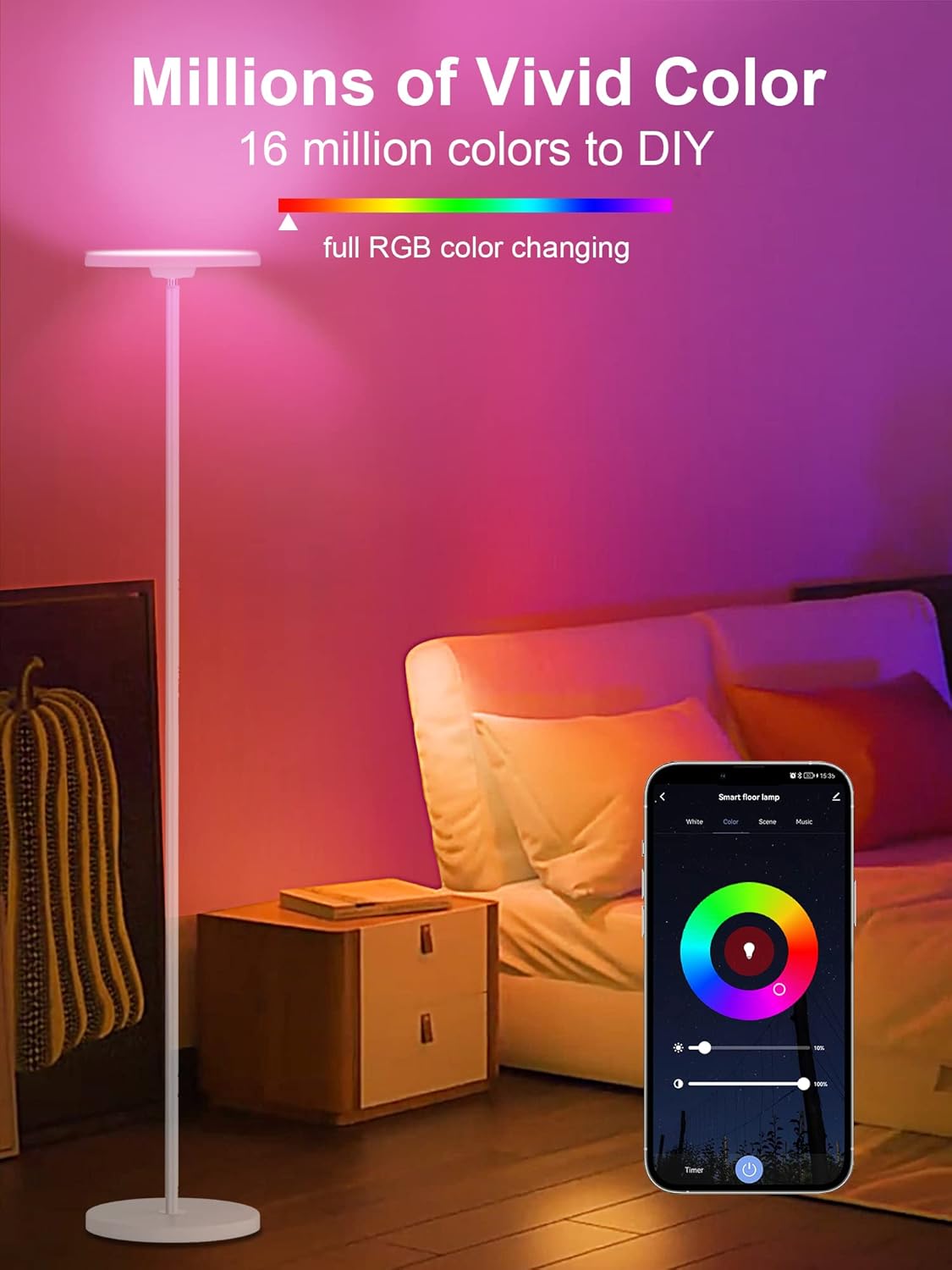
Image: A couple interacting with an Alexa device to control the smart floor lamp by voice.

Image: A smart floor lamp responding to a Google Assistant voice command in a contemporary living room setting.
ځانګړتیاوې ختمې شوېview
- RGBCW Multi-Color: Offers 16 million colors (RGB) and adjustable white light (Cool White to Warm White).
- Uplight & Downlight Design: Unique design projects uniform, eye-friendly light both upwards and downwards.
- ډیر روښانه: Provides 2000LM brightness at 6000K daylight, equivalent to a 150-watt incandescent bulb.
- د حافظې دنده: دamp remembers your last brightness and color settings when turned off and on.
- د تنظیم وړ Lamp سر: دamp head can be adjusted by 30 degrees to direct light as needed.
- مستحکم ایلamp اساس: Designed for stability and safety.
د ستونزو حل کول
- Lamp نه چالانېدل: ډاډ ترلاسه کړئ چې د بریښنا اډاپټر په خوندي ډول په دواړو l کې نښلول شویamp او د دیوال کاري ځای.
- Lamp not connecting to Wi-Fi:
- Confirm your Wi-Fi network is 2.4GHz. 5GHz networks are not supported.
- ډاډ ترلاسه کړئ چې lamp is in rapid blinking mode (long-press power button).
- د دقت لپاره د خپل وای فای پټنوم وګورئ.
- L حرکت وکړئamp closer to your Wi-Fi router during setup.
- خپل روټر بیا پیل کړئ او بیا هڅه وکړئ.
- د غږ کنټرول کار نه کوي:
- Verify that your Smart Life account is correctly linked to Alexa or Google Home.
- ډاډ ترلاسه کړئ چې lamp is online in the Smart Life app.
- په خپل الیکسا/ګوګل کور ایپ کې د وسایلو بیا کشف کولو هڅه وکړئ.
- Use the exact name you assigned to the lamp in the Smart Life app.
- Lamp unresponsive to touch control: l خلاص کړئamp for 10 seconds, then plug it back in to reset.
مشخصات
| د ماډل شمیره | TK-FL-A-White |
| ابعاد (D x W x H) | ۱۶"د x ۲۶"وچ x ۴۷"ح |
| د توکي وزن | 8.8 پونډه |
| د رڼا سرچینې ډول | LED |
| روښانتیا | 2000 Lumens |
| د رنګ د حرارت درجه | 2700K - 6500K (RGBCW) |
| واټtage | 25 واټ |
| والیtage | 120 ولټه |
| د کنټرول طریقه | App, Touch, Voice (Alexa, Google Assistant) |
| ارتباط | وای فای (یوازې 2.4GHz) |
| مواد | فلزي، پلاستيک |
| د USB محصول | 5V 1A |
ساتنه
ستاسو د l د اوږد عمر او غوره فعالیت ډاډمن کولو لپارهamp:
- پاکول: د پاکولو دمخه بریښنا قطع کړئ.amp د نرم، وچ ټوکر سره. د کثافاتو پاکوونکي یا محلول مه کاروئ.
- ذخیره کول: که چیرې د l ذخیره کولamp, disassemble it carefully and store it in its original packaging in a dry, cool place.
- LEDs: د LED د رڼا مدغم سرچینه د اوږدې مودې کارونې لپاره ډیزاین شوې او د کاروونکي لخوا بدلیدونکې نه ده.
تضمین او ملاتړ
Torkase provides a 360-day warranty for this product, covering manufacturing defects from the date of purchase. Additionally, lifetime technical support is available.
For warranty claims, technical assistance, or any questions regarding your Torkase Smart Floor Lamp, please contact Torkase customer support through the retailer's platform or visit the official Torkase webد اړیکو معلوماتو لپاره سایټ.
Please have your model number (TK-FL-A-White) and proof of purchase ready when contacting support.