
پیژندنه
This manual provides detailed instructions for the installation, operation, and maintenance of your Decdeal WiFi Thermostat for Gas Boilers. Please read this manual thoroughly before installation and use to ensure proper function and safety. This thermostat features a large LCD touchscreen, app control, voice control compatibility with Alexa and Google Home, and programmable scheduling for optimal comfort and energy efficiency.
محصول پای ته ورسیدview

مخکی view of the Decdeal WiFi Thermostat, showcasing its sleek design and large LCD display.
The Decdeal WiFi Thermostat (Model GC) is designed for gas boiler systems. It offers advanced features for managing your home's heating, including:
- د پروګرام وړ طریقې: 5+1+1 weekly programming for customized heating schedules.
- د APP کنټرول: Remote control via the "My Smart Life" app (or Tuya Smart app) from your mobile device.
- د غږ کنټرول: Compatible with Amazon Alexa, Google Home, and Tmall Genie.
- Modern LCD Screen: 4.8-inch backlit color LCD touchscreen for easy readability and operation.
- Multifunctional Assistant: Integrated humidity sensor display, time, and UV index.
- د ماشوم قفل: Option to fully or partially lock the touchscreen to prevent accidental changes.
چمتو کول
۳.۲. فزیکي نصب او تارونه
مهم: Installation should be performed by a qualified electrician. Ensure power is turned off at the main circuit breaker before beginning any wiring.

Wiring diagram for the GC model thermostat, showing connections for gas/water boiler, power supply, and optional sensor.
The GC model is specifically for water/gas boiler systems. Refer to the diagram above for correct wiring connections:
- Clean Contacts (Boiler): Connect to terminals 1 and 2.
- Neutral Line (N): Connect to terminal 3.
- Live Wire (L): Connect to terminal 4.
- د تودوخې سینسر (اختیاري): Connect to terminals 5 and 6.
The thermostat is suitable for standard wall switch boxes (86mm, European 60mm round, or 503 installation boxes).
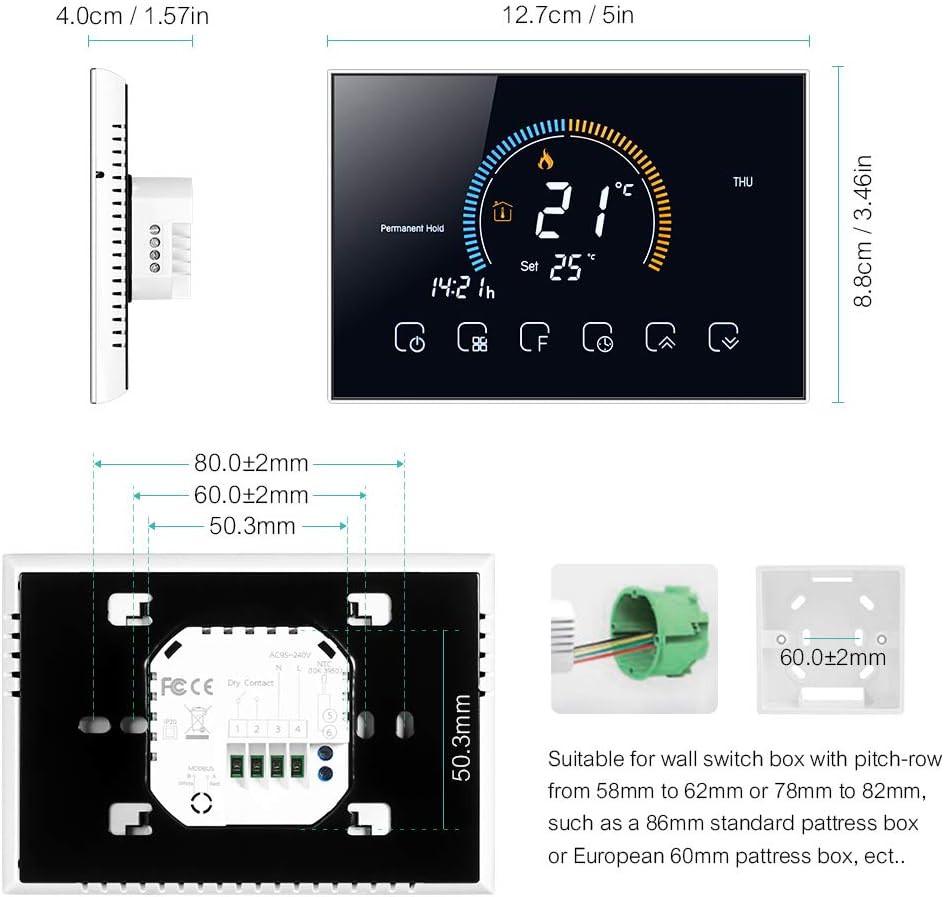
Detailed dimensions and mounting plate for the thermostat, indicating compatibility with various wall boxes.
۳. د اپلیکیشن نصب او د وای فای اتصال
The thermostat connects to your home Wi-Fi network (2.4 GHz only) for remote control via a smartphone app. Download the "My Smart Life" app (or Tuya Smart app) from your mobile app store.
- Ensure your mobile device is connected to a 2.4 GHz Wi-Fi network. The thermostat does not support 5 GHz networks.
- Turn off the thermostat screen by pressing the power button.
- Press and hold the "Up" arrow button (usually the rightmost arrow) for approximately 8 seconds until the Wi-Fi icon on the thermostat screen starts blinking rapidly. This indicates pairing mode.
- Open the "My Smart Life" app on your smartphone.
- Select "Add Device" or the "+" icon to add a new device.
- Choose the corresponding thermostat type from the list of devices (e.g., "Thermostat (Wi-Fi)").
- Follow the on-screen instructions in the app to complete the connection. You may need to confirm the Wi-Fi network and enter its password.
Video demonstrating the Wi-Fi connection process and basic app operation for the thermostat.
For a detailed multilingual manual, including Italian, scan the QR code below:

Scan this QR code to access the comprehensive multilingual user manual online.
عملیاتي لارښوونې
۴.۲. د LCD ډسپلې اوورview

تفصيلي view of the thermostat's LCD display, highlighting various indicators and touch buttons.
The LCD display provides real-time information and allows interaction via touch buttons. Key elements include:
- (1) Heating On: کله چې د تودوخې سیسټم فعال وي په ګوته کوي.
- (2) Periods: Shows the current programming period.
- (3) Monday to Sunday: د اونۍ د ورځې شاخص.
- (4) External Sensor: Indicates if an external sensor is connected.
- (5) Down Button: تودوخه کموي یا مینو ته ځي.
- (6) Up Button: تودوخه زیاتوي یا مینو ته ځي.
- (7) Clock: اوسنی وخت ښیې.
- (8) Advanced Options: Accesses advanced settings.
- (9) Mode: Switches between operating modes (Manual, Program, Economy).
- (10) ځواک: ترموسټاټ چالان/بندوي.
- (11) Time: د اوسني وخت ښودنه.
- (12) Set Temp: Desired temperature setting.
- (13) Menu: د مینو اختیارونو ته لاسرسی لري.
- (14) Room Temp: د اوسنۍ خونې د حرارت درجه.
- (15) Lock: Indicates if the screen is locked.

Close-up of the LCD display and responsive touch keys for easy interaction.
2. عملیاتي طریقې
The thermostat offers several operating modes to suit your needs:
- لاسي حالت: In this mode, you can manually set the heating temperature according to your immediate needs. The thermostat will maintain this set temperature until changed.
- Programmable Mode (5+1+1): This mode allows you to set a weekly heating schedule with different temperature settings for weekdays (5 days), Saturday (1 day), and Sunday (1 day). You can define up to 6 periods per day. The thermostat will automatically follow this schedule.
- د اقتصاد حالت: In this mode, the temperature is maintained at a fixed 20°C (or other preset economy temperature) and cannot be adjusted manually. This is ideal for energy saving when you are away or during specific times.

The thermostat display showing weather information and the mobile app interface for setting a 6-period programmable schedule.
3. د اپلیکیشن کنټرول
Control your thermostat remotely using the "My Smart Life" app. This allows you to adjust settings, change modes, and monitor your home's temperature from anywhere.

The mobile app interface showing remote control capabilities for the thermostat, including temperature adjustment and mode selection.
4. د غږ کنټرول
The thermostat is compatible with popular voice assistants like Amazon Alexa and Google Home. Once connected to your smart home system, you can use voice commands to control your heating.
- Exampحکم: "Alexa, set bedroom to 25 degrees."
- Exampحکم: "Hey Google, turn on the heating."
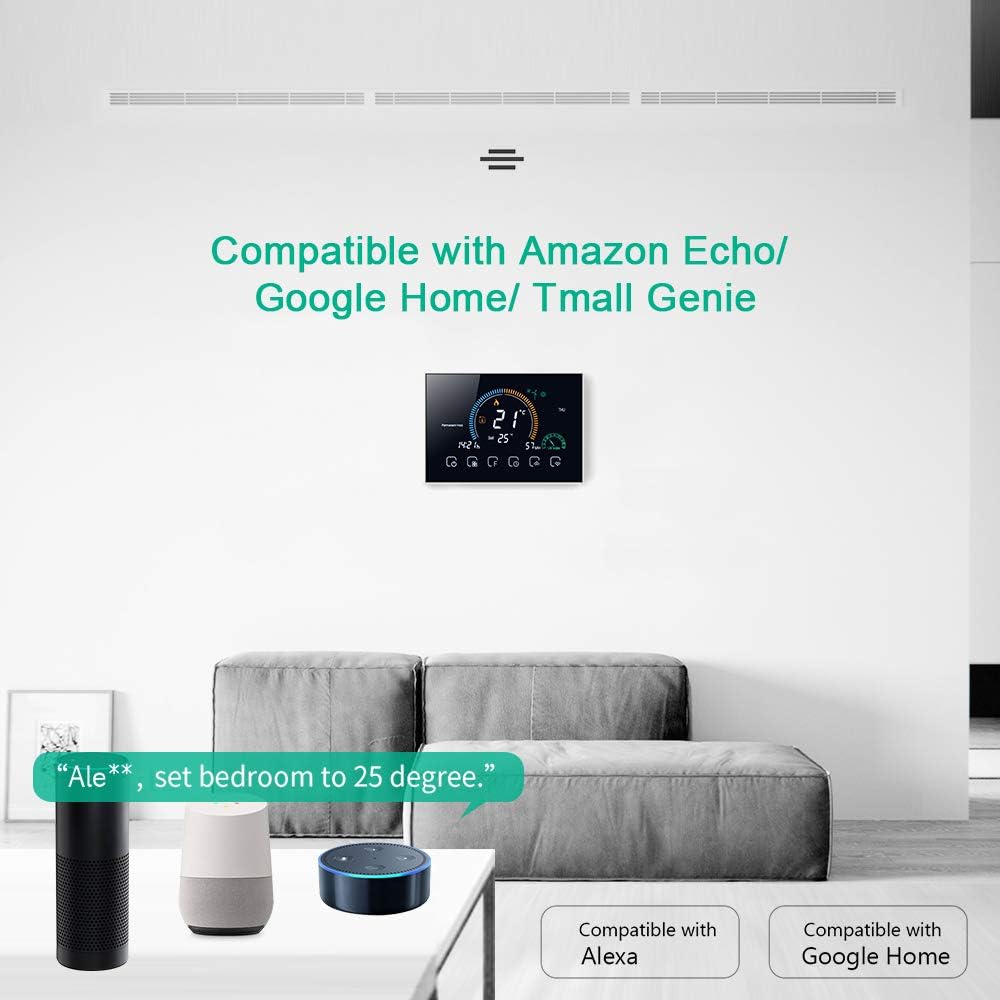
The thermostat displayed in a living room setting with Amazon Echo and Google Home devices, illustrating voice control compatibility.
5. د ماشوم د تالاشۍ فعالیت
To prevent accidental changes to settings, the thermostat features a child lock. Press and hold the lock button (usually the padlock icon) for 5 seconds to activate or deactivate the lock. You can choose between a full lock (all buttons disabled) or a partial lock (only temperature adjustment disabled).
ساتنه
- پاکول: Wipe the screen and body with a soft, dry cloth. Do not use abrasive cleaners or solvents.
- د سافټویر تازه معلومات: Ensure your app is up-to-date for the latest features and performance improvements. Firmware updates for the thermostat may be available through the app.
- د بریښنا دوره: If the thermostat becomes unresponsive, try turning off the power at the circuit breaker for a few minutes, then restore power.
د ستونزو حل کول
| ستونزه | احتمالي لامل | د حل لاره |
|---|---|---|
| ترموسټاټ نه چالانېږي. | ناسم تارونه یا د بریښنا نشتوالی. | Verify wiring connections (L and N terminals) and ensure power is supplied to the thermostat. Consult a qualified electrician if unsure. |
| د وای فای / اپلیکیشن سره وصل نشو. | Incorrect Wi-Fi frequency (5GHz), incorrect password, or device not in pairing mode. | Ensure your router is broadcasting a 2.4 GHz Wi-Fi signal and your phone is connected to it. Put the thermostat into pairing mode (hold Up button for 8 seconds). Re-enter Wi-Fi password carefully. |
| Flame icon flickering / High temperature protection. | External sensor not connected or incorrectly configured. | If an external sensor is not used, ensure the thermostat's sensor type setting is correct. Access advanced settings (hold 'F' button), navigate to 'AL', and adjust to 'IN' if necessary. |
| د حرارت درجه ناسم لوستل. | Thermostat calibration needed. | Access advanced settings to calibrate the temperature. (Specific steps for calibration are not detailed in the provided data, refer to the full manual via QR code). |
| Clock losing time / Program not running correctly. | Internal clock drift or Wi-Fi connection issues preventing time synchronization. | Ensure a stable Wi-Fi connection for automatic time synchronization. If issues persist, a factory reset and re-pairing might be necessary. |
| Thermostat frequently loses app connection. | Unstable Wi-Fi signal or router interference. | Ensure the thermostat is within good range of your 2.4 GHz Wi-Fi router. Try restarting your router. If issues persist, consider repositioning the router or using a Wi-Fi extender. |
مشخصات
| فیچر | تفصیل |
|---|---|
| برانډ | Decdeal |
| د ماډل نوم | GC |
| د محصول ابعاد | 4P x 12.7L x 8.8H cm |
| د کنټرولر ډول | Amazon Alexa, Google Assistant, Button |
| ځانګړي ځانګړتیاوې | APP Control, Voice Control, Humidity Sensor |
| ځانګړي استعمالونه | بویلر |
| د ارتباط ټیکنالوژي | وای فای (2.4 GHz) |
| د بریښنا سرچینه | د AC ځواک ځواک |
| والیtage | 240 ولټه |
| د ښودلو ډول | LCD |
| د سکرین اندازه | ۷۸۷ انچه |
| د نصب کولو ډول | دیوال غر |
| شاته څراغ | هو |
| بریښنایی بریښنا | 1.5 واټ |
| د توکي وزن | 231 ګرامه |
| مواد | PC + ABS |
تضمین او ملاتړ
For warranty information and technical support, please refer to the documentation included with your product or contact Decdeal customer service. You can also find additional resources by scanning the QR code provided in the Setup section.