
1. پیژندنه
This manual provides detailed instructions for the installation, operation, and maintenance of your FLEXISPOT CH2B Desktop PC CPU Holder. Please read this manual thoroughly before installation and use to ensure proper function and safety. Keep this manual for future reference.
2. محصول ختم شوview
The FLEXISPOT CH2B CPU Holder is designed to securely store your desktop computer tower, optimizing workspace and protecting your PC from dust and accidental damage. Its adjustable design allows for versatile mounting options and compatibility with various CPU sizes.
کلیدي ځانګړتیاوې:
- دوامدار ساختمان: Made from carbon steel material with double protection for enhanced security and stability.
- د تنظیم وړ چوکاټ: Features telescopic length and width adjustments to accommodate a wide range of CPU sizes. Height is adjustable from 300-565 mm, and width from 70-203 mm.
- د لوړ بار وړتیا: Supports a maximum load of 30kg.
- کیفیت لرونکي مواد: Constructed from varnished and cold-rolled steel for durability.
- Rotational Functionality: Suspended off the floor and 360° adjustable, providing more spacious under-table area and freer leg movement.
- مدغم ډیزاین: Engineered to move with your desk, ensuring cables are not restricted during height adjustments.
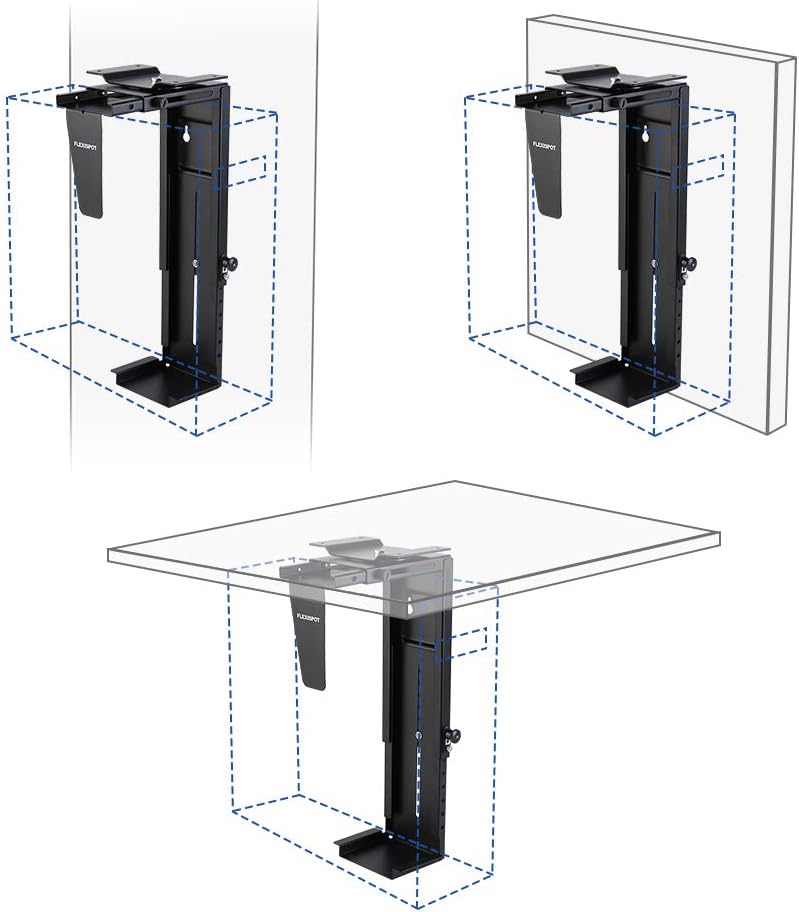
- Multiple Installation Modes: Can be mounted on the side of a desk, underneath a desk, or on a wall.
د محصول اجزا:
Familiarize yourself with the main components of the FLEXISPOT CH2B CPU Holder.


3. د خوندیتوب معلومات
- Ensure all mounting hardware is securely fastened before placing the CPU in the holder.
- د 30kg اعظمي بار ظرفیت څخه ډیر مه کوئ.
- Verify that the CPU holder is compatible with your computer's dimensions before installation.
- Avoid installing the holder in locations where it could obstruct movement or create a tripping hazard.
- Regularly check all connections and adjustments to ensure they remain tight and secure.
4. ترتیب او نصب کول
The FLEXISPOT CH2B CPU Holder offers flexible installation options to suit your workspace needs. Follow these steps for proper setup.
Adjusting the Holder:
Before mounting, adjust the holder to fit your CPU tower's dimensions.
- د لوړوالی سمون: Loosen the vertical adjustment knob (refer to Figure 3) and slide the holder's base up or down to match your CPU's height. Tighten the knob securely.
- د عرض تعدیل: Loosen the horizontal adjustment mechanism and expand or contract the holder's side panels to snugly fit your CPU's width. Tighten the mechanism securely.

د نصبولو اختیارونه:
The CH2B can be installed in multiple ways:
- Under-Desk Mount: Attach the holder directly to the underside of your desk. This is ideal for standing desks as the holder moves with the desk.
- Side-Desk Mount: Secure the holder to the side panel of your desk.
- وال ماونټ: For maximum floor and desk space, the holder can be mounted to a sturdy wall.
Refer to the included hardware and specific instructions for your chosen mounting method. Ensure the mounting surface is capable of supporting the combined weight of the holder and your CPU (up to 30kg).


5. عملیات
Once installed, the FLEXISPOT CH2B CPU Holder requires minimal operation. Its primary function is to securely hold your CPU.
- Movement with Desk: If mounted under a height-adjustable desk, the CPU holder will move synchronously with the desk's height adjustments, ensuring cables remain untangled and the CPU stays off the floor.
- گردش: The holder allows for 360° rotation, which can be useful for accessing ports on the back of the CPU without removing it from the holder. Gently rotate the holder to the desired position.
6. ساتنه
To ensure the longevity and proper function of your CPU holder, follow these simple maintenance guidelines:
- پاکول: هولډر په نرم، دamp د دوړو او خاورې د لرې کولو لپاره ټوکر. د کثافاتو پاکوونکو یا محلولونو څخه ډډه وکړئ.
- معاینه: Periodically check all screws, bolts, and adjustment knobs to ensure they are tight. Re-tighten if necessary.
- د بار چک کول: Ensure the weight of your CPU does not exceed the 30kg capacity.
7. ستونزه حل کول
If you encounter any issues with your FLEXISPOT CH2B CPU Holder, refer to the following common problems and solutions:
- CPU does not fit: Verify that your CPU's dimensions (height and width) are within the adjustable range of the holder (Height: 300-565 mm, Width: 70-203 mm). Adjust the holder as described in Section 4.
- هولډر بې ثباته احساس کوي: Ensure all mounting screws are securely fastened to the desk or wall. Check that the adjustment knobs for height and width are fully tightened to secure the CPU. Confirm the CPU weight does not exceed 30kg.
- د هولډر په ګرځولو کې ستونزه: Ensure no cables are snagged or obstructing the rotation mechanism. Check for any debris that might be impeding movement.
- Cables are restricted: If the holder is mounted to a height-adjustable desk, ensure cables have enough slack to accommodate the full range of desk motion.
8. مشخصات
| مشخصات | تفصیل |
|---|---|
| برانډ | FLEXISPOT |
| د ماډل شمیره | CH2B |
| رنګ | تور |
| مواد | Carbon Steel, PC (Polycarbonate) |
| د محصول مطابقت | کمپیوټرونه |
| د توکي وزن | 2.86 کیلوګرامه |
| د تنظیم وړ لوړوالی | 300-565 ملي متره |
| د تعدیل وړ عرض | 70-203 ملي متره |
| د اعظمي بار ظرفیت | 30 کیلو ګرامه |
| د پای ډول | رنګ شوی |
| ځانګړی ځانګړنه | Portable (referring to holder's mobility) |
| د کوټې ډول | دفتر |
9. تضمین او ملاتړ
For warranty information, please refer to the documentation provided with your purchase or visit the official FLEXISPOT website. If you require technical support or have questions not covered in this manual, please contact FLEXISPOT customer service through their official channels.


