
فلیکس سپاټ EN2
FLEXISPOT EN2 Electric Height Adjustable Standing Desk Instruction Manual
ماډل: EN2 | برانډ: FLEXISPOT
پیژندنه
This manual provides comprehensive instructions for the assembly, operation, and maintenance of your FLEXISPOT EN2 Electric Height Adjustable Standing Desk. Please read this manual thoroughly before use to ensure proper function and longevity of your product.
The FLEXISPOT EN2 features a whole-piece bamboo desktop, a removable power outlet with USB ports, a 6-button digital controller with 4 memory presets, and a durable steel frame designed for a stable and productive workspace.
د خوندیتوب معلومات
- د وزن اعظمي ظرفیت: ۳۰۰ پونډه (۱۳۶ کیلوګرامه). له دې حد څخه مه اوړئ.
- Assembly requires an electric drill (not included). Exercise caution during assembly.
- د میز چلولو دمخه ډاډ ترلاسه کړئ چې ټولې اړیکې خوندي دي.
- د کار پرمهال ماشومان او څاروي له میز څخه لرې وساتئ.
- Avoid contact with water or abrasive materials during cleaning.
تنظیم او مجلس
Your FLEXISPOT EN2 desk will arrive in two separate packages, which may be shipped separately. Assembly is required and is recommended for two people to facilitate handling of components. An electric drill is necessary for proper setup, but is not included.
اجزاء پای ته ورسیدلview

شکل 1: پایview of FLEXISPOT EN2 desk components. This image displays the various parts included for assembly, such as the desktop, leg frames, and hardware.
د کیبل مدیریت
The desk includes a cable management device to help organize cords, contributing to a tidy workspace. Fasteners and Velcro straps are provided to secure cables neatly under the desktop.

Figure 2: Illustration of effective cable management. The "Before" section shows disorganized cables, while the "After" section demonstrates how the integrated cable management system tidies them.
د مجلس ویډیو
Video 1: Flexispot Standing Desk - Embrace a Healthier Lifestyle. This official video demonstrates the desk's features and includes brief segments on assembly and operation.
عملیاتي لارښوونې
څو اړخیز کنټرولر
The desk is equipped with a 6-button digital controller for easy height adjustment and memory preset functions. The controller features an LED display showing the current height.

شکل 3: مفصل view of the multifunctional controller. It shows the LED display, up/down arrows, and four programmable height setting buttons.
د لوړوالی سمون
- د کارولو پورته (^) او ښکته (v) arrows to manually adjust the desk height.
- The motorized system adjusts smoothly from 28.1 inches (71.4 cm) to 45.7 inches (116.1 cm).
- The motor operates quietly at less than 50 dB.
د حافظې پریزیټ
The controller allows you to save up to 4 preferred height settings for quick transitions between sitting and standing positions.
- د پورته/ښکته تیرونو په کارولو سره میز د خپلې خوښې لوړوالي سره سم تنظیم کړئ.
- فشار ورکړئ "م" button. The LED display will flash.
- د شمېرل شوي مخکینۍ تڼۍ څخه یو فشار ورکړئ (۳، ۴، ۵، یا ۶) while the display is flashing to save the current height to that preset.
- د خوندي شوي لوړوالي د یادولو لپاره، په ساده ډول د اړونده شمیرې سره سم تڼۍ فشار ورکړئ.
Removable Desktop Power Outlet
The desktop includes a removable power outlet with 3 AC outlets and 2 USB charging ports (5V/2A). This can be clipped to the back or side of your desk for convenient access.

Figure 4: The removable desktop power outlet, featuring 3 AC outlets (125V/12A) and 2 USB ports (5V/2A) for charging devices.
د ټکر ضد سیسټم
The desk is equipped with a smart anti-collision system. If the desk encounters an obstruction during height adjustment, it will stop and reverse slightly to prevent damage.
ساتنه
- Dust regularly with a dry cloth to keep the desktop clean.
- Avoid contact with water or abrasive cleaning materials to prevent damage to the bamboo surface.
- په دوره یي ډول ټول پیچونه او اړیکې وګورئ ترڅو ډاډ ترلاسه شي چې دوی کلک او خوندي پاتې دي.
د ستونزو حل کول
If you encounter any issues with your FLEXISPOT EN2 desk, please refer to the following general advice:
- میز نه حرکت کوي: Check all power connections and ensure the power outlet is functioning. Verify that the control panel is properly connected.
- نا مساوي حرکت: ډاډ ترلاسه کړئ چې میز په یوه هواره سطحه کې ایښودل شوی دی. وګورئ چې د پښو ټولې برخې په خوندي ډول تړل شوي دي.
- د تېروتنې کوډونه په ښودلو کې: Consult the full troubleshooting guide available on the FLEXISPOT website or contact customer support for specific error code interpretations.
For further assistance, please contact FLEXISPOT customer support.
مشخصات
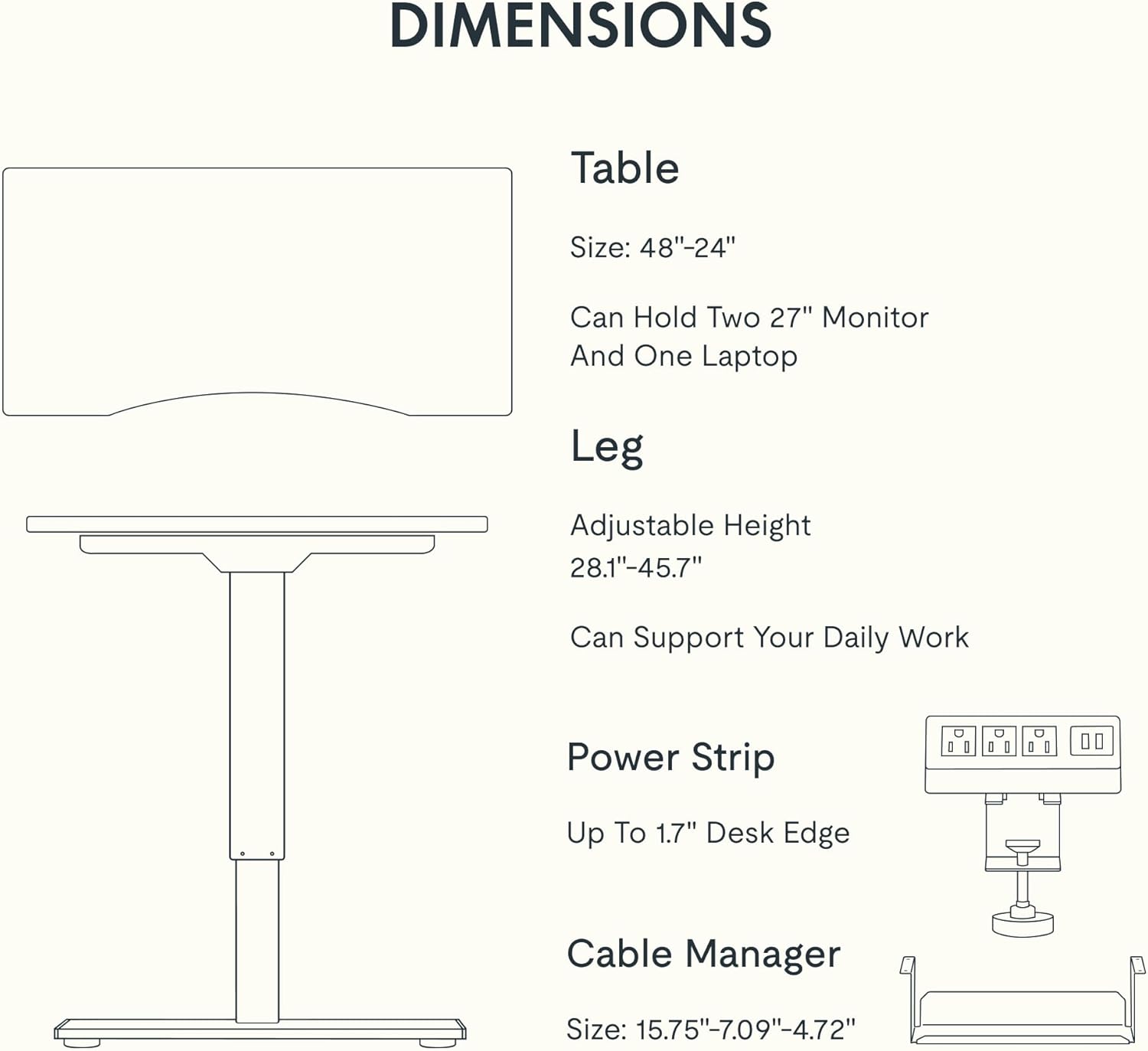
Figure 5: Dimensional specifications of the FLEXISPOT EN2 desk. This diagram illustrates the table size, adjustable height range, and dimensions of the power strip and cable manager.
| فیچر | تفصیل |
|---|---|
| برانډ | FLEXISPOT |
| د ماډل شمیره | EN2 |
| د ډیسټاپ مواد | Whole-Piece Bamboo |
| د چوکاټ مواد | د الماس فولاد |
| د محصول ابعاد (د x څلویښتم x څلویښتم) | ۹.۲۵" عرض x ۱۲" عرض x ۲.۹۴" قد (۲۳.۵ سانتي متره طول x ۳۰.۵ سانتي متره طول x ۷.۵ سانتي متره قد) |
| د تنظیم وړ لوړوالی سلسله | ۲۵" - ۳۵" (۶۳ سانتي متره - ۹۰ سانتي متره) |
| د اعظمي وزن ظرفیت | ۱۱.۵۷ پونډه (۵.۲۵ کیلو ګرامه) |
| د موټرو شور کچه | له 50 dB څخه کم |
| بریښنایی رسنۍ | ۳ د AC آوټ لیټونه (۱۲۵V/۱۲A)، ۲ د USB چارج کولو پورټونه (۵V/۲A) |
| مجلس ته اړتیا ده | Yes (Recommended 2 people, electric drill not included) |
تضمین او ملاتړ
FLEXISPOT provides the following warranty for your EN2 standing desk:
- ۱ کلن تضمین: چوکاټونه، موټورونه، او نور میخانیکي وسایل پوښي.
- ۱ کلن تضمین: کنټرولرونه، سویچونه، او برقیات پوښي.
For customer support, warranty claims, or additional product information, please visit the official FLEXISPOT webسایټ یا د دوی د پیرودونکو خدماتو څانګې سره اړیکه ونیسئ. تاسو کولی شئ د په ایمیزون کې د FLEXISPOT پلورنځی.
Ask a question about this manual
Ask about setup, troubleshooting, compatibility, parts, safety, or missing instructions. Manuals+ will review the question and use this page’s manual context to help answer it.