
1. پیژندنه
This manual provides instructions for the proper setup, operation, and maintenance of your Decdeal J900 USB Wired Gaming Mouse. Please read this manual thoroughly before using the product to ensure optimal performance and longevity.
2. د محصول ب Featuresې
- د تنظیم وړ DPI: Supports 800/1600/2400/3200/4800/6400 DPI settings for precise control.
- د RGB شاته رڼا: Features 7 programmable RGB backlight modes for customizable visual effects.
- ارګونومیک ډیزاین: Engineered for comfortable hand feel, reducing fatigue during extended use.
- Honeycomb Hollow Design: Promotes ventilation and cooling, preventing hot hands and palms.
- پلګ او پلی کول: USB powered, no additional drivers required for operation.
- دوامدار سویچونه: Equipped with switches rated for 20 million clicks.

شکل ۳: د اړخ پروfile of the Decdeal J900 mouse, detailing its ergonomic design, maximum 6400 DPI, customizable RGB lighting, 5G laser sensor, and 1000Hz polling rate for responsive performance.
3. ترتیب کول
- Unpack the Decdeal J900 USB Wired Gaming Mouse from its packaging.
- په خپل کمپیوټر (ډیسکټاپ یا لیپ ټاپ) کې یو موجود USB پورټ ومومئ.
- د موږک USB نښلونکی په USB پورټ کې دننه کړئ.
- The mouse is plug-and-play; no additional software or drivers are required for basic functionality. The operating system will automatically detect and install the necessary components.
4. عملیاتي لارښوونې
۴.۴. د DPI سمون
The Decdeal J900 mouse features six adjustable DPI levels to suit various tasks and preferences. The DPI can be cycled through using the dedicated DPI button located on the top of the mouse, behind the scroll wheel.
- Press the DPI button to cycle through the available settings: 800, 1600, 2400, 3200, 4800, and 6400 DPI.
- Each DPI level may correspond to a specific LED color indicator (refer to Figure 4.1 for details).

Figure 4.1: This diagram shows the six adjustable DPI levels (800, 1600, 2400, 3200, 4800, 6400) of the Decdeal J900 mouse, indicating how to cycle through them.
4.2. RGB Backlight Modes
The mouse offers 7 programmable RGB backlight modes. These modes can be changed using the RGB light mode switch located on the underside of the mouse.
- Flip the mouse over to locate the RGB light mode switch.
- Press the switch to cycle through different lighting effects, including Rainbow, DPI Color Breath, Keep Light On, Close, Random Leisure, Random Sleep, and Random Sport modes.
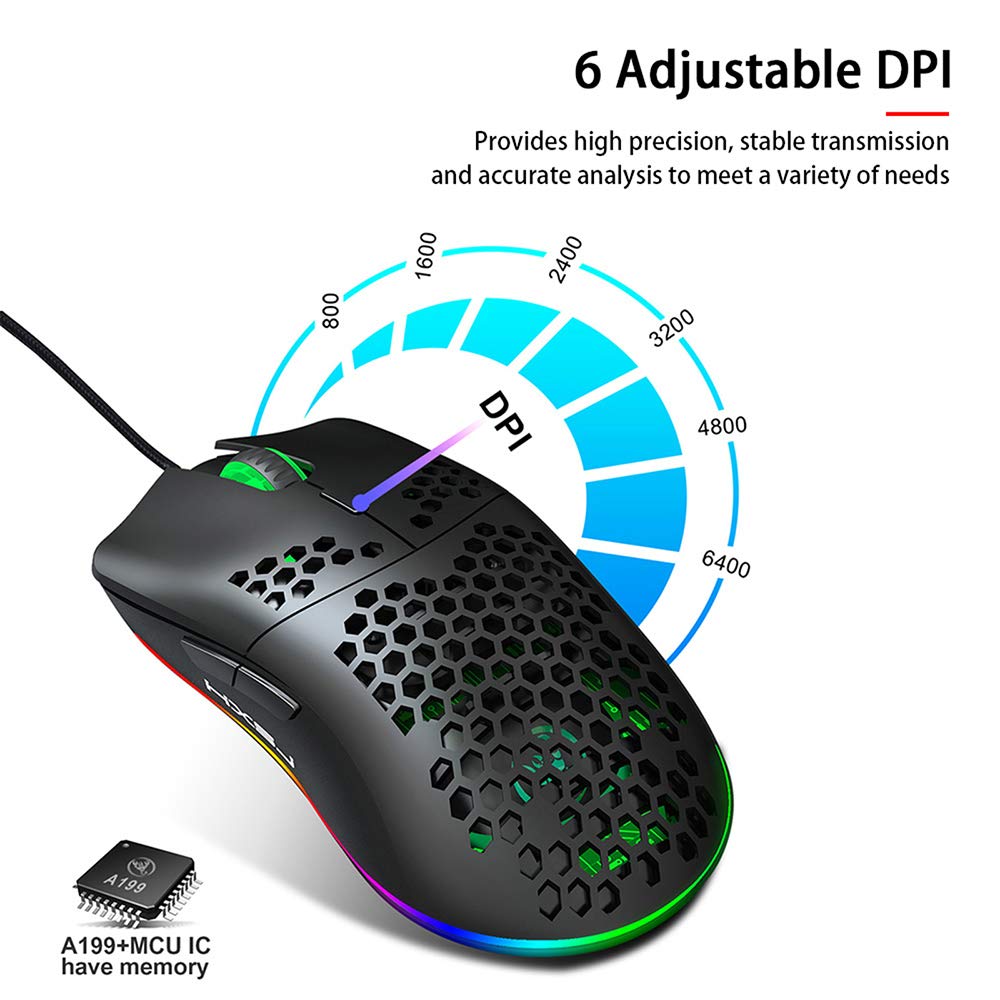
Figure 4.2: A hand is shown pressing the dedicated RGB light mode switch located on the underside of the Decdeal J900 mouse, demonstrating how to change lighting effects.

Figure 4.3: This image illustrates the adjustable DPI settings and various LED light modes available on the Decdeal J900 mouse.
5. ساتنه
To ensure the longevity and optimal performance of your Decdeal J900 mouse, follow these maintenance guidelines:
- پاکول: د موږک سطحه د پاکولو لپاره نرم، وچ ټوکر وکاروئ. د سختې خاورې لپاره، یو څه damp ټوکر کارول کیدی شي، ډاډ ترلاسه شي چې رطوبت داخلي برخو ته ننوځي. د سختو کیمیاوي موادو یا د کثافاتو پاکوونکو څخه ډډه وکړئ.
- د کیبل پاملرنه: Avoid bending or twisting the USB cable excessively. Do not pull the cable to disconnect the mouse; always grasp the USB connector.
- ذخیره کول: کله چې په کارولو کې نه وي، موږک په پاک او وچ چاپیریال کې د سختې تودوخې او مستقیم لمر وړانګو څخه لرې وساتئ.
6. ستونزه حل کول
If you encounter issues with your Decdeal J900 mouse, refer to the following common solutions:
- موږک ځواب نه ورکوي:
- ډاډ ترلاسه کړئ چې USB کیبل ستاسو د کمپیوټر د USB پورټ سره په خوندي ډول وصل دی.
- هڅه وکړئ چې موږک د بل USB پورټ سره وصل کړئ.
- خپل کمپیوټر بیا پیل کړئ.
- موږک په بل کمپیوټر کې ازموینه وکړئ ترڅو معلومه کړئ چې ستونزه په موږک کې ده یا په کمپیوټر کې.
- DPI نه بدلیږي:
- ډاډ ترلاسه کړئ چې تاسو د DPI سم تنظیم کولو تڼۍ فشاروئ.
- Check if the mouse is properly connected and powered.
- RGB Lights Not Working/Changing:
- Verify the RGB light mode switch on the underside of the mouse is being pressed correctly.
- Ensure the mouse is receiving power via the USB connection.
7. مشخصات
| برانډ | Decdeal |
| ماډل | J900 |
| د ارتباط ټیکنالوژي | د USB تار |
| د حرکت کشف ټیکنالوژي | نظري |
| د سمون وړ DPI | 800/1600/2400/3200/4800/6400 |
| شاته څراغ | RGB (۱۴ حالتونه) |
| د لاس لارښوونه | ښي لاس |
| د محصول ابعاد | 15 x 10 x 5 سانتي متره |
| د توکي وزن | 150 ګرامه |
| مطابقت لرونکي عملیاتي سیسټمونه | لینکس، وینډوز ۷، وینډوز ایکس پی (او نوي نسخې) |

Figure 7.1: An exploded diagram of the Decdeal J900 mouse, revealing its internal components such as the left button, Gundam 6400DPI sensor, transparent roller, ten-million-life microswitch, PCB circuit board, tail logo, RGB marquee glow ring, hollow base, and UPE foot sticker.
8. تضمین او ملاتړ
The Decdeal J900 USB Wired Gaming Mouse comes with a standard manufacturer's warranty. For specific warranty terms, duration, and support inquiries, please refer to the warranty card included with your product or contact Decdeal customer service directly. Keep your purchase receipt as proof of purchase for warranty claims.