
1. پیژندنه
د پیرودلو لپاره مننهasing the QFX E-B3 Bluetooth Professional High-Power Speaker. This manual provides essential information for the safe and efficient operation of your speaker. Please read it thoroughly before use and retain it for future reference.
The QFX E-B3 is designed to deliver powerful audio with features including Bluetooth connectivity, FM radio, USB/SD card playback, LED party lights, and a 250W power amplifier. It also supports True Wireless System (TWS) for stereo pairing with another compatible speaker.
2. د خوندیتوب معلومات
- د بریښنا سرچینه: Connect the speaker only to the specified power supply as indicated on the unit.
- وینټیلیشن: د سپیکر شاوخوا مناسب هوا ورکول ډاډمن کړئ. د هوا د بهېدو هیڅ لاره مه بندوئ.
- اوبه او رطوبت: This speaker is not waterproof. Do not expose it to rain, moisture, or any liquids to prevent electric shock or fire.
- تودوخه: سپیکر د تودوخې سرچینو لکه ریډیټرونو، د تودوخې راجسترونو، بخاریو، یا نورو وسایلو څخه لرې وساتئ چې تودوخه تولیدوي.
- پاکول: Unplug the speaker from the power outlet before cleaning. Use a dry cloth for cleaning. Do not use liquid cleaners or aerosol cleaners.
- خدمت کول: د دې محصول پخپله خدمت کولو هڅه مه کوئ. ټول خدمتونه وړ خدماتي پرسونل ته راجع کړئ.
- ځای په ځای کول: سپیکر په یوه مستحکم او فلیټ سطحه کېږدئ ترڅو د رالویدو مخه یې ونیول شي.
3. د بسته محتويات
ډاډ ترلاسه کړئ چې ټول توکي په کڅوړه کې شتون لري:
- QFX E-B3 High-Power Speaker
- مایکروفون
- ریموټ کنټرول
- د AC بریښنا کیبل
- د کارونکي لارښود (دا لاسوند)
4. محصول ختم شوview
The QFX E-B3 speaker features dual 15-inch woofers and a 1-inch tweeter, protected by a metal grill. It includes integrated handles and wheels for portability.

شکل 4.1: مخکی view of the QFX E-B3 Speaker.
Rear Panel Controls and Ports
The rear panel houses all input/output connections and control knobs.
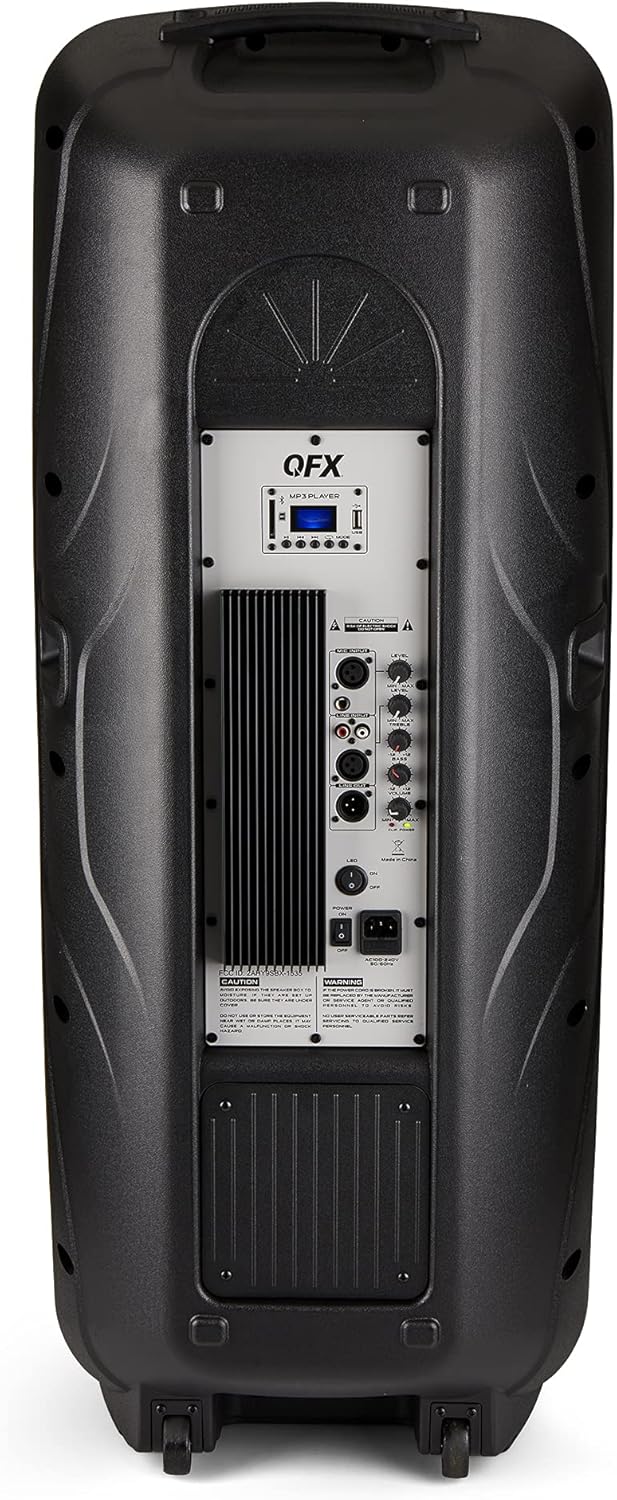
Figure 4.2: Rear panel with controls and ports.
- د بریښنا سویچ: سپیکر چالان/بندوي.
- د AC داخلول: Connects the AC power cable.
- USB/SD Card Ports: د آډیو غږولو لپاره fileد USB ډرایو یا SD کارتونو څخه.
- د ښودلو سکرین: د اوسني حالت او ټریک معلومات ښیې.
- د حالت تڼۍ: Switches between input modes (Bluetooth, FM, USB, SD, RCA).
- د پلی کولو/پاز بټن: د USB/SD/بلوتوث لپاره پلې بیک کنټرولوي.
- مخکینی/راتلونکی ټریک بټن: ټریکونه یا ایف ایم سټیشنونه نیویګیټ کوي.
- د ماسټر حجم نوب: ټول حجم تنظیموي.
- Bass/Treble Control Knobs: ټیټ او لوړ فریکونسۍ تنظیموي.
- د XLR مایکروفون داخلول: Connects a wired microphone.
- Microphone Volume/Echo Knobs: Adjusts microphone volume and echo effect.
- د RCA ان پټ (L/R): Connects external audio devices via RCA cables.
- XLR Line Input/Output: د نورو آډیو تجهیزاتو سره د نښلولو لپاره.
5. ترتیب کول
لومړنی ځای پرځای کول
Place the speaker on a stable, flat surface. For optimal sound, position it in a central location within the listening area. The integrated wheels and handle allow for easy transport.

Figure 5.1: Speaker being moved with handle and wheels.
د بریښنا پیوستون
- ډاډ ترلاسه کړئ چې د سپیکر د بریښنا سویچ په بند حالت کې دی.
- Connect the AC power cable to the AC input on the rear panel of the speaker.
- د AC بریښنا کیبل بله پای په معیاري دیوال آوټ لیټ کې ولګوئ.
- Flip the power switch to the ON position. The display screen will illuminate.
6. عملیاتي لارښوونې
د بلوتوث جوړې کول
- Turn on the QFX E-B3 speaker.
- فشار ورکړئ موډ button on the speaker or remote control until "BLUE" appears on the display screen, indicating Bluetooth mode.
- په خپل ګرځنده وسیله (سمارټ فون، ټابلیټ، او نور) کې بلوتوث فعال کړئ.
- لټون available Bluetooth devices and select "QFX E-B3" from the list.
- Once paired, the speaker will emit a confirmation sound. You can now play audio from your device through the speaker.
د ریښتیني بې سیم سیسټم (TWS) جوړه کول
TWS allows two QFX E-B3 speakers to connect wirelessly for a stereo sound experience. This feature works only in Bluetooth mode.
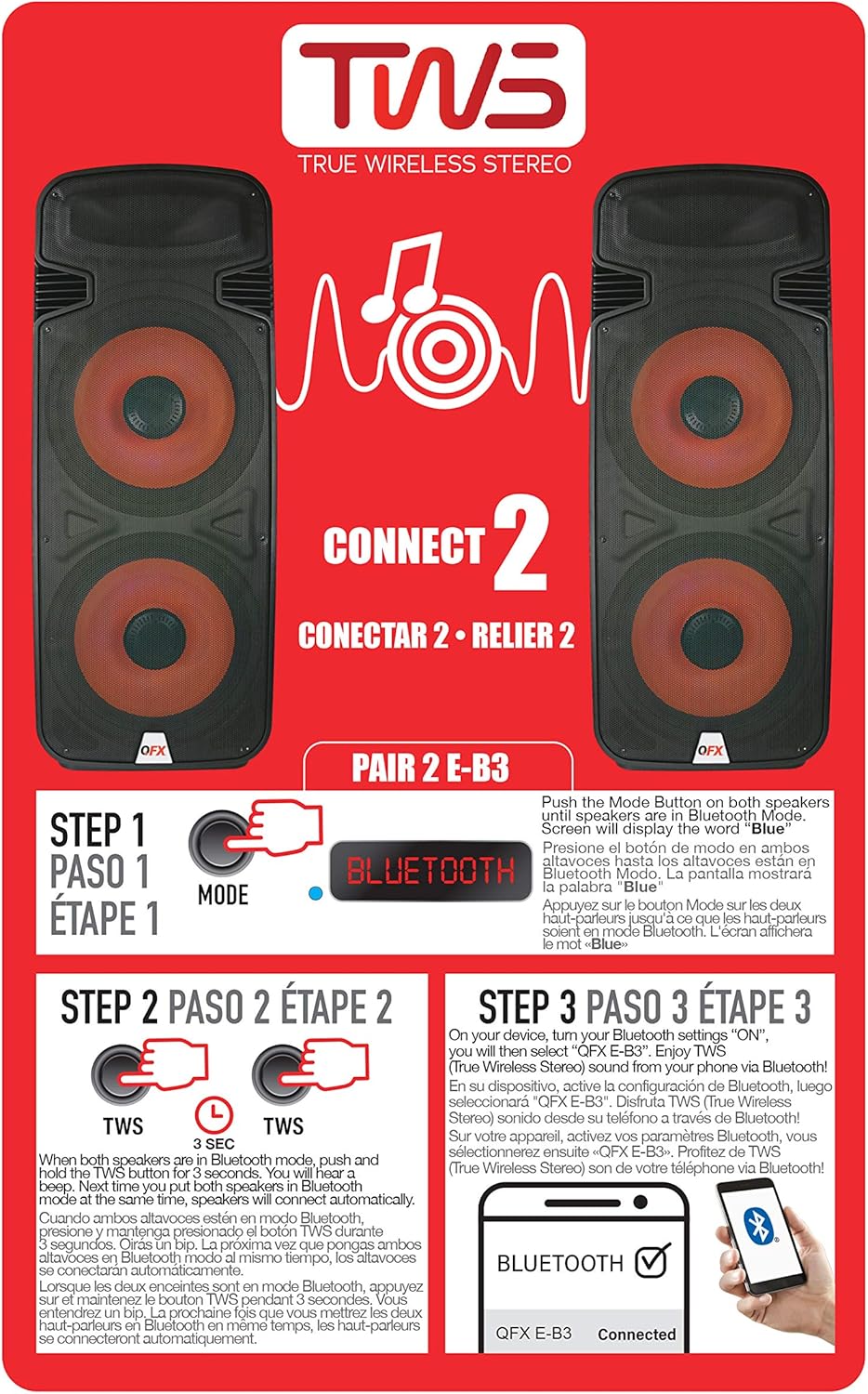
Figure 6.1: TWS Pairing Instructions.
- Ensure both QFX E-B3 speakers are powered on and in Bluetooth mode. The display on both speakers should show "BLUE".
- On one of the speakers (this will be your primary speaker), press and hold the TWS button for approximately 3 seconds. The speakers will attempt to connect to each other.
- Once successfully paired, you will hear a confirmation sound, and the display on the primary speaker will show "BLUE" while the secondary speaker will show "BLUE" as well.
- On your Bluetooth-enabled device, search for and select "QFX E-B3". The two speakers will now play audio in stereo.
د ایف ایم راډیو عملیات
- فشار ورکړئ موډ button to switch to FM radio mode. The display will show the FM frequency.
- فشار ورکړئ او ونیسئ پلی/ودرول button to initiate an automatic scan for FM stations. The speaker will save all found stations.
- د کارولو مخکینی/بل ټریک buttons to navigate through the saved FM stations.
د USB/SD کارت پلې بیک
- Insert a USB flash drive or SD card (with compatible audio files) into the respective port on the rear panel.
- سپیکر به په اتوماتيک ډول USB/SD حالت ته لاړ شي او د آډیو غږول به پیل کړي files. که نه، فشار ورکړئ موډ د USB یا SD حالت غوره کولو لپاره تڼۍ.
- د کارولو پلی/ودرول او مخکینی/بل ټریک د پلې بیک کنټرول لپاره تڼۍ.
د مایکروفون داخلول
- Connect a microphone to the XLR Microphone Input on the rear panel.
- Adjust the Microphone Volume and Echo knobs to achieve the desired sound.
د RCA ننوتنه
- Connect an external audio source (e.g., CD player, mixer) to the RCA Input (L/R) ports using appropriate RCA cables.
- فشار ورکړئ موډ button to select RCA input mode.
- Adjust the master volume on the speaker and the volume on your external audio source.
د LED ګوند څراغونه
The speaker features integrated LED party lights that activate automatically when the speaker is powered on. There are no specific controls for the LED lights mentioned; they are designed to enhance the audio experience.
7. ساتنه
پاکول
- Always unplug the speaker before cleaning.
- د سپیکر بهرنۍ سطحې پاکولو لپاره نرم، وچ ټوکر وکاروئ.
- د کثافاتو پاکوونکي، موم یا محلول مه کاروئ ځکه چې دوی ممکن پای ته زیان ورسوي.
- د هوا د بهېدو دروازې له دوړو او کثافاتو څخه پاکې وساتئ.
ذخیره کول
When not in use for extended periods, store the speaker in a cool, dry place, away from direct sunlight and extreme temperatures. Cover the speaker to protect it from dust.
8. ستونزه حل کول
If you encounter issues with your QFX E-B3 speaker, refer to the following common problems and solutions:
| ستونزه | احتمالي لامل | د حل لاره |
|---|---|---|
| هیڅ ځواک نشته | د برېښنا کیبل نه دی وصل شوی؛ د برېښنا آوټ لیټ فعال نه دی؛ د سپیکر د برېښنا سویچ بند دی. | Ensure AC cable is securely connected to speaker and outlet. Check if outlet is working. Turn speaker power switch ON. |
| غږ نشته | Volume too low; Incorrect input mode selected; Audio source not playing. | Increase master volume. Press MODE button to select correct input. Ensure audio source is playing and its volume is up. |
| بلوتوث نه نښلي | Speaker not in Bluetooth mode; Device Bluetooth off; Speaker already paired to another device; Device too far. | Ensure speaker is in Bluetooth mode ("BLUE" on display). Turn on device Bluetooth. Disconnect from other devices. Move device closer to speaker (within 30 feet). |
| د TWS جوړه ناکامه شوه | Speakers not in Bluetooth mode; TWS button not held long enough. | Ensure both speakers are in Bluetooth mode. Press and hold the TWS button on one speaker for 3 seconds. |
| د USB/SD پلې بیک کار نه کوي | ناسم حالت؛ نا مناسب file format; Corrupted USB/SD card. | Press MODE to select USB/SD. Ensure audio files are in a compatible format (e.g., MP3). Try a different USB/SD card. |
9. مشخصات
| فیچر | مشخصات |
|---|---|
| برانډ | QFX |
| د ماډل شمیره | E-B3 |
| د سپیکر اعظمي تولید ځواک | 250 واټ |
| د ارتباط ټیکنالوژي | USB، بلوتوث |
| د آډیو وتلې حالت | سټیریو |
| د نصب کولو ډول | Plug Mount, Wheel Mount |
| د سپیکر ډول | Woofer (Dual 15 Inches) |
| د کنټرولر ډول | ریموټ کنټرول |
| رنګ | Party LED |
| پنروک دی | دروغ |
| د کنټرول طریقه | لرې |
| د ووفر قطر | ۷۸۷ انچه |
| د آډیو چینلونو شمیر | 2.0 |
| بې سیم ټیکنالوژي | بلوتوث |
| د ارتباط پروتوکول | بلوتوث |
| د بریښنا سرچینه | د بریښنا تار شوی |
| د آډیو ډرایور ډول | متحرک چلوونکی |
| د آډیو ډرایور اندازه | ۷۸۷ انچه |
| د توکي ابعاد (D x W x H) | ۱۶"د x ۲۶"وچ x ۴۷"ح |
| د توکي وزن | 13.2 پونډه |
| مطابقت لرونکې وسیلې | لیپ ټاپ، MP3 پلیر، سمارټ فون، ټابلیټ، تلویزیون |
| UPC | 606540039618 |
10. د تضمین معلومات
This product is covered by a limited warranty. For specific details regarding warranty coverage and terms, please refer to the warranty information provided at the point of purchase or contact QFX customer support directly. The warranty is typically per contract with the retailer.
11. ملاتړ
For technical assistance, troubleshooting beyond this manual, or inquiries about your QFX E-B3 speaker, please contact QFX customer support or your retailer. Contact information can usually be found on the manufacturer's webسایټ یا ستاسو د پیرود رسید کې.