
۱.۱. د خوندیتوب مهم معلومات
مهرباني وکړئ د راټولولو او کارولو دمخه ټولې لارښوونې په دقت سره ولولئ. دا لارښود د راتلونکي حوالې لپاره وساتئ.
- خبرداری: Always assemble the desk according to the provided instructions to ensure stability.
- د وزن اعظمي ظرفیت له ۱۱۰.۰ پونډو (۵۰.۰ کیلوګرامه) څخه زیات مه کوئ.
- Be cautious when using the height adjustment feature to avoid injury from moving parts.
- Keep hands and fingers away from the moving parts during operation.
- Ensure the power cord is not pinched or damaged during assembly or operation.
- دا محصول یوازې د داخلي کارونې لپاره دی.
2. محصول ختم شوview
The FLEXISPOT E1L is a dual-motor, L-shaped electric standing desk designed for home and office use. It features adjustable height, a quiet operation, and a customizable control panel.

Image 2.1: The FLEXISPOT E1L desk frame demonstrating its adjustable height capabilities.

Image 2.2: The FLEXISPOT E1L desk in a typical office setup, showcasing its L-shape and functionality.
3. تنظیم او مجلس
Assembly of the FLEXISPOT E1L desk is designed to be straightforward, typically taking less than 30 minutes. All necessary tools are included.
۲.۱ د بسته بندۍ او اجزاو چک کول
Carefully unpack all components and verify against the packing list. Ensure all parts are present and undamaged before proceeding.
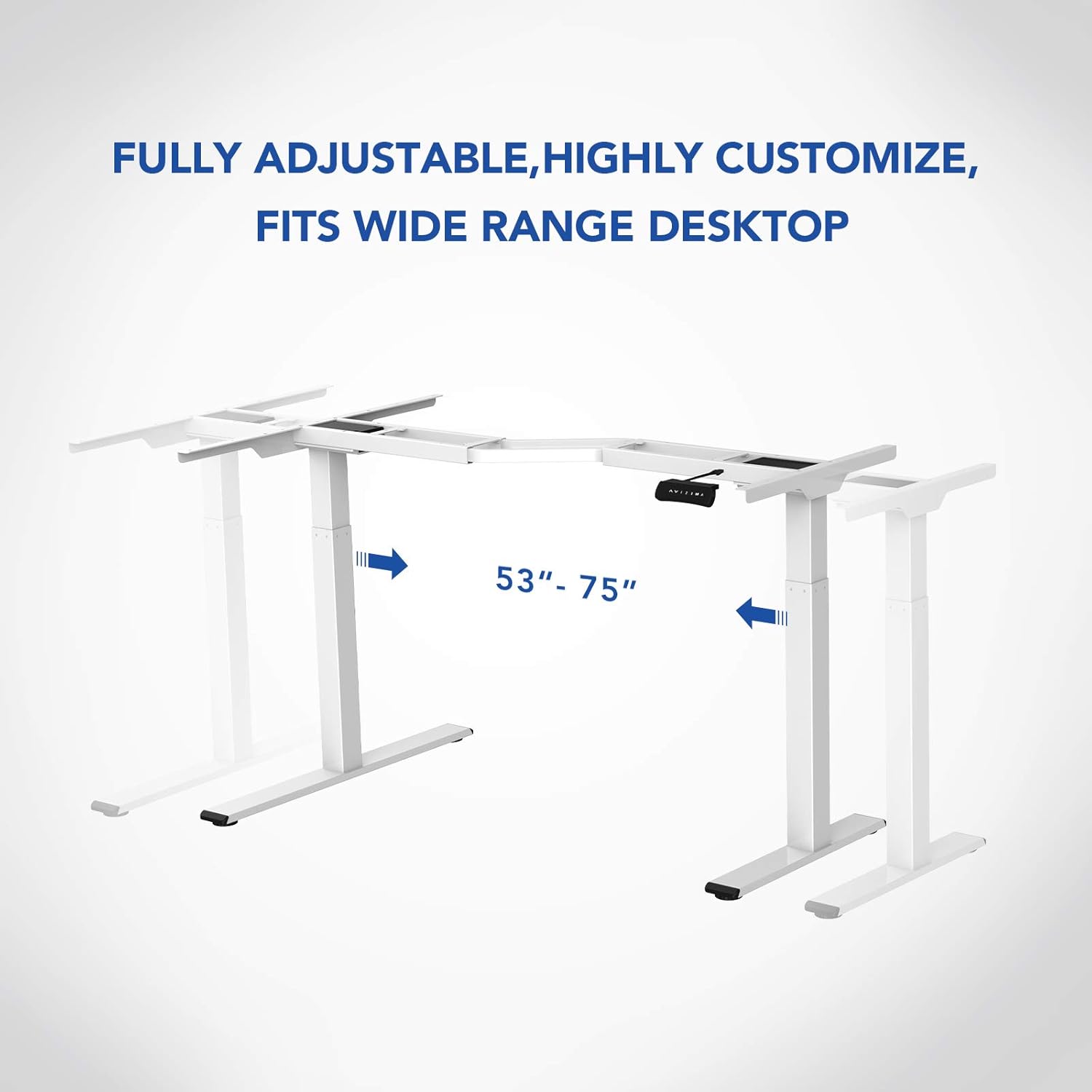
انځور 3.1: اوورview of the FLEXISPOT E1L desk frame components prior to assembly.
3.2 د مجلس مرحلې
- د پورته کولو ستنې د ډیسټاپ چوکاټ سره وصل کړئ.
- Secure the feet to the bottom of the lifting columns.
- Connect the control box and motor cables as per the detailed diagram in the included assembly guide.
- Mount the control panel to the desired location on the desk.
- Place the desktop surface onto the assembled frame and secure it.
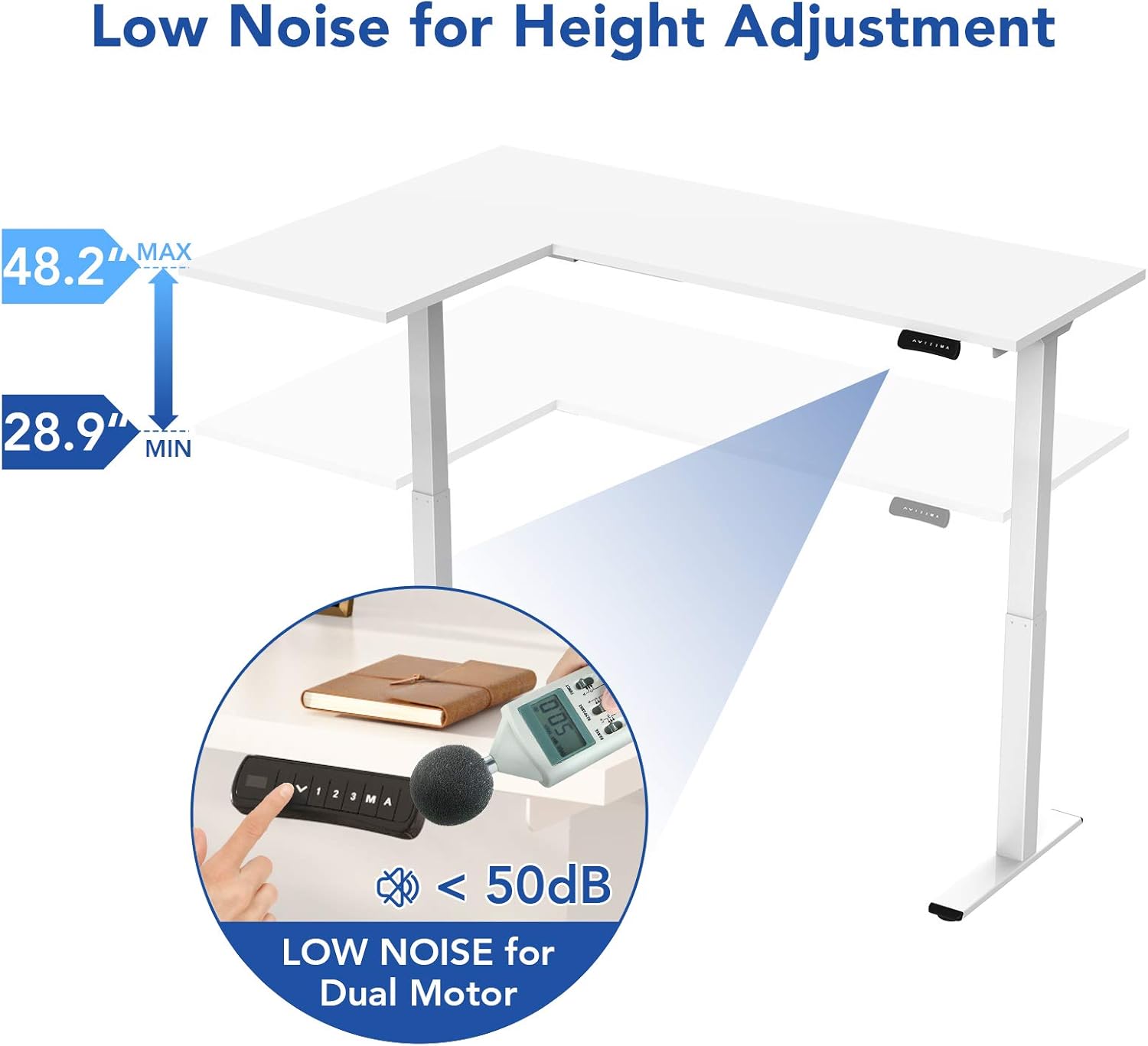
Image 3.2: An assembly step illustrating the connection of the L-shaped desk frame components.

Image 3.3: The desk frame nearing completion, with the control panel attached.
3.3 Reversible L-Shape Configuration
The L-shaped configuration of the desk is reversible, allowing you to set up the longer side on either the left or right, depending on your preference and workspace layout. This flexibility is determined during the assembly process.

Image 3.4: Visual representation of the desk's reversible L-shape, allowing for left or right-hand configurations.
4. عملیاتي لارښوونې
4.1 د قد تنظیم کول
The desk features a dual-motor lift mechanism for smooth and quiet height adjustments. The height can be adjusted from 27.9 inches (70.9 cm) to 47.2 inches (120 cm).
- د کارولو Up (▲) او ښکته (▼) buttons on the control panel to manually adjust the desk height.
- The desk operates at a speed of 1 inch per second and maintains a noise level under 50 dB during movement.

Image 4.1: Illustration highlighting the low noise operation (under 50 dB) of the desk's dual motor system.
4.2 د کنټرول پینل دندې
The built-in LED control panel allows for easy customization and programming of desk height settings.

Image 4.2: Close-up of the control panel, detailing its buttons and functions.
- Up/Down Buttons (▲, ▼): Manually adjust the desk height.
- د حافظې پریزیسټونه (۱، ۲، ۳): Store and recall up to three preferred height settings. To save a height, adjust the desk to the desired position, then press the 'M' button followed by the desired number (1, 2, or 3).
- Memory Button (M): Used to save height presets.
- Sit-Stand Reminder (A): Activate a programmable timer to remind you to switch between sitting and standing postures. Refer to the full assembly guide for detailed programming instructions.
۳.۲ د ټکر ضد سیسټم
The desk is equipped with a built-in anti-collision system. If the desk encounters an obstruction during height adjustment, it will automatically stop and reverse slightly to prevent damage or injury.

Image 4.3: Visual explanation of the anti-collision system, showing the desk reversing upon contact with an obstacle.
5. ساتنه
Regular maintenance ensures the longevity and optimal performance of your FLEXISPOT E1L desk.
- پاکول: د میز سطحه او چوکاټ د نرم، d سره پاک کړئamp ټوکر. د کثافاتو پاکوونکو یا محلولونو څخه ډډه وکړئ کوم چې ممکن پای ته زیان ورسوي.
- د کیبل مدیریت: Periodically check all cables to ensure they are securely connected and not pinched or frayed. Use the included cable management tray to keep wires organized.
- بندونکي: کله ناکله ټول پیچونه او بولټونه وګورئ ترڅو ډاډ ترلاسه کړئ چې دوی کلک دي. که اړتیا وي نو بیا یې ټینګ کړئ.
- د موټرو تفتیش: Listen for any unusual noises during operation. If you notice any, discontinue use and consult the troubleshooting section or contact customer support.
6. ستونزه حل کول
که تاسو په خپل میز کې ستونزې سره مخ شئ، نو لاندې عام د ستونزو حل کولو مرحلو ته مراجعه وکړئ:
| ستونزه | احتمالي لامل | د حل لاره |
|---|---|---|
| مېز نه حرکت کوي. | د برېښنا کیبل قطع شوی؛ د کنټرول بکس تېروتنه؛ ډیر بار. | Check power connections. Unplug and replug the power cord. Reduce weight on the desk. |
| میز په نا مساوي ډول حرکت کوي. | Uneven load; motor synchronization issue. | Distribute weight evenly. Perform a reset (refer to the full manual for specific reset procedures). |
| د تېروتنې کوډ ښودل شوی. | د ځانګړي سیسټم تېروتنه. | Refer to the detailed error code list in the complete user manual or contact customer support. Often, a power cycle (unplugging for 10 seconds and replugging) can resolve temporary errors. |
| Anti-collision system triggers too easily. | Sensitivity setting too high. | Adjust the anti-collision sensitivity setting via the control panel (refer to the full manual for instructions). |
If these steps do not resolve the issue, please contact FLEXISPOT customer support.
7. مشخصات
| فیچر | مشخصات |
|---|---|
| برانډ | FLEXISPOT |
| د ماډل شمیره | E1L |
| د میز ډیزاین | د L شکل کمپیوټر میز |
| د چوکاټ مواد | Industrial-grade Steel |
| د پورته کولو میکانیزم | Dual Electric Motor |
| د لوړوالی تنظیم کولو سلسله | له ۲۸.۵ انچه څخه تر ۴۶.۸ انچه پورې (۷۲.۴ سانتي متره څخه تر ۱۱۸.۹ سانتي متره پورې) |
| د پورته کولو سرعت | 1"/second |
| د شور کچه | د ۵۰ ډیسیبل څخه کم |
| د اعظمي وزن ظرفیت | ۱۱.۵۷ پونډه (۵.۲۵ کیلو ګرامه) |
| د تضمین اداره | LED with 3 Memory Presets & Sit-Stand Reminder |
| ځانګړي ځانګړتیاوې | Anti-Collision System, Corded Operation, Reversible L-Shape |
| مجلس ته اړتیا ده | هو (د ټولو اسمبلۍ وسایلو په ګډون) |
| د غونډې لپاره وړاندیز شوي کسان | 1 |
8. تضمین او ملاتړ
8.1 د تضمین معلومات
The FLEXISPOT E1L desk comes with a Limited Warranty. Please refer to the warranty card included with your product or visit the official FLEXISPOT website for detailed terms and conditions regarding parts and labor coverage.
8.2 د پیرودونکي ملاتړ
For technical assistance, warranty claims, or any questions regarding your FLEXISPOT E1L desk, please contact FLEXISPOT customer support through their official webسایټ یا ستاسو د محصول په بسته بندۍ کې چمتو شوي د اړیکو معلومات.
تاسو هم کولی شئ لیدنه وکړئ په ایمیزون کې د FLEXISPOT پلورنځی د اضافي محصول معلوماتو او ملاتړ سرچینو لپاره.