
پیژندنه
Thank you for choosing the Newskill Manticore Gaming PC Case. This manual provides essential information for the proper installation, operation, and maintenance of your new PC chassis. Please read these instructions carefully before beginning the assembly process to ensure optimal performance and longevity of your components.
محصول پای ته ورسیدview
The Newskill Manticore is an ATX mid-tower gaming PC case designed for high-performance builds. It features a mesh front panel for superior airflow, a tempered glass side panel to showcase your components, and four pre-installed 120mm ARGB fans for effective cooling and customizable aesthetics.
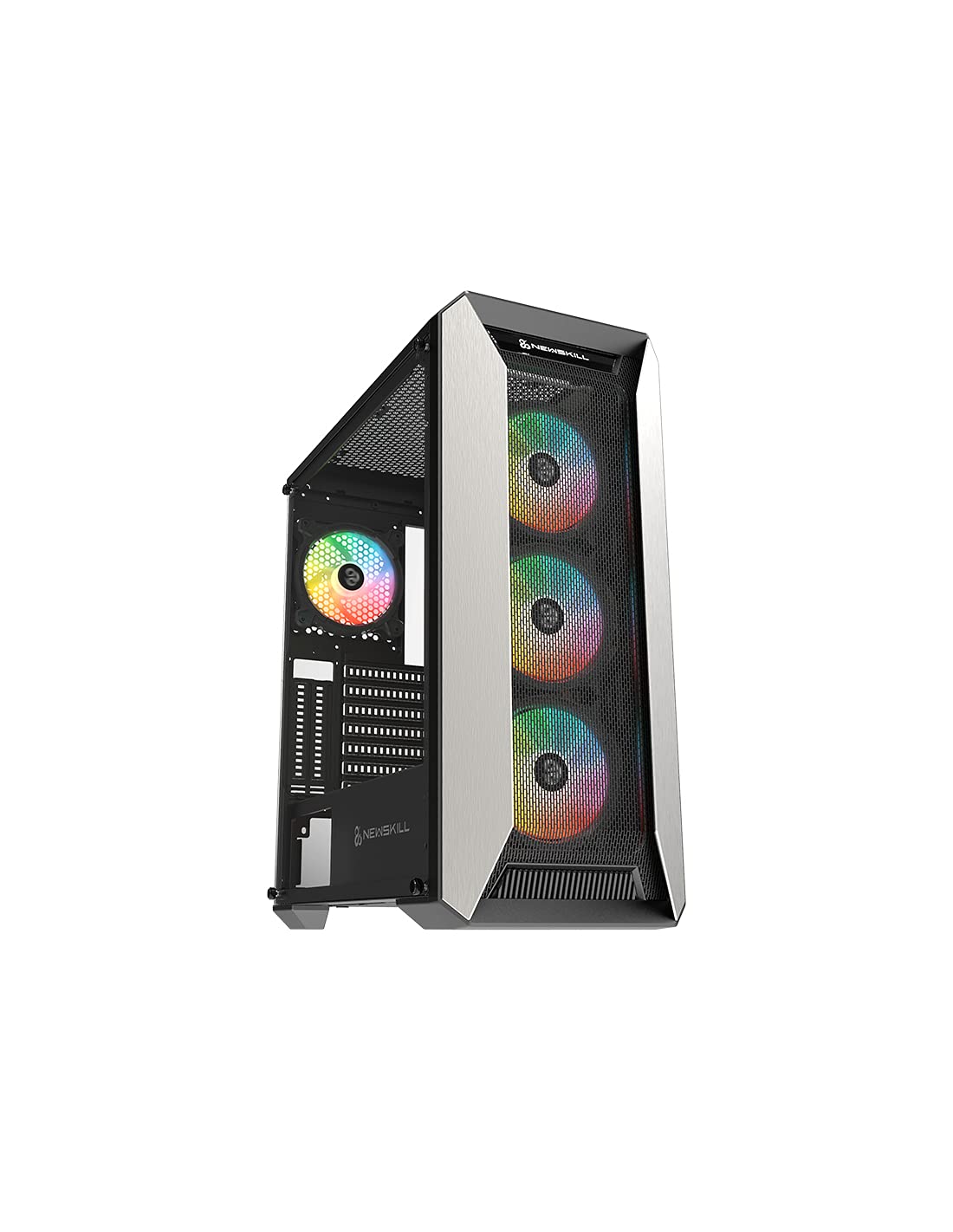
شکل 1: مخکی view of the Newskill Manticore Gaming PC Case, highlighting the mesh front and tempered glass side panel.
کلیدي ځانګړتیاوې:
- ATX Mid-Tower compatibility
- Mesh front panel for optimized airflow
- د تودوخې شیشې اړخ پینل
- Four pre-installed 120mm ARGB fans
- Two removable dust filters
- USB 3.0 connectivity on the front panel
تنظیم او نصب کول
1. خلاصول
Carefully remove the PC case from its packaging. Inspect for any damage that may have occurred during shipping. Retain the packaging for future transport or warranty claims.
2. د اجزاو پیژندنه
Before installation, familiarize yourself with the case components and included accessories:
- Newskill Manticore PC Case
- Accessory box (screws, cable ties, standoffs)
- د کارونکي لارښود (دا لاسوند)
3. د مور بورډ نصب کول
- Remove the tempered glass side panel by unscrewing the thumb screws.
- Install the necessary motherboard standoffs into the motherboard tray.
- Carefully place your ATX motherboard onto the standoffs, aligning the screw holes.
- د چمتو شوي پیچونو سره مور بورډ خوندي کړئ.
۳. د بریښنا رسولو واحد (PSU) نصب کول
- د کیس په ښکته شا کې د PSU نصبولو ساحه ومومئ.
- Slide your PSU into position from the rear of the case.
- Secure the PSU with screws from the exterior rear of the case.
۴. د ذخیره کولو ډرایو نصب کول
The case supports various storage configurations. Refer to your specific drive type for mounting instructions (e.g., 2.5" SSDs, 3.5" HDDs).
۵. د ګرافیک کارت او توسیع کارت نصب کول
Remove the necessary PCIe slot covers and install your graphics card or other expansion cards, securing them with screws.
۵.۸. د مخکینۍ تختې اړیکې
Connect the front panel cables (USB 3.0, HD Audio, Power Switch, Reset Switch, Power LED, HDD LED) to the corresponding headers on your motherboard. Consult your motherboard manual for exact pin layouts.
8. د کیبل مدیریت
د کیبلونو د مدیریت لپاره د مدر بورډ ټری شاته د کیبل روټینګ کټ آوټونو او ټای ډاون نقطو څخه کار واخلئ. دا د هوا جریان او جمالیات ښه کوي.
عملیاتي لارښوونې
بریښنا کول / بند کول
Press the power button located on the top panel of the case to turn on your system. To shut down, use the operating system's power-off function or press and hold the power button for several seconds for a forced shutdown (not recommended for regular use).
د ARGB رڼا کنټرول
The pre-installed ARGB fans can be controlled via your motherboard's ARGB software (if compatible) or a dedicated ARGB controller (if included or purchased separately). Refer to your motherboard or controller manual for specific instructions on changing lighting effects and colors.
ساتنه
د دوړو فلټر پاکول
The Newskill Manticore includes two removable dust filters (typically located on the top and bottom/front). Regularly clean these filters to maintain optimal airflow and prevent dust buildup inside your PC. Gently slide them out, clean with water and mild soap, or use a vacuum cleaner, and ensure they are completely dry before re-inserting.
بهرنۍ پاکول
بهرنۍ سطحې په نرمۍ سره مسح کړئ، دamp ټوکر. د کثافاتو پاکوونکو یا محلولونو څخه ډډه وکړئ کوم چې کولی شي پای یا تودوخې شیشې ته زیان ورسوي.
د ستونزو حل کول
هیڅ ځواک نشته
- ډاډ ترلاسه کړئ چې PSU په سمه توګه د دیوال آوټ لیټ سره وصل دی او چالان شوی دی.
- ډاډ ترلاسه کړئ چې د PSU ټول بریښنا کیبلونه په سمه توګه د مور بورډ او برخو سره وصل دي.
- د مور بورډ سره د مخکینۍ پینل بریښنا سویچ اتصالونه وګورئ.
Fans Not Spinning / ARGB Not Lighting Up
- ډاډ ترلاسه کړئ چې د فین بریښنا کیبلونه په خوندي ډول د مور بورډ یا فین کنټرولر سره وصل دي.
- Check ARGB connections to the motherboard's ARGB header or dedicated controller.
- Ensure ARGB software or controller settings are correctly configured.
Poor Airflow / Overheating
- Clean dust filters regularly.
- Ensure no obstructions are blocking air intake or exhaust vents.
- Verify all fans are spinning correctly and oriented for optimal airflow.
For further assistance, please contact Newskill support.
مشخصات
| فیچر | تفصیل |
|---|---|
| د ماډل نوم | مینټیکور |
| د ماډل شمیره | 1102 |
| د قضیې ډول | منځنی برج |
| د مور بورډ مطابقت | ATX |
| ابعاد (L x W x H) | 60 x 60 x 85 سانتي متره |
| وزن | 1 کیلو ګرامه |
| مواد | د شیشې نرموالی، فلز |
| د یخولو طریقه | Air (4x 120mm ARGB fans included) |
| سامنے I / O بندرونه | USB 3.0, Audio Jacks, Power, Reset |
| د دوړو فلټرونه | ۱ (د لرې کولو وړ) |
| وړاندیز شوی کارول | لوبې کول |
د تضمین معلومات
The Newskill Manticore PC Case comes with a د جوړونکي دوه کلن تضمین. This warranty covers defects in materials and workmanship under normal use. It does not cover damage caused by misuse, accident, modification, or unauthorized repair. Please retain your proof of purchase for warranty claims.
ملاتړ او اړیکه
For technical support, troubleshooting assistance, or warranty inquiries, please visit the official Newskill website or contact their customer service department. You can find contact information on the Newskill webسایټ: www.newskillgaming.com