
پیژندنه
Thank you for choosing the Hbada Ergonomic Gaming Chair. This manual provides essential information for the safe and efficient assembly, operation, and maintenance of your new chair. Please read these instructions carefully before use and retain them for future reference.

Image: The Hbada Ergonomic Gaming Chair in a modern gaming environment, showcasing its design and presence.
د خوندیتوب معلومات
- ډاډ ترلاسه کړئ چې ټولې برخې شتون لري او د راټولولو دمخه زیانمن شوي ندي. که کومې برخې ورکې یا ماتې وي نو مه کاروئ.
- د راټولولو لارښوونې په دقت سره تعقیب کړئ. ناسم راټولول کولی شي د بې ثباتۍ او ټپي کیدو لامل شي.
- په څوکۍ مه ودریږئ. یوازې د ناستې لپاره یې وکاروئ.
- د وزن له اعظمي ظرفیت څخه زیات مه کوئ (ځانګړتیاو ته مراجعه وکړئ).
- د غونډې پرمهال ماشومان او څاروي له څوکۍ څخه لرې وساتئ.
- د موادو د تخریب د مخنیوي لپاره د څوکۍ مستقیم لمر یا سختې تودوخې ته د رسیدو څخه ډډه وکړئ.
د محصول ابعاد
Understanding the dimensions of your chair is important for proper placement and comfortable use. Below are the key measurements:
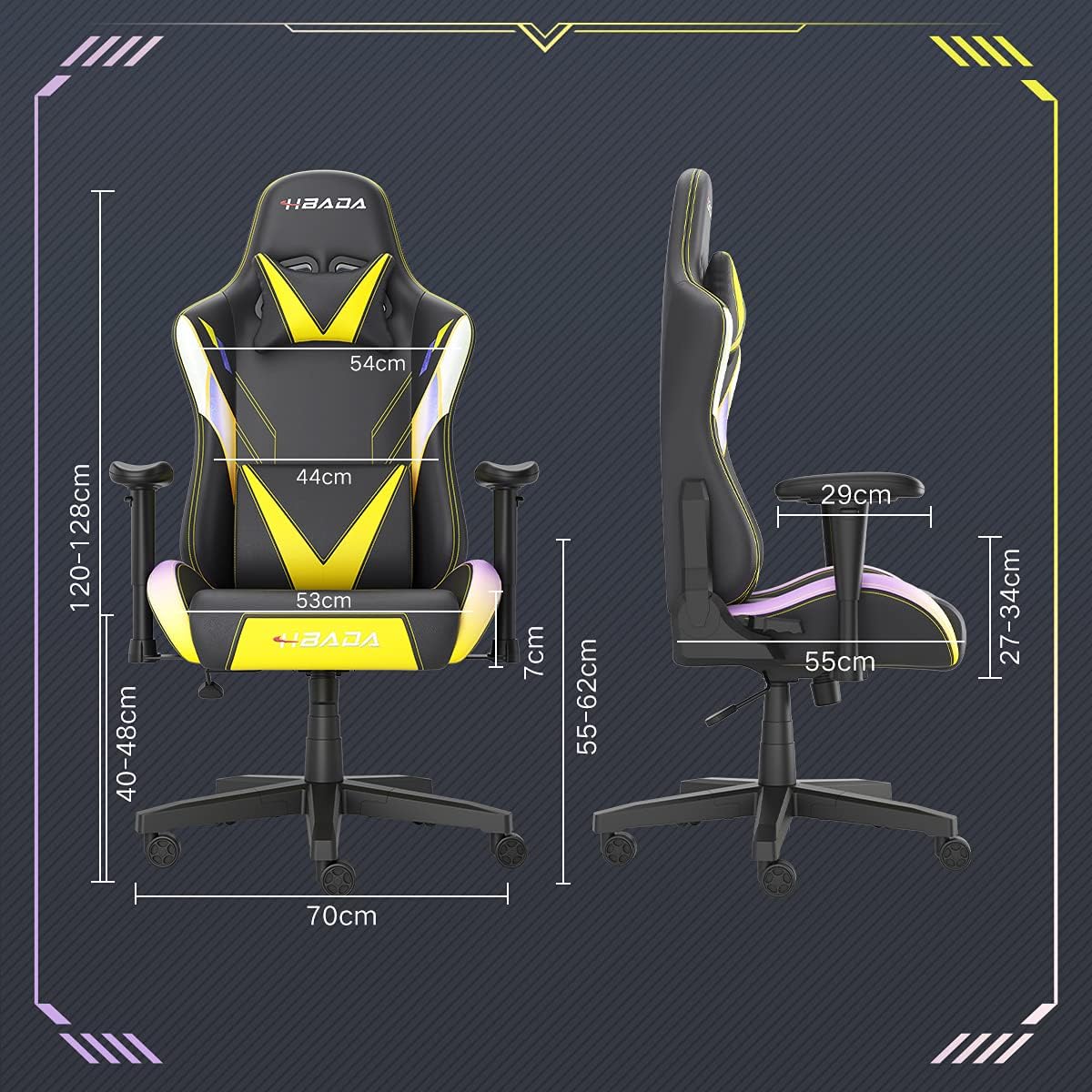
Image: A detailed diagram illustrating the various dimensions of the Hbada Gaming Chair, including height, width, and depth measurements.
- په ټولیزه توګه لوړوالی: ۲۵-۳۰ سانتي متره (د تنظیم وړ)
- د څوکۍ لوړوالی: ۲۵-۳۰ سانتي متره (د تنظیم وړ)
- د څوکۍ عرض: 53 سانتي متره
- د څوکۍ ژوروالی: 55 سانتي متره
- د شا پلنوالی: 54 cm (shoulder area), 44 cm (lumbar area)
- د آرمرسټ لوړوالی (له څوکۍ څخه): ۱۵۰ سانتي متره (د تنظیم وړ)
- د بنسټ قطر: 70 سانتي متره
تنظیم او مجلس
Please follow these steps carefully to assemble your Hbada Gaming Chair. It is recommended to have a clear, spacious area for assembly.
د مجلس پړاوونه:
- Step 1: Assemble the Base and Wheels
Insert the five casters into the holes on the star base. Then, place the gas lift cylinder into the center hole of the base.

Image: Illustration of attaching the five casters to the chair's star-shaped base and inserting the gas lift cylinder.
- Step 2: Attach the Seat and Backrest
Connect the backrest to the seat using the provided screws and mounting plates. Ensure all screws are tightened securely.

Image: Diagram showing the process of securing the backrest to the seat cushion using screws and brackets.
- دریم ګام: د بازوګانو پټۍ نصب کړئ
Attach the armrests to the sides of the seat using the designated screws. Make sure they are firmly attached.

Image: Visual guide for attaching the armrests to the chair's seat base.
- Step 4: Connect Seat to Base
Carefully place the assembled seat onto the gas lift cylinder, ensuring it is properly seated and stable.

Image: Depiction of lowering the assembled seat onto the gas lift cylinder, connecting the upper and lower parts of the chair.
- Step 5: Attach Headrest and Lumbar Pillow
Secure the detachable headrest and lumbar support pillow to the chair as desired for optimal comfort.

Image: Instructions for attaching the headrest and lumbar support pillows to the gaming chair.
عملیاتي لارښوونې
Your Hbada Gaming Chair is designed with several adjustable features to provide personalized comfort and support.
Key Adjustable Functions:
- Adjustable Sitting Height: Use the lever located under the seat on the right side to raise or lower the chair. Pull the lever up to adjust the height, then release it at your desired position. The seat has an 8 cm elevation range.
- Reclining Backrest (90° to 155°): The backrest can be reclined from 90 degrees (upright) to 155 degrees (nearly flat). Use the recline lever on the side of the chair to adjust the angle. Lean back to your preferred position and lock the lever.
- د تعدیل وړ لاسونه: The armrests can be adjusted in height by 7 cm. Locate the button or lever on the side of each armrest to unlock, adjust, and then lock them into your desired height.
- 360° Free Swivel: The chair features a full 360-degree swivel function, allowing for easy movement and access to your surroundings without needing to move the entire chair.
- Detachable Headrest and Lumbar Support: The chair includes a removable headrest pillow and lumbar support cushion for enhanced ergonomic comfort. Adjust their positions or remove them based on your preference.

انځور: یو اوورview of the chair's ergonomic systems, highlighting adjustable sitting height, armrests, 155° reclining, 360° swivel, cool racing casters, and durable base.

Image: The Hbada Gaming Chair demonstrated in its 155-degree reclined position, illustrating the recline controller.
ساتنه
Regular maintenance will help prolong the life and appearance of your Hbada Gaming Chair.
- د PU چرم پاکول: د PU چرم سطحې د نرم، d سره پاک کړئamp cloth. For stubborn stains, use a mild soap solution and then wipe with a clean, damp ټوکر. د سختو کیمیاوي موادو یا د کثافاتو پاکوونکو څخه ډډه وکړئ، ځکه چې دا کولی شي مواد زیانمن کړي.
- د کاسټر پاملرنه: Periodically check the casters for accumulated dust or hair. Clean them with a brush or vacuum cleaner to ensure smooth movement and prevent damage to your flooring.
- چوکاټ او اجزا: ټول پیچونه او بولټونه په منظم ډول معاینه کړئ ترڅو ډاډ ترلاسه شي چې دوی کلک دي. که اړتیا وي نو بیا کلک کړئ ترڅو ثبات وساتئ.
- د مستقیم لمر وړانګو څخه ډډه وکړئ: Prolonged exposure to direct sunlight can cause the PU leather to fade and crack. Position your chair away from direct sunlight when possible.
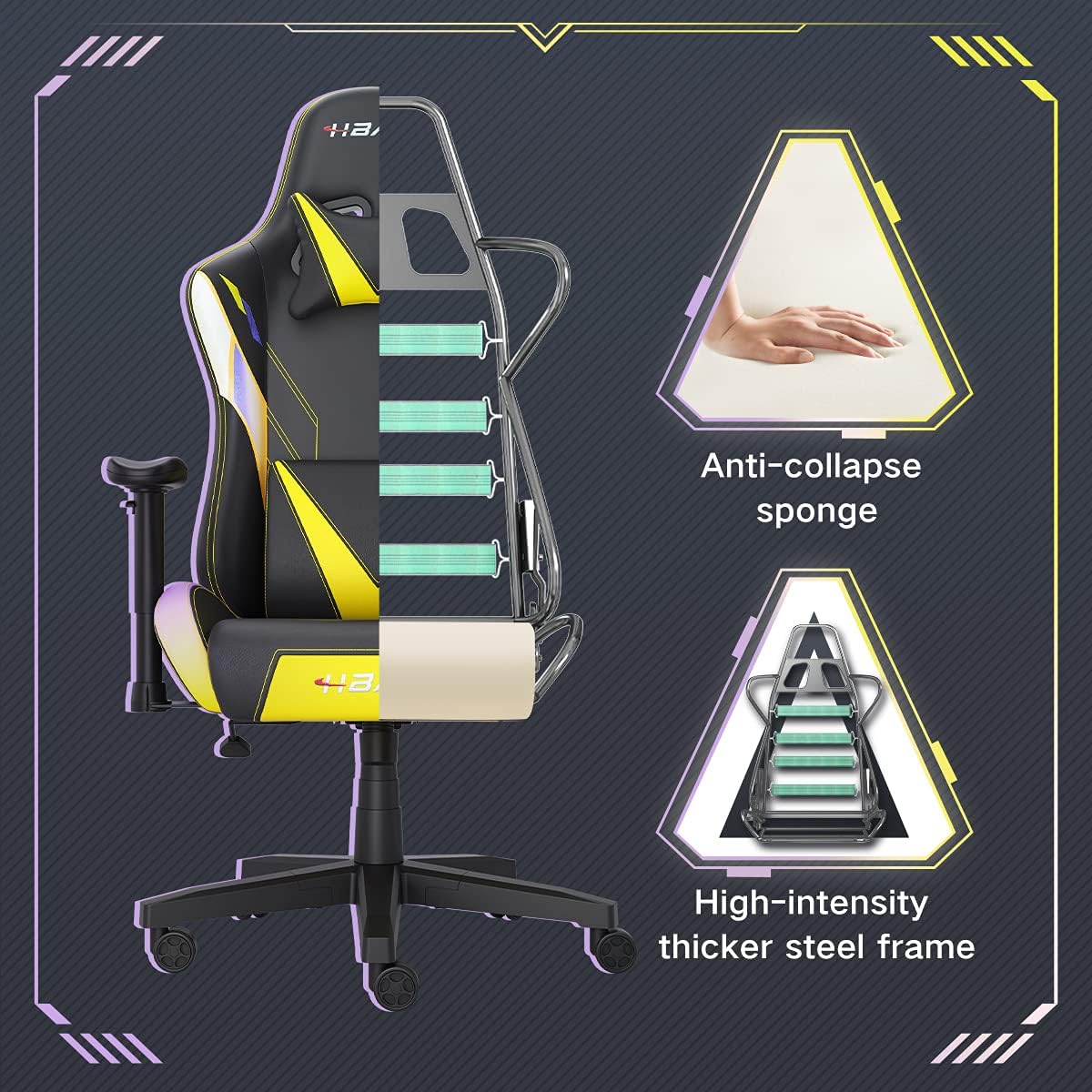
انځور: یوه ټوټه ټوټه view of the chair's internal structure, highlighting the anti-collapse sponge padding and the high-intensity thicker steel frame, indicating durable construction.
د ستونزو حل کول
If you encounter any issues with your Hbada Gaming Chair, refer to the following common problems and solutions:
| ستونزه | احتمالي لامل | د حل لاره |
|---|---|---|
| څوکۍ لوړوالی نه تنظیموي | د ګازو د پورته کولو کار خراب شوی یا لیور نه دی فعال شوی. | ډاډ ترلاسه کړئ چې د لوړوالي تنظیم کولو لیور په بشپړه توګه فعال دی. که ستونزه دوام وکړي، د ګازو لفټ ممکن بدلولو ته اړتیا ولري. د پیرودونکو ملاتړ سره اړیکه ونیسئ. |
| څوکۍ په ټپه ولاړه یا بې ثباته ده | خلاص پیچونه یا ناسم مجلس. | Check all assembly screws and bolts, and tighten them securely. Refer to the assembly instructions. |
| کاسټرې په اسانۍ سره نه ګرځي | کثافات (ویښتان، دوړې) چې په کاسټرونو کې بند پاتې دي. | څوکۍ واړوئ او د کاسټر څرخونو څخه هر ډول کثافات لرې کړئ. |
| شاته نه تکیه کوي او نه بندیږي | د تکیه کولو میکانیزم بند شوی یا لیور نه دی فعال شوی. | Ensure the recline lever is fully engaged. Check for any obstructions around the mechanism. |
مشخصات
| فیچر | تفصیل |
|---|---|
| برانډ | هبدا |
| د ماډل شمیره | W203YMA/EU |
| ASIN | B095PSFLKX |
| رنګ | ژیړ |
| مواد | PU Leather, Metal Frame |
| د محصول ابعاد | 70 x 70 x 128 سانتي متره (اوږدوالی x پلنوالی x لوړوالی) |
| د محصول وزن | 22 کیلوګرامه |
| ځانګړي ځانګړتیاوې | Ergonomic, Swivel, Casters, Headrest Support, Adjustable Recline (90°-155°), Adjustable Seat Height (8cm range), Adjustable Armrests (7cm range) |
| د واحدونو شمیر | 1.0 شمېره |
تضمین او ملاتړ
Your Hbada Gaming Chair comes with a یو کلن تضمین د پیرود نیټې څخه. دا تضمین د عادي استعمال لاندې د تولید نیمګړتیاوې او د موادو نیمګړتیاوې پوښي.
If you experience any issues during use, including problems with installation, damage, or missing parts, please do not hesitate to contact Hbada customer service. We are committed to providing reliable service and can offer free exchanges for covered issues.
For support, please visit the official Hbada webسایټ یا خپل پرچون پلورونکي سره اړیکه ونیسئ.