
1. پیژندنه
The BAOFENG UV-5R Pro is a high-performance, multi-functional two-way radio designed for reliable communication. It features long battery life, strong communication capabilities, flexible programming options, and multiple power adjustments, making it suitable for both professional and amateur radio enthusiasts. This manual provides essential information for the proper setup, operation, and maintenance of your device.
2. د بسته محتويات
Please check the package carefully to ensure all items are present and in good condition. If any items are missing or damaged, contact your retailer.
- 1 × BAOFENG UV-5R Pro 8W Radio
- 1 × 3800mAh Li-ion Battery (Model: BL-5L)
- 1 × Support CHIRP Programming Cable
- 1 × Radio Case
- 1 × Handheld Microphone (MIC-01)
- 1 × بریښنا اډاپټر
- 1 × بیلټ کلپ
- 1 × د لاس پټه
- 1 × User's Manual (this document)
3. محصول ختم شوview
Familiarize yourself with the main components of your BAOFENG UV-5R Pro radio and its accessories.

شکل 3.1: BAOFENG UV-5R Pro Radio. This image displays the front of the UV-5R Pro radio, showing the display screen, keypad, and various function buttons. The antenna is attached at the top.
3.1. لاسي مایکروفون

شکل 3.2: Handheld Microphone (Model: MIC-01). This image shows the handheld microphone accessory, which connects to the radio for external audio input and output. It features a speaker, microphone, and a coiled cable that can stretch up to 60 inches.
The included handheld microphone (MIC-01) provides convenient external control for transmitting and receiving audio. It features a speaker, microphone, and a push-to-talk (PTT) button. The coiled cable allows for flexible use.
3.2. Programming Cable

شکل 3.3: Programming Cable. This image illustrates the USB programming cable used to connect the radio to a computer for channel and setting configuration via software like CHIRP.
The programming cable allows you to connect your UV-5R Pro radio to a computer for advanced configuration using compatible software, such as CHIRP. This enables customization of channels, frequencies, and other operational parameters.
3.3. 3800mAh Li-ion Battery

شکل 3.4: 3800mAh Li-ion Battery (Model: BL-5L). This image shows the high-capacity Li-ion battery pack designed for the UV-5R Pro, providing extended operational time.
The radio is powered by a high-capacity 3800mAh Li-ion battery (Model: BL-5L), offering extended usage time. Proper battery installation and charging are crucial for optimal performance.
3.4. Radio Case
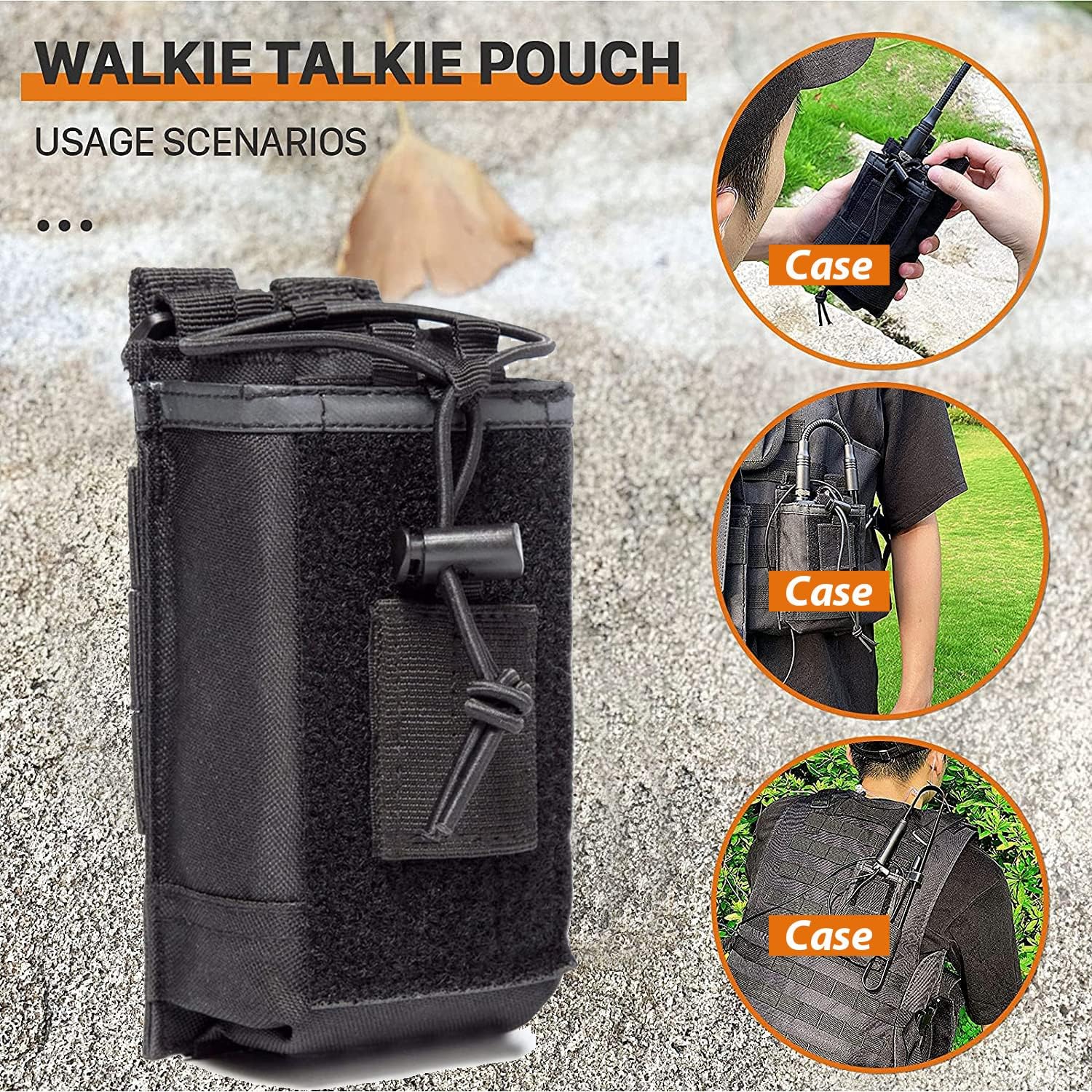
شکل 3.5: Radio Case/Pouch. This image displays the included radio case, designed for secure and convenient carrying of the UV-5R Pro radio, suitable for various usage scenarios.
A durable radio case is included to protect your device during transport and use. It can be attached to belts or tactical gear for easy access.
4. ترتیب کول
4.1. د بیټرۍ نصب کول
- د بیټرۍ کڅوړه د راډیو په شا کې د نالیو سره سم کړئ.
- د بیټرۍ کڅوړه پورته خوا ته وغورځوئ تر هغه چې په خپل ځای کې کلیک وکړي.
- د لرې کولو لپاره، د بیټرۍ خوشې کولو لیچ (معمولا د بیټرۍ په ښکته برخه کې) فشار ورکړئ او بیټرۍ ښکته خوا ته وغورځوئ.
۴.۲. د انتن ضمیمه
- انټینا د ساعت په لور د راډیو په سر کې د نښلونکي سره ونښلوئ تر هغه چې د ګوتو سره ټینګ شي. ډیر مه ټینګوئ.
- Ensure the antenna is securely attached before operation to prevent damage and ensure optimal signal.
4.3. د بیټرۍ چارج کول
- د بریښنا اډاپټر د چارج کولو بیس سره وصل کړئ.
- د بریښنا اډاپټر په AC آوټ لیټ کې ولګوه.
- Place the radio with the battery installed into the charging base. The charging indicator light will typically turn red while charging and green when fully charged.
- A full charge typically takes 4-5 hours. Do not overcharge the battery for extended periods.
5. عملیاتي لارښوونې
۱. د بریښنا فعالول/بندول او د حجم کنټرول
- پاور آن: Rotate the volume knob (located on top of the radio) clockwise until you hear a click.
- بندول: Rotate the volume knob counter-clockwise until you hear a click.
- د حجم سمون: د حجم زیاتولو لپاره د حجم غوټۍ د ساعت په لور وګرځوئ او د حجم کمولو لپاره د ساعت په مخالف لوري وګرځوئ.
5.2. د چینل انتخاب
- The UV-5R Pro supports both Frequency Mode (VFO) and Channel Mode (MR).
- فشار ورکړئ VFO/MR د حالتونو ترمنځ د بدلولو لپاره تڼۍ.
- په چینل حالت کې، وکاروئ پورته/ ښکته arrow keys or the keypad to select a stored channel.
- In Frequency Mode, enter the desired frequency directly using the keypad.
۵.۳. لېږدول او ترلاسه کول
- د لیږدولو لپاره، فشار ورکړئ او ونیسئ PTT (فشار ته خبرې) button on the side of the radio or the handheld microphone. Speak clearly into the microphone.
- خوشې کړئ PTT د لیږد بندولو او د ترلاسه کولو حالت ته د بیرته راستنیدو لپاره تڼۍ.
- Ensure you are on an appropriate frequency or channel before transmitting.
5.4. Power Output Adjustment
The UV-5R Pro offers multiple power output options (High, Medium, Low) up to 8W. This allows you to adapt to communication needs at different distances and environments, conserving battery life when high power is not required.
- Access the power setting through the radio's menu. Consult the on-screen menu for specific navigation steps.
- Select the desired power level (High, Medium, or Low).
5.5. Programming with CHIRP Software
For advanced channel management and customization, use the included programming cable and CHIRP software. CHIRP is a free, open-source program that allows you to manage your radio's memory channels, frequencies, and other settings from your computer.
- Install the necessary drivers for the programming cable on your computer.
- Download and install the latest version of CHIRP software.
- Connect the programming cable to your computer's USB port and to the radio's accessory port.
- راډیو چالان کړه.
- Launch CHIRP and follow the software's instructions to read data from the radio, make changes, and write data back to the radio.
Note: Detailed instructions for CHIRP software can be found on the official CHIRP webسایټ یا د آنلاین سرچینو له لارې.
6. ساتنه
- پاکول: یو نرم استعمال کړئ، دamp د راډیو د بهرنۍ برخې د پاکولو لپاره ټوکر. سخت کیمیاوي مواد یا د کثافاتو پاکوونکي مه کاروئ.
- د بیټرۍ پاملرنه: کله چې بیټرۍ نه کارول کېږي، په یخ او وچ ځای کې وساتئ. د بیټرۍ د عمر د اوږدولو لپاره د هغې د بار بار بشپړ چارج کولو څخه ډډه وکړئ.
- انتن: Ensure the antenna connection is clean and free of debris. Avoid bending or stressing the antenna.
- ذخیره کول: کله چې راډیو د اوږدې مودې لپاره ذخیره کوئ، بیټرۍ لرې کړئ او په جلا توګه یې وساتئ.
7. ستونزه حل کول
| ستونزه | احتمالي لامل | د حل لاره |
|---|---|---|
| راډیو نه چالانېږي. | بیټرۍ ټیټه ده یا په سمه توګه نه ده نصب شوې. | بیټرۍ چارج کړئ یا یې په خوندي ډول بیا نصب کړئ. |
| لیږدول یا ترلاسه کول نشي کیدی. | Incorrect frequency/channel, antenna not connected, or low battery. | Verify frequency/channel, ensure antenna is secure, charge battery. |
| ضعیف غږ کیفیت. | Weak signal, incorrect squelch setting, or damaged microphone/speaker. | Adjust squelch, move to a better signal area, check microphone/speaker connections. |
| Programming issues with CHIRP. | Incorrect cable drivers, wrong COM port, or radio not in programming mode. | Install correct drivers, select proper COM port in CHIRP, ensure radio is on. |
8. مشخصات
| فیچر | تفصیل |
|---|---|
| برانډ | BAOFENG |
| د ماډل شمیره | د UV-5R پرو |
| رنګ | تور |
| د چینلونو شمیر | 999 |
| ځانګړي ځانګړتیاوې | Dual Band, Long Range, Multiple Power Output Options (up to 8W) |
| د فریکونسی رینج | VHF/UHF (420-450MHz) |
| د خبرو کولو حد اعظمي | 8 Miles (approximate, depends on terrain and conditions) |
| والیtage | 7.4 ولټه |
| د اوبو د مقاومت کچه | د اوبو مقاومت |
| د بیټرۍ ډول | 3800mAh Li-ion (Model: BL-5L) |
| د بیټرۍ اوسط ژوند | ۵ ساعته (معمولي کارول) |
| د توکي وزن | 250 ګرامه |
| خنډ | 50 اوهم |
| د تونر ډول | UHF/VHF |
| جوړونکی | Fujian Baofeng Electronics Co., Ltd |
9. تضمین او ملاتړ
BAOFENG offers a comprehensive warranty program for your UV-5R Pro radio:
- د راډیو بدن: 2 کلن تضمین.
- لوازم: 1 کلن تضمین.
- د راستنیدو پالیسي: د ۳۰ ورځو بې دلیله بیرته ستنیدو پالیسي.
- د تضمین وروسته خدمت: Maintenance services are available at your cost after the warranty period.
For any questions, technical assistance, or warranty claims, please contact BAOFENG customer support through the Amazon platform for a prompt response within 12 hours. Please provide your product model and purchase details when contacting support.