
پیژندنه
The Poly DA75 is a versatile USB-A/USB-C digital adapter designed to connect Poly Quick Disconnect (QD) headsets to computers. It ensures clear audio quality for call center environments, supporting both USB-A and USB-C connections for compatibility with various systems. This adapter is engineered to work seamlessly with platforms such as Avaya, Genesys, and Cisco, providing a reliable audio solution for professionals.
کلیدي ځانګړتیاوې عبارت دي له:
- نړیوال ارتباط: Equipped with both USB-A and USB-C connectors on the cable for broad compatibility with new and legacy equipment.
- Intelligent Headset Recognition: Automatically adjusts audio performance to the specific Poly Quick Disconnect headset for optimized call quality.
- Acoustic Protection: Incorporates features to manage safe volume levels, protecting user hearing.
- د پلیټ فارم ادغام: Fully compatible with leading call center platforms including Avaya, Genesys, and Cisco.
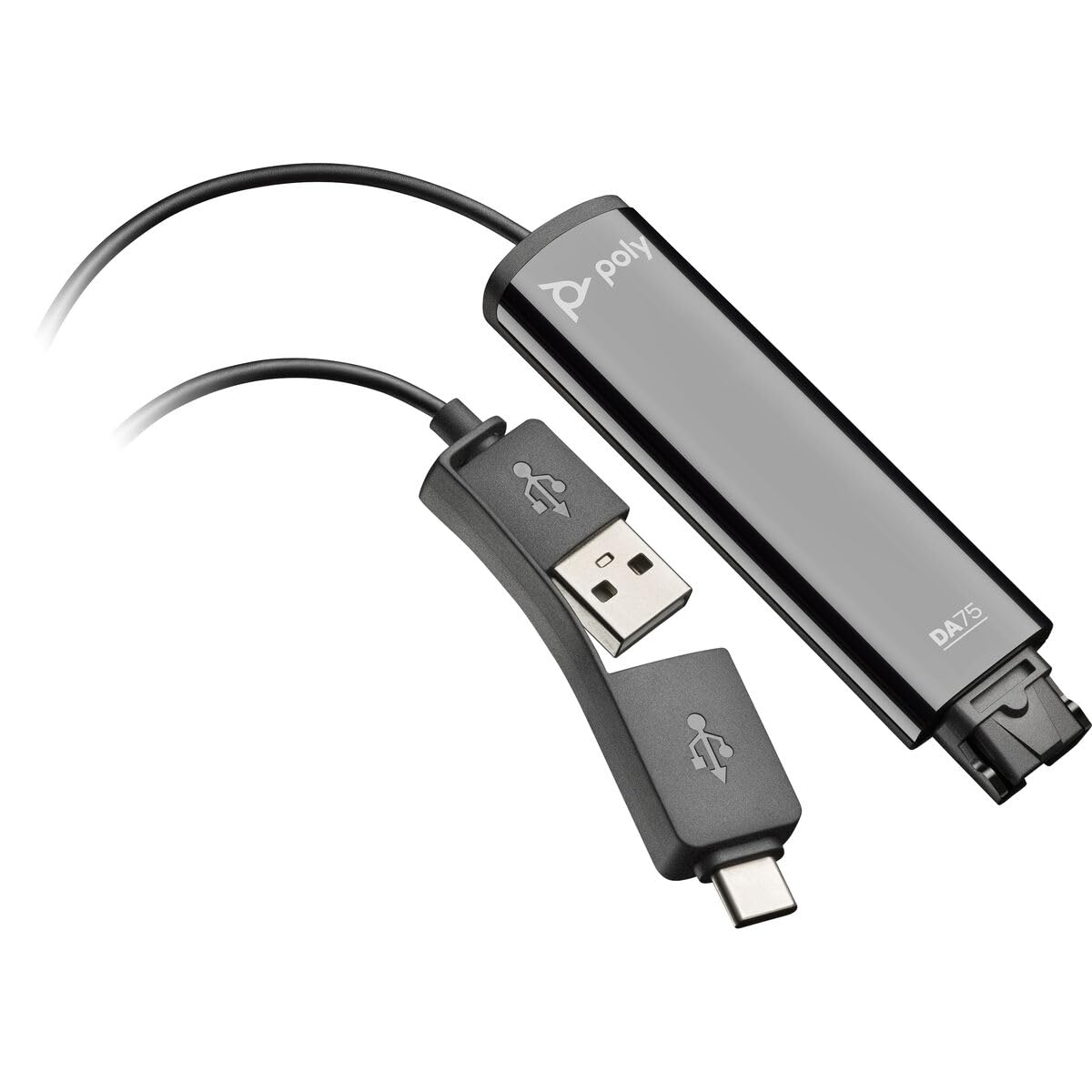
Image: The Poly DA75 USB-A/USB-C Digital Adapter, showing its dual USB-A and USB-C connectors and the Quick Disconnect port for headsets.
په بکس کې څه دي
The Poly DA75 package typically includes the following items:
- Poly DA75 USB-A/USB-C Digital Adapter
- اسناد (د چټک پیل لارښود، د خوندیتوب معلومات)
Note: Headsets are sold separately and are not included with the DA75 adapter.
چمتو کول
Follow these steps to set up your Poly DA75 Digital Adapter:
- هیډسیټ وصل کړئ: Connect your Poly Quick Disconnect (QD) headset to the QD port on the Poly DA75 adapter. Ensure the connection is secure.
- کمپیوټر سره وصل کړئ:
- If your computer has a USB-A port, use the USB-A connector on the DA75 cable.
- If your computer has a USB-C port, use the USB-C connector on the DA75 cable.
Plug the appropriate USB connector into an available USB port on your computer.
- د ډرایور نصب کول: The DA75 is a plug-and-play device. Your operating system (Windows, macOS) should automatically detect the device and install the necessary drivers. This process may take a few moments.
- د وسیلې پیژندنه تایید کړئ:
- وینډوز: ورتګ Settings > System > Sound or د کنټرول پینل> غږ. The Poly DA75 should appear as an audio input and output device.
- macOS: ورتګ System Settings > Sound. The Poly DA75 should appear as an input and output device.
Select the Poly DA75 as your default communication device for both playback and recording.
- د سافټویر ترتیب: If you are using communication software (e.g., Avaya, Genesys, Cisco, Microsoft Teams, Zoom), ensure that the Poly DA75 is selected as the audio device within the application's settings.
عملیاتي لارښوونې
The Poly DA75 adapter facilitates audio communication through your connected Poly QD headset. Its operation is primarily managed through your computer's operating system and communication software.
- زنګونه وهل/ترلاسه کول: Use your communication software to initiate or answer calls. The audio will be routed through your connected Poly QD headset via the DA75 adapter.
- د حجم کنټرول: Adjust the listening volume using your computer's system volume controls or the volume controls within your communication application.
- د مایکروفون خاموش کول: Mute and unmute your microphone using the controls provided by your communication software.
- Audio Optimization: The DA75 automatically optimizes audio for your specific Poly QD headset. No manual adjustments are typically required for audio profiles.
ساتنه
To ensure the longevity and optimal performance of your Poly DA75 Digital Adapter, follow these maintenance guidelines:
- پاکول: Gently wipe the adapter with a soft, dry, anti-static cloth. Do not use liquid cleaners or abrasive materials.
- ذخیره کول: اډاپټر په یخ او وچ ځای کې د مستقیم لمر وړانګو او سختې تودوخې څخه لرې وساتئ.
- سمبالول: د کیبل د ډیر تاوولو یا تاوولو څخه ډډه وکړئ، په ځانګړې توګه د نښلونکو سره نږدې، ترڅو د داخلي زیان مخه ونیول شي.
- ارتباط: Ensure the Quick Disconnect (QD) connection and USB connections are clean and free of debris before connecting.
د ستونزو حل کول
If you encounter issues with your Poly DA75 Digital Adapter, refer to the following troubleshooting steps:
| ستونزه | احتمالي لامل | د حل لاره |
|---|---|---|
| د هیډسیټ څخه هیڅ غږ نشته |
|
|
| مایکروفون کار نه کوي |
|
|
| Adapter not recognized by computer |
|
|
مشخصات
| فیچر | تفصیل |
|---|---|
| د ماډل شمیره | 218266-01 |
| برانډ | پولی |
| د نښلونکي ډول | USB-A, USB-C (dual connector) |
| مطابقت لرونکې وسیلې | Poly Quick Disconnect (QD) Headsets |
| ځانګړي استعمالونه | PC, Call Center Platforms (Avaya, Genesys, Cisco) |
| رنګ | تور |
| د توکي ابعاد (L x W x H) | 0.98 x 0.39 x 2.95 انچه |
| د توکي وزن | 30 ګرامه |
| د بندرونو شمیر | 2 (USB-A/USB-C to QD) |
| UPC | 197029650054، 017229175112 |
تضمین او ملاتړ
د تضمین معلومات: The Poly DA75 Digital Adapter comes with a د جوړونکي پنځه کلن محدود تضمین. دا تضمین د عادي استعمال لاندې موادو او کاریګرۍ نیمګړتیاوې پوښي. مهرباني وکړئ د تضمین ادعاوو لپاره د پیرود ثبوت وساتئ.
تخنیکي ملاتړ: For technical assistance, product inquiries, or warranty service, please contact Poly customer support. Visit the official Poly website for the most up-to-date support contact information, FAQs, and additional resources.
آنلاین سرچینې: پولی ملاتړ Webسایټ