
پیژندنه
The Macally BTBLZKEYSG is a full-size backlit Bluetooth keyboard designed specifically for Mac and iOS devices. It features a MacOS-specific layout with 107 scissor-switch keys and 14 convenient shortcuts, enhancing workflow and productivity. This keyboard allows seamless pairing and switching between up to three Bluetooth-enabled devices, including MacBooks, iMacs, iPhones, and iPads. The integrated white LED backlighting offers three adjustable brightness levels for comfortable typing in various lighting conditions. Powered by a built-in 1500mAh rechargeable battery, it provides extended usage time between charges.
د بسته محتويات
- Macally BTBLZKEYSG Backlit Bluetooth Keyboard
- د USB-C چارج کیبل
- د لارښوونې لارښود
د محصول ځانګړتیاوې
- شاته کیلي: Crisp white LEDs with 3 brightness levels for typing in low-light environments. Backlight can be turned off.
- MacOS Specific Layout: 107 scissor-switch keys with 14 macOS shortcuts for familiar and efficient use.
- Multi-Device Bluetooth: Easily pair and switch between up to 3 Bluetooth-enabled devices (Mac, iPhone, iPad) within a 30 ft wireless range.
- د چارج وړ بیټرۍ: Built-in 1500mAh battery provides 1 to 4 weeks of runtime with backlighting on. USB-C charging cable included.
- نری او آرام ډیزاین: Only 0.87 inches thin with an integrated kickstand for ergonomic typing.
چمتو کول
1. د کیبورډ چارج کول
Before initial use, fully charge the keyboard. Connect the supplied USB-C charging cable to the keyboard's USB-C port and the other end to a USB power source (e.g., computer USB port, USB wall adapter). The LED indicator will show charging status.
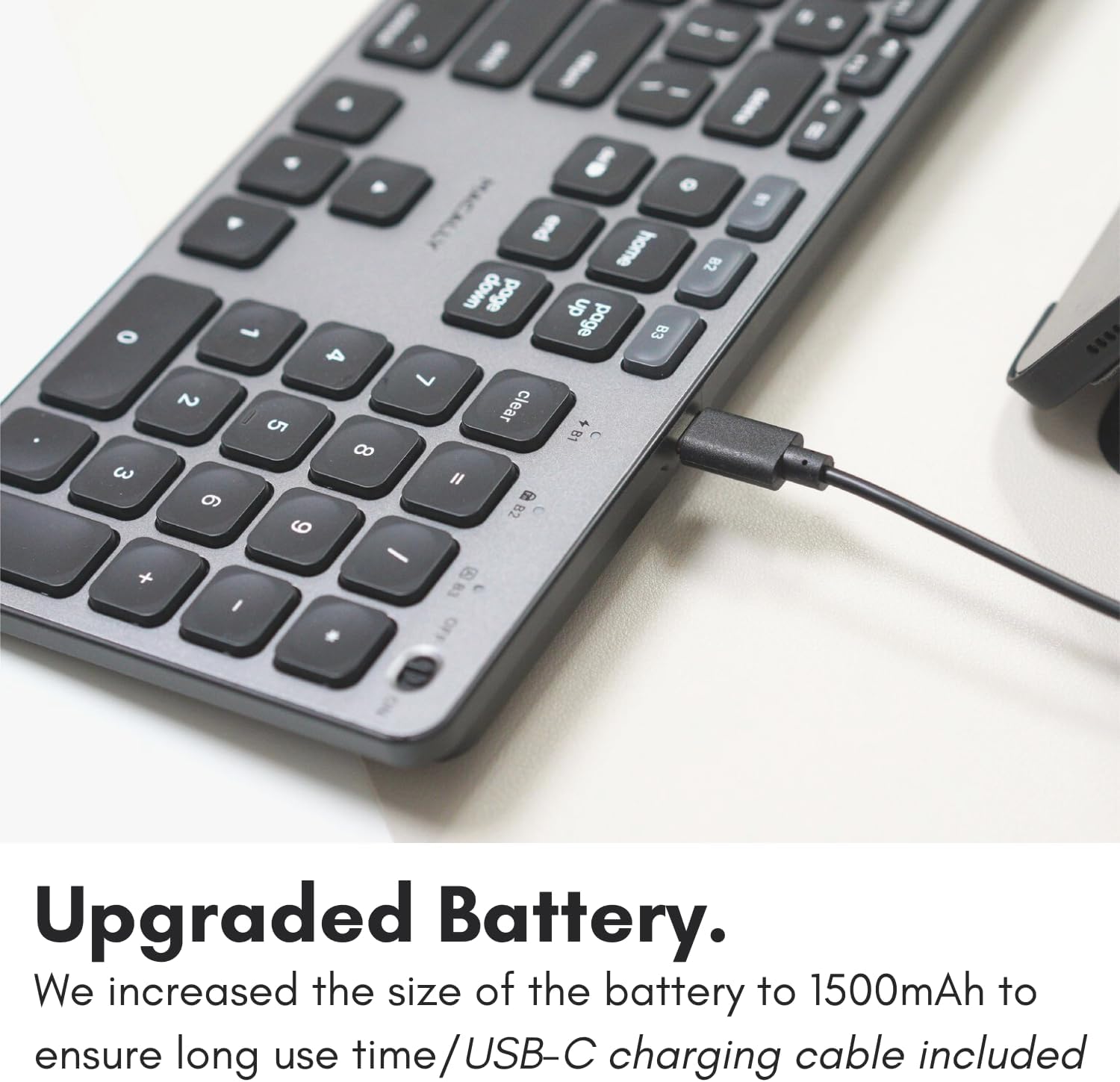
Image: The USB-C charging port on the side of the Macally BTBLZKEYSG keyboard, with the charging cable inserted.
2. په بریښنا چالانول
Locate the power switch on the keyboard, usually on the top right edge. Slide the switch to the 'ON' position.
3. د وسیلې سره جوړه کول
- ډاډ ترلاسه کړئ چې کیبورډ فعال دی.
- Press and hold one of the Bluetooth pairing keys (B1, B2, or B3) for 3-5 seconds until the corresponding LED indicator above the key starts blinking rapidly. This indicates the keyboard is in pairing mode.
- ستاسو په میک یا iOS وسیله کې، لاړ شئ د سیسټم ترتیبات (یا د سیسټم غوره توبونه) > بلوتوث.
- Look for "Macally BTBLZKEYSG" (or similar name) in the list of available devices and click/tap to connect.
- که غوښتنه وشي، د کیبورډ په کارولو سره ستاسو په سکرین کې ښودل شوی جوړه کوډ دننه کړئ او فشار ورکړئ ننوتل.
- Once connected, the LED indicator for the selected Bluetooth channel will stop blinking and remain solid for a few seconds before turning off.

Image: The Macally BTBLZKEYSG keyboard shown with a MacBook and an iPad, illustrating its multi-device capability.
عملیاتي لارښوونې
MacOS Specific Keys and Shortcuts
The keyboard features a standard MacOS layout, including function keys (F1-F12) that double as media and system control shortcuts. Use the Fn key in combination with these keys to access their secondary functions.
- Fn+F1: د نندارې روښانتیا کمه کړئ
- Fn+F2: د ښودنې روښانتیا زیاته کړئ
- Fn+F3: د ماموریت کنټرول
- Fn+F4: لانچ پیډ
- Fn+F7: مخکینی ټریک
- Fn+F8: پلی/ودرول
- Fn+F9: بله لار
- Fn+F10: حجم خاموش کړئ
- Fn+F11: حجم کم کړئ
- Fn+F12: حجم زیات کړئ
د شاتنۍ رڼا کنټرول
The keyboard's backlight can be adjusted to three brightness levels or turned off completely. Use the dedicated backlight control keys, typically located near the function keys or arrow keys, to cycle through the brightness settings.

Image: The Macally BTBLZKEYSG keyboard with its white LED backlighting illuminated at different intensity levels.
د جوړه وسیلو تر مینځ بدلول
To switch between your paired Bluetooth devices, simply press the corresponding Bluetooth pairing key (B1, B2, or B3) that your device is connected to. The keyboard will automatically connect to the selected device.
ساتنه
د خپل کیبورډ د اوږد عمر او غوره فعالیت ډاډمن کولو لپاره، د ساتنې دا لارښوونې تعقیب کړئ:
- پاکول: د نرم، لینټ پاک ټوکر څخه لږ څه کار واخلئampened with water or a mild cleaning solution to wipe the keyboard surface. Avoid harsh chemicals or abrasive materials.
- د دوړو لرې کول: د کیلي ګانو ترمنځ د دوړو او کثافاتو د لرې کولو لپاره د فشار شوي هوا څخه کار واخلئ.
- ذخیره کول: When not in use for extended periods, store the keyboard in a dry, cool place.
- د مایعاتو څخه ډډه وکړئ: Do not expose the keyboard to excessive moisture or spill liquids on it.
د ستونزو حل کول
| ستونزه | د حل لاره |
|---|---|
| کیبورډ نه چالانیږي. | Ensure the power switch is in the 'ON' position. Charge the keyboard using the supplied USB-C cable. |
| کیبورډ د وسیلې سره نه جوړیږي. | Ensure the keyboard is in pairing mode (LED blinking). Check your device's Bluetooth settings to ensure Bluetooth is enabled and the keyboard is visible. Try restarting both the keyboard and your device. |
| کیبورډ ډېر ځله منقطع کېږي. | Ensure the keyboard is within the 30 ft wireless range of your device. Check for interference from other wireless devices. Ensure the keyboard battery is sufficiently charged. |
| د شا څراغ کار نه کوي. | Press the backlight control keys to cycle through brightness levels. Ensure the keyboard battery is charged, as low battery may disable backlighting. |
| کلیدونه ځواب نه ورکوي. | Check the Bluetooth connection. If connected, try restarting the keyboard. Ensure no debris is lodged under the keys. |
مشخصات
| فیچر | تفصیل |
|---|---|
| د ماډل شمیره | BTBLZKEYSG |
| ارتباط | بلوتوث، بېسیم |
| مطابقت لرونکې وسیلې | Mac Mini / Pro Studio, iMac, Macbook Air, MacBook Pro, iPhone, iPad |
| د کیبورډ توضیحات | Backlit Keyboard for Mac |
| ځانګړي ځانګړتیاوې | Backlit, Multi-Device Bluetooth, Rechargeable |
| رنګ | خړ |
| د کیبورډ شاته رڼا کول | Single Color (White), 3 Brightness Levels |
| د محصول ابعاد | ۷۱"لیتر x ۲۳.۶"واټه x ۲۴.۴"هوا |
| د کلیدونو شمیر | 107 |
| د بریښنا سرچینه | Battery Powered (1500mAh rechargeable) |
| د سویچ ډول | Tactile Scissor Keys |
| د کیبورډ ترتیب | QWERTY (MacOS) |
| مواد | المونیم |
| UPC | 701107500362 |
د محصول رسمي ویډیو
ویډیو: یو اوورview of the Macally Backlit Bluetooth Keyboard for Mac & iOS, highlighting its features and compatibility.
تضمین او ملاتړ
The Macally BTBLZKEYSG Backlit Bluetooth Keyboard comes with a warranty of up to two years. For technical support, warranty claims, or further assistance, please visit the official Macally webسایټ یا د دوی د پیرودونکي خدماتو څانګې سره اړیکه ونیسئ.