
1. پیژندنه
Thank you for choosing the FLEXISPOT E9 Electric Standing Desk. This manual provides essential information for the safe and efficient assembly, operation, and maintenance of your new desk. Please read it thoroughly before use and keep it for future reference.
The FLEXISPOT E9 is designed for easy assembly with minimal parts, ensuring a smooth setup experience. It offers a wide height adjustment range from 73 cm to 123 cm, with a swift adjustment speed of 25mm/s for a stress-free transition between sitting and standing positions. Its robust design supports up to 50 kg, allowing you to safely adjust the desk height with your equipment in place.
The desk features a smart touch panel for intuitive one-touch operation, enabling you to effortlessly switch between sitting and standing postures to optimize your workspace for health and activity. The compact 60 cm x 120 cm tabletop provides ample workspace while harmonizing with various room aesthetics. Its minimalist design makes it suitable for home offices, studies, or even as a versatile dining or hobby table in your living room.

Image: The FLEXISPOT E9 Electric Standing Desk, highlighting its adjustable height from 73-123cm and 120cm width.
2. تنظیم او مجلس
The FLEXISPOT E9 desk is designed for straightforward assembly. Follow these steps to set up your desk:
- اجزا خلاص کړئ: Carefully remove all parts from the packaging and verify against the parts list in your included manual.
- Attach the Beam: The desk's beam is pre-attached to the tabletop. Simply rotate the support columns into place.
- د پښو نصب کول: Securely attach the desk feet to the support columns using the provided screws and tools.
- د ریموټ کنټرول سره نښلول: Connect the remote control cable to the control box under the desk.
- د بریښنا پیوستون: د بریښنا کیبل د کنټرول بکس کې او بیا د دیوال آوټ لیټ کې ولګوئ.
All necessary assembly tools are included in the package. Assembly typically requires one person and can be completed in approximately 15 minutes.
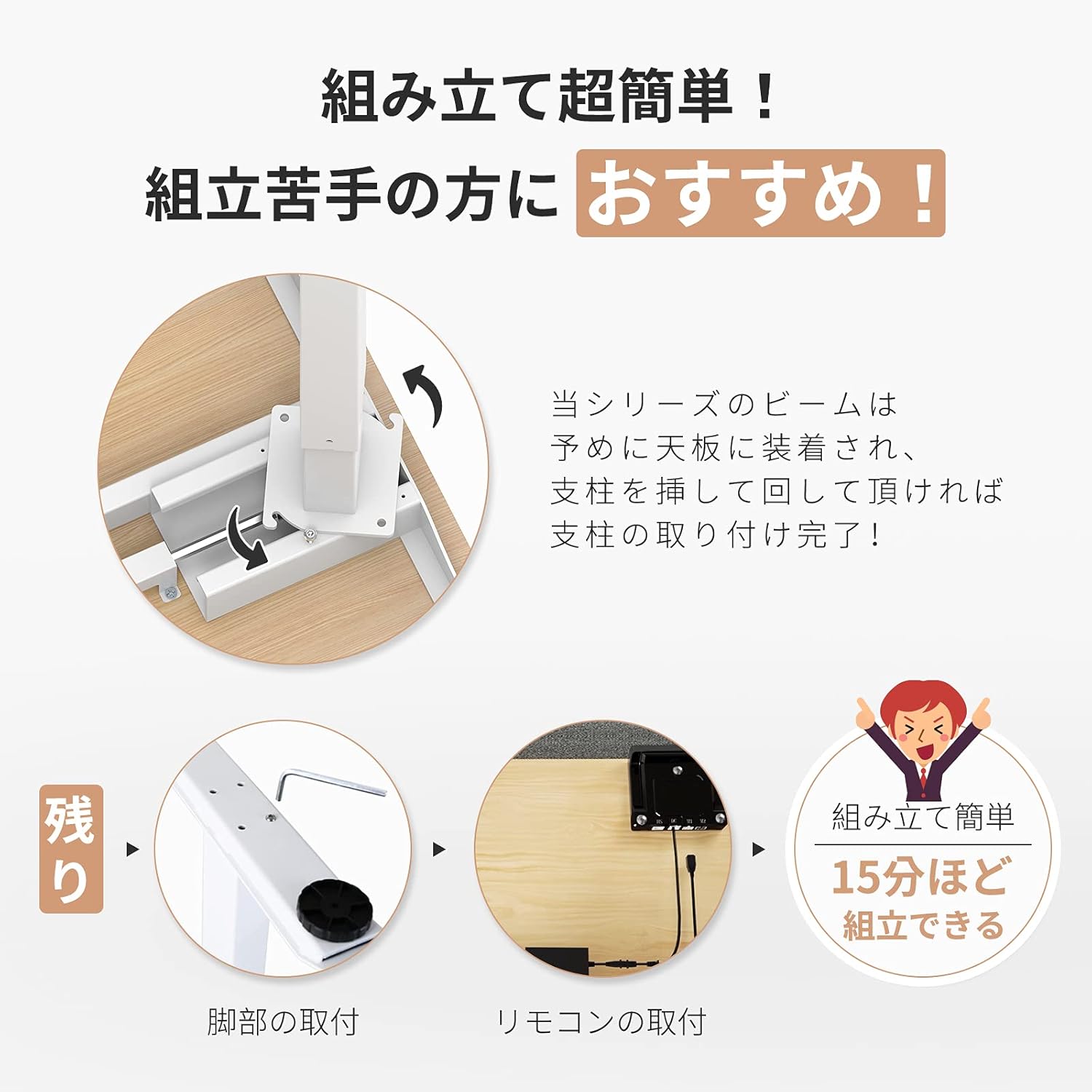
Image: Visual guide demonstrating the simple assembly process, including beam rotation, foot attachment, and remote control connection.
3. عملیاتي لارښوونې
The FLEXISPOT E9 features an intuitive control panel for easy height adjustment and memory functions.
3.1 د کنټرول پینلview

Image: The control panel, indicating the LED panel, up button, down button, and four height memory preset buttons.
- د LED تخته: د میز اوسنی لوړوالی ښیي.
- پورته/ښکته تڼۍ (▲ / ▼): Press and hold to adjust the desk height upwards or downwards. Release to stop at the desired height.
- د حافظې مخکینۍ تڼۍ (۱، ۲، ۳، ۴): Store and recall preferred height settings.
۴.۲ د حافظې پریسیټونه تنظیم کول
- د پورته/ښکته تڼیو په کارولو سره میز د خپلې خوښې لوړوالي سره سم تنظیم کړئ.
- Press and hold one of the memory preset buttons (1, 2, 3, or 4) until the LED panel flashes or beeps, indicating the height has been saved.
۵.۴ د حافظې د مخکینیو سیټونو یادول
Simply press the desired memory preset button (1, 2, 3, or 4). The desk will automatically move to the saved height.
3.4 Safety Features (Anti-Collision)
The desk is equipped with a built-in sensor to detect obstacles during height adjustment. If an obstruction is encountered, the desk will automatically stop and reverse slightly to prevent damage or injury.
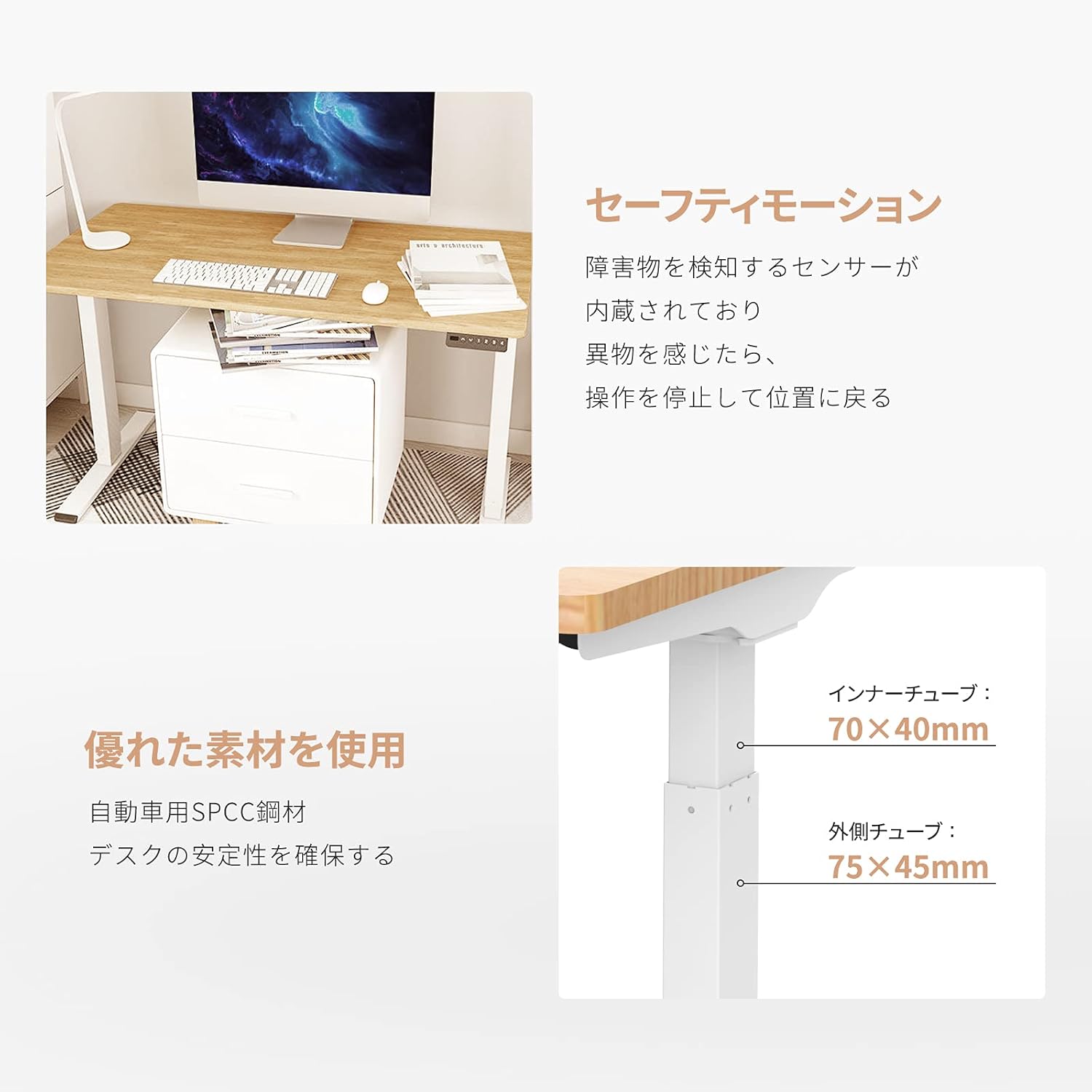
Image: Explanation of the safety motion feature, where the desk stops and reverses upon detecting an obstacle. Also shows inner tube (70x40mm) and outer tube (75x45mm) dimensions.
4. ساتنه
To ensure the longevity and optimal performance of your FLEXISPOT E9 Electric Standing Desk, follow these maintenance guidelines:
- منظم پاکول: د میز سطحه او پښې په نرم، داغ سره پاک کړئamp ټوکر. د خړوبولو پاکوونکو یا سختو کیمیاوي موادو څخه ډډه وکړئ چې کولی شي پای ته زیان ورسوي.
- د کیبل مدیریت: Ensure all cables are neatly organized and not tangled or pinched, especially during height adjustments. Use cable ties or management trays if necessary.
- اړیکې چیک کړئ: Periodically check that all screws and connections are secure. Tighten if any looseness is detected.
- د ډیر بار کولو څخه ډډه وکړئ: د 50 کیلو ګرام وزن اعظمي حد څخه ډیر مه کوئ.
- د چاپیریال شرایط: Keep the desk in a dry environment and avoid extreme temperatures or direct sunlight.
5. ستونزه حل کول
If you encounter any issues with your FLEXISPOT E9 Electric Standing Desk, please refer to the following common troubleshooting steps:
- میز نه حرکت کوي:
- وګورئ چې آیا د بریښنا کیبل په خوندي ډول د میز او دیوال دواړو سره نښلول شوی دی.
- ډاډ ترلاسه کړئ چې د حرکت مخه نیولو لپاره هیڅ خنډ شتون نلري.
- د میز د بیا تنظیمولو هڅه وکړئ د 30 ثانیو لپاره یې خلاص کړئ او بیا یې بیرته ولګوئ.
- ناانډوله حرکت:
- ډاډ ترلاسه کړئ چې میز په سطحه کې ځای پرځای شوی.
- Verify that the weight on the desk is evenly distributed.
- Error Codes on LED Display:
- Refer to the full product manual (if provided separately) for specific error code meanings and solutions.
- Often, an error can be cleared by resetting the desk (unplugging and replugging).
که دا ګامونه ستونزه حل نه کړي، مهرباني وکړئ د نورو مرستو لپاره د FLEXISPOT پیرودونکي ملاتړ سره اړیکه ونیسئ.
6. مشخصات
Detailed technical specifications for the FLEXISPOT E9 Electric Standing Desk:
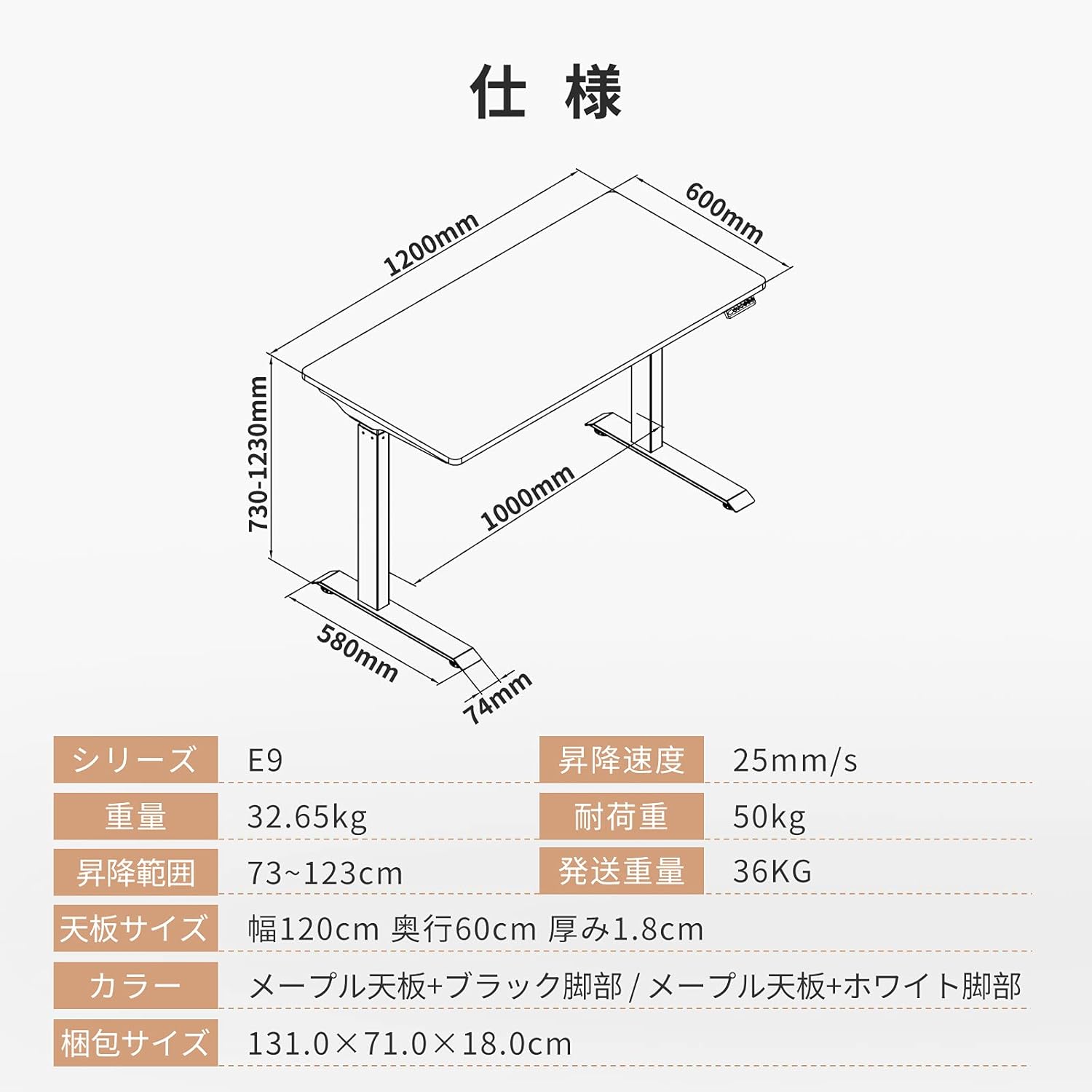
Image: Technical drawing with key dimensions: 1200mm width, 600mm depth, 730-1230mm height range, 1000mm base width, 580mm base depth, 74mm foot height.
| فیچر | تفصیل |
|---|---|
| برانډ | FLEXISPOT |
| ماډل | E9 |
| د میز ډول | Computer Desk, Electric Standing Desk |
| د محصول ابعاد (د x څلویښتم x څلویښتم) | 60 cm x 120 cm x 73-123 cm |
| د لوړوالی تنظیم کولو سلسله | له 73 سانتي مترو څخه تر 123 سانتي مترو پورې |
| Height Adjustment Speed | 25 mm/s |
| Maximum Recommended Weight Capacity | 50 کیلو ګرامه |
| د ټابلیټ اندازه | 120 cm (Width) x 60 cm (Depth) x 1.8 cm (Thickness) |
| د ټابلیټ ټاپ مواد | Maple (Finish: Paint) |
| اساسی مواد | Wood (Legs: Black) |
| مجلس ته اړتیا ده | هو |
| Recommended Persons for Assembly | 1 |
| ځانګړي ځانګړتیاوې | Height Adjustment Function, Anti-Collision Sensor |
| د توکي وزن | 35.9 کیلو ګرامه |
| د بار وړلو وزن | 36 کیلو ګرامه |
| جي ټي آی اين / يو پي سي | 810072794987 |
7. تضمین او ملاتړ
FLEXISPOT provides a free long-term manufacturer's warranty for the E9 Electric Standing Desk. This warranty includes unlimited support responses during the warranty period, offering complete peace of mind.
FLEXISPOT has established a dedicated support system in Japan, including a call center, to ensure excellent after-sales service for our customers. In the event that you require support, our team will assist you in Japanese, eliminating any language concerns.
For warranty claims, technical assistance, or any other inquiries, please contact FLEXISPOT customer service through the official webسایټ یا د اړیکې معلومات ستاسو د پیرود سره چمتو شوي.