
1. پیژندنه
This manual provides comprehensive instructions for the installation, operation, and maintenance of your FLEXISPOT Gas Spring Monitor Arm F8LB. Designed for single monitors ranging from 17 to 36 inches, this arm enhances your workspace ergonomics and frees up valuable desk space. Please read this manual thoroughly before installation and use to ensure safe and optimal performance.
2. د خوندیتوب معلومات
- Ensure the monitor arm is securely attached to a stable desk surface capable of supporting the combined weight of the arm and your monitor.
- د وزن اعظمي ظرفیت له ۳۴۰ کیلوګرامه (۷۵۰ پونډه) څخه زیات مه کوئ.
- Keep children and pets away from the monitor arm during installation and adjustment.
- Be cautious of pinch points when adjusting the arm.
- If any parts are missing or damaged, do not attempt to install the product. Contact customer support immediately.
3. د بسته محتويات
مهرباني وکړئ د نصبولو پیل کولو دمخه تصدیق کړئ چې ټولې برخې شتون لري:
- د څارنې بازو اسمبلۍ
- د VESA پلیټ
- د میز Clamp بیس
- Grommet Mount Base (optional installation method)
- د هارډویر کټ (سکرو، واشیرونه، فاصلې)
- Allen Keys for assembly and tension adjustment
- د کیبل مدیریت کلیپونه
4. مشخصات
| فیچر | مشخصات |
|---|---|
| ماډل | F8LB |
| رنګ | تور |
| د VESA مطابقت | 75x75mm، 100x100mm |
| د سکرین اندازه مطابقت | ۱۲.۶" - ۳۸.۲" |
| د بار کولو ظرفیت | ۲ - ۹ کیلوګرامه (۴.۴ - ۱۹.۸ پونډه) |
| د خښتو سلسله | -90° څخه تر +15° پورې |
| د انګړ سلسله | 180° |
| د څرخېدو سلسله | 360° |
| د نصب کولو ډول | د میز Clamp یا Grommet Mount |
| د میز ضخامت (Clamp) | 20-60mm |
| د میز ضخامت (ګرومیټ) | 25-100mm |
| UPC | 810054072508 |

Image: Illustration of the monitor arm's extensive angle adjustment capabilities, including 360-degree rotation and a tilt range from -90 to +15 degrees.
5. ترتیب کول
5.1 Choose Mounting Method
The monitor arm supports two installation methods: desk clamp or grommet mount. Select the method suitable for your desk.

Image: Visual guide illustrating the two available installation options: a C-clamp for securing the arm to the edge of a desk, and a grommet mount for installation through a desk hole.
5.2 Attach Base to Desk
- د Cl لپارهamp غره C-cl ضمیمه کړئamp to the edge of your desk and tighten the knob until it is secure. Ensure the desk thickness is between 20-60mm.
- د ګرومیټ ماونټ لپاره: If your desk has a grommet hole (8.5-70mm diameter), use the grommet base and secure it through the hole. Ensure the desk thickness is between 25-100mm.
5.3 د نظارت لپاره VESA پلیټ ضمیمه کړئ
The arm head is removable for easier monitor installation.
- Remove the VESA plate from the monitor arm.
- د VESA پلیټ د خپل مانیټر په شا کې د نصب شوي سوري سره سم کړئ (75x75mm یا 100x100mm).
- Secure the VESA plate to the monitor using the provided screws and washers.

Image: The VESA plate is shown detached from the monitor arm, highlighting the convenience of attaching it directly to the monitor before re-attaching the monitor to the arm.
5.4 Mount Monitor to Arm
- Slide the monitor (with the attached VESA plate) onto the arm head.
- Ensure the monitor is securely locked in place.

Image: A black monitor arm is shown securely clamped to a desk, supporting a black monitor from its rear VESA mount.
5.5 Adjust Gas Spring Tension
The gas spring tension needs to be adjusted to match the weight of your monitor. Use the provided Allen key to turn the adjustment screw on the arm. Turn clockwise to decrease tension (for lighter monitors) or counter-clockwise to increase tension (for heavier monitors) until the monitor stays at the desired height.
5.6 د کیبل مدیریت
Route your monitor cables through the integrated cable management channels on the arm to maintain a tidy workspace.

Image: A monitor arm is installed on a wooden desk in an office environment, showcasing a clean setup with a keyboard and mouse, and cables neatly managed.
6. عملیاتي لارښوونې
The FLEXISPOT Gas Spring Monitor Arm allows for flexible adjustment to achieve an ergonomic viewتجربه
6.1 د قد تنظیم کول
Gently push or pull the monitor up or down to your desired height. The gas spring mechanism will hold it in place once released. This helps alleviate neck, eye, and back strain by allowing you to maintain a comfortable posture.
6.2 د خښتو سمون
Tilt your monitor up or down to reduce glare and find the optimal viewing angle. The arm supports a tilt range of -90° to +15°.
۵.۲ څرخېدل او څرخېدل
Swivel the monitor left or right up to 180° to share your screen with colleagues or adjust your viewing position. You can also rotate the monitor 360° from landscape to portrait orientation.
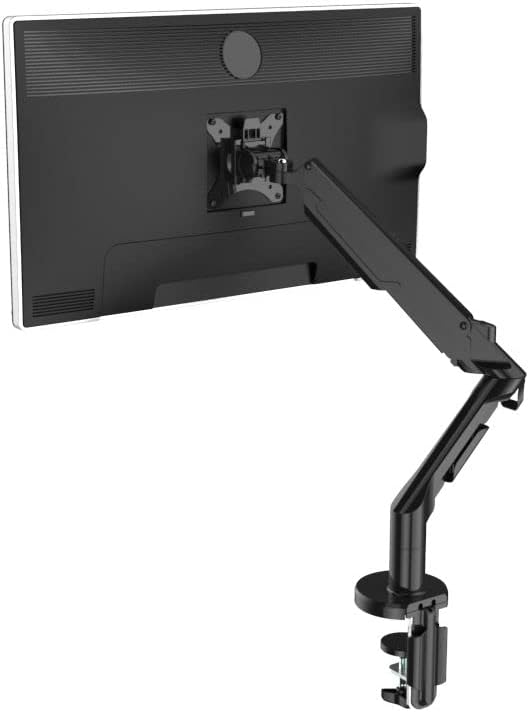
Image: The monitor arm is depicted at its maximum extension, demonstrating its wide range of motion and flexibility in positioning the monitor.
6.4 Optimizing Desk Space and Ergonomics
By elevating your monitor, the arm frees up significant desk space. Its design also promotes better posture, reducing discomfort during long work sessions.

Image: A visual comparison illustrating how a monitor arm (right) creates more usable desk space compared to a traditional monitor stand (left).

Image: An illustration demonstrating the improvement in ergonomic posture when using a monitor arm (right) compared to a standard monitor setup (left), reducing strain on the neck and back.

Image: A monitor arm is shown integrated with a standing desk, enabling users to maintain an ergonomic viewing height whether sitting or standing.
7. ساتنه
- په منظم ډول ټول پیچونه او اړیکې وګورئ ترڅو ډاډ ترلاسه کړئ چې دوی کلک او خوندي دي.
- د مانیټر لاس د نرم، d سره پاک کړئamp ټوکر. د کثافاتو پاکوونکو یا محلولونو څخه ډډه وکړئ.
- د ګازو د پسرلي میکانیزم غوړ مه کوئ.
8. ستونزه حل کول
- Monitor sags or does not stay at desired height: The gas spring tension is too low for your monitor's weight. Increase tension by turning the adjustment screw counter-clockwise with the provided Allen key.
- Monitor is difficult to move or too stiff: The gas spring tension is too high. Decrease tension by turning the adjustment screw clockwise.
- Monitor wobbles: Ensure all mounting screws (VESA plate to monitor, arm to base, base to desk) are securely tightened. Check if the desk surface is stable.
- کیبلونه ګډوډ دي: Utilize the integrated cable management clips and channels on the arm to organize cables.
9. تضمین او ملاتړ
Your FLEXISPOT Gas Spring Monitor Arm F8LB comes with a 1 کلن تضمین د پیرود نیټې څخه.
If you encounter any issues, have questions, or require assistance, please do not hesitate to contact our customer support team:
بریښنالیک: اړیکه@flexispot.jp
Please provide your purchase details and a description of the issue when contacting support to ensure a prompt resolution.