
1. پیژندنه
This manual provides instructions for the Keychron K14 mechanical keyboard. The K14 is a 70% layout, 72-key keyboard designed for both Mac and Windows operating systems, offering both Bluetooth wireless and USB wired connectivity. It features an RGB backlight, an aluminum frame, and Gateron G Pro Brown mechanical switches.

انځور: اوورview of the Keychron K14 mechanical keyboard highlighting its 70% layout, wireless/wired modes, multi-device connectivity, Gateron G Pro switches, RGB lighting, Mac/Windows compatibility, and USB-C plug.
2. د بسته محتويات
Verify that all items are present in your Keychron K14 package:
- Keychron K14 Mechanical Keyboard
- د USB ډول - سي کیبل
- کیکیپ پلر
- Switch Puller (if hot-swappable version)
- Extra Keycaps for Windows/Mac operating systems
- د کارن لارښود
3. د محصول ب Featuresې
3.1. 70% Layout and Key Cluster
The K14 features a compact 70% layout with 72 keys, providing a smaller footprint while retaining essential navigation keys such as Home, End, and Arrow keys, similar to a tenkeyless keyboard.

انځور: نږدې انځور view of the Keychron K14 keyboard, illustrating its 70% layout which includes dedicated navigation keys such as Insert, Home, End, Delete, Page Up, Page Down, and arrow keys.
3.2. Gateron G Pro Brown Switches
The keyboard is equipped with Gateron G Pro Brown mechanical switches, known for their tactile feedback. These switches offer a durable lifespan of up to 50 million keystrokes.

Image: Specifications for the Gateron G Pro mechanical Brown Switch, detailing operating force (55±15gf), pre-travel (2±0.6mm), tactile behavior, gentle sound level, pre-lubed status (Yes), and a lifespan of up to 50 million keystrokes.
3.3. Ergonomic ډیزاین
The K14 features two-level adjustable feet, allowing for typing angles of 6º and 9º. This design, combined with an inclined bottom frame, provides ergonomic support for extended typing comfort.

انځور: یوه خوا view of the Keychron K14 keyboard, illustrating its two-level adjustable feet that allow for typing angles of 6 and 9 degrees, enhancing ergonomic support.
4. ترتیب کول
4.1. د کیبورډ سره نښلول
The Keychron K14 supports both Bluetooth wireless and USB Type-C wired connections.
4.1.1. د بلوتوث پیوستون
- Ensure the keyboard's mode switch (located on the side) is set to "BT" (Bluetooth).
- Press and hold the "Fn" + "1" (or "2" or "3") keys for 4 seconds to enter pairing mode. The backlight will flash rapidly.
- On your device (smartphone, laptop, iPad), enable Bluetooth and search for "Keychron K14".
- Select the keyboard to pair. The backlight will stop flashing upon successful connection.
- The keyboard can connect to up to 3 devices. Use "Fn" + "1", "Fn" + "2", or "Fn" + "3" to switch between paired devices.
4.1.2. د تار نښلول
- ډاډ ترلاسه کړئ چې د کیبورډ موډ سویچ "کیبل" ته تنظیم شوی دی.
- Connect the provided USB Type-C cable from the keyboard to your computer's USB port.
- The keyboard will automatically be recognized and function as a wired keyboard.

Image: The Keychron K14 keyboard shown connecting wirelessly to a desktop computer, laptop, and smartphone, indicating compatibility with Mac and Windows operating systems.

Image: The Keychron K14 keyboard displayed with icons representing its dual connectivity options: wireless Bluetooth and wired USB-C.
۳.۲. د عملیاتي سیسټم سویچ
The K14 includes a switch to toggle between Mac and Windows layouts. Locate the OS switch on the side of the keyboard and set it to the appropriate operating system for optimal key functionality.
۲. د کیبورډ زاویه تنظیم کول
The keyboard features two-level adjustable feet. Flip out the feet to select between 6º and 9º typing angles to suit your ergonomic preference.
5. عملیات
5.1. د backlight کنټرول
The Keychron K14 features RGB backlighting with 19 different types of lighting effects. Use the dedicated backlight key (often marked with a lightbulb icon) or function key combinations to cycle through effects, adjust brightness, and change colors.
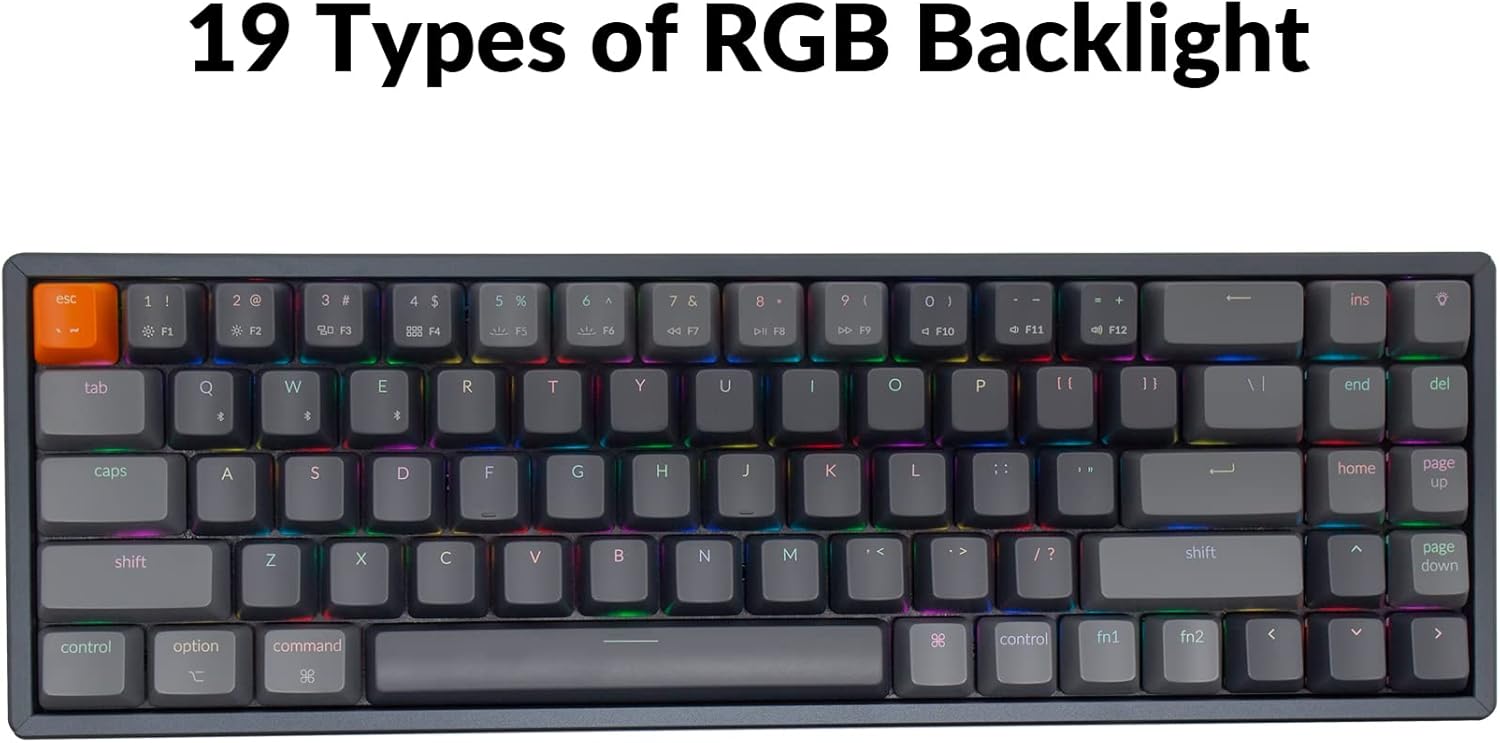
Image: The Keychron K14 keyboard illuminated with a multi-color RGB backlight, demonstrating its various lighting capabilities.
۴.۲. ملټي میډیا کیلي
Access multimedia functions (e.g., volume control, play/pause) using the Fn key in combination with the designated function row keys. Refer to the keycap legends for specific functions.
۶. د این-کی رول اوور (NKRO)
The K14 supports N-key rollover (NKRO) in wired mode, allowing all keys to be registered simultaneously. In wireless mode, it supports 6-key rollover (6KRO).
6. د بیټرۍ مدیریت
The Keychron K14 is equipped with a 4000 mAh battery, providing up to 240 hours of usage with the backlight off. Connect the keyboard via the USB Type-C cable to charge the battery. The charging indicator will show the charging status.

Image: A close-up of the Keychron K14 keyboard with a prominent overlay indicating its 4000 mAh battery capacity.
7. ساتنه
To ensure the longevity and optimal performance of your Keychron K14 keyboard, follow these maintenance guidelines:
- د کیلي کیپس پاکول: Use a keycap puller to remove keycaps. Clean them with a mild soap solution and a soft cloth. Ensure they are completely dry before reattaching.
- د کیبورډ بدن پاکول: Use a soft, dry, lint-free cloth to wipe the aluminum frame and other surfaces. For stubborn dirt, a slightly damp ټوکر کارول کیدی شي، مګر د ډیر رطوبت څخه ډډه وکړئ.
- د دوړو لرې کول: د کیلي کیپسونو او سویچونو ترمنځ د دوړو او کثافاتو لرې کولو لپاره د فشار شوي هوا څخه کار واخلئ.
- ذخیره کول: کله چې د اوږدې مودې لپاره نه کارول کیږي، کیبورډ په وچ او یخ ځای کې د مستقیم لمر وړانګو او سختې تودوخې څخه لرې وساتئ.
- د مایعاتو څخه ډډه وکړئ: The keyboard is not water-resistant. Keep liquids away to prevent damage.
8. ستونزه حل کول
If you encounter issues with your Keychron K14 keyboard, refer to the following common solutions:
۱. کیبورډ ځواب نه ورکوي
- پیوستون چیک کړئ: Ensure the USB cable is securely connected or that Bluetooth is properly paired.
- د بیټرۍ کچه: If using Bluetooth, check if the battery is charged. Connect the USB cable to charge.
- د حالت بدلول: Verify the keyboard's mode switch is set correctly (BT for Bluetooth, Cable for wired).
- بیا پیل کول: Try restarting your computer or device and the keyboard.
8.2. Bluetooth Disconnection Issues
- لاسوهنه: کیبورډ خپل وسیله ته نږدې او د نورو بېسیم وسیلو څخه لرې کړئ چې ممکن د مداخلې لامل شي.
- بیا جوړه: Unpair the keyboard from your device's Bluetooth settings and then re-pair it.
- فرم ویئر: Check the official Keychron website for any available firmware updates for your K14 model.
8.3. Keys Not Registering or Double Typing
- پاک سویچونه: Dust or debris under the keycap or switch can cause issues. Use compressed air.
- د سویچ بدلول: If you have a hot-swappable version, try replacing the problematic switch with a spare one.
8.4. شاته څراغ کار نه کوي
- روښانتیا: Ensure the backlight brightness is not set to the lowest level.
- د فعالیت کلیدونه: Try cycling through backlight modes and brightness levels using the designated function key combinations.
9. مشخصات
| فیچر | تفصیل |
|---|---|
| برانډ | کیکرون |
| د ماډل شمیره | K14C3 |
| ترتیب | ۶۰٪ (۶۱ کیلي) |
| ارتباط | بلوتوث ۵.۰ او د USB ډول-سي وایرډ |
| سویچونه | Gateron G Pro Brown Mechanical |
| شاته څراغ | RGB (19 types) |
| د چوکاټ مواد | المونیم |
| د بیټرۍ ظرفیت | 4000 mAh |
| د بیټرۍ ژوند | تر ۱۴۶ ساعتونو پورې (د رڼا بندول) |
| د تنظیم وړ پښې | Yes (6º and 9º) |
| N-کیلي رول اوور | NKRO (Wired), 6KRO (Wireless) |
| مطابقت لرونکې وسیلې | لپ ټاپ، سمارټ فون، ټابلیټ |
| عملیاتي سیسټمونه | ماک، وینډوز |
10. تضمین او ملاتړ
Keychron products are covered by a limited warranty. For specific warranty terms, duration, and support inquiries, please refer to the official Keychron webسایټ ته مراجعه وکړئ یا مستقیم د دوی د پیرودونکو خدماتو سره اړیکه ونیسئ. د تضمین ادعاوو لپاره د پیرود ثبوت وساتئ.
رسمي Webسایټ: www.keychron.com