
1. پیژندنه
د پیرودلو لپاره مننهasing the MONODEAL Portable CD Player. This device is designed for personal and portable audio playback, featuring built-in speakers, anti-skip protection, and dual headphone jacks. This manual provides detailed instructions for setup, operation, maintenance, and troubleshooting to ensure optimal performance and longevity of your CD player.

Image: The MONODEAL Portable CD Player, a compact black device with a clear top cover and control buttons on the front.
۲. په بکس کې څه دي؟
مهرباني وکړئ د بسته بندۍ محتويات وګورئ ترڅو ډاډ ترلاسه کړئ چې ټول توکي شتون لري:
- سي ډي غږونکی
- غوږونه
- د USB چارج کیبل
- د Aux کیبل
- د کارن لارښود

Image: The MONODEAL CD Player, its packaging, and all included accessories: earphones, USB charging cable, and aux cable.
3. محصول ختم شوview
Familiarize yourself with the various parts and controls of your CD player:
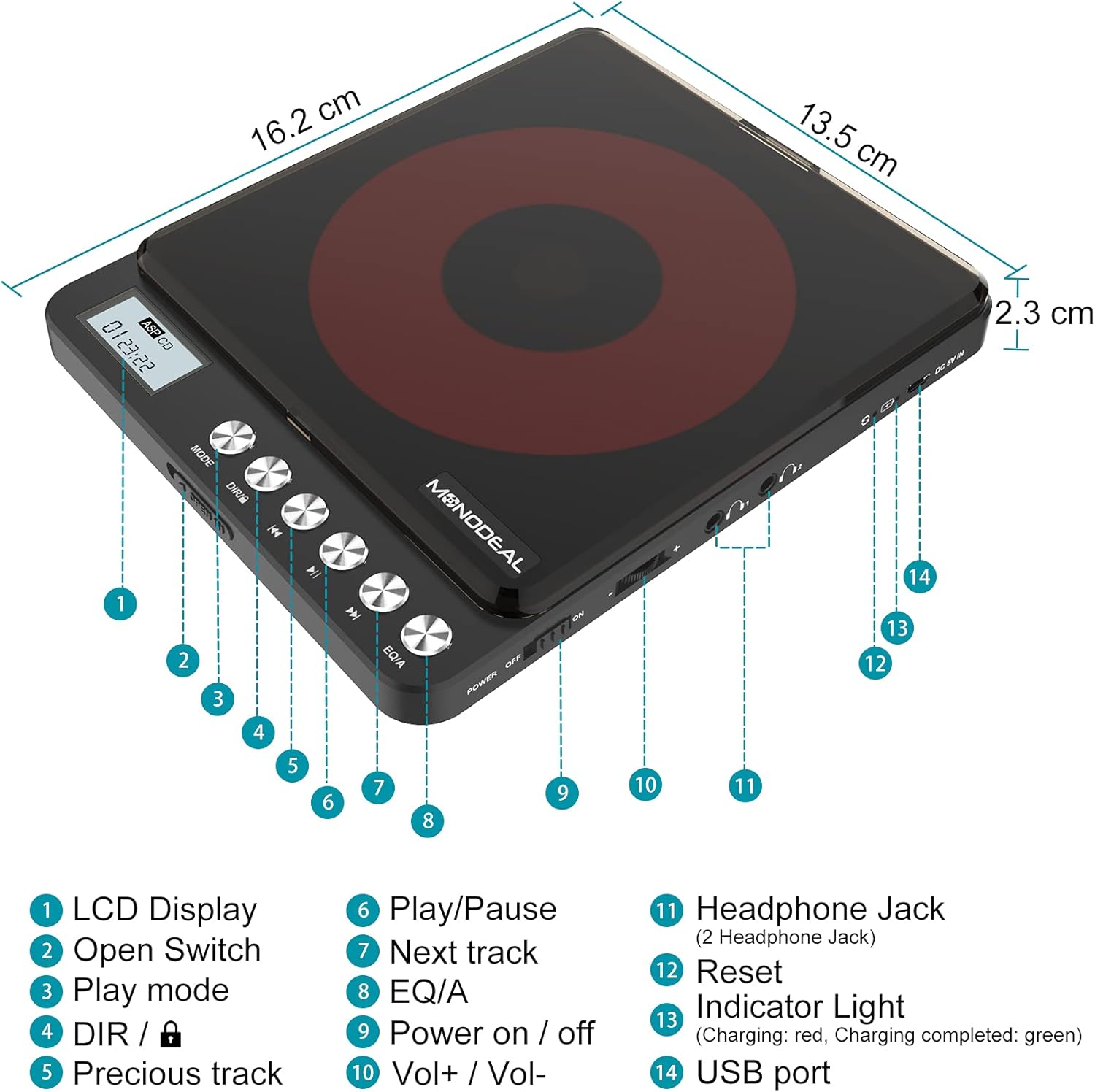
Image: A detailed diagram of the MONODEAL Portable CD Player, highlighting its various components with numbered labels.
- د LCD نندارې: د ټریک شمیره، وخت، او د پلې بیک حالت ښیي.
- خلاص سویچ: Used to open the CD compartment.
- د لوبې حالت: Cycles through playback modes (e.g., repeat, random).
- DIR / Lock: Directory navigation for MP3 CDs / Key lock function.
- مخکینی لار د اوسني ټریک یا پخواني ټریک پیل ته ځي.
- پلی کول / ودرول: پلے بیک شروع کوي یا وقفه کوي.
- بله لار: راتلونکي ټریک ته ځي.
- EQ/A: Equalizer settings / Anti-skip function indicator.
- بریښنا فعال / بند: د بریښنا اصلي سویچ.
- Vol+/ Vol-: د حجم کنټرول.
- Headphone Jack (2 Headphone Jacks): Audio output for headphones.
- بیا تنظیمول: Recessed button to reset the device (requires a thin object like a needle).
- د رڼا شاخص: Shows charging status (red for charging, green for fully charged).
- USB پورټ: د وسیله چارج کولو لپاره.
4. ترتیب کول
4.1 د وسیلې چارج کول
The CD player has a built-in rechargeable battery. Before first use, fully charge the device. A full charge provides up to 15 hours of playback.
- ورکړل شوی USB چارجینګ کیبل د CD پلیر USB پورټ (14) سره وصل کړئ.
- Connect the other end of the USB cable to a power adapter, car charger, laptop, or power bank.
- The indicator light (13) will show red during charging and turn green when fully charged.
- چارج کول معمولا شاوخوا 4 ساعته وخت نیسي.

Image: The MONODEAL CD Player being charged via various methods including a power bank, power adapter, laptop, and car charger.
4.2 Connecting to External Audio Systems
You can connect the CD player to external speakers, car audio systems, or home stereos using the provided 3.5mm AUX cable.
- Insert one end of the 3.5mm AUX cable into one of the headphone jacks (11) on the CD player.
- Insert the other end of the AUX cable into the 3.5mm auxiliary input port of your car stereo or external sound system.
- یادونه: The CD player is not compatible with car's USB ports or Bluetooth connections for audio output. An AUX port is required.
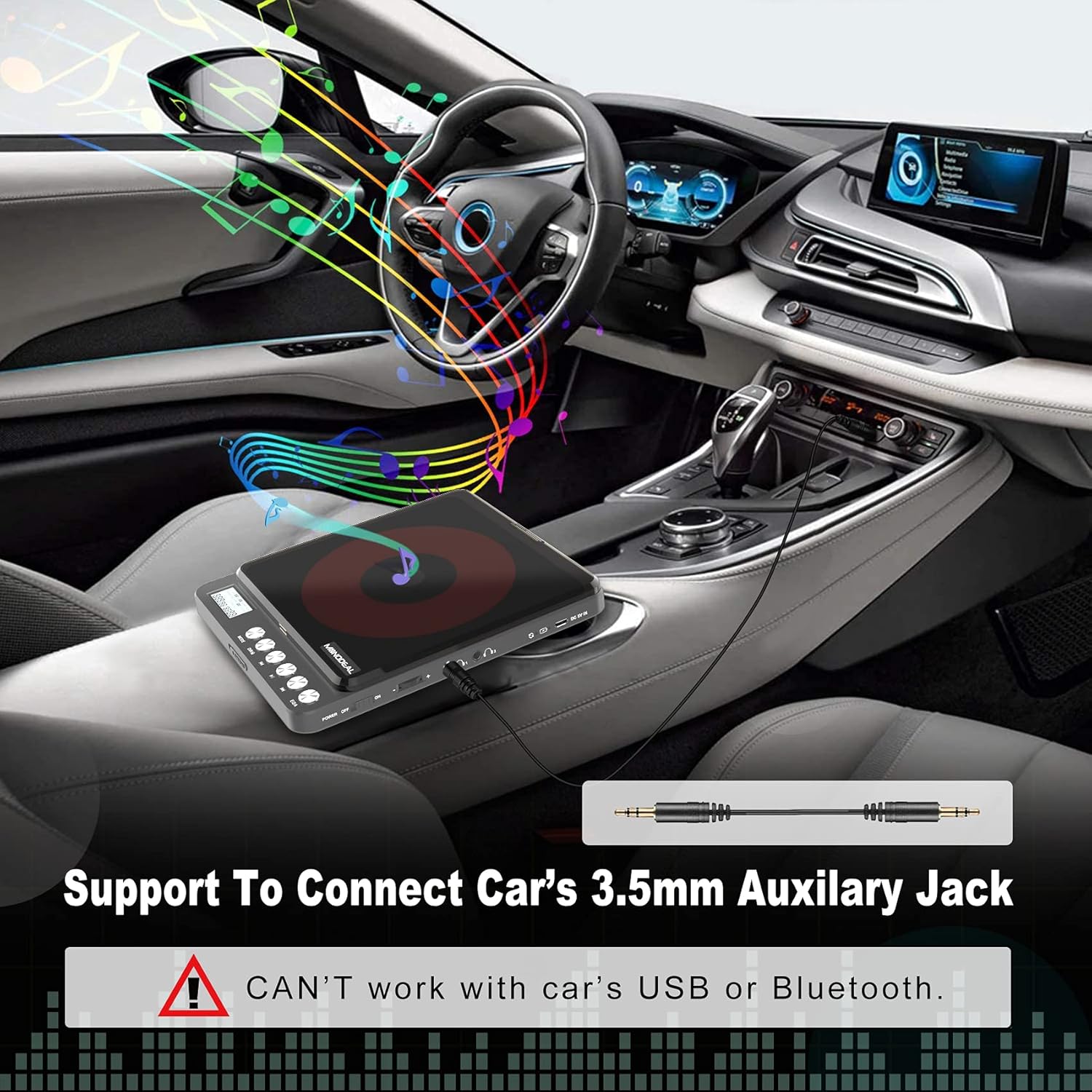
Image: The MONODEAL CD Player connected to a car's dashboard via a 3.5mm auxiliary cable, illustrating its use in a vehicle.
5. عملیاتي لارښوونې
۶.۱ بنسټیز پلې بیک
- Slide the Power On/Off switch (9) to the "ON" position.
- Press the Open Switch (2) to open the CD compartment.
- Carefully place a compatible CD (CD, MP3, CD-R, CD-RW, HDCD) onto the spindle, ensuring it is seated correctly.
- د CD کڅوړه بنده کړئ.
- The LCD display (1) will show "READ" and then the total number of tracks and total playback time.
- د پلې بیک پیل کولو لپاره د پلې/پاز تڼۍ (6) کېکاږئ.
- Adjust the volume using the Vol+ / Vol- controls (10).
- To pause, press the Play/Pause button (6) again. Press again to resume.
- To skip to the next track, press the Next Track button (7).
- To go back to the previous track or the beginning of the current track, press the Previous Track button (5).
- To turn off the player, slide the Power On/Off switch (9) to the "OFF" position. The player will remember the last played position if a disc remains inside.
5.2 د لوبې حالتونه
Press the Play Mode button (3) repeatedly to cycle through different playback modes:
- په ترتیب سره لوبه وکړئ: په ترتیب سره ټریکونه غږوي.
- یو ټریک تکرار کړئ: اوسنۍ لار تکراروي.
- ټول تکرار کړئ: په ډیسک کې ټول ټریکونه تکراروي.
- پېژندنه: د هر ټریک لومړۍ ۱۰ ثانیې غږوي.
- Shuf (Shuffle): ټریکونه په ناڅاپي ترتیب سره غږوي.

Image: A visual representation of the five play modes available on the MONODEAL CD Player, including play in order, repeat track, repeat all, intro, and shuffle.
5.3 Dual Headphone Jacks
The MONODEAL CD Player is equipped with two headphone jacks (11), allowing two users to listen simultaneously. Simply plug two sets of headphones into the available jacks.

Image: Two individuals sharing the MONODEAL CD Player using both headphone jacks, emphasizing the dual listening feature.
۳.۵ جوړ شوي سپیکرونه
For listening without headphones, the CD player features built-in stereo speakers. The sound quality is suitable for personal listening in quiet environments. The maximum volume of the internal speakers is designed for portability and may not be as loud as larger audio systems.

Image: The MONODEAL CD Player with an overlay indicating the location of its built-in dual speakers, shown in a setting with people dancing to music.
6. ساتنه
- Keep the CD player clean by wiping it with a soft, dry cloth.
- د کثافاتو پاکوونکي یا محلول مه کاروئ.
- Regularly clean the disc and the optical pickup lens of the CD player with a dry, lint-free cloth.
- د وسیلې د خورا تودوخې ، رطوبت یا مستقیم لمر وړانګو ته د افشا کولو څخه ډډه وکړئ.
- کله چې کارول نه وي، پلیر په یخ او وچ ځای کې وساتئ.
7. ستونزه حل کول
| ستونزه | احتمالي لامل | د حل لاره |
|---|---|---|
| سي ډي پرېښودل یا نه غږول. | Disc is dirty, scratched, or incompatible format. Low battery. |
|
| No sound from internal speakers. | Volume too low. Headphones plugged in. |
|
| No sound when connected to car/external speakers. | Incorrect connection. Car/external system not set to AUX input. |
|
| لوبغاړی نه چالانېږي. | Low battery. Power switch off. |
|
8. مشخصات
| فیچر | تفصیل |
|---|---|
| د ماډل نوم | CW705 |
| د محصول ابعاد | 6.1 x 5.1 x 1.1 انچه |
| د توکي وزن | ۲.۴۵ پونډه |
| رنګ | تور |
| د ارتباط ټیکنالوژي | معاون |
| ځانګړی ځانګړنه | Portable, Built-in Speakers, Anti-Skip, Dual Headphone Jacks, Rechargeable |
| ملاتړ شوي ډیسک فارمیټونه | سي ډي، ايم پي ۳، سي ډي-آر، سي ډي-آر ډبليو، اېچ ډي سي ډي |
| د میوزیک فارمیټ ملاتړ شوی | CD-DA، MP3، WMA |
| د بیټرۍ ژوند | Up to 15 hours playback (after full charge) |

Image: The MONODEAL CD Player highlighting its 2000mAh built-in rechargeable battery for up to 15 hours of playback, and listing supported disc and music formats.
9. تضمین او ملاتړ
For warranty information or further assistance, please refer to the official MONODEAL website or contact customer support through your purchase platform. A digital version of this user manual is also available for download at: MONODEAL User Manual PDF.