
پیژندنه
This manual provides detailed instructions for the installation, operation, and maintenance of your Hama 00118498 Monitor Desk Mount. Designed to enhance your ergonomic workspace, this monitor arm allows for flexible positioning of your display, promoting a comfortable and productive environment. Please read these instructions carefully before beginning installation.
د تنظیم کولو لارښوونې
Follow these steps to correctly install your Hama 00118498 Monitor Desk Mount.
1. Attaching the Desk Clamp
- د میز ځای clamp assembly onto the edge of your desk. Ensure the desk surface is sturdy and can support the weight of the mount and your monitor.
- cl کلک کړئamp screw firmly until the mount is securely fastened to the desk. Do not overtighten.
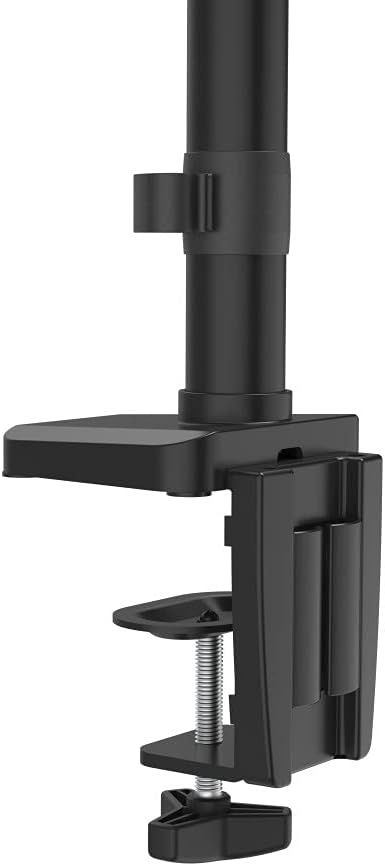
Image: The desk clamp mechanism, showing how it attaches to the desk edge for secure mounting.
۴.۳. د مانیټر نښلول
- Ensure your monitor is VESA compatible (100x100mm or 75x75mm).
- Carefully attach the VESA plate from the monitor arm to the back of your monitor using the provided screws. Make sure the screws are tightened securely.
- Slide the monitor (with the attached VESA plate) onto the arm's mounting head. Ensure it clicks into place or is secured with any locking mechanism provided.

Image: The monitor arm's VESA plate and adjustable joint, ready for monitor attachment.

انځور: یوه خوا view of the assembled monitor arm, highlighting the VESA mount and integrated cable management channels.
3. د کیبل مدیریت
Utilize the integrated cable management system to route your monitor cables neatly along the arm. This helps maintain a tidy workspace and prevents cable clutter.
عملیاتي لارښوونې
The Hama 00118498 Monitor Desk Mount offers various adjustment options for optimal viewراحت.
- د لوړوالی سمون: The integrated pneumatic spring allows for smooth and effortless vertical height adjustment. Gently push or pull the monitor to your desired height.
- تیر: The arm can swivel horizontally, allowing you to rotate your monitor to share your screen or change your viewزاویه.
- ټیلټ: Adjust the monitor's tilt angle (up or down) to reduce glare and find the most comfortable viewموقعیت لري.
- گردش: Rotate your monitor from landscape to portrait orientation as needed for different tasks.
Adjustments should be smooth. If the monitor does not hold its position, refer to the troubleshooting section for tension adjustments.
ساتنه
منظم ساتنه ستاسو د څارونکي بازو اوږد عمر او غوره فعالیت تضمینوي.
- پاکول: د مانیټر بازو سطحه د نرم، d سره پاک کړئamp ټوکر د کثافاتو پاکونکو یا محلولونو کارولو څخه ډډه وکړئ.
- اړیکې چیک کړئ: ټول پیچونه او اړیکې په دوره یي ډول وګورئ ترڅو ډاډ ترلاسه شي چې دوی کلک او خوندي پاتې دي. که اړتیا وي نو بیا یې ټینګ کړئ.
- غوړول: The pneumatic spring is maintenance-free. Do not attempt to lubricate internal components.
د ستونزو حل کول
If you encounter issues with your Hama 00118498 Monitor Desk Mount, refer to the following common problems and solutions:
- د ساګونو څارنه یا په موقف کې نه پاتې کیږي: The tension of the pneumatic spring may need adjustment. Locate the tension adjustment screw (usually found on the arm joint) and turn it clockwise to increase tension for heavier monitors, or counter-clockwise for lighter monitors. Adjust gradually until the monitor holds its position.
- د مانیټر حرکت کول ستونزمن دي: If the arm is too stiff, the tension may be too high. Turn the tension adjustment screw counter-clockwise to decrease tension.
- Arm Feels Loose on Desk: ډاډ ترلاسه کړئ چې میز clamp is fully tightened. If the desk surface is too thin or fragile, consider adding a protective pad between the clamp and the desk.
- د څپو څارنه: Check all mounting screws on the VESA plate and the arm joints to ensure they are securely fastened.
مشخصات
| فیچر | تفصیل |
|---|---|
| د ماډل شمیره | 00118498 |
| د نصب کولو ډول | د میز Clamp |
| د حرکت ډول | Rotating, Swivel, Tilt, Height Adjustable (Pneumatic Spring) |
| برانډ | حما |
| مواد | المونیم |
| رنګ | تور |
| مطابقت لرونکې وسیلې | څارنه |
| لږترلږه مطابقت اندازه | 10 انچه |
| اعظمي مطابقت لرونکی اندازه | 32 انچه |
| د توکي وزن | 2.2 کیلوګرامه |
| د اصلي هیواد | چین |
تضمین او ملاتړ
For warranty information or technical support, please refer to the documentation included with your purchase or visit the official Hama webسایټ. تاسو معمولا هلته د ملاتړ د اړیکو توضیحات، FAQs، او اضافي سرچینې موندلی شئ.
رسمي هاما Webسایټ: www.hama.com