
1. پیژندنه
Thank you for choosing the FLEXISPOT EG1 Electric Standing Desk. This manual provides essential information for the safe and efficient assembly, operation, and maintenance of your new height-adjustable desk. The EG1 desk is designed to promote a healthier work environment by allowing seamless transitions between sitting and standing positions, enhancing focus and comfort throughout your workday.
The FLEXISPOT EG1 features a wide height adjustment range, a smooth one-piece desktop, and an intuitive control panel for ease of use. Please read this manual thoroughly before assembly and operation to ensure proper functionality and longevity of your product.
2. د خوندیتوب معلومات
- ډاډ ترلاسه کړئ چې ټولې برخې شتون لري او د راټولولو دمخه زیانمن شوي ندي. که چیرې کومې برخې ورکې یا زیانمنې وي نو مه کاروئ.
- د ټپي کیدو مخنیوي لپاره د عملیاتو په جریان کې ماشومان او څاروي له میز څخه لرې وساتئ.
- د لوړوالي د تنظیم په وخت کې لاسونه یا نور شیان د حرکت کوونکو برخو (د بیلګې په توګه، د ستنو پورته کول) ته نږدې مه کېږدئ.
- ډاډ ترلاسه کړئ چې میز په یوه هواره سطحه کې کیښودل شوی ترڅو ثبات وساتل شي.
- میز ډیر مه باروئ. د اعظمي وزن ظرفیت لپاره مشخصاتو ته مراجعه وکړئ.
- یوازې چمتو شوي بریښنا اډاپټر او کیبلونه وکاروئ.
- د پاکولو یا ساتنې څخه دمخه بریښنا قطع کړئ.
- د کنټرول پینل یا بریښنایی برخو کې د مایعاتو له توییدو څخه ډډه وکړئ.
- This desk is equipped with an anti-collision rebound function. However, always be aware of surroundings during movement.
3. د بسته محتويات
The FLEXISPOT EG1 Electric Standing Desk is shipped in two separate packages to ensure better protection during transit. Please verify that all components listed below are present before beginning assembly.
- ډیسکټاپ (۱ ټوټه)
- Desk Frame (includes legs, motor, control box)
- د تضمین اداره
- د بریښنا اډاپټر او کیبل
- د اسمبلۍ هارډویر (پیچونه، بولټونه، وسایل)
- د لارښوونې لارښود

Image: The FlexiSpot EG1 desk components are shipped in two distinct packages: one containing the desktop and another for the desk frame, ensuring secure delivery.
4. تنظیم او مجلس
Assembly of the FLEXISPOT EG1 desk is designed to be straightforward with pre-drilled holes and a complete set of tools included. Follow these general steps for assembly:
- اجزا خلاص کړئ: په احتیاط سره د بسته بندۍ ټولې برخې لرې کړئ او په پاکه، نرمه سطحه یې واچوئ ترڅو د سکریچونو مخه ونیول شي.
- د میز چوکاټ راټولول: Attach the lifting columns to the crossbar, ensuring all screws are securely tightened.
- پښې وصل کړئ: Secure the foot pads to the bottom of the lifting columns. The anti-slip foot pads provide stability and protect your floor.
- د ډیسکټاپ نصبول: Carefully place the desktop upside down on a soft surface. Align the assembled desk frame with the pre-drilled holes on the desktop and secure it with the provided screws.
- د کنټرول پینل نصب کړئ: Attach the control panel to the underside of the desktop in a convenient location.
- کیبلونه وصل کړئ: Connect the motor cables, control panel cable, and power adapter to the control box. Ensure all connections are firm.
- د کیبل مدیریت: Use cable ties or clips (if provided) to organize and secure cables, preventing them from snagging during height adjustments.
- د دندې میز: Carefully flip the desk upright and place it in its desired location. Ensure there is adequate clearance for height adjustments.
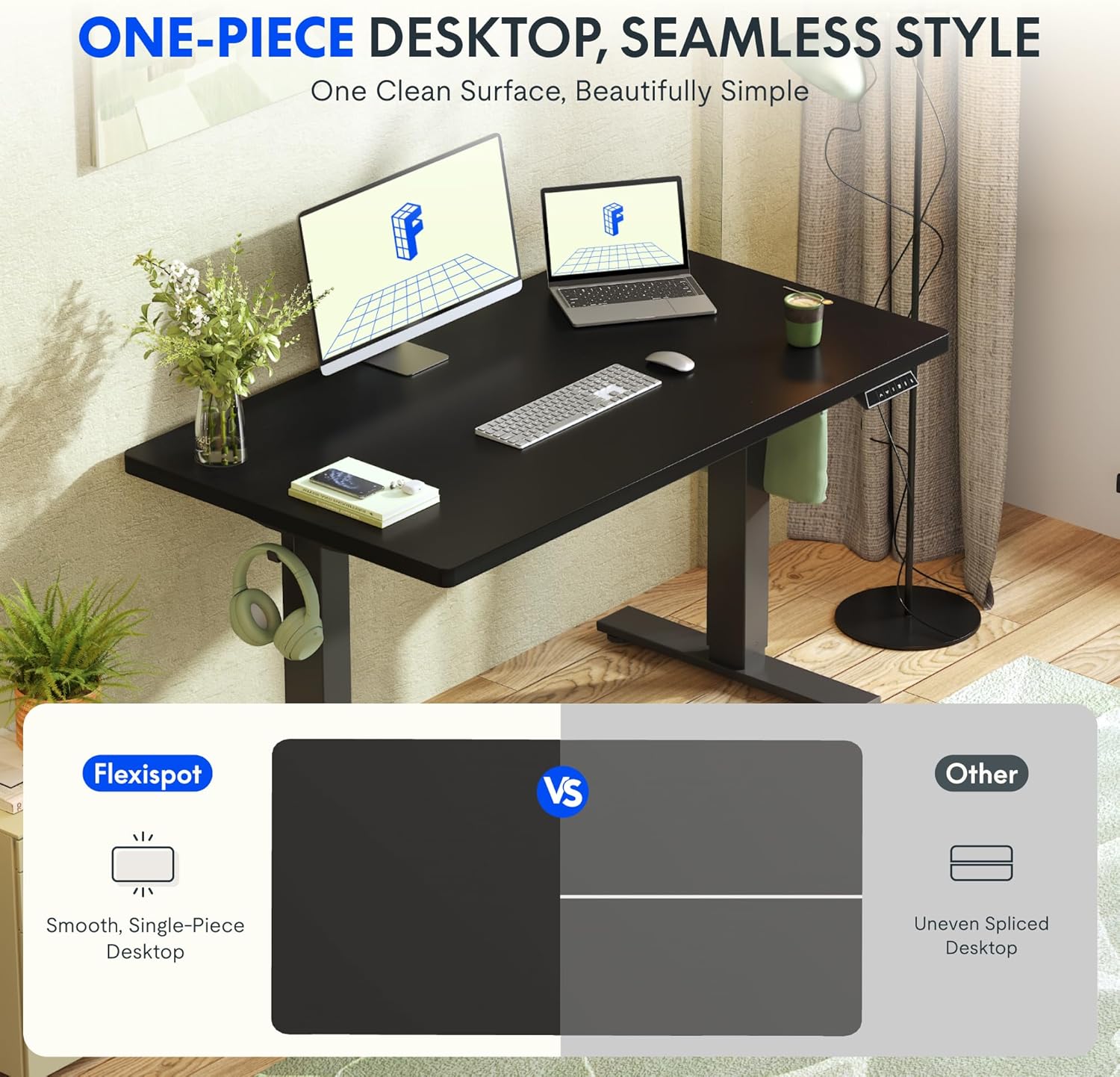
Image: The desk features a smooth, one-piece desktop, eliminating gaps and burrs often found in spliced desktops, contributing to a clean and stable work surface.
5. عملیاتي لارښوونې
The FLEXISPOT EG1 Electric Standing Desk is operated using a simple 2-button control panel, allowing for quick and easy height adjustments and memory presets.
5.1 د کنټرول پینل دندې

Image: The smart control panel features an LED display, up/down buttons for height adjustment, and four memory preset buttons for saving preferred desk heights.
- د LED ښودنه: Shows the current desk height in centimeters or inches.
- پورته/ښکته تڼۍ (▲ / ▼): Press and hold to move the desk up or down. Release the button to stop at the desired height.
- د حافظې پریزیسټونه (۱، ۲، ۳، ۴): These buttons allow you to save and recall up to four preferred desk heights.
۴.۲ د حافظې پریسیټونه تنظیم کول
- د پورته/ښکته تڼیو په کارولو سره میز د خپلې خوښې لوړوالي سره سم تنظیم کړئ.
- Press the 'M' or 'SET' button (if available, otherwise proceed to step 3). The display may flash.
- Press one of the numbered memory buttons (1, 2, 3, or 4) within a few seconds. The display will confirm the setting.
- To recall a saved height, simply press the corresponding numbered memory button. The desk will automatically move to that height.
۴.۳ د ټکر ضد ځانګړتیا
The desk is equipped with an anti-collision system. If the desk encounters an obstacle during height adjustment, it will automatically stop and reverse slightly to prevent damage. Always ensure the area around the desk is clear during operation.

Image: The desk offers a wide height range (71.5 to 116 cm), accommodating various users for comfortable sitting or standing positions.
6. ساتنه
Regular maintenance ensures the longevity and optimal performance of your FLEXISPOT EG1 Electric Standing Desk.
- پاکول: ډیسټاپ او چوکاټ د نرم، d سره پاک کړئamp cloth. Avoid abrasive cleaners or harsh chemicals that could damage the finish. Ensure the desk is unplugged before cleaning.
- د کیبل مدیریت: Periodically check cables for wear or damage. Ensure they are neatly organized and not pinched or tangled.
- د تړلو چک: کله ناکله ټول پیچونه او بولټونه وګورئ ترڅو ډاډ ترلاسه کړئ چې دوی کلک دي. که اړتیا وي نو بیا یې ټینګ کړئ.
- د حرکت معاینه: میز په دوره یي ډول د هغې د بشپړ لوړوالي له لارې چل کړئ ترڅو ډاډ ترلاسه شي چې حرکت یې اسانه او دوامداره وي.
7. ستونزه حل کول
If you encounter issues with your FLEXISPOT EG1 desk, refer to the following troubleshooting guide:
| ستونزه | احتمالي لامل | د حل لاره |
|---|---|---|
| مېز نه حرکت کوي. | Power cable disconnected, control box error, motor issue. | Check power connections. Unplug and replug the desk for 10 seconds to reset. If problem persists, contact customer support. |
| میز په نا مساوي ډول حرکت کوي یا غیر معمولي غږ کوي. | نا مساوي بار، خلاص فاسټینرونه، خنډ. | Ensure weight is evenly distributed. Check and tighten all assembly fasteners. Clear any obstructions. |
| میز د تنظیم کولو پرمهال ودریږي. | Anti-collision activated, overload. | Remove any obstacles. Reduce weight on the desk if it exceeds maximum capacity. |
| د حافظې مخکینۍ سیټونه کار نه کوي. | پریسیټونه په سمه توګه نه دي خوندي شوي. | د 5.2 برخې لارښوونو په تعقیب د حافظې مخکینۍ سیټونه بیا خوندي کړئ. |
8. مشخصات
Key specifications for the FLEXISPOT EG1 Electric Standing Desk:
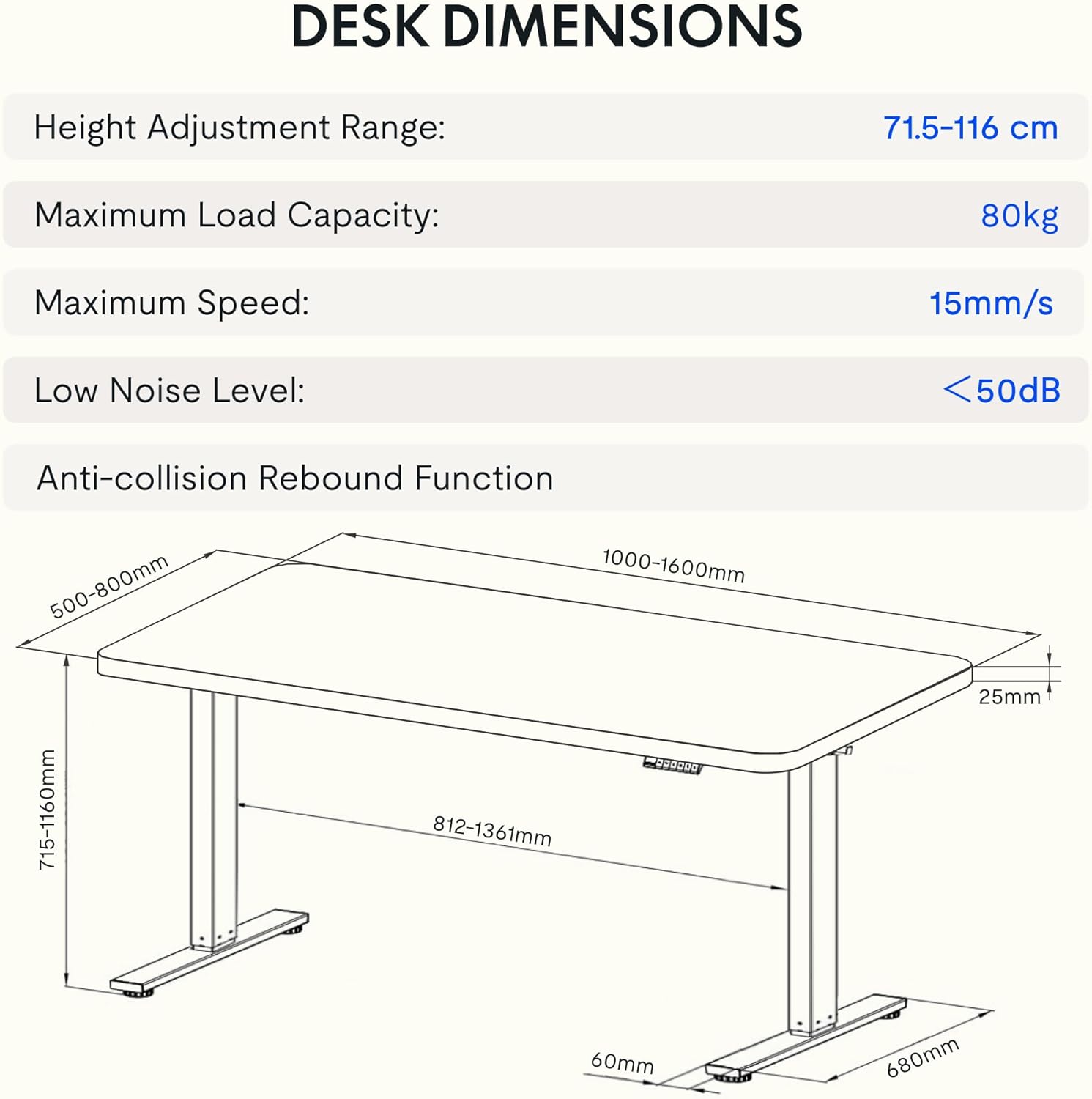
Image: Detailed diagram illustrating the desk's dimensions, height adjustment range (71.5-116 cm), maximum load capacity (80kg), maximum speed (15mm/s), and low noise level (<50dB).
| فیچر | مشخصات |
|---|---|
| د ماډل شمیره | EG1B+TP1608-Black |
| د لوړوالی تنظیم کولو سلسله | ۰.۹ - ۱.۵ سانتي متره (۰.۳۵ - ۰.۵۹ انچه) |
| د اعظمي بار ظرفیت | ۷.۰ کیلو ګرامه (۱۵.۵ پونډه) |
| اعظمي سرعت | 15 mm/s |
| د ټیټ شور کچه | < 50 dB |
| د ډیسټاپ مواد | Wood (2.5 cm thickness) |
| د چوکاټ مواد | فولاد |
| د محصول ابعاد (د x څلویښتم x څلویښتم) | 31.5" x 62.99" x 11.02" (packaged) |
| د توکي وزن | 30 کیلوګرامه |
| ځانګړي ځانګړتیاوې | Electric, Anti-collision Rebound Function, 4 Memory Presets |
9. تضمین او ملاتړ
FLEXISPOT is committed to providing high-quality ergonomic solutions. With over 20 years of experience, our products undergo rigorous testing and meet various European certifications (IGR, CE, TÜV).
For warranty information, technical support, or any questions regarding your FLEXISPOT EG1 Electric Standing Desk, please visit the official FLEXISPOT website or contact our customer service department. You can find more information and contact details on the په ایمیزون کې د FLEXISPOT پلورنځی.