
TECURS MR02
TECURS Condenser USB Microphone User Manual
Model: MR02 | Brand: TECURS
پیژندنه
The TECURS Condenser USB Microphone is a versatile audio solution designed for high-quality sound capture in various applications, including recording, podcasting, streaming, gaming, and online meetings. This kit provides professional sound quality with its built-in sound chipset, Cardioid Pickup Pattern, and high sampling rate, ensuring clear and smooth audio reproduction.
په بکس کې څه دي
- Adjustable Boom Arm for Streaming
- USB مایکروفون
د تنظیم کولو لارښود
۱.۱ د بکس خلاصول او د اجزاو پیژندنه
Upon opening the package, carefully remove all components. The kit includes the condenser microphone, an adjustable boom arm, a pop filter, a windproof foam cover, a tripod stand, and a USB cable.

Image: All components of the TECURS Condenser USB Microphone kit laid out, including the microphone, boom arm, pop filter, tripod, and cables.
ویډیو: د بکس خلاصول او پورته کولview of the TECURS MR02 microphone kit, demonstrating the contents and initial setup steps.
۴.۱ د بوم بازو راټولول
د میز cl ضمیمه کړئamp to a sturdy surface. Insert the base of the boom arm into the clamp and tighten the screw to secure it. Adjust the arm's position and angle using the tension knobs to suit your recording needs.
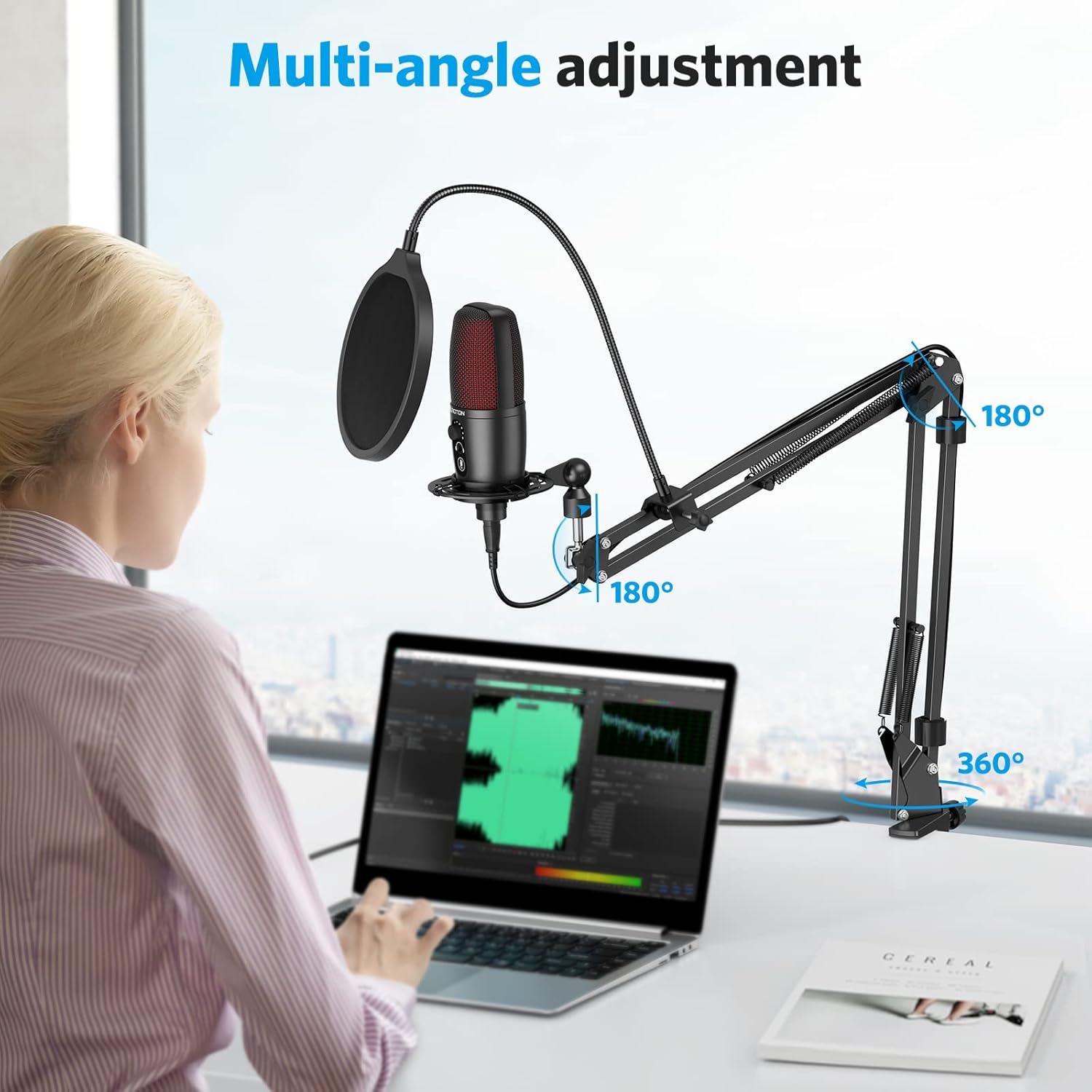
Image: Illustration showing the multi-angle adjustment capabilities of the boom arm, including 180-degree and 360-degree rotation points.
۴.۲ د مایکروفون نښلول
Screw the microphone securely onto the shock mount or the tripod stand. Ensure it is firmly attached to prevent accidental dislodgement.

Image: The TECURS microphone mounted on the adjustable boom arm with the pop filter in place, ready for use.
۴.۳ د نښلولو لوازم
Attach the pop filter to the boom arm and position it approximately 2-3 inches from the microphone. This helps to eliminate plosive sounds. For additional wind noise reduction, place the foam cover over the microphone head.

Image: Diagram illustrating the double-layer acoustic filter and windproof foam cover for pop filter protection.
1.5 د وسیلې پیوستون
Connect the USB cable from the microphone to an available USB 2.0 port on your Mac or Windows computer. The microphone is plug-and-play, requiring no additional drivers or external sound cards. It is compatible with PC, Laptop, Mac, PS4, and PS5. Please note: It is NOT compatible with Xbox.

Image: The microphone connected to a laptop via its 5.9 ft USB cable, highlighting its plug-and-play compatibility with various operating systems and devices.
عملیاتي لارښوونې
2.1 Professional Sound Quality
The TECURS microphone features a built-in sound chipset, Cardioid Pickup Pattern, 192KHz/24Bit high Sampling Rate, and 30 Hz-20 KHz wide Frequency Response. This ensures clear and smooth sound capture, perfect for reproducing your voice accurately.

Image: A diagram illustrating the cardioid pickup pattern of the microphone, showing its directional sound capture capabilities.
2.2 One-Touch Mute
Easily mute or unmute the microphone with a single touch. The red LED indicator lights up when the microphone is in use, providing a clear visual cue of its status.
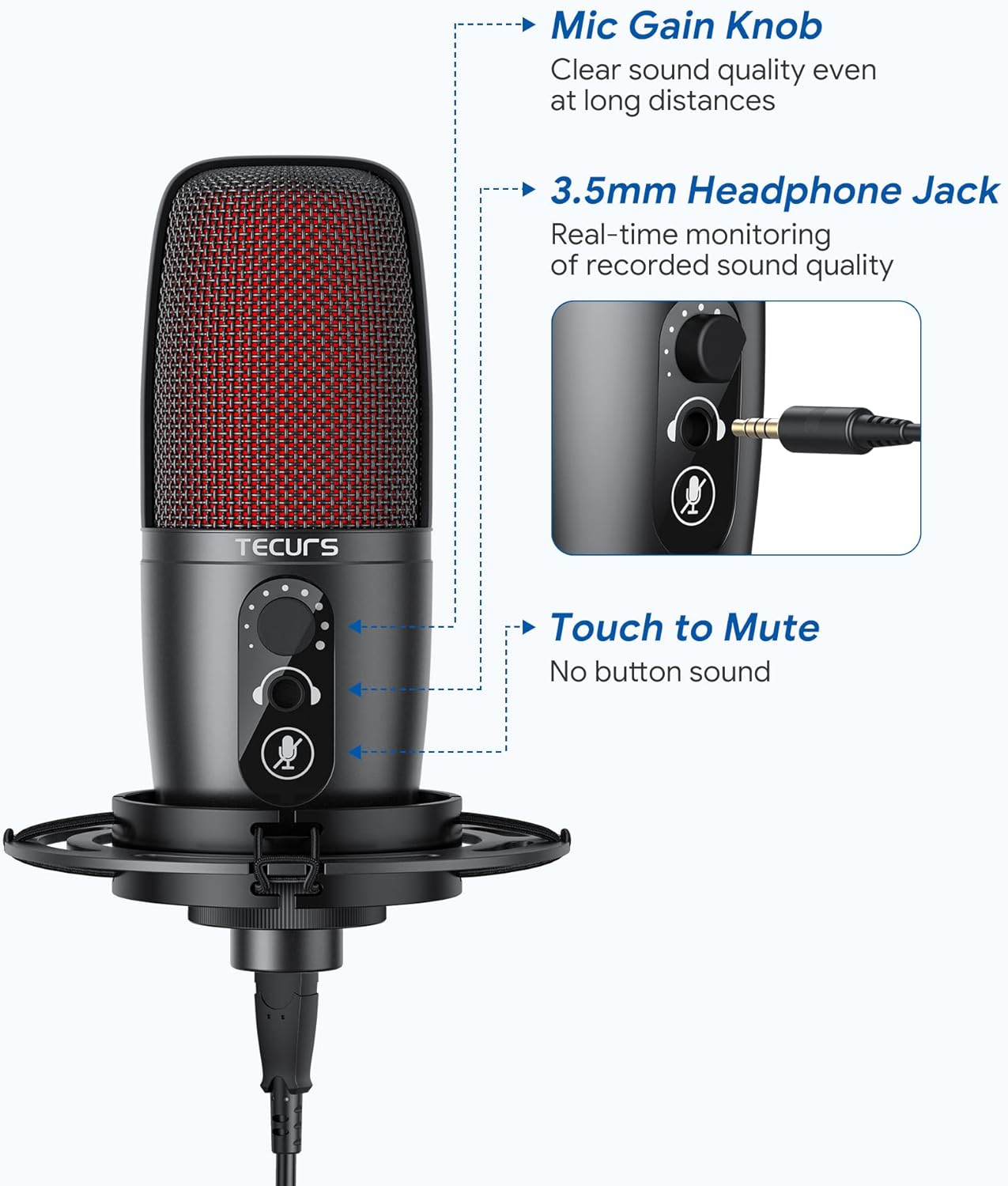
Image: A close-up of the microphone highlighting the one-touch mute button and its LED indicator.
2.3 Gain Knob & Earphone Monitor
Adjust the microphone's volume quickly using the integrated Gain Knob. The 3.5 mm Headphone Jack allows for efficient real-time monitoring of your voice, ensuring optimal audio levels during recording or streaming.
انځور: یو مفصل view of the microphone's controls, including the gain knob and the 3.5mm headphone jack for real-time monitoring.
ساتنه
To ensure the longevity and optimal performance of your TECURS microphone, keep it clean and free from dust. Use a soft, dry cloth for cleaning. Avoid exposing the microphone to extreme temperatures or humidity. Store it in a safe place when not in use to prevent physical damage.
د ستونزو حل کول
۶.۱ د غږ محصول نشته
- ډاډ ترلاسه کړئ چې USB کیبل په خوندي ډول د مایکروفون او ستاسو وسیله دواړو سره وصل دی.
- Check your device's sound settings to ensure the TECURS microphone is selected as the input device.
- Verify that the microphone is not muted (red LED indicator should be off when unmuted).
- Adjust the Gain Knob on the microphone to increase volume.
۵.۲ د غږ خراب کیفیت
- Ensure the pop filter and foam cover are correctly positioned to reduce plosives and wind noise.
- Adjust the microphone's position relative to your mouth (ideally 6-12 inches away for optimal clarity).
- Check for any background noise in your environment and try to minimize it.
د نورو تفصيلي ستونزو حل کولو لپاره، مهرباني وکړئ رسمي ته مراجعه وکړئ د کارن لارښود (PDF) or د ستونزو د حل لارښود (PDF).
مشخصات
| فیچر | ارزښت |
|---|---|
| برانډ | TECURS |
| د ماډل نوم | MR02 |
| د ارتباط ټیکنالوژي | USB |
| د نښلونکي ډول | USB |
| ځانګړی ځانګړنه | د خاموش فعالیت |
| مطابقت لرونکې وسیلې | PC, Latop, Mac, PS4, PS5 |
| رنګ | تور |
| شاملې برخې | usb microphone, Boom Arm for Streaming |
| قطبي بڼه | یو طرفه |
| د کیبل اوږدوالی | 5.9 پښه |
| د آډیو حساسیت | 112 dB |
| د توکي وزن | 1150 ګرامه |
| خنډ | 2.2 Kiloohms |
| د مایکروفون فارم فکتور | ګوزنیک |
| د بریښنا سرچینه | د بریښنا تار شوی |
| مواد | د الماس فولاد، فلز |
| د سیګنال څخه تر شور پورې نسبت | 72 dB |
| د هارډویر پلیټ فارم | لپ ټاپ، کمپیوټر، پلی سټیشن |
| د چینلونو شمیر | 1 |
| د فریکونسی رینج | 30Hz~20KHz |
| د تعدد ځواب | 20 KHz |
| د شور کچه | 6 dB |
| جوړونکی | Enping Yushi Electronic Technology Co.,Ltd |
| UPC | 789605588341 |
| د توکي وزن | ۲.۴۵ پونډه |
| د اصلي هیواد | چین |
| ASIN | B09KLL9QHT |
| د توکي ماډل نمبر | MR02 |
| نیټه لومړی شتون لري | د ۲۰۲۳ کال د نومبر ۳۰مه |
| د رنګ نوم | تور |
| د موادو ډول | د الماس فولاد، فلز |
| د محصول لپاره وړاندیز شوي کارول | Streaming, Video Conference, Singing, Gaming |
تضمین او ملاتړ
TECURS products come with a standard manufacturer's warranty. For detailed warranty information, technical support, or service inquiries, please visit the official TECURS webسایټ ته مراجعه وکړئ یا د دوی د پیرودونکو خدماتو سره اړیکه ونیسئ. د تضمین ادعاوو لپاره خپل د پیرود رسید وساتئ.
Ask a question about this manual
Ask about setup, troubleshooting, compatibility, parts, safety, or missing instructions. Manuals+ will review the question and use this page’s manual context to help answer it.