
1. پیژندنه
This manual provides detailed instructions for the Waveshare RGB LED Matrix Panel 64x32. This panel features 2048 individual RGB LEDs with a 3mm pitch, offering a full-color display with adjustable brightness. It is designed for compatibility with development boards such as Arduino, Raspberry Pi Pico, and ESP32, enabling the display of text, colorful images, and animations.
The panel's dimensions are 192mm × 96mm, making it suitable for various display applications, including DIY desktop setups or wall-mounted displays.
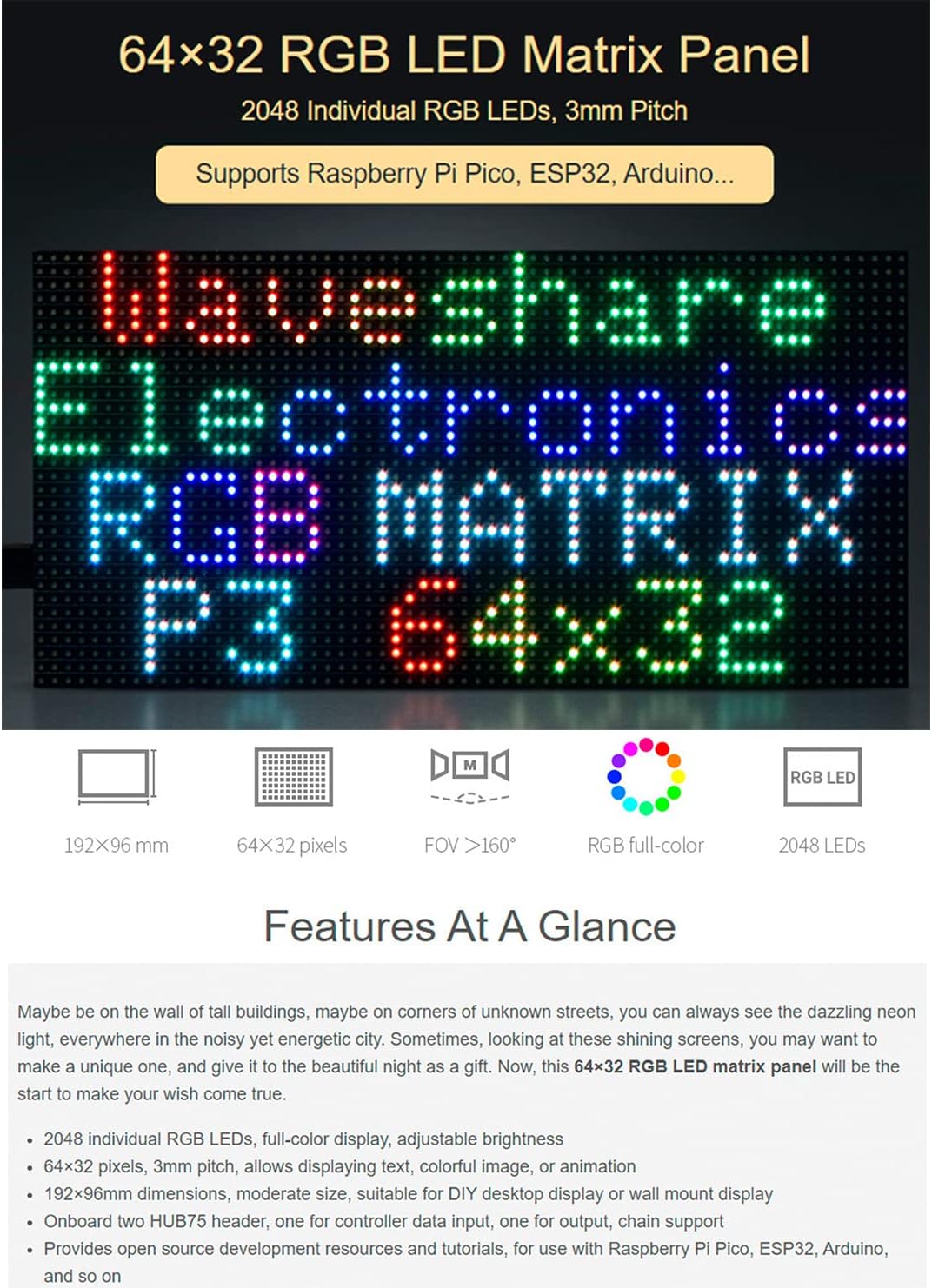
شکل 1: پایview of the RGB LED Matrix Panel 64x32.
2. ځانګړتیاوې
- 2048 individual RGB LEDs for full-color display.
- د تنظیم وړ روښانتیا.
- 64×32 pixel resolution with a 3mm pitch.
- Supports displaying text, colorful images, and animations.
- Dimensions: 192mm × 96mm.
- Chainable design with two onboard HUB75 headers (one for input, one for output) to create larger display panels.
- Compatible with Raspberry Pi Pico, ESP32, Arduino, and similar microcontrollers.
- Provides open-source development resources and tutorials.
3. د بسته محتويات
ډاډ ترلاسه کړئ چې ټول توکي ستاسو په کڅوړه کې شتون لري:
- RGB-Matrix-P3-64x32 LED matrix and accessories (x1)
- 16P wire (~30cm) (x1)
- Dark brown acrylic front panel (x1)
- Power supply terminal adapter (x1)
- Double-sided tape (x1)
- Magnetic bolt (4pcs) (x1)

شکل ۲: په کڅوړه کې شاملې برخې.
4. ترتیب کول
4.1 فزیکي نصب کول
- Attach the magnetic bolts to the back of the LED matrix panel for mounting.
- Use the double-sided tape or suction cups (if provided separately) to secure the panel to a desired surface.
- Connect the power supply terminal adapter to the panel's VH4 header input.
- Connect the 16P wire to the HUB75 input header for data connection to your microcontroller.
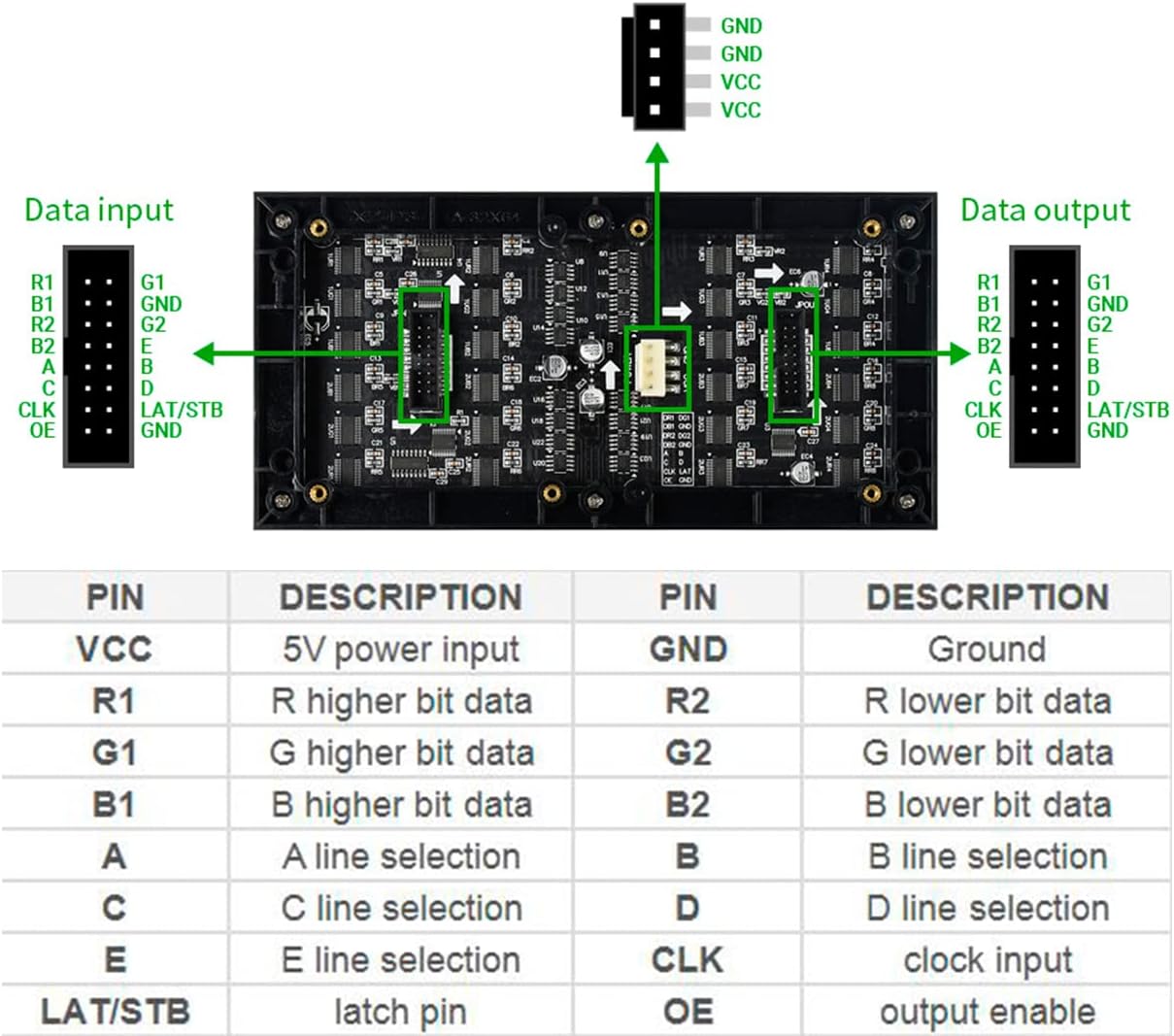
Figure 3: Pinout and connection details for the LED Matrix Panel.
4.2 د بریښنا نښلول
The panel requires a 5V / 2.5A power supply connected via the VH4 header input. Ensure the power supply meets these specifications to prevent damage and ensure optimal performance.
4.3 د سافټویر تنظیم کول
The panel is compatible with Arduino, Raspberry Pi Pico, and ESP32. Refer to the online user manual and open-source development resources for specific libraries, code examples, and detailed instructions on how to program and control the display with your chosen microcontroller.
Online User Manual/Online Resource: //bit.ly/3VrjhtV
5. عملیاتي لارښوونې
5.1 Displaying Content
Once connected to a compatible microcontroller and programmed, the panel can display various content types:
- متن: Program the panel to show scrolling text, static messages, or dynamic text updates.
- انځورونه: Display colorful images. The 64x32 pixel resolution allows for clear pixel art or simplified graphics.
- انیمیشنونه: Create and display simple animations or GIF-like sequences.
5.2 Adjustable Brightness
The brightness of the LED panel can be adjusted through software control on your microcontroller. Consult the programming guides in the online resources for instructions on how to implement brightness control.
5.3 Chainable Design
Multiple LED matrix panels can be chained together to form a larger display. Connect the HUB75 output of one panel to the HUB75 input of the next. Each panel in the chain requires a standalone 5V/2.5A or above power supply when chained to display.

Figure 4: Chainable design for expanding display size.
6. تخنیکي مشخصات
| مشخصات | ارزښت |
|---|---|
| ابعاد | 192mm × 96mm |
| پکسلز | 64×32 = 2048 DOTS |
| پچه | 3mm |
| Pixel Form | 1R1G1B |
| Viewزاویه | ≥160° |
| د کنټرول ډول | همغږي کول |
| موټر چلول | 1/16 Scan |
| سرلیک | مرکز HUB75 |
| د بریښنا رسول | 5V / 2.5A (VH4 header input) |
| د بریښنا مصرف | ≤12W |
| مطابقت لرونکې وسیلې | Arduino, Raspberry Pi Pico, ESP32 |

Figure 5: Physical dimensions of the LED Matrix Panel.
۵.۲. د کارونې سناریوګانې
The Waveshare RGB LED Matrix Panel 64x32 is versatile and can be used in various applications:
- DIY desktop displays
- Wall-mounted displays
- Digital signboards
- Environment monitors
- تعلیمي پروژې

شکل 6: مثالamples of the LED Matrix Panel in use.
8. ستونزه حل کول
8.1 ګډې ستونزې او حل لارې
- Display not lighting up: Ensure the 5V/2.5A power supply is correctly connected and functioning. Check all cable connections, especially the HUB75 data cable.
- Incorrect display or flickering: Verify that the correct libraries and code are uploaded to your microcontroller. Check the data cable for proper connection and integrity. Ensure the power supply is stable and sufficient.
- Panel not recognized by microcontroller: Confirm that the microcontroller's GPIO pins are correctly mapped to the HUB75 header. Reinstall or update necessary drivers and libraries.
- Issues with chained panels: Each chained panel requires its own adequate power supply. Ensure data connections between panels are correct (output to input).
For more detailed troubleshooting and specific error codes, refer to the online user manual and community forums for your chosen microcontroller platform.
9. ملاتړ او تضمین
د تخنیکي ملاتړ، اضافي سرچینو، او وروستي اسنادو لپاره، مهرباني وکړئ رسمي ویوشیر ته مراجعه وکړئ. website or the online resource link provided in this manual. Waveshare provides open-source development resources and tutorials to assist users.
Information regarding product warranty, returns, and service can typically be found on the product's purchase page or the manufacturer's official webسایټ. مهرباني وکړئ د تضمین ادعاوو لپاره د پیرود ثبوت وساتئ.
Online User Manual/Online Resource: //bit.ly/3VrjhtV